Expense report management helps businesses control spending effectively, as an expense report is a structured document that records, categorizes, and approves employee business expenses in an organized and transparent manner.
However, many companies struggle with limited visibilityinto uncontrolled expenses, making it difficult to monitor daily transactions and often leading to budget overruns and unapproved spending across departments.
As expense volumes grow, manual tracking methods increase the risk of missing receipts, delayed approvals, and inconsistent reporting, ultimately reducing financial accuracy and slowing employee reimbursement processes.
According to the data our team found from Fortune Business Insights, the global expense management software market was valued at USD 8.33 billion in 2025 and is projected to reach USD 17.26 billion by 2034, with a CAGR of 8.30% during the forecast period, underscoring the growing importance of structured expense reporting and management systems.
Therefore, businesses need a reliable expense reporting process to maintain spending transparency, improve financial control, and ensure every recorded transaction supports accurate budgeting, compliance requirements, and long-term operational efficiency.
In this article, we will explore expense reports in detail, including why businesses need them and how the reporting process works, to help businesses understand their role in controlling spending, improving reimbursement accuracy, and maintaining reliable financial records across daily operations.
Key Takeaways
An Expense Report is a structured document used to record, categorize, verify, and reimburse business-related spending made by employees or departments.
Types of Expense Reports, including travel and mileage reports, help businesses categorize expenses based on specific operational and reimbursement needs.
Expense Report Templates help employees understand the formatting requirements and consistently submit accurate financial documentation.
ScaleOcean Atlas Expense Management Software automates expense tracking, improves approval workflows, and helps businesses maintain accurate records with greater operational efficiency.
An expense report is a structured document that records business-related spending made by employees or departments. It captures details such as dates, purposes, and amounts, ensuring organizations clearly document every reimbursable expense.
Additionally, expense reports help finance teams verify transactions before approving reimbursements. By organizing receipts and supporting information systematically, businesses maintain transparency and prevent unauthorized spending or duplicate claims from compromising financial accuracy.
Furthermore, well-prepared expense reports streamline auditing processes and facilitate compliance with internal policies and external regulations. This careful documentation supports financial accountability and promotes ethical business practices.
Businesses rely on expense reports to monitor daily operational costs and strengthen cost control across departments while maintaining financial discipline. Without structured documentation, organizations risk overspending, delayed reimbursements, and inaccurate records, disrupting long-term financial planning and operational efficiency.
Moreover, expense reports support accountability across departments and improve visibility into spending patterns. As companies regularly analyze submitted reports, they identify cost-saving opportunities while maintaining compliance with financial regulations and internal expense policies.
Efficient Expense Tracking
Efficient expense tracking allows businesses to monitor how employees use company funds during travel, procurement, or client meetings. By submitting expense reports consistently, teams create reliable data that supports smarter operational and financial decisions.
Reimburse Employees on Time
Timely reimbursements strengthen employee trust and maintain workplace satisfaction. When staff submit accurate expense reports, finance teams verify claims quickly and process reimbursements without unnecessary delays that could negatively affect employee morale or productivity.
Budgeting and Planning
Accurate expense reporting with proper budgeting and planning strengthens long-term financial strategies. Managers analyze categorized expenses to support cost-benefit analysis, predict future spending trends, and ensure resources align with strategic objectives and anticipated business growth requirements.
Tax and Audit Preparation
Expense reports simplify tax preparation by organizing financial data into verifiable records. Businesses maintain proper documentation to support deductible expenses and inform capital budgeting decisions, while ensuring compliance with applicable tax regulations.
Improved Cash Flow Management
Expense reports directly support stable cash flow management by helping businesses regularly monitor outgoing payments. When organizations review spending trends, they evaluate opportunity costs and adjust financial strategies to balance operational costs with available funds.
Accurate Financial Records
Maintaining accurate financial records becomes easier when organizations rely on detailed expense reports. Each recorded transaction enhances bookkeeping accuracy and supports standard costing methods, ensuring financial statements reflect actual business activities without undocumented expenses.
How Does the Expense Report Process Work?
The expense report process typically begins when employees incur business-related expenses during travel, procurement, or client engagement activities. They collect receipts immediately and record transaction details to prevent missing or inaccurate documentation later.
Next, employees complete expense report forms and attach supporting documents before submitting them for managerial approval. Managers review each claim carefully to confirm policy compliance, ensuring submitted expenses match approved business activities.
After approval, finance teams verify the accuracy of expense data and process reimbursements accordingly. They also record approved prepaid expenses in accounting systems, ensuring financial records remain up to date and aligned with organizational reporting standards.
What’s Included in an Expense Report?
An expense report typically contains essential information that helps finance teams evaluate and approve submitted claims efficiently. By including standardized details, organizations ensure that every expense receives proper documentation and verification before approval for reimbursement.
Common components within an expense reportbusiness include:
Employee Information: includes the employee’s name, department, and contact details, helping finance teams quickly identify the claimant and maintain accountability throughout the reimbursement and approval workflow.
Expense Date and Description: records when the expense occurred and explains its purpose, allowing reviewers to confirm that the spending directly supports legitimate business-related activities or operational needs.
Amount and Payment Method: specify the total expense amount and the payment method used to help finance teams verify transaction details and ensure alignment with approved corporate payment policies.
Supporting Receipts: includes digital or physical proof of transactions, enabling finance teams to validate reported amounts and reduce the likelihood of fraudulent or duplicate expense submissions.
What Expenses Go Into an Expense Report?
Expense reports usually include a variety of business-related costs incurred during daily operations or official assignments. By properly categorizing expenses, organizations maintain consistency while simplifying financial analysis and reporting across departments.
Typical expense categories that businesses include in expense reports consist of the following items:
Travel Expenses: cover transportation costs, such as flights, trains, taxis, or fuel, that employees incur while attending meetings, conferences, or other official business-related activities outside their regular work locations.
Accommodation Costs: include hotel or lodging expenses for overnight business trips, ensuring employees are reimbursed for approved stays that directly support organizational travel requirements and operational responsibilities.
Meals and Entertainment: records costs related to client meetings or official meals, provided they align with company policies and support legitimate business interactions or relationship-building activities.
Office and Operational Supplies: includes purchases of essential tools, materials, or consumables, while distinguishing routine expenses from larger investments, such as CapEx, that require separate approval processes.
What are the Types of Expense Reports?
Businesses use different types of expense reports depending on operational activities and reimbursement requirements. Each type helps categorize spending accurately, ensuring finance teams process claims efficiently while maintaining clear visibility into various cost structures.
Moreover, understanding these types allows organizations to standardize reporting procedures across departments. When employees use the correct format, businesses reduce confusion, improve documentation accuracy, and strengthen consistency in overall financial reporting across operational workflows.
Simple Expense Report
A simple expense report records routine business expensesthat occur during regular work activities. Employees typically use this report to document smaller purchases that support daily operations without requiring complex documentation procedures.
Additionally, this type of report suits organizations that handle frequent minor expenses. By using a straightforward format, businesses simplify submission processes while enabling finance teams to review and approve expenses faster and more consistently.
Examples of simple expense report entries include:
Office Supplies Purchases: include items such as pens, notebooks, printer paper, and folders purchased to support daily office tasks and maintain uninterrupted productivity across departments.
Small Equipment Costs: cover minor purchases such as computer accessories, cables, and storage devices needed to maintain efficient workflows and support employee productivity.
Local Transportation Fees: records short-distance travel costs such as parking tickets or local rides used for routine work-related errands within nearby operational areas.
Travel Expense Report
A travel expense report tracks costs incurred during official business trips. Employees use this report to document expenses for transportation, lodging, and meals incurred while performing duties outside their regular work locations.
Furthermore, this type supports accurate reimbursement for travel-related spending. By recording expenses systematically, organizations maintain better visibility into travel budgets while ensuring employees follow company-approved travel policies during assignments.
Examples of travel expense report entries include:
Airfare and Transportation Costs: include airplane tickets, train fares, or airport transfers required to attend meetings, conferences, or client visits outside local office areas.
Hotel and Accommodation Fees: records lodging expenses incurred during overnight stays, ensuring employees receive reimbursement for approved accommodations during business travel assignments.
Meal and Daily Allowances: covers meal costs during travel periods, allowing employees to maintain productivity while meeting clients or attending professional events in different locations.
Business Mileage Tracking Sheet
A business mileage tracking sheet records distances traveled using personal or company vehicles for work purposes. Employees use this format to calculate mileage reimbursements based on approved distance rates and travel purposes.
In addition, accurate mileage trackingprevents reimbursement disputes and supports financial transparency. By documenting routes, travel dates, and reasons, businesses maintain reliable records that align with transportation expense policies and operational reporting standards.
Examples of business mileage tracking entries include:
Client Visit Travel: records mileage accumulated when employees drive to meet clients at external locations, ensuring proper reimbursement for fuel and vehicle usage costs.
Delivery or Service Trips: includes distances traveled to deliver products or perform service-related tasks that require transportation outside the main office location.
Inter-Office Travel: documents mileage when employees travel between company branches or facilities to complete assigned responsibilities or attend scheduled internal meetings.
Incidentals
Incidentals refer to minor unexpected expenses that arise during business activities, particularly during travel assignments. Employees use this category to report small but necessary costs that support the smooth completion of work-related tasks.
Moreover, documenting incidental expenses ensures that businesses maintain transparency while accounting for smaller charges that might otherwise go unrecorded. Proper tracking helps organizations maintain accurate budgeting and reimbursement practices across departments.
Examples of incidental expense entries include:
Baggage Handling Fees: includes tips or service charges paid to support luggage handling during business travel activities at airports or hotels.
Communication Charges: records small expenses such as internet access fees or phone usage costs required to maintain communication during official assignments.
Laundry or Cleaning Services: covers minor service expenses incurred during extended travel periods when employees require clothing maintenance for professional activities.
Non-Employee Expenses
Non-employee expenses refer to costs incurred on behalf of individuals who are not full-time staff members. Businesses record these expenses to maintain transparency when reimbursing contractors, consultants, or external collaborators involved in projects.
Additionally, documenting non-employee expenses ensures organizations maintain proper accountability for outsourced services. By tracking these costs separately, finance teams can more effectively distinguish employee reimbursements from external service-related spending.
Examples of non-employee expense entries include:
Consultant Travel Costs: include transportation or accommodation expenses incurred by external consultants attending meetings or providing on-site professional services.
Contractor Material Purchases: records supplies purchased by contractors specifically for completing assigned tasks or delivering agreed project outcomes.
Vendor-Related Expenses: cover operational costs incurred when coordinating services with third-party vendors that support company operations or events.
Professional Expenses
Professional expenses cover costs related to employee development, certifications, or professional memberships. Employees submit this type of report when expenses support skill development or enhance qualifications relevant to organizational goals.
Furthermore, tracking professional expenses supports workforce development planning and budget allocation. Businesses maintain visibility into training investments while ensuring that funds contribute directly to employee growth and long-term improvements in organizational performance.
Examples of professional expense report business entries include:
Training Program Fees: include payments for workshops, seminars, or online courses designed to improve professional knowledge and strengthen employee competencies.
Certification Examination Costs: records fees paid for professional certification exams required to maintain qualifications or meet industry compliance standards.
Membership Subscriptions: covers annual fees for professional organizations that provide networking opportunities, industry insights, and ongoing learning resources.
Expense Report Examples + Free Download
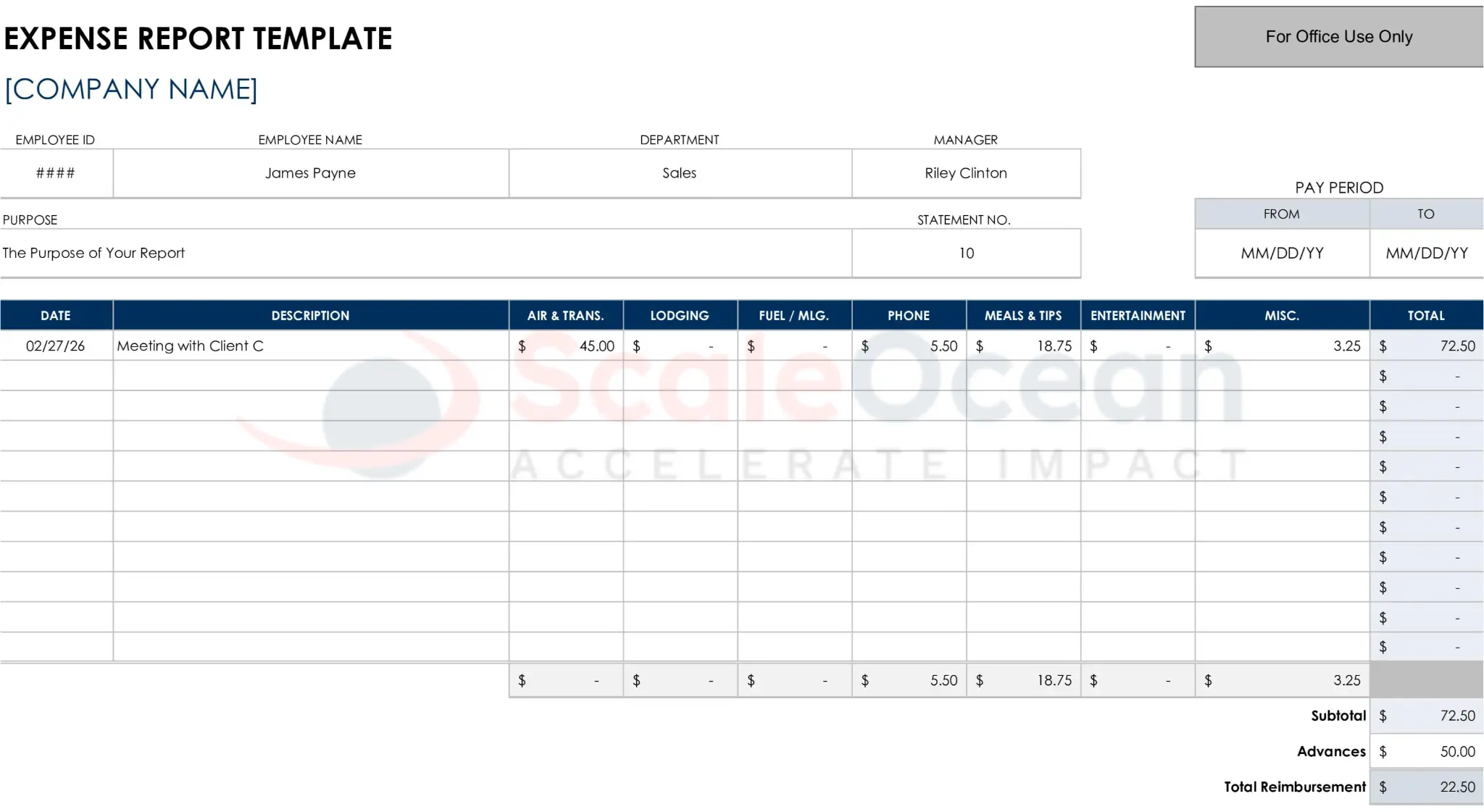
A structured expense report Excel template helps employees understand how information should be recorded clearly and consistently. The sample below demonstrates a practical layout that supports accurate documentation and efficient reimbursement processing.
Click the expense report template below to view the full layout and download a ready-to-use template that simplifies expense recording and improves reporting consistency across departments.
Reviewing the expense report Excel template helps employees understand proper formatting and required details before submitting claims. By studying structured samples, organizations reduce submission errors while improving documentation accuracy and reimbursement approval timelines across departments.
To simplify reporting tasks, businesses often provide standardized templates that employees can reuse regularly. Using a downloadable expense report form template ensures consistent formatting, improves tracking accuracy, and supports faster verification during routine financial reviews and reimbursement processes.
To help you start quickly, you can download a free, ready-to-use expense report template using the link below. This expense report form template simplifies expense recording, improves accuracy, and ensures consistent reporting across departments and operational activities.
Filling out an expense report requires careful documentation of each business-related expense. By following clear steps, employees ensure their reports remain accurate, complete, and ready for quick approval by managers and finance teams.
Additionally, consistent reporting habits reduce delays and minimize the need for corrections. When employees follow structured procedures, organizations maintain reliable records while improving transparency and accountability across financial operations and reimbursement workflows.
1. Itemize your Expenses
Start by listing each expense separately rather than combining multiple transactions into a single entry. Itemizing expenses clearly allows finance teams to review spending details quickly while ensuring that every cost is properly documented and verified.
Moreover, detailed itemization improves reporting accuracy and supports better financial analysis. When employees categorize expenses correctly, businesses track spending patterns more effectively and identify areas where operational costs may require adjustments.
2. Provide Receipts
Attach receipts for every recorded expense to support reimbursement claims. Receipts serve as proof of purchase and allow finance teams to confirm that reported amounts match actual transaction values during the verification process.
Additionally, keeping receipts organized prevents missing documentation during submission. Employees should store digital or physical copies immediately after purchase, which ensures accurate reporting and reduces the risk of reimbursement requests being rejected.
3. Total the Cost
After listing all expenses, calculate the total amount carefully to ensure accuracy. Correctly summing individual entries helps finance teams process reimbursements faster while preventing discrepancies that might delay approval or require additional verification.
Furthermore, reviewing totals before submission minimizes calculation mistakes. Employees should double-check category totals and final reimbursement amounts to confirm that recorded values match supporting receipts and approved expense limits.
4. Submit the Report
Submit the completed expense report to the designated manager or the finance department in accordance with company guidelines. Timely submission ensures faster processing while maintaining compliance with internal reimbursement policies and approval schedules.
Additionally, submitting reports promptly helps finance teams maintain updated records. When employees consistently meet submission deadlines, businesses improve reporting efficiency and ensure reimbursements reach employees without unnecessary delays.
However, utilizing expense management software can streamline the process, reducing delays and administrative overhead across departments. Luckily, ScaleOcean Atlas Expense Management Software can automate expense submissions and approval workflows, helping businesses standardize reporting processes and reduce manual errors.
Additionally, centralized expense tracking and automated approval workflows help businesses reduce processing errors and improve reimbursement speed across reporting cycles. Request a free demo today to discover how ScaleOcean Atlas simplifies expense reporting and enhances financial control.
How to Track GST on an Expense Report in Singapore?
Tracking GST within expense reports helps businesses maintain compliance with tax regulations. Recording tax amounts separately ensures organizations calculate deductions accurately and maintain transparent financial documentation during reporting periods.
Employees should record the tax portion of each expense alongside the base cost when submitting transactions. Separating taxable values from total amounts allows finance teams to verify eligible tax credits and maintain consistent reconciliation across financial reporting cycles.
Singapore only has GST, currently 9%, so there is no HST or provincial tax to track. Most receipts show GST-inclusive prices, so employees need to split each amount into base cost and GST. For example, a S$109 receipt is S$100 plus S$9 GST.
Additionally, businesses should review tax entries regularly to confirm that recorded amounts match official receipts and tax rates. Consistent tax tracking supports accurate filings, simplifies audits, and reduces the risk of penalties caused by incorrect reporting or missing documentation.
3 Common Mistakes to Avoid in Expense Reporting
Expense reporting mistakes often lead to reimbursement delays, inaccurate records, and compliance risks that disrupt daily operations. By recognizing common reporting errors early, businesses improve financial accuracy while maintaining consistent documentation across departments and reporting cycles.
Additionally, avoiding frequent reporting mistakes strengthens accountability and reduces unnecessary administrative workload. When organizations establish clear procedures and enforce documentation standards, finance teams process reports faster while maintaining reliable financial records and audit readiness.
1. Lack of a Clear Expense Policy
Without a clear expense policy, employees may misunderstand which expenses qualify for reimbursement. This confusion leads to inconsistent submissions, policy violations, and delays due to repeated clarifications among employees, managers, and finance teams.
Moreover, unclear policies increase the risk of unauthorized spending and reporting disputes. Businesses should define allowable expenses, reimbursement limits, and submission deadlines clearly to ensure employees follow standardized procedures and maintain consistent reporting practices.
2. Accepting Expense Reports Without Proper Documentation
Accepting expense reports without proper documentation creates significant financial risks for organizations. Missing receipts or incomplete details prevent finance teams from verifying transactions, which increases the likelihood of errors, fraud, or duplicate reimbursement claims.
Furthermore, incomplete documentation weakens audit readiness and regulatory compliance. Businesses should enforce strict submission requirements, ensuring employees attach receipts and supporting records to confirm the accuracy and legitimacy of every reported expense.
3. Incorrectly Categorizing Expenses
Incorrectly categorizing expenses can confuse financial analysis and reporting. When employees assign expenses to the wrong categories, businesses struggle to track spending trends accurately and may misinterpret operational cost patterns.
Additionally, misclassified expenses can complicate tax preparation and budget planning. Therefore, businesses should provide clear category guidelines and training so employees can classify expenses properly, ensuring reliable reporting and improved financial visibility across departments.
Automated Expense Reporting with ScaleOcean Expense Management
Managing expense reports manually often slows reimbursement cycles and increases the risk of documentation errors. However, automated expense reporting with ScaleOcean Atlas Expense Management Software helps businesses streamline submission, approval, and tracking processes across departments with greater accuracy and efficiency.
ScaleOcean Atlas supports unlimited users at no additional cost, enabling multiple departments to collaborate without increasing operational expenses. As organizations grow, this flexibility helps businesses manage expense reporting efficiently while maintaining predictable long-term system costs.
ScaleOcean is an all-in-one solution that connects expense management with more than 200 integrated modules, including accounting, finance, and HR systems. With this integrated environment, businesses manage expense submissions, approvals, and financial reporting seamlessly from a single centralized platform.
In addition, ScaleOcean provides rational and flat pricing structures that eliminate hidden fees and unexpected charges. Transparent pricing allows organizations to plan expense management budgets with confidence while avoiding sudden cost increases that disrupt financial planning.
The platform also follows industry best practices that ensure expense reporting processes align with regulatory standards and operational requirements. By using proven frameworks, businesses strengthen compliance readiness while maintaining accurate records that support tax reporting and financial audits.
Furthermore, comprehensive integrations automatically connect expense management with other operational modules, such as accounting and procurement systems. This connectivity reduces manual data entry, minimizes reporting errors, and improves overall data accuracy across financial and operational workflows.
Key features of ScaleOcean Atlas Expense Management Software include:
Automated Expense Reporting: records and organizes employee expenses digitally, reducing manual entry tasks while improving reporting speed and accuracy across departments handling frequent reimbursement requests.
Digital Receipt Integration: captures and stores transaction receipts electronically, ensuring that supporting documents remain accessible, traceable, and ready for verification during reimbursement or audit preparation.
Clear Approval Workflow: establishes structured approval steps that automatically route expense reports to managers, helping organizations maintain accountability and reduce delays caused by manual authorization procedures.
Budget and Policy Control: monitors spending against predefined company policies, enabling finance teams to enforce expense limits and prevent unauthorized claims before reimbursement is approved.
Tax and Audit Compliance Support: organizes expense data in accordance with regulatory standards, simplifying tax reporting and strengthening audit readiness by maintaining accurate, well-documented financial records.
Conclusion
Expense report management helps businesses maintain financial transparency by consistently documenting, reviewing, and approving operational spending. When organizations implement structured reporting processes, they improve budgeting accuracy, reduce reimbursement delays, and strengthen compliance across daily financial activities.
However, as expense volumes increase, manually managing reports becomes time-consuming and error-prone. By using ScaleOcean Atlas Expense Management Software, businesses can automate reporting workflows, integrate digital receipts, and maintain accurate financial records that support faster approvals and stronger expense control.
To simplify expense tracking and improve financial efficiency, consider adopting ScaleOcean Atlas Expense Management Software as part of your daily operations. Request a free demo today to see how automated expense reporting boosts visibility, cuts admin work, and enables smarter financial decisions.
FAQ:
1. What should be in an expense report?
An expense report should include the employee’s name, department, and submission date. Each entry must detail the expense date, vendor, amount, business purpose, and expense category. For example, travel, meals, supplies, fuel, etc.
2. Are expense reports difficult?
Traditional expense reports are often time-consuming and create gaps in financial oversight. Employees pay upfront and claim reimbursements later, leaving companies unaware of actual spending until month-end reconciliation.
3. What is the standard expense report?
A standard expense report records all expenses with details such as date, vendor, business purpose, amount, category, description, and attached receipts. Templates ensure all transactions are documented and easy to audit.
4. Do accountants do expense reports?
Accountants manage expense reports by accurately documenting, categorizing, approving, and reconciling business expenses. This process supports accurate financial reporting, tax compliance, and spending transparency for organizations and clients.













 Key Takeaways