

If your company is currently using manual methods for processing invoices, it can quickly get caught in an endless cycle of costly data errors and missed deadlines.
This way, your employees are prone to fraud and duplicate payments, which may exhaust your valuable cash reserves in a matter of minutes.
This is where accounts payable automation software comes to the fore, as it will secure your payment data and provide complete accuracy. By means of a digitalized process, your company will also be able to avoid high expenses associated with accidental overpayments.
As there are various options on the market to choose from, you must select the appropriate software for your business. This article provides insights for you to pick out the perfect AP automation system among ScaleOcean, NetSuite, and Tipalti that suits your needs.
 Key Takeaways
- Accounts payable automation streamlined the entire AP process from receiving invoices to the actual payment, thereby reducing manual effort and errors and simultaneously improving cash flow management for your financial operations.
- AP automation software key features are integral to the financial operations, as features like invoice data capture and customizable approval workflow are incorporated into the process to ease and enhance the operations.
- Businesses should evaluate several aspects of AP automation software while selecting the best one, namely business needs, integration, usability, and vendor support, as they will ultimately lead your company to acquire the ideal tool.
- Best accounts payable automation solutions, such as ScaleOcean, NetSuite, and Tipalti, offer numerous integrated features, including seamless ERP integration and a user-friendly interface in each system.

What Is Accounts Payable Software?
Accounts payable software is the one-stop system to handle each stage of a company’s payment cycle. Using custom instructions, the system filters and validates the accounting data prior to saving it in your business.
According to Tungsten Automation, digitization is driving this change, with the AP automation market growing at an annual rate of 10%.
AI and OCR technology are utilized to facilitate the approval workflow of the invoice data and to significantly cut the need for manual input, consequently saving your finance records from human error, redundant tasks, and expensive overpayments.
Finally, all necessary information will be extracted and classified with the aim of ensuring its accuracy. Automated software allows businesses to keep complete control of their cash flow while improving efficiency.
Accounts payable software functionality includes:
- Managing and recording vendor invoices for purchases and services under trade credit terms.
- Assigning account codes for short-term liabilities and corresponding assets or expenses.
- Matching documents.
- Handling approvals.
- Taking advantage of early payment discounts.
- Paying bills.
- Generating accounts payable aging and cash disbursement reports.
- Posting to the general ledger.
Key Features of Accounts Payable Automation Software

When choosing accounts payable automation software, it’s critical to grasp the essential elements that might determine its effectiveness for your company. These capabilities help to simplify your workflow, eliminate manual involvement, and improve financial management efficiency.
With the proper technology, you can speed invoice processing, optimize approval workflows, and ensure on-time payments. Here are some important features to consider:
- Invoice Data Capture with OCR Scanning: OCR technology instantly digitizes data from invoices, eliminating manual entry to drastically reduce human errors and processing time.
- Software for Accounts Payable Invoice Processing: This feature automates three-way matching between invoices, POs, and receipts to ensure all payments are validated against actual deliveries. It’s a key function in invoicing software in Singapore, helping businesses streamline their payment processes.
- Automated Approval Workflows: Digitized rules route invoices to the right managers for quick sign-off, removing manual bottlenecks and ensuring every deadline is met.
- Cross-Border Payment Solutions: Advanced tools support multi-currency payments and international tax compliance, making it easy to pay global suppliers efficiently. This helps businesses manage their Days Payable Outstanding (DPO) and optimize cash flow management.
- Document Management for Accounts Payable: Centralized digital storage keeps all financial records organized, providing a clear audit trail and easy retrieval for tax or internal reviews. This feature is a key component of the best accounting software for efficient financial management.
Key features like OCR scanning, automated workflows, and cross-border payment solutions improve efficiency in AP processes. According to IBTEKR, the IAEA started automating finance and procurement in 2017, equipping staff with skills to adopt new software effectively.
10 Best Accounts Payable Software Platforms
Key features, pricing, and performance should be taken into account when choosing the best accounts payable software for your company. An AP automation system will help streamline your invoicing process, boost financial reporting accuracy, and enhance your cash flow.
Your solution needs to be user-friendly, easy to integrate, and scalable. Here is a review of the top AP automation software currently available, with each system’s features and benefits discussed:
1. ScaleOcean AP Accounting Software
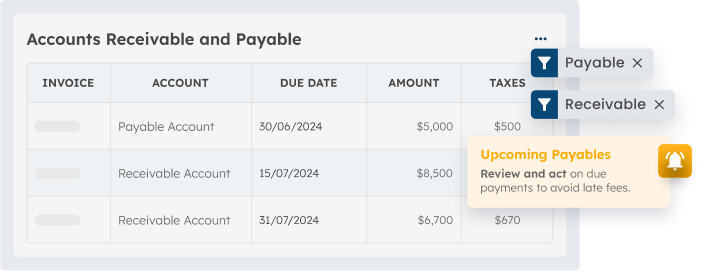
ScaleOcean’s AP accounting software simplifies the accounts payable process for businesses in Singapore. It offers features like automated invoice processing, customizable approval workflows, and seamless ERP integration, boosting efficiency and reducing errors for better cash flow management.
Businesses based in Singapore can make their accounts payable process simple through ScaleOcean’s AP accounting software, which enables features like automated invoice processing and customized approval workflows to be set up efficiently.
Businesses that are seeking greater cash flow management due to a reduction in errors and faster approvals can count on ScaleOcean, which offers a free demo for demonstration and subsidies through CTC(Capability Transfer Grant), which may cover a portion of the costs of implementing new systems.
Key Features:
- Automated invoice processing: This feature streamlines the tedious job of manual data capture for invoices using technology such as OCR and AI, so that your system will no longer need to do the double work of verifying the accuracy and speed up the approval process for your invoices.
- Customizable approval workflows: Companies can build their approval workflow system according to their unique business needs, and ensure that all bills pass the required verification steps prior to any further processes in order to maintain compliance and control.
- Vendor management portals: The vendor’s portal gives businesses a streamlined channel to directly upload invoices, manage vendors, update payment and contact details with ease and efficiency.
- Payment processing and scheduling: With the automatic payment features, you can either manually control or schedule the payments that are to be made to vendors using different modes like ACH, virtual cards, or wire transfers.
- Integration capabilities with other financial systems: Seamless and easy to integrate, the AP automation software system is able to combine with other business solutions and accounting software like ERP systems and other applications, to increase efficiency and eliminate errors that may arise from separate data input.
| Pros | Cons |
|---|---|
|
|
Best For: ScaleOcean is ideal for medium to large enterprises, offering customized solutions tailored to any business process or industry.
Price: The pricing is flat with no hidden costs, adjusted based on the scope and complexity of implementation.
2. NetSuite Accounts Payable Software
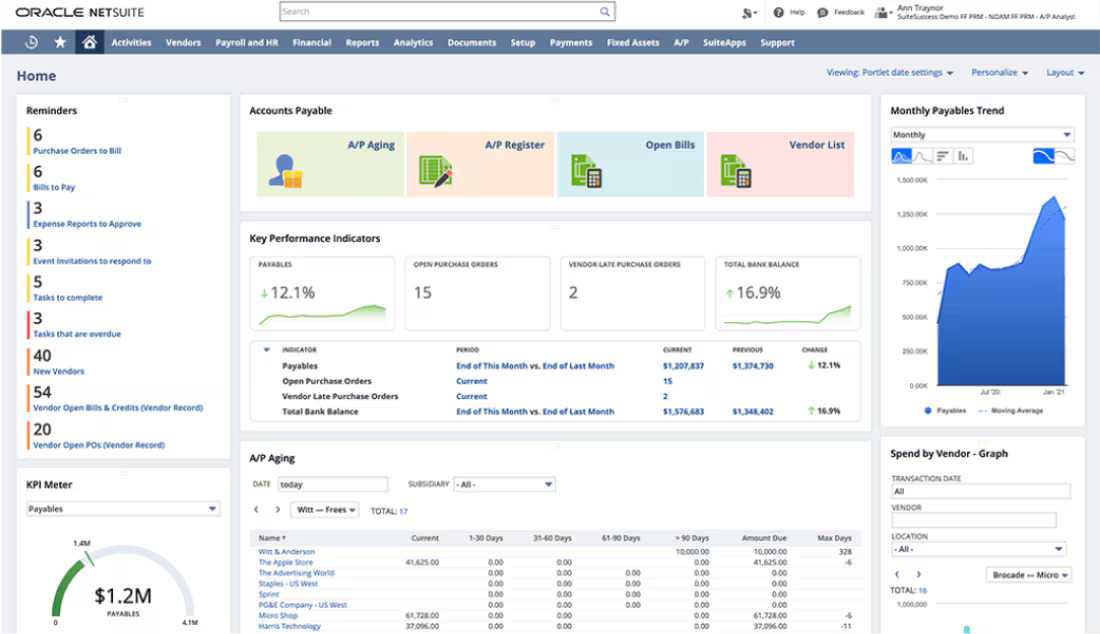
NetSuite is a robust cloud-based enterprise resource planning software solution that enables businesses to conduct their financial operations through a single, centralized system. The highly integrative tool offers an integrated system to manage all your invoices, payments, and vendors.
Moreover, strong reporting and real-time business intelligence allow businesses to monitor key financial metrics, which makes this solution one of the best options for large organizations looking to perform well in a global market.
Key Features:
- End-to-end AP automation
- Real-time reporting and visibility
- Integration with CRM and other business systems
| Pros | Cons |
|---|---|
|
|
Best For: Medium to large-scale companies with a mobile workforce and business units.
Price: Businesses opting for the platform will incur a price starting from $45- $60 per user per month for small business scale and $85-$100 per user per month for medium-scale business.
3. Microsoft Dynamics 365
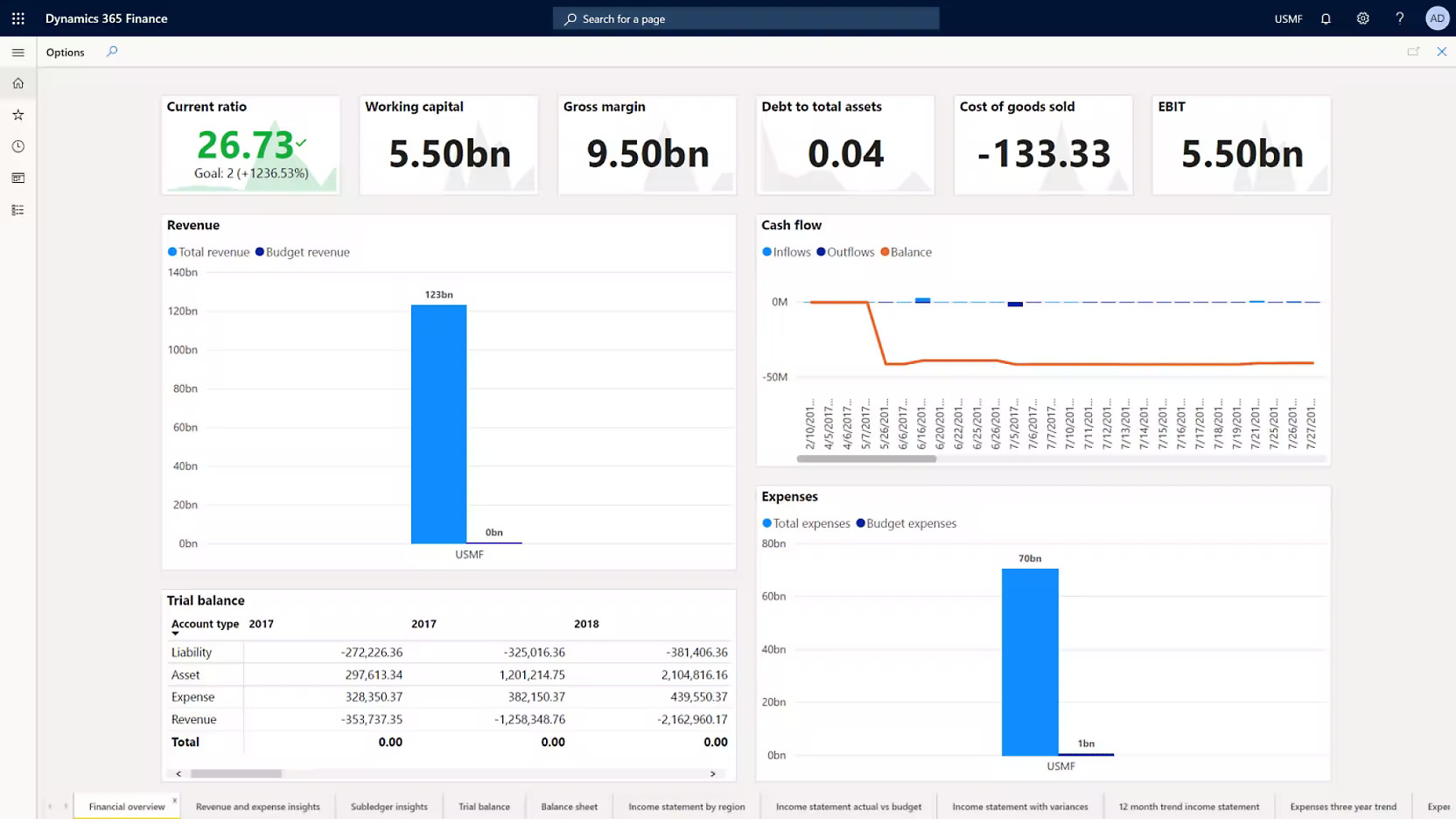
Microsoft Dynamics 365 is another end-to-end solution that combines the functions of ERP and CRM, delivering complete automation of the AP process, from data capture to payment arrangement.
With powerful integration options for your business applications, it is ideal for businesses looking to integrate them into existing Microsoft products that operate in the cloud.
Key Features:
- Automated invoice capture and processing
- Customizable approval workflows
- Integration with Microsoft products (Office 365, Azure, etc.)
| Pros | Cons |
|---|---|
|
|
Best For: Best suited for medium to large-scale organizations that need comprehensive financial management, scalability, and a seamlessly integrated Microsoft business ecosystem.
Price: The starting price ranges from $8 (for Team Members) per user per month up to $100+ per user per month for ERP modules.
4. Tipalti AP Automation Solution Software

Tipalti is a cloud-based AP automation platform specialising in cross-border payments, compliance, and processes such as 3 way matching.
Providing a complete platform from invoice management to supplier onboarding and multilateral currency payment, Tipalti can be your business solution when seeking efficient and simplified global financial management.
Key Features:
- Invoice capture and processing
- Global payment processing (multi-currency support)
- Supplier management and onboarding
| Pros | Cons |
|---|---|
|
|
Best For: Ideal for medium to large companies managing an international vendor base.
Price: Starting from $500-$600/month for the Premium plan, it may be reduced to $150-$250/month depending on the client; there’s also a one-time charge for implementation totaling $4,000-$5,000.
5. ExFlow Accounts Payable System
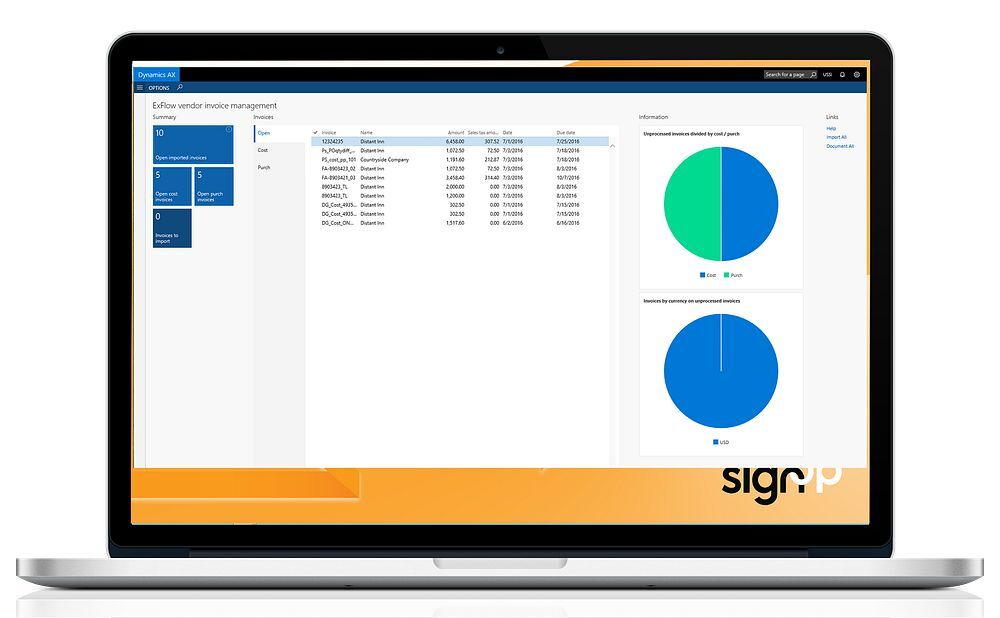
ExFlow is a cloud-based accounts payable automation solution designed specifically for Microsoft Dynamics 365 users. It offers invoice automation, approval workflows, and seamless integration with Dynamics 365, making it ideal for businesses that already use Microsoft’s ERP system.
Key Features:
- Automated invoice processing
- Integration with Microsoft Dynamics 365
- Multi-level approval workflows
| Pros | Cons |
|---|---|
|
|
Best For: Ideal for medium to large businesses that use Microsoft Dynamics 365 (Finance & Operations or Business Central).
Price: Typically priced on a subscription basis through the Azure Marketplace.
6. QuickBooks Online Accounts Payable System
QuickBooks Online is a widely used accounting software that also offers accounts payable automation features. It is ideal for small to mid-sized businesses looking for an affordable, easy-to-use solution to manage invoices, payments, and vendor relationships.
Key Features:
- Automated invoice creation and payment scheduling
- Integration with bank accounts for payment tracking
- Customizable approval workflows
| Pros | Cons |
|---|---|
|
|
Best For: Designed primarily for small to medium-sized businesses.
Price: Subscription fees vary by package (Simple Start, Essentials, Plus, Advanced), ranging from around SGD 17 to 57 per month, depending on the region.
7. Sage Intacct Accounts Payable Software
Sage Intacct is a cloud-based financial management solution designed for growing businesses. Its AP automation features include invoice capture, approval workflows, and payment scheduling, while its real-time financial management and insights help businesses make informed decisions.
Key Features:
- Invoice capture and automated processing
- Multi-currency and multi-subsidiary management
- Integration with CRM and ERP systems
| Pros | Cons |
|---|---|
|
|
Best For: Best for medium to large businesses looking for complex financial automation, multi- entity processing, and integration in depth.
Price: The annual subscription is priced from $12,000 for one user, and for a typical customer, it can be expected that it is between $25,000 – $35,000 on an annual basis.
8. SAP Concur AP Software
SAP Concur’s AP software is a fully integrated solution of AP, travel, and expense management that can support a company through invoicing and payment processes and offer real time expense reporting and adherence to company policies.
Key Features:
- Invoice and expense capture and processing
- Travel and expense management integration
- Payment scheduling and tracking
| Pros | Cons |
|---|---|
|
|
Best For: Best for medium to large enterprises with a focus on high automation, spend control, and complex invoice management.
Price: Custom; quote-based starting around $9/user/month with base platform costs around $129/month or $82/month for certain configurations.
9. Xero Accounts Payable Automation Software
Xero is another simple-to-use accounting software solution that has Accounts Payable features.
It is ideal for small businesses and accountants who are looking for an easy-to-use way of dealing with invoice management and payments, and also managing vendors.
Key Features:
- Invoice creation and approval workflows
- Integration with bank accounts for payment tracking
- Cloud-based for remote access
| Pros | Cons |
|---|---|
|
|
Best For: Best suited for small to medium-sized businesses (SMEs).
Price: Xero operates on a monthly subscription model with common US plans at $25/mo (Early), $55/mo (Growing), and $90/mo (Established).
10. Libeo AP Automation Solution
Libeo is a simple accounts payable solution that helps businesses manage payments and invoices. With a focus on simplicity and ease of use, Libeo is ideal for small businesses looking for a straightforward platform to handle payments.
Key Features:
- Invoice capture and payment scheduling
- Direct bank payment integration
- Simple user interface
| Pros | Cons |
|---|---|
|
|
Best For: Ideal for small to medium-sized enterprises (SMEs) and startups.
Price: Starting at €49/month for the entry-level paid plan, with options for €99/month (Advanced) and €159/month (Unlimited).
How to Choose the Right Accounts Payable Automation Software
With many options on the market, it can be quite a challenge to know which Accounts Payable Automation software, and with it an accounting software, best suits your needs as an organization in Singapore.
Several features make a good choice in software and in relation to a good AP module, which will improve efficiency in accounts payable turnover ratio and more:
1. Understand Your AP Environment
Understand where your current AP processes are and document everything from the reception of an invoice to its payment process. This understanding will serve as the guideline to know what software will work for you.
Take some time to research your current data usage, approval, and payment process, and choose software with the capability of integrating with your ERP software to allow efficient operations.
2. Outline Your AP Invoice Workflow
Clearly understanding your AP invoice process will simplify the selection process as much as possible. Focus on how your company receives and pays an invoice, making sure to identify your current process and take note of the steps involved from receiving an invoice to its payment.
Automate your invoice process with your present capabilities by selecting the most appropriate system for your business, whether it is complex or not.
3. Seek Centralized Data Management
Having the financial accounting ERP software centrally manage your AP data is a critical point. Make sure your invoices and payment documents are all in a single location so that information can be accessed by anyone quickly and easily.
The right system will ensure that data management allows you real-time access to payment status and outstanding payments, as it provides better visibility and control.
4. Choose Automated Tax Form Collection
Select AP automation software that is fully equipped with automatic tax forms collection, which can include W-9s, 1099s, and many other forms required for the taxation season.
Tax form collection, by utilizing the best tax software for corporations, can speed up the tax process and simplify compliance.
5. Establish and Enforce Workflow Rules
As it is always beneficial to define the workflow rules as an integral aspect of choosing software, you will also want to choose a system that allows the use of custom workflow rules for your invoice approval process so that the payment procedure is streamlined and consistent.
The right software can alert your team to complete tasks promptly and avoid delaying payment processing.
6. Leverage Cloud Technology
Cloud technology provides a convenient and scalable approach to AP automation. With your AP process in the cloud, you will have the flexibility to work remotely or from different offices without having to compromise your business performance.
Software that has cloud-based applications saves on hardware and maintenance, providing continuous, automatic updates and real-time data. As per the Singaporean financial accounting standards, cloud-based financial accounting ERP is reliable.
Conclusion
Accounts payable automation software is a pivotal resource for companies striving to enhance the speed and precision of their financial operations.
Singapore-based organizations can enhance cash flow, payment accuracy, and invoice processing speed by selecting the appropriate accounts payable automation software.
Automation of invoice capture, flexible workflow management, and rapid payment processing reduces errors, delays, and overall costs to a business, resulting in the optimization of financial transactions.
Through careful consideration of business needs, integration capabilities, and user-friendliness, the right system will boost overall performance while managing costs and accuracy in financial operations, making ScaleOcean’s accounting system and integration their top choice.
FAQ:
1. What is the best accounts payable automation software?
The ideal accounts payable automation software varies based on your business needs. Some of the top choices include ScaleOcean, Tipalti, NetSuite, and AvidXchange. These platforms offer features like automated invoice processing, customizable approval workflows, and easy ERP integration. ScaleOcean AP Software is a strong recommendation as it offers seamless ERP integration, real-time data insights, and an intuitive interface, making it a great choice for businesses seeking enhanced efficiency, accuracy, and scalability in their AP processes.
2. Can accounts payable be automated?
Yes, accounts payable can be entirely automated. AP automation software uses technologies like Optical Character Recognition (OCR), Artificial Intelligence (AI), and Robotic Process Automation (RPA) to handle tasks such as invoice capture, approvals, and payments. This automation reduces manual effort, minimizes errors, and speeds up the process.
3. Which software is used for accounts payable?
Common software used for accounts payable includes ScaleOcean Accounting Software, QuickBooks Online, Tipalti, SAP Concur, and Microsoft Dynamics 365. These solutions automate various AP functions, such as invoice processing, payment scheduling, and vendor management, improving efficiency and accuracy in financial operations.
4. How much does AP automation software cost?
The price of AP automation software varies depending on the software provider, your business size, and the features required. Small businesses typically spend around $50 to $150 per month, while larger companies may pay between $500 to $2,000 or more monthly. Additional charges for setup, integration, and training may also apply, depending on the level of customization needed.
























.png)