Cash flow management software is a business finance program that helps businesses track cash flow, forecast future cash flow, monitor receivables and payables, compare bank statements, and assess cash availability to meet upcoming obligations.
Managing cash flow is more complex within enterprise businesses where finance teams manage multiple bank accounts, entities, currencies, payment schedules, receivables, and supplier obligations. Late customer payments can compound visibility issues and make it harder to know how much cash is really on hand.
Cash flow management software can overcome these issues by bringing financial data into a more interconnected space. Finance teams can track liquidity, forecast upcoming cash needs, and manage accounting data through dashboards, forecasts, reconciliation tools, and a single place instead of separate spreadsheets and bank portals.
According to the data our team gathered from Alpha Southeast Asia’s, 72% of respondents identified improving cash visibility across entities, accounts, and countries as a top treasury priority, while 61% prioritised improving cash-flow forecasting accuracy. These findings highlight why better visibility and forecasting remain important for Singapore businesses.
Read this article to compare 10 cash flow management software options in Singapore 2026, their features, benefits, drawbacks, pricing, ratings, and suitability for small, medium, and large businesses.
Key Takeaways
Cash flow management software is a financial solution that helps businesses monitor cash positions, forecast future inflows and outflows, manage receivables and payables, reconcile bank transactions, and improve liquidity planning.
Key features to evaluateinclude cash visibility, rolling cash flow forecasts, scenario planning, accounts receivable and payable management, bank reconciliation, multi-entity and multi-currency reporting, approval workflows, audit trails, and AI-assisted financial analysis.
ScaleOcean Atlas provides an integrated ERP approach to cash flow management by connecting finance, accounting, receivables, payables, procurement, sales, inventory, and other business processes.
Cash flow management software is used to monitor the flow of money in and out of a business. It generally includes cash balances, accounts receivable, accounts payable, bank activity, forecasts, budgets, and financial reporting to create a better understanding of the liquidity position today and into the future.
Unlike basic accounting software that primarily records financial transactions, cash flow management software focuses more heavily on when cash will be received or spent. This makes it useful for forecasting potential cash gaps, planning payments, evaluating scenarios, and supporting working capital decisions.
For instance, a finance team could find that there are several big supplier payments to make before the likely customer collections. The team can then review the cash position, the timing of payments, and choose to either speed up collections, delay payments, or seek additional financing.
Cash flow management software can aid finance groups in interpreting financial data and provide a clearer perspective on liquidity and future cash needs. Teams can save time and effort by consolidating all balance, invoice, payment, and forecast data into a single flow rather than reviewing them in isolation, to better track cash movements, pinpoint potential cash flow gaps, and support financial planning.
The main functions typically include:
Monitor cash positions: Consolidate balances and cash movements across accounts and entities.
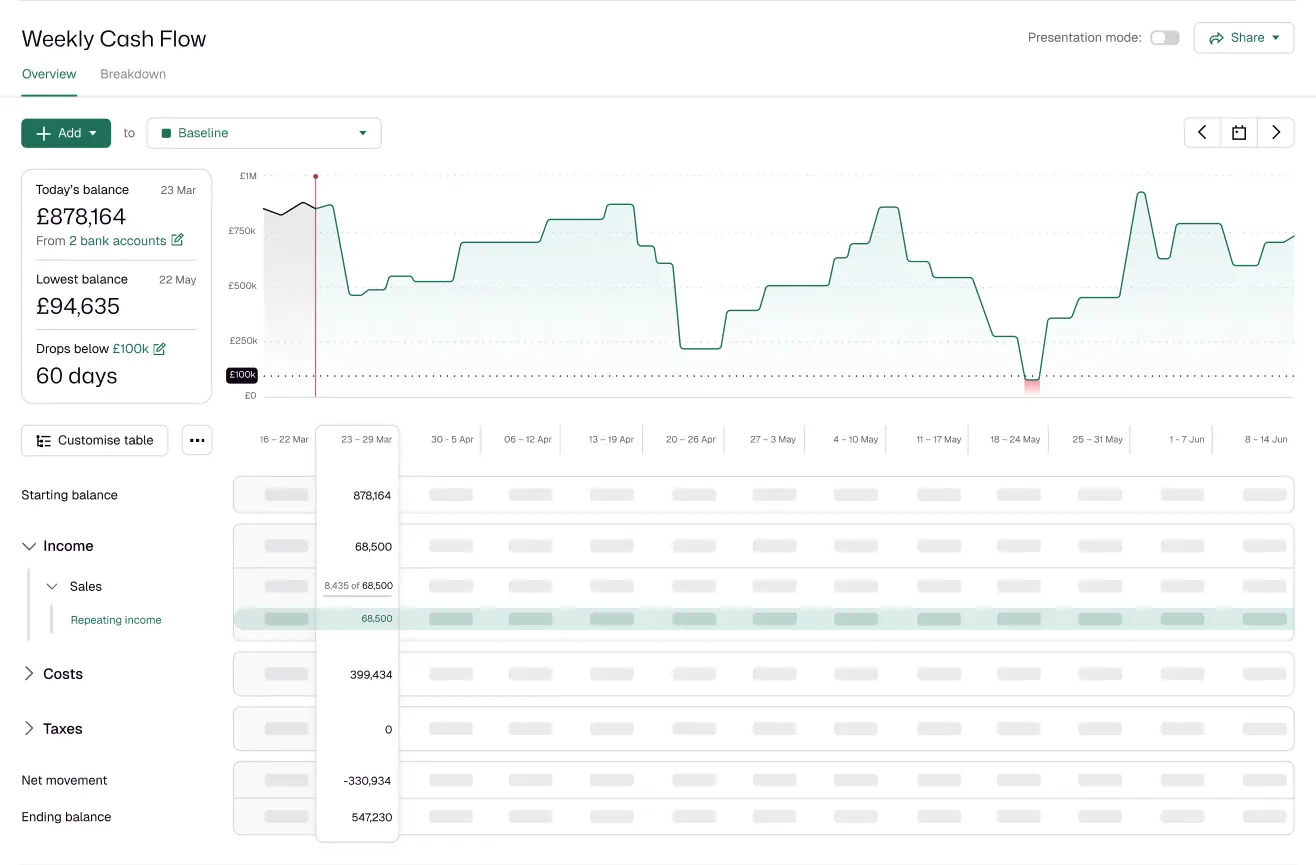
Forecast future cash flow: Project expected inflows and outflows based on available financial data.
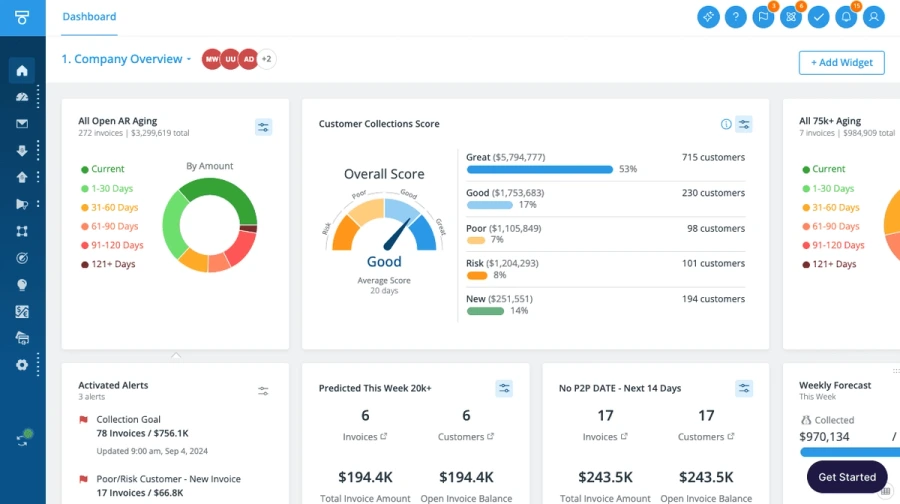
Manage accounts receivable: Track outstanding invoices, due dates, collections, and expected customer receipts.
Manage accounts payable: Monitor upcoming supplier payments and other financial obligations.
Reconcile bank transactions: Compare bank activity with accounting records to identify discrepancies.
Run scenarios: Assess how changes in sales, collections, expenses, or payment timing could affect future liquidity.
Support multi-entity finance: Consolidate financial information across subsidiaries and business units.
Improve financial reporting: Provide dashboards and reports that help finance teams and management review cash positions.
Identify exceptions: Highlight unusual movements, overdue payments, or potential cash shortfalls that require attention.
Support financial decisions: Give management clearer information for budgeting, financing, payment planning, and cash allocation.
10 Best Cash Flow Management Software at a Glance
The following comparison provides a quick overview of the 10 platforms based on their primary use case, publicly available starting pricing, and user ratings. Pricing can vary by region, plan, users, modules, implementation scope, or negotiated requirements.
Platform
Best For
Price
Rating
ScaleOcean
Medium and large enterprises requiring integrated ERP-based cash management
Custom quote
5.0/5 on Software Advice
QuickBooks Online
Small and medium businesses managing accounting and cash flow
From S$31/month in Singapore
4.3/5 on Capterra
Float Cash Flow
Small and medium businesses needing dedicated cash forecasting
From US$39/user/month
4.8/5 on Capterra
Agicap
Medium and large businesses requiring corporate cash management
Custom quote
4.3/5 on Capterra
Cash Flow Frog
Small and medium businesses focused on cash forecasting
From US$69/month
4.8/5 on Capterra
Xero Analytics Plus
Small and growing businesses using Xero accounting
Xero plans from S$39/month in Singapore
4.4/5 on Capterra
Calxa
Businesses and accounting firms requiring budgeting and cash forecasting
From US$174/month
4.5/5 on Capterra
Tesorio
Medium and large businesses focused on AR and cash flow
From US$30,000/year
4.9/5 on Capterra
HighRadius
Large enterprises requiring AR and finance automation
Custom quote
4.4/5 on Capterra
Dryrun
Mid-market finance teams requiring flexible cash forecasting
Custom quote
4.6/5 on Capterra
ScaleOcean currently has a 5.0/5 rating on Software Advice based on 2 reviews. QuickBooks Online has a 4.3/5 rating across more than 8,500 Capterra reviews, while Float Cash Flow, Agicap, Cash Flow Frog, Xero, Calxa, Tesorio, HighRadius, and Dryrun have the ratings shown above on Capterra.
10 Best Cash Flow Management Software in Singapore for 2026
Choosing cash flow management software requires more than comparing forecasting features. Businesses should also consider accounting integration, bank connectivity, multi-entity support, reporting capabilities, scalability, pricing, and how well each platform fits their financial workflows.
The following list compares 10 cash flow management software options in Singapore for 2026 to help businesses evaluate their choices.
1. ScaleOcean
ScaleOcean is an ERP solution provider with its flagship product, ScaleOcean Atlas, designed to connect financial management with broader business processes. Rather than treating cash flow as a separate finance activity, ScaleOcean Atlas connects accounting, receivables, payables, banking, procurement, sales, inventory, and other operational data within one ERP ecosystem.
For businesses managing multiple entities or complex financial processes, this integrated approach provides a broader source of financial information. ScaleOcean’s Singapore accounting solution supports cash flow forecasting, accounts receivable and payable management, bank reconciliation, financial reporting, and real-time financial visibility, helping finance teams monitor liquidity across connected business activities.
The system has been optimized and complies with PDPA regulations and local financial reporting standards, with capabilities supporting Singapore-related GST and IRAS requirements. ScaleOcean can also support digital transformation initiatives related to EDG and CTC grant claims, subject to eligibility and qualifying requirements. Schedule a consultation with ScaleOcean to discuss your cash flow management needs, implementation scope, integrations, and relevant accounting workflows.
Key Features:
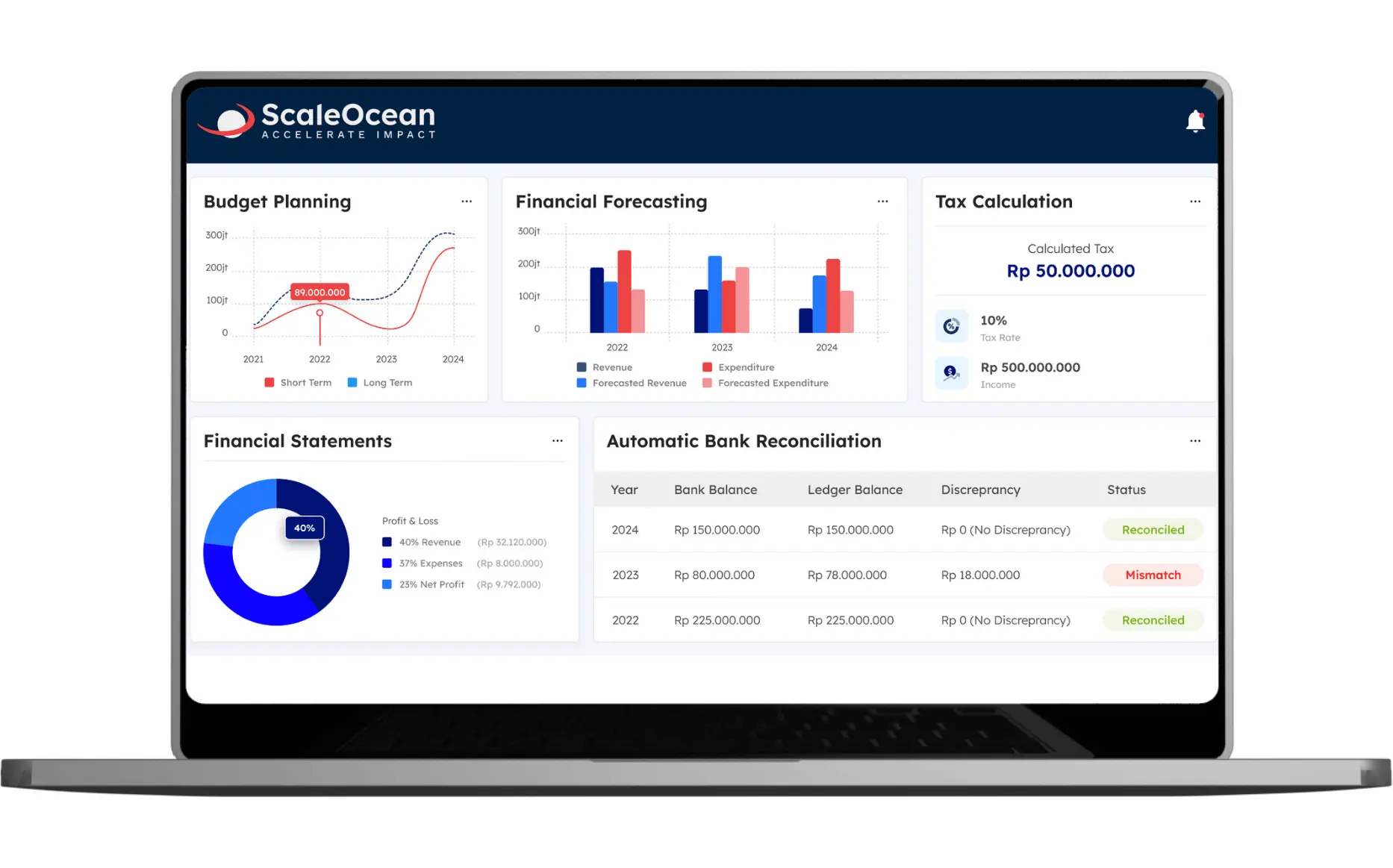
Cash Flow Management Dashboard: View cash position, receivables, payables, financial movements, forecasts, and other relevant finance indicators in one environment.
Real-Time Financial Visibility: Connect financial information with operational transactions to reduce fragmented data.
Cash Flow Forecasting: Analyze expected inflows and outflows to support liquidity planning.
Bank Reconciliation: Compare internal financial records with bank transactions and identify discrepancies.
Multi-Entity & Multi-Currency Management: Support financial management across different entities and currencies.
Configurable Workflows: Adapt approvals, financial processes, reports, and controls to business requirements.
Pros
Cons
Connects cash flow management with accounting, AR/AP, banking, sales, procurement, inventory, and other ERP processes.
Its broader ERP scope may be more extensive than needed for businesses looking only for basic cash flow forecasting.
Supports cash flow forecasting and automated bank reconciliation.
Implementation requires process mapping and configuration based on business requirements.
Provides broader visibility across entities and business functions.
Pricing depends on selected modules, integrations, and implementation scope.
Configurable workflows can adapt to different enterprise processes.
Best for: Medium and large enterprises, multi-entity businesses, distributors, manufacturers, logistics companies, professional services firms, and other organizations that need cash flow management connected to wider ERP processes.
Cost/Price: Custom quote. Software Advice currently lists ScaleOcean with one custom-quote plan and a 5.0/5 rating from 2 reviews.
ℹ️Why choose ScaleOcean?
ScaleOcean Atlas helps businesses manage cash flow as part of a broader ERP ecosystem. Finance teams can connect accounting, receivables, payables, procurement, sales, inventory, and other operational data rather than relying on an isolated cash flow tool.
2. QuickBooks Online
QuickBooks Online is cloud accounting software designed to help businesses manage bookkeeping, invoicing, expenses, financial reporting, and cash flow information. It provides bank feeds and accounting data that can help small businesses monitor their financial position without maintaining separate accounting systems.
QuickBooks Online is particularly relevant for smaller businesses that want accounting and cash flow visibility within the same platform. Capterra lists a 4.3/5 rating from more than 8,500 reviews.
Key Features:
Bank feeds and transaction categorisation
Invoicing and payment tracking
Expense tracking
Cash flow reporting
Financial dashboards
Third-party integrations
Pros
Cons
Combines accounting with cash flow planning.
Cash Flow Planner availability varies by QuickBooks Online version.
Cash flow planner can use connected bank, credit card, and accounting data.
Some features have limitations when multicurrency is enabled.
Users can add, edit, and model future income and expenses.
Businesses with complex multi-entity requirements may need additional tools or integrations.
Best for: Small and medium businesses that primarily need cloud accounting with basic to moderate cash flow management.
Cost/Price: QuickBooks Online Singapore currently lists Simple Start at S$31/month before promotional discounts, with higher plans available for additional users and functionality.
ℹ️Why choose QuickBooks Online?
QuickBooks Online is suitable for businesses that want to combine everyday accounting, invoicing, expenses, bank feeds, and financial reporting in a familiar cloud environment.
3. Float
Float is a dedicated cash flow forecasting and cash management platform that works alongside accounting platforms such as Xero, QuickBooks Online, and FreeAgent. It allows businesses to view cash positions, build forecasts, and run scenarios based on financial data.
Its focus on forecasting makes it relevant for finance teams that already have an accounting system but need more dedicated cash planning capabilities.
Key Features:
Scenario planning
Cash budgeting
Accounts receivable and payable visibility
Budget versus actual reporting
Forecast exports
Accounting integrations
Pros
Cons
Provides cash flow forecasting, budgeting, and scenario planning.
Depends on supported accounting platforms.
Offers daily, weekly, and monthly cash flow views.
Businesses seeking a broader ERP may need additional systems for non-financial processes.
Forecasts can extend up to three years.
Integration dependencies can influence implementation requirements.
Best for: Small and medium businesses that already use Xero, QuickBooks Online, or FreeAgent and want dedicated cash forecasting.
Cost/Price: Capterra lists Float Cash Flow at US$39/user/month.
ℹ️Why choose Float?
Float is a practical choice when you need dedicated cash forecasting and scenario planning alongside an existing accounting platform.
4. Agicap
Agicap is a corporate cash flow management platform focused on cash monitoring, liquidity planning, cash collection, banking connectivity, reporting, and financial management. Its modular approach is designed for organizations that need broader visibility over corporate cash positions.
Agicap is more focused on cash and treasury-related processes than general bookkeeping, making it relevant for finance teams that already have accounting systems but need more dedicated cash management capabilities.
Key Features:
Cash management
Liquidity planning
Banking and ERP connectivity
Cash collection
Business spend management
Reporting and analytics
Pros
Cons
Provides real-time cash visibility across bank accounts and entities.
Setup and implementation can require additional technical work.
Supports cash forecasting, liquidity planning, and scenario modelling.
Some users may require more advanced mobile or API capabilities.
Offers bank and ERP connectivity.
Its broad treasury functionality may be more than smaller businesses need.
Best for: Medium and large businesses that need dedicated corporate cash management and liquidity planning.
Cost/Price: Custom pricing. Agicap’s pricing is personalised according to business requirements.
ℹ️Why choose Agicap?
Agicap is suited to businesses looking for a dedicated cash management environment covering liquidity planning, banking connectivity, cash collection, and financial reporting.
5. Cash Flow Frog
Cash Flow Frog is a cash flow forecasting platform that connects accounting data or bank information to generate future cash projections. It supports scenario planning, forecasting, and planned-versus-actual analysis.
The platform supports integrations with QuickBooks, Xero, Sage Intacct, Odoo, Zoho Books, FreshBooks, and other financial systems, making it useful for companies that want to add cash forecasting without replacing their accounting platform.
Key Features:
Cash flow forecasting
What-if scenario planning
Daily to quarterly cash views
Multi-entity and multi-currency support
Accounting integrations
Bank connectivity
Pros
Cons
Provides cash flow forecasting and long-term projections.
Primarily focuses on cash flow planning rather than a complete ERP environment.
Supports daily, weekly, monthly, and quarterly planning.
Businesses may still need separate systems for broader accounting and operational workflows.
Allows businesses to consolidate cash flow data across multiple companies.
The platform is more specialised for organizations prioritising cash forecasting.
Best for: Small and medium businesses that need dedicated cash forecasting alongside existing accounting software.
Cost/Price: Capterra lists the Pro plan at US$69/month and an Accountant multi-client plan at US$98/month.
ℹ️Why choose Cash Flow Frog?
Cash Flow Frog is useful for businesses that want to strengthen forecasting, scenario planning, and cash visibility without replacing their existing accounting system.
6. Xero Analytics Plus
Xero Analytics Plus provides cloud accounting with bank reconciliation, financial reporting, cash flow forecasting, budgeting, and analytics. Xero Analytics Plus adds more advanced financial insight capabilities to eligible Xero plans.
For Singapore businesses already using Xero, Analytics Plus can extend the platform’s financial visibility without requiring a separate cash forecasting environment.
Key Features:
Bank feeds and reconciliation
Cash flow forecasting
Financial dashboards
KPI analysis
Budgeting
Multi-currency support
Pros
Cons
Extends Xero’s accounting environment with deeper forecasting capabilities.
Forecasting capabilities depend on the applicable Xero plan or Analytics Plus availability.
Supports cash flow forecasting and scenario modelling.
Forecasting is closely tied to the Xero ecosystem.
Provides business analytics alongside core accounting data.
Businesses requiring broader enterprise workflows may need additional applications.
Best for: Small and medium businesses already using Xero, particularly those seeking stronger forecasting and financial analytics.
Cost/Price: Xero Singapore currently lists Starter from S$39/month, Standard at S$70/month, and Premium at S$95/month. Premium includes a 180-day cash flow forecast and advanced analytics features. Xero has also announced price changes from 1 November 2026.
ℹ️Why choose Xero Analytics Plus?
Xero Analytics Plus is relevant when a business already relies on Xero for accounting and wants to extend its financial dashboards, forecasting, KPI analysis, and business insights within the same ecosystem.
7. Calxa
Calxa is financial planning software focused on budgeting, cash flow forecasting, consolidations, KPIs, and management reporting. It connects with accounting systems so businesses can prepare forecasts and recurring management reports.
Calxa supports organizations ranging from smaller businesses to larger companies and accounting firms, particularly where budgeting, consolidation, and cash forecasting are important.
Key Features:
Cash flow forecasting
Budgeting
Multi-entity consolidation
KPI dashboards
Management reporting
Accounting integrations
Pros
Cons
Supports cash flow forecasting, budgeting, and scenario modelling.
Requires integration with an existing accounting or ERP system for much of its financial data.
Provides three-way forecasting across P&L, balance sheet, and cash flow.
Businesses looking for an all-in-one ERP may need additional applications.
Supports multi-company consolidation.
Its extensive forecasting capabilities may require financial planning expertise to configure effectively.
Best for: Small to large businesses, accounting firms, and organizations managing multiple entities or requiring structured budgeting and forecasting.
Cost/Price: Calxa’s current US pricing starts at US$174/month for Premier 1, with higher tiers for additional organizations.
ℹ️Why choose Calxa?
Calxa is a useful option for organizations that want budgeting, cash flow forecasting, consolidation, KPI tracking, and recurring management reports within a dedicated financial planning environment.
8. Tesorio
Tesorio focuses on accounts receivable automation, cash flow forecasting, collections, payment prediction, and financial operations. Its platform is designed to help finance teams understand expected customer payments and improve cash collection processes.
Tesorio is particularly relevant for organizations where receivables and collections represent a major part of cash flow management.
Key Features:
Accounts receivable automation
Cash forecasting
Payment prediction
Collections management
Invoice matching
Customer payment workflows
Pros
Cons
Strong focus on AR automation and cash flow forecasting.
More focused on AR, collections, and cash operations than broad accounting or ERP management.
Connects collections activities with cash forecasting.
Businesses may require additional systems for procurement, inventory, HR, and other functions.
Provides real-time dashboards and invoice-level visibility.
Integration and workflow requirements should be assessed before implementation.
Best for: Medium and large businesses with high-volume accounts receivable and collections requirements.
Cost/Price: Capterra lists Tesorio at approximately US$30,000/year, while G2 describes pricing as custom and structured around an annual platform subscription plus AI-agent capacity.
ℹ️Why choose Tesorio?
Tesorio is relevant for finance teams where improving collections, predicting customer payments, and automating accounts receivable processes are central to cash flow performance.
9. HighRadius
HighRadius provides finance automation focused on accounts receivable, collections, cash application, deductions, credit management, and order-to-cash processes. Its capabilities are designed primarily for organizations with complex finance operations and high transaction volumes.
Its cash flow value is closely connected to receivables automation. By improving payment matching, collections, dispute handling, and AR visibility, finance teams can gain better insight into incoming cash.
Key Features:
Accounts receivable automation
Cash application
Collections management
Credit management
Deduction management
Payment matching
O2C analytics
Pros
Cons
Designed for enterprise finance and treasury operations.
Its enterprise-oriented capabilities may be excessive for smaller businesses with straightforward cash requirements.
Provides global cash visibility across banks and entities.
Implementation can involve more extensive configuration and integration work.
Supports automated bank integration and reconciliation.
Businesses may need specialised finance resources to maximise its broader treasury capabilities.
Best for: Large enterprises with complex accounts receivable, collections, cash application, and order-to-cash processes.
Cost/Price: Custom quote. HighRadius states that its newer AI automation offerings use outcome-based pricing rather than traditional per-user pricing.
ℹ️Why choose HighRadius?
HighRadius suits enterprises that need deep automation across receivables, cash application, collections, deductions, and broader order-to-cash operations.
10. Dryrun
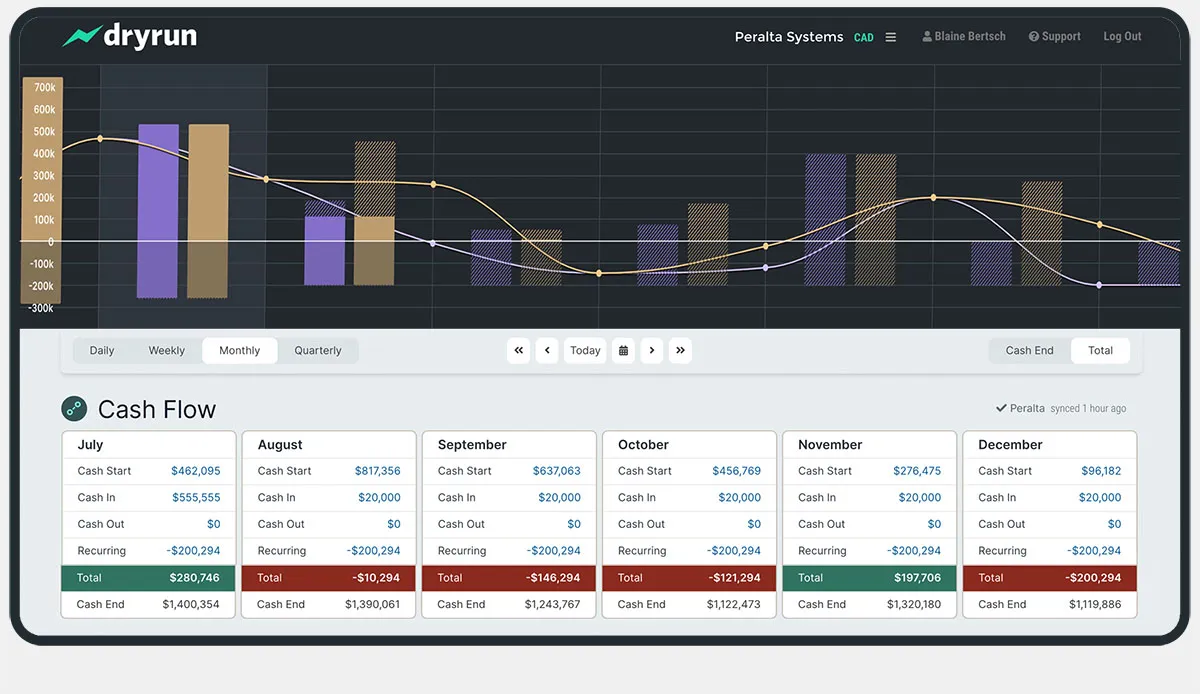
Dryrun is cash flow forecasting software designed for finance teams that want more flexibility than standard accounting forecasts. It supports daily tracking, rolling 13-week forecasting, monthly models, scenario planning, AR/AP adjustments, and multi-entity consolidation.
Dryrun is particularly useful for finance teams that want to combine automated accounting data with the ability to manually adjust assumptions when business conditions change.
Key Features:
Daily cash flow forecasting
Rolling 13-week forecasts
Monthly financial models
Scenario planning
Multi-currency support
Pros
Cons
Provides daily, weekly, and monthly cash flow forecasting.
Primarily focuses on forecasting and cash management rather than being a complete ERP.
Supports detailed AR/AP timing and multiple scenarios.
Businesses may need separate systems for broader accounting and operational management.
Offers multi-entity and multi-currency consolidation.
Its detailed forecasting controls may require finance teams to invest time in configuration and scenario management.
Best for: Medium-sized and mid-market finance teams, CFO offices, and businesses requiring flexible cash flow forecasting.
Cost/Price: Custom quote with a free trial available. Capterra currently rates Dryrun 4.6/5 from 8 reviews.
ℹ️Why choose Dryrun?
Dryrun is suitable for finance teams that need detailed control over cash flow assumptions, AR/AP timing, scenarios, and multi-entity forecasts while retaining flexibility over forecast adjustments
Why Singapore Businesses Need Cash Flow Software
To manage the business’s finances automatically, ensure visibility of local compliance deadlines such as GST and CPF, and avoid unexpected cash shortages, Singapore businesses need cash flow software.
1. Fragmented Cash Visibility Across Bank Accounts
A finance team could have multiple bank accounts in multiple banks, entities, currencies, and locations. If balances are held in a variety of bank portals and spreadsheets, it takes longer to consolidate the true cash position of the group and to make financial decisions.
ScaleOcean Atlas can integrate accounting, banking, receivables, payables, and other financial data in one ERP system. This allows finance teams to see the bigger picture of cash flow without having to consider each source as a financial workflow.
2. Late Customer Payments and Uncertain Collections
Even if the business has good sales, delayed payments can cause cash gaps. Finance Staff must be aware of which invoices are overdue, when they are to be collected, and whether they are to be collected before or after the next payments.
Based on the data our team got from The Business Times, this issue is particularly relevant in Singapore. A September 2026 survey reported that 49% of Singapore respondents said payment delays had become more frequent over the previous year, while 57% had experienced at least one customer default during the preceding 12 months.
3. Supplier Payments That Compete with Payroll
Other bills and costs, including suppliers’ invoices, payroll, taxation, rent, loan repayments, and more, could fall due at about the same time. Forward-looking cash visibility can be challenging for finance teams, as they need to make decisions on payments and liquidity.
A cash flow management system can facilitate the finance team in aligning the cash expected with the upcoming bills. This enables them to take proactive measures to address any vulnerabilities in advance and decide if collections, payment schedules, or financing should be considered.
4. Cash Gaps Across Entities and Regional Markets
For multi-entity businesses, cash can be located in various bank accounts, currencies, countries, and subsidiaries. It is therefore possible that a profitable business has money in its bank account, and another business has a short-term cash shortage.
ScaleOcean Atlas is capable of providing businesses with multi-entity and multi-currency financial processes, enabling them to link financial data across entities and ensure appropriate reporting frameworks. This is especially helpful for businesses that are growing in Singapore and in the region.
Key Features of Cash Flow Management Software
Cash flow management software can automate financial tracking, live bank reconciliation, and predictive liquidity forecasting for optimal working capital.
1. Cash Visibility and Bank Connectivity
The ideal cash flow software should add up all the necessary banking and financial data, allowing finance teams to grasp the current flow of cash without having to check various sources repeatedly.
In Singapore, bank connectivity also needs to be carefully considered as there are differences in access and integration between different financial institutions and providers.
2. Rolling Forecasts and Scenario Planning
Rolling forecasts enable finance to keep up to date with expected cash positions as new invoices, payments, collections, and business assumptions are made.
It goes further than that in the case of scenario planning, with the ability to simulate potential scenarios of delayed payments from customers, rising supplier prices, rising wages, or falling sales, before committing financial resources.
3. Accounts Receivable and Payable Management
The usefulness of cash flow forecasting is enhanced when it includes actual receivables and payables. Finance can identify outstanding customer invoices and upcoming supplier commitments.
The result is a more practical view of cash timing rather than relying only on historical balances, especially when businesses manage multiple currencies through multi-currency accounting software.
4. Bank Reconciliation and Cash Application
Bank reconciliation is used to reconcile transactions on the books with transactions that are in the bank. Cash application takes it one step further and matches payments with billings or customer accounts.
These capabilities, when used together, can help minimize the ambiguity associated with receipts not being received as expected or the proper allocation of receipts.
5. Multi-Entity and Multi-Currency Reporting
Some entities with several subsidiaries may require consolidated cash reporting with entity-level financial information.
Multi-currency functionality is also a key feature if businesses receive income or have to pay suppliers in currencies other than SGD or have accounts in other currencies.
ScaleOcean Atlas provides multi-entity and multi-currency financial management, enabling businesses to handle financial data with a variety of organizational setups, while ensuring seamless reporting.
6. Approval Workflows and Audit Trails
Cash management involves sensitive activities such as payments, transfers, adjustments, and approvals. A suitable system should therefore provide appropriate access controls and traceable approval workflows. Audit trails can help finance teams identify who performed an action, when it occurred, and what changed, improving financial governance.
When combined with cloud accounting, these records can provide greater visibility into financial activities while allowing authorized teams to access accounting information from a centralized digital environment.
7. AI Cash Flow Forecasting and Exception Alerts
AI can be used to analyze vast amounts of financial data and detect patterns, unusual movements, potential exceptions, and predict changes for finance teams.
ScaleMind is embedded within ScaleOcean Atlas as an AI Business Assistant, allowing teams to analyze business information and support financial decision-making directly within the ERP environment. This can help finance teams move from simply reviewing cash data toward using it more proactively.
Standalone Cash Flow Software vs ERP Cash Management
These two approaches can be beneficial for cash visibility; however, they approach the problem from two different perspectives. Typically, standalone cash flow applications are more inclined towards forecasting and cash liquidity, whereas ERP cash management will combine the cash information with the transaction activities that lead to cash in or out.
Comparison
Standalone Cash Flow Software
ERP Cash Management
Primary Focus
Cash flow forecasting, liquidity monitoring, and scenario planning
Cash management integrated with accounting and wider business processes
Data Sources
Often connects to accounting software, banks, and financial applications
Uses data from accounting, sales, procurement, inventory, payroll, banking, and other ERP modules
Cash Flow Forecasting
Strong focus on detailed cash flow forecasting and scenarios
Forecasting can use connected financial and operational data
Accounting Integration
Usually requires integration with a separate accounting system
Accounting is typically built into the same platform
Accounts Receivable & Payable
May provide AR/AP monitoring or connect to external systems
Directly connected with invoices, receivables, payables, and payment workflows
Bank Reconciliation
Often available through bank connections or integrations
Can connect reconciliation directly with accounting transactions and financial records
Multi-Entity Management
Depends on the software and selected plan
Can support consolidated financial management across entities and business units
Multi-Currency
Availability varies by platform
Typically integrated with broader multi-currency accounting capabilities
Operational Data
Limited unless connected to other systems
Can connect cash flow data with sales, procurement, inventory, projects, and other operations
Implementation
Generally simpler when the business already has an accounting system
May require broader implementation, configuration, and process mapping
Best Suited For
Businesses that primarily need specialised cash flow forecasting and planning
Medium and large businesses that need integrated financial and operational management
Main Advantage
Focused cash flow functionality
Broader visibility and connected workflows across the organization
Main Consideration
May require multiple systems to manage other business functions
Broader scope may require more planning during implementation
What Singapore Businesses Should Check Before Implementing Cash Flow Software
Singapore businesses should first determine their data readiness, compatibility with local compliance regulations (such as IRAS GST and InvoiceNow e-invoice requirements), and banking connections before implementing cash flow software.
1. Singapore Bank Connectivity and Data Refresh
Bank connectivity should be one of the first implementation checks for Singapore businesses. Finance teams should confirm which local banks are supported, whether the connection is API-based, how frequently data refreshes, and what happens when a bank connection fails.
According to the data our team obtained from DBS Singapore, API-based banking connectivity had grown from 37% to 56% among surveyed Asia-Pacific corporates, while 56% were investing in cash management solutions.
For any Singapore business, where software is used to support bank integration, it’s about supporting the required banks, entities, accounts, refresh rate,e and types of transactions.
2. SGD Reporting and Cross-Border Transactions
Businesses should check whether the platform can maintain SGD reporting while handling foreign-currency transactions. This becomes particularly important for companies with regional subsidiaries, overseas suppliers, or customers paying in different currencies.
The system should also be capable of processing the right exchange rates, reporting and consolidating in the right currencies, without the finance teams having to work in a number of separate spreadsheets from each market.
3. GST, Payroll and CPF Cash Planning
Plans for cash flow should take into consideration commitments that have an impact on cash flow, such as paying out payroll, CPF contributions and paying GST.
The prevailing rate of GST in Singapore is 9%, with employers having to make CPF contributions for qualified Singapore citizens and Singapore Permanent Resident workers.
So, finance departments must make sure that their forecasts include tax and payroll obligations and not just customer receipts and supplier bills.
4. InvoiceNow Integration and Invoice Status
InvoiceNow may impact the timing and the form of the invoicing process. Businesses should then determine if their finance system can integrate with InvoiceNow and continue to track the invoice status in the applicable financial procedures.
Based on the information our team collected from IMDA, GST-registered businesses will progressively be required to submit invoice data directly to IRAS through the InvoiceNow network from April 2028 to April 2031.
5. Local Support and Implementation Ownership
Enterprise cash flow software has the potential to impact accounting processes, bank connections, reporting, approvals, and integrations. Where the system must integrate with the existing finance process, local support is important.
Businesses should confirm who handles configuration, integration, data migration, testing, training, and post-go-live support before selecting a platform. This is particularly important when implementing an accounting information system, as the system needs to align with existing financial processes, data structures, and reporting requirements.
How to Choose the Right Cash Flow Management Software for Your Business
Choose cash flow management software by evaluating your core accounting integration, forecasting depth, and bank connectivity requirements.
1. Identify Your Main Cash Flow Bottleneck
Start by identifying the actual problem. It could be delayed collections, fragmented bank data, unreliable forecasts, manual reconciliation, multi-entity consolidation, or limited visibility into upcoming payments.
This prevents businesses from selecting software based only on feature count and encourages them to evaluate how well the platform supports their needs, particularly when managing multi-entity accounting softwareacross different subsidiaries or business units.
2. Map Your Systems and Data Sources
Record the systems currently in place for finance, such as accounting software, ERP, banks, payroll, invoicing, procurement, sales, and spreadsheets.
The idea is to identify the sources of cash data and whether that can be achieved through the new system without establishing another data silo.
3. Separate Must-Have and Optional Features
A small business might just need bank feeds, cash forecasting, and basic reporting; large enterprises might need multi-entity consolidation, multi-currency management, approval workflows, audit trails, and AI-assisted analysis.
Clearing up the essentials from the optional features allows organizations to make vendor comparisons more objective.
4. Evaluate Scalability, Security and Support
Lastly, assess the capabilities of the platform to handle growing transaction volumes, entities, currencies, users, and integrations.
Security, access controls, auditability, data governance, implementation support, and local compliance should not be a secondary consideration, but should be part of the evaluation.
Conclusion
Cash flow management software helps businesses monitor liquidity, forecast future cash positions, manage receivables and payables, reconcile financial information, and make better decisions around upcoming cash requirements. The right platform can provide finance teams with a clearer view of both current cash and expected future movements.
For Singapore enterprises, the challenge becomes more complex when finance teams manage multiple bank accounts, entities, currencies, delayed customer payments, supplier obligations, GST, payroll, and cross-border transactions. Cash flow software can address these gaps through connected data, forecasting, reconciliation, scenario planning, and financial visibility.
ScaleOcean Atlas provides integrated cash flow management within an ERP ecosystem connecting finance, accounting, receivables, payables, procurement, sales, inventory, HR, projects, and other business functions. Schedule a consultation with ScaleOcean to discuss your cash flow requirements, integrations, implementation scope, and deployment options.
1. How Is Cash Flow Software Different from Accounting Software?
Accounting software primarily records and manages financial transactions, while cash flow software focuses more specifically on liquidity, cash forecasting, expected inflows and outflows, and scenario planning. Some platforms combine both capabilities, while others integrate cash flow tools with an existing accounting system.
2. Can Cash Flow Software Connect to Singapore Bank Accounts?
Some cash flow platforms can connect to Singapore bank accounts, but availability depends on the provider, supported banks, connection method, and API access. Businesses should verify the exact banks and accounts they use before implementation, particularly because Singapore banks may apply different API access requirements.
3. Does InvoiceNow Automatically Improve Cash Flow?
No. InvoiceNow can reduce manual invoice processing and help shorten payment cycles, but it does not guarantee faster customer payments. Businesses still need effective invoicing, collection, payment terms, and receivables management to turn faster invoice processing into improved cash flow.
4. Is Excel Enough for Cash Flow Forecasting?
Excel can be sufficient for small businesses with relatively simple cash flows and a limited number of entities or accounts. However, businesses managing high transaction volumes, multiple entities, currencies, bank accounts, and frequent updates may benefit from software that automates data collection, reconciliation, forecasting, and reporting.