Odoo is an enterprise resource planning (ERP) software that integrates various business functions, such as accounting, CRM, sales, procurement, inventory, manufacturing, projects, HR, and e-commerce, into a single platform. Hence, many Singapore companies are turning to Odoo to replace silo-based systems and to maximize operational visibility.
But picking an ERP is not as simple as checking out the options of the applications available or the subscription fees they charge. Therefore, some points should be taken into account before making a big investment, such as Usability, deployment, customization, integration, support, and ownership costs.
Many organizations also face challenges when a highly configurable ERP becomes more complex than their practical requirements. As a result, employees may need longer training, customizations become harder to maintain, workflows slow down, and businesses struggle to maximize system adoption after implementation.
This Odoo review explores its ratings, primary features, advantages, disadvantages, industry suitability, and implementation considerations. Furthermore, it compares Odoo with modern alternatives such as ScaleOcean ERP, which offers flexible cloud or on-premises deployment, transparent flat-rate pricing with unlimited users, highly customizable workflows, and integrated AI capabilities.
This article will ultimately help Singapore businesses choose ERP software that fits their operational requirements, technical readiness, budget, and long-term growth plans without introducing unnecessary complexity.
Key Takeaways
Odoo ERP is a modular ERP suite that connects accounting, CRM, sales, procurement, inventory, manufacturing, projects, HR, POS, and e-commerce.
Evaluating Odoo’s strengths and weaknesses helps businesses determine whether its customization, implementation model, support structure, and upgrade requirements fit their operational needs.
Odoo’s features support accounting, supply chain management, manufacturing, customer management, reporting, and workflow automation across different departments.
ScaleOcean ERP stands out as an alternative with highly customizable workflows, flexible deployment, unlimited users, transparent pricing, and integrated AI capabilities for growing businesses.
Odoo is an enterprise resource planning (ERP) software thatcentralizes essential business processes within one integrated platform. It connects accounting, CRM, sales, procurement, inventory, manufacturing, project management, human resources, e-commerce, and point-of-sale operations, allowing organizations to manage data through a single business ecosystem.
In the present day, Odoo has community and enterprise editions for their various functional, technical, and budget needs. Odoo Online, Odoo.sh, and on-premises deployment options are also available for businesses based on their preferred degree of control, customization, and technical responsibility within the business.
Unlike standalone business applications, Odoo allows information to flow between connected modules without requiring teams to repeatedly transfer data across spreadsheets and separate systems. Consequently, organizations can improve cross-department collaboration, maintain more consistent records, and access operational information from one centralized environment.
Moreover, the modular design of Odoo allows companies to start using specific modules and expand their functionality as needed. Odoo.sh or self-hosted deployments also offer companies the flexibility to connect to custom modules and third-party software, leading to an even bigger software ecosystem that will help them address changing business needs.
However, implementing Odoo may still require substantial planning when businesses need complex customizations, integrations, data migration, or industry-specific workflows. Therefore, companies should evaluate whether Odoo’s modular approach fits their technical readiness, implementation timeline, ownership budget, and long-term requirements when choosing the best ERP software in Singapore.
Aggregated Ratings Dashboard of Odoo ERP
Odoo receives generally positive ratings across established software review platforms, particularly for its modular applications, integrated business functions, and customization flexibility. However, feedback becomes more varied when users discuss implementation effort, upgrades, training, technical support, and long-term maintenance.
The table below combines numerical ratings from Software Advice, Capterra, and Trustpilot with recurring qualitative discussions from the Odoo Reddit community. Ratings were accessed in July 2026 and may change as new user reviews are published.
Review Platform
Average Score
Sentiment Summary
Software Advice
4.3 / 5
Users value Odoo’s integrated modules, flexibility, and ability to centralize finance, sales, CRM, HR, and operational data. Some reviews mention slower support and additional effort during setup.
Capterra
4.1 / 5
Frequently praised for affordability, modular applications, and cross-department integration. Criticism commonly focuses on complex setup, upgrade effort, learning requirements, and inconsistent support.
Trustpilot
3.1 / 5
Customer sentiment is mixed. Some reviewers appreciate responsive staff and helpful technical assistance, while others report concerns about account management, response times, and issue resolution.
Reddit (r/Odoo)
Cautious / Developer-Focused
Community discussions recognize Odoo as a flexible ERP framework but repeatedly emphasize partner quality, gap analysis, customization control, training, and technical readiness to prevent implementation bottlenecks.
Overall, the ratings indicate that. Nevertheless, companies should assess implementation resources, partner quality, workflow complexity, and future upgrade requirements rather than relying on average scores alone.
How Are Odoo ERP Reviews and Ratings in 2026?
Odoo ERP has a rating of 4.2/5 based on the reviews our team received from G2’s review. Most reviewers represented small businesses, followed by mid-market organizations and a smaller number of enterprise users. This distribution is important because functionality considered sufficient for a smaller company may not address every governance, consolidation, security, or integration requirement of a larger enterprise.
Flexibility, user-friendliness, and integrated modules are themes that are consistently mentioned in G2’s aggregated review summary. Participants explain how the sales, purchasing, inventory, accounting, CRM, and manufacturing functions can share data without having to use separate applications or re-enter data.
Features such as workflow automation, approval tracking, invoicing, reminders, centralized reporting, mobile access, and application expansion are among the positive features mentioned. This integration can help businesses have a smoother process, starting from lead generation to order confirmation, to inventory updates, to invoicing, and accounting entries.
G2 notes its initial learning curve, structure of applications, performance on larger volumes of data, advanced integrations, and unpredictable costs when customization increases are a concern. Others say that a deeper integration requires third-party applications or custom development, which could require implementation and maintenance effort.
Some reviewers describe responsive assistance, while others report slow guidance, unclear ownership, or greater dependence on paid support and implementation partners. Companies should evaluate not only the software but also the delivery team, service-level expectations, documentation, and post-go-live support structure.
Overall, Odoo’s reviews indicate that it can provide good value if it is used with modules that align with the enterprise’s needs. However, companies should not assume that the more applications installed, the more their integration will improve. Control of process design, governance, training, and customization is still crucial.
Pros and Cons of Odoo ERP
Odoo’s benefits and limitations are closely connected. The same modularity that allows a company to build a tailored ERP can also create a complicated application landscape when modules, third-party extensions, and custom code are added without clear governance.
Pros
Cons
Connects finance, sales, inventory, procurement, HR, and operations in one system.
Can increase costs and make system maintenance more difficult.
Allows businesses to add modules gradually as operational needs expand.
May require custom modules and integrations to undergo additional testing.
Offers a practical entry point for small and mid-sized businesses adopting ERP.
May vary depending on the implementation partner, plan, and region.
Let businesses configure forms, approvals, dashboards, and reports.
May require users to receive additional onboarding and guidance.
Pros of Odoo: What Users Love
We have researched data from The CFO Club and found Odoo’s modular architecture, seamless integration, and scalability to meet expanding business needs, all highly valued.
Connected data across departments: CFO says that the native integrations of Odoo apps can help them avoid silos between finance, sales, inventory, CRM, and projects.
Flexible implementation scope: Companies can begin by implementing the necessary applications and expand to new ones as they expand and grow.
Accessible starting investment: Odoo can be appealing to small and medium-sized businesses that may not wish to immediately invest in a big enterprise deployment.
Adaptable business processes: Business processes and workflows can be set up with fields, reports, approvals, users, and more. This adaptability helps businesses that do not have completely standardized processes to fit into standardized software structures.
Cons of Odoo: Common Complaints
However, as the implementation becomes more complex, Odoo’s shortcomings become more apparent. Companies that start with multiple applications, integrations, entities, and custom workflows could require more robust technical governance than anticipated.
The concerns are not a sign of failure of the platform. They suggest that when considering a rollout, buyers should consider implementation, support, upgrade plans, and training.
Growing technical complexity: There are times when gaps in the process may be addressed by custom code or third-party applications, but they can add to the complexity of the environment to document, troubleshoot, and maintain.
Additional upgrade effort: Companies with particular environments might have to undergo technical testing before rolling out a new Odoo version. Achieving this compatibility can contribute to lengthier upgrade times and extra development tasks.
Variable service experience: CFO Club observes that some third-party applications may be less refined or supported, which can lead to varying levels of user experience.
Greater onboarding requirements: Although the applications might seem simple at first glance, workers need to know how data is transferred between the interlinked modules. If teams are not trained using a role-based approach, they can still rely on manual processes and fail to take full advantage of the ERP system.
Knowing these trade-offs will help companies not choose software just for its looks or low price. A cheap initial subscription is not always cheaper in the end due to underestimating customization, third-party applications, migration, training, and support.
For businesses that want more control over implementation, they can also consider ScaleOcean ERP. The flexible workflows, expert implementation support, clear pricing, and unlimited users model are designed to alleviate uncertainty in deployment and future growth.
What are the Primary Features of Odoo ERP Software?
Odoo has a wide variety of business functions covered by a wide variety of connected applications. The functionality depends on the applications selected, the configuration, the localization, the hosting environment, and the use of third-party modules or custom modules.
Features should be evaluated as entire workflows, instead of single menu items. For instance, inventory management should not be considered separately from purchase, sales, accounting, warehouse, manufacturing, and reporting.
Financial Management and Accounting
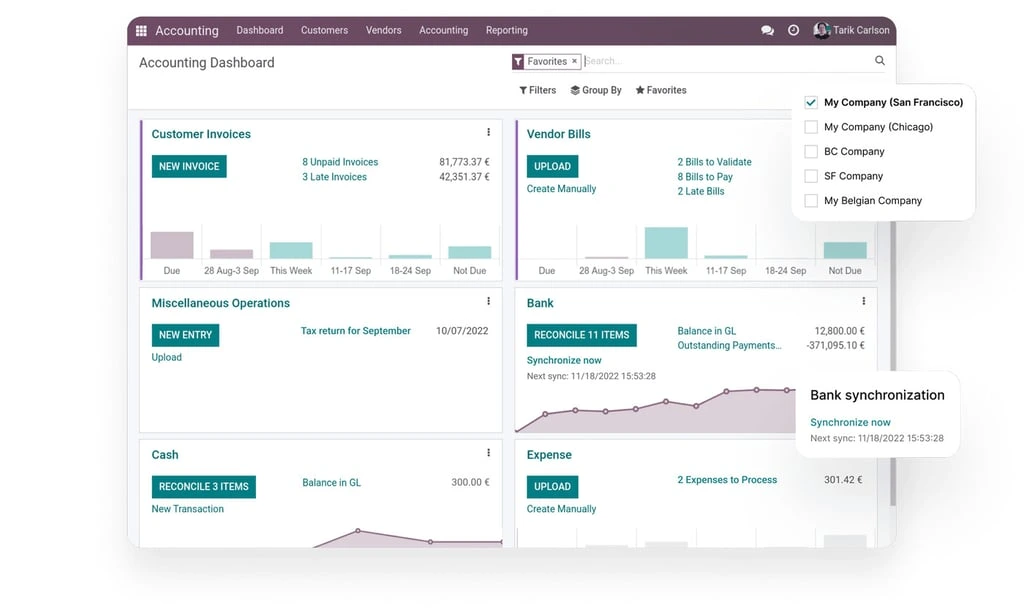
Odoo’s finance applications cover invoicing, accounts receivable, accounts payable, general ledger activities, bank reconciliation, expenses, budgets, reporting, tax processes, asset-related workflows, and multi-company accounting. Enterprise functionality also includes broader accounting capabilities, consolidation, localizations, and reporting tools.
Because financial records can connect with sales, purchasing, inventory, expenses, and other applications, transactions can flow into accounting without being recreated manually. However, Singapore companies should verify GST configuration, localization, approval controls, audit requirements, reporting formats, and external integrations during implementation.
Sales, CRM, and Customer Management
Odoo CRM assists sales teams in dealing with leads, opportunities, pursuits, pipelines, forecasts, communications, and follow-ups. Quotes, orders, pricing, subscriptions, customer records, inventory availability, deliveries, and invoices can all be linked together in the same environment for sales functions.
This connection can enhance visibility throughout the first interaction with a customer, through to order fulfilment and payment. However, complex workflows such as a complex chain of accounts, a matrix of approvals, commission schemes, contract conditions, or an omnichannel approach should be tested with realistic sample transactions.
Procurement, Inventory, and Warehouse Operations
Odoo supports requests for quotation, purchase orders, vendor records, replenishment, stock movements, warehouse locations, product variants, units of measure, serial numbers, lots, barcodes, and inventory valuation. Inventory can also connect with sales, purchasing, manufacturing, maintenance, quality, and e-commerce processes.
These capabilities can help businesses replace disconnected purchasing and inventory records. As an alternative to Odoo, SAP ERP offers broader capabilities for companies managing multiple warehouses, advanced distribution rules, regulated traceability, complex landed costs, or high transaction volumes. Businesses can explore the SAP ERP review to assess its performance and process coverage before deployment.
Manufacturing, Quality, and Maintenance
Production planning, component requirements, product lifecycle management, quality controls, equipment maintenance, shop-floor operations, manufacturing orders, manufacturing applications, bills of materials, and work centres are all supported by Odoo’s manufacturing applications.
Sales demand, procurement, raw materials, production, quality, finished goods, maintenance, and costing can be linked together in the manufacturer. The platform can then be used for smaller and medium-sized manufacturers and can be designed to meet their production requirements, although more advanced scheduling, compliance with sectors, and costing may require further configuration.
Project, Service, and Workforce Management
Odoo is an ideal solution for project-based organizations for tasks, stages, deadlines, timesheets, planning, appointments, field service, helpdesk activities, expenses, and billing. This means these apps are able to tie service delivery and project costs to customer contracts and books.
HR applications include leave, employee records, recruitment, employee appraisal, referrals, HR expenses, fleet activities, and other HR processes. HR coverage may vary from country to country and from business to business, so it is always important to review local payroll, employment, approval, privacy, and reporting requirements.
E-commerce, Point of Sale, and Websites
Website creation, e-commerce, online forms, customer portals, marketing, POS, payment workflows, stock management, customer data, and sales processing are part of Odoo. Retailers can thus link online and offline transactions to inventory and accounting without having to keep two sets of databases.
This integrated model could help to minimize the synchronization workload in the stores, websites, warehouses, and finance departments. However, businesses should perform testing of payment partners, taxation, offline POS behaviour, promotions, returns, loyalty rules, marketplace connections, and high-volume transaction performance.
Reporting, Integration, and Customization
Odoo provides dashboards, operational reports, spreadsheets, role-based access, workflow automation, APIs, Studio customization, and application extensions. Connected data can support reporting across finance, sales, inventory, manufacturing, projects, and other functions.
When the standard views and workflows need a tweak, their flexibility may be useful. Companies need to differentiate between safe configuration and custom development, however. All custom fields, scripts, connectors, and modules must have an owner, business case, test plan, and upgrade plan documented.
For businesses that require more specific workflows, industry-focused modules, or deeper customization, ScaleOcean can be considered as an alternative. Its ERP can be tailored to match complex operational requirements without forcing companies to rely on rigid standard processes, making it suitable for businesses that need a more flexible and scalable system.
What Industries Can Use Odoo ERP?
Odoo’s industry configurations include those for retail, hospitality, real estate, consulting, manufacturing, health and fitness, trades, and several service sectors. An application can be integrated with other applications through its modular foundation, depending on the application’s operating model.
However, the presence of an industry template does not guarantee complete sector coverage. Businesses should compare the platform against regulatory controls, terminology, costing models, reporting obligations, operational exceptions, and integration requirements specific to their industry.
Manufacturing
Odoo’s manufacturing modules can be used for purchasing, raw materials, bills of materials, production orders, work centres, quality checks, maintenance, inventory, sales, and accounting. Official industry examples include textile, metal, furniture, food, brewery, and Custom product manufacturing.
The platform may suit businesses seeking a modular manufacturing system with integrated commercial and financial data. Manufacturers with advanced planning, engineering change control, strict traceability, complex subcontracting, or industry certification requirements should conduct a detailed fit-gap assessment.
Retail and E-commerce
Odoo is widely used by retail and e-commerce businesses to manage POS transactions, inventory, purchasing, online orders, and fulfilment. As discussed in the Sage X3 ERP review, the system connects supplier management, warehouse activities, deliveries, product tracking, invoicing, and financial reporting. ScaleOcean can also serve as another alternative for enterprises seeking configurable workflows, unlimited users, and integrated multi-branch operations.
For businesses with a desire to have a single database across both their physical and digital locations, even prove beneficial. Multi-store controls, offline transactions, return rules, Loyalty programmes, marketplace integrations, warehouse allocation, and Local payment methods should be tested by retailers.
Distribution and Wholesale
Purchasing, vendor management, warehouse operations, sales orders, delivery management, product tracking, invoicing, and financial reporting are all capabilities available to distributors.
The suitability is based on the complexity of replenishment, product variants, warehouse networks, lot tracking, expiry dates, landed costs, pricing agreements, credit limits, and delivery operations. More complex distributors may necessitate further setup and/or sector-specific apps.
Construction and Project-Based Businesses
Odoo has workflows specific to the construction industry, including project records, procurement, materials, inventory, employee planning, tasks and expenses, vendor orders, and budget management. Compared to other software, its construction page sets itself apart by serving as the hub for managing project records and movements of materials.
While the primary focus of this project is on costing, progress billing, retention, variation orders, subcontractor claims, site inventory, equipment, timesheets, and multi-project reporting should still be reviewed. These requirements can be more intricate than the general project management and may require significant configuration.
Professional Services
Consulting, legal, accounting, marketing, engineering, and other professional-service firms can use CRM, quotations, projects, resource planning, timesheets, expenses, documents, billing, and financial reporting. Centralized project information may help managers monitor delivery, utilization, and customer activity.
The platform will be suitable if the project and billing processes are relatively standard and service operations follow a similar pattern. Complex revenue recognition, contract milestones, multi-entity delivery, professional compliance, and detailed profitability requirements are some examples of processes that should be tested carefully by firms in their particular cases.
Food, Beverage, and Hospitality
To combine the POS, purchasing, inventory, manufacturing, recipes, sales, website, and accounting systems, they can be used by restaurants, fast food establishments, hotels, guest houses, bars, beverage distributors, and food manufacturers. In Odoo, there are several food and hospitality configurations available in its industry catalogue.
The platform’s fit will depend on table management, kitchen workflows, ingredient costing, expiry tracking, branch operations, delivery channels, reservations, service charges, and local tax requirements. Businesses should confirm whether these functions are native, configured, or supplied through additional applications.
Odoo’s broad industry catalogue gives companies several starting points. Still, as also highlighted in the Oracle Fusion ERP Review, an effective ERP should be adapted around actual operational requirements rather than relying only on generic industry labels.
Businesses with highly specific industry workflows may need an ERP alternative that offers greater flexibility beyond standard configurations. In this case, ScaleOcean can be considered a suitable option, providing configurable industry models for manufacturing, distribution, retail, logistics, healthcare, and other sectors. This flexibility allows implementation teams to align modules, forms, approvals, reports, and user roles with the company’s existing operating model.
ScaleOcean ERP: A Flexible Software Alternative to Odoo
For companies that require more extensive ERP functions but don’t wish to handle a lot of custom modules, ScaleOcean could be a sensible choice over Odoo. This software emphasizes flexible implementation, transparent pricing, unlimited users, and configurable workflows that adapt to existing operations rather than forcing major process changes.
Moreover, ScaleOcean provides industry-specific ERP solutions for manufacturing, construction, distribution, retail, logistics, healthcare, F&B, and professional services. Its integrated AI capabilities help teams monitor performance, identify risks, automate repetitive tasks, and make faster decisions without paying additional licence fees for every new user.
To determine how ScaleOcean fits into their business operations, businesses can request a free demo to test the ERP system. The session enables teams to discuss which modules are applicable, to understand the implementation requirements, and to see if the platform provides sufficient support for existing workflows and future growth.
To determine how ScaleOcean fits into their business operations, companies can request a free demo to explore the ERP system directly. During the session, teams can identify relevant modules, review implementation requirements, and assess how well the platform supports current workflows and future growth.
Key Features of ScaleOcean ERP:
200+ Modules and 1,000+ Business Features: Supports finance, supply chain, workforce, projects, sales, customer management, and industry-specific operations within one integrated ERP ecosystem.
Highly Customizable Workflows: Configures approval matrices, forms, reports, dashboards, access rights, document flows, and operational processes according to each company’s requirements.
Unlimited Users and Transparent Pricing: Enables businesses to extend ERP access across departments, branches, and entities without recurring per-user licence increases or unclear add-on charges.
Cloud and On-Premise Deployment: Gives companies the flexibility to select a deployment model based on their security, infrastructure, compliance, integration, and scalability priorities.
Singapore-Focused ERP Capabilities: Supports local operational requirements, including GST and IRAS-related reporting processes, multi-currency transactions, audit trails, and PDPA-conscious data management.
All-in-One Business Integration: Connects finance, procurement, inventory, warehouse, manufacturing, CRM, sales, HR, projects, and asset management through a centralized source of data.
AI-Assisted Insights and Automation: Combines AI Business Assistant, AI Insight, AI Forecast, and Smart Alert to support reporting, forecasting, risk detection, workflow execution, and operational recommendations.
Dedicated Implementation Support: Covers process mapping, system configuration, data migration, integration, user training, testing, deployment, and post-implementation assistance.
Conclusion
Odoo ERPprovides a wide-ranging set of modules for finance, sales, inventory, manufacturing, HR, projects, and commerce. The strengths of its main features are centralisation, flexibility, and easy entry pricing, while on the downside, customization, upgrades, support quality, and user training need to be planned.
Businesses needing deeper workflow control can also evaluate ScaleOcean ERP, which combines configurable modules, AI insights, flexible deployment, and unlimited users. Request a free demo to compare both platforms against your existing processes, implementation budget, and long-term growth plans.
For those requiring a greater degree of control over their workflow, ScaleOcean ERP offers the option for scalable, configurable modules, AI-driven insights, flexible deployment, and unlimited users. Get a free demo to compare the two platforms with your current processes, implementation budget, and long-term growth plans.
FAQ Odoo ERP Reviews:
1. What tools are available in Odoo ERP software?
Odoo provides applications for accounting, CRM, sales, purchasing, inventory, manufacturing, project management, HR, e-commerce, POS, marketing, document management, approvals, and other business processes.
2. What are the alternatives to Odoo ERP software?
Odoo ERP alternatives include ScaleOcean, SAP Business One, Oracle NetSuite, Microsoft Dynamics 365, Acumatica, and ERPNext. Businesses should compare each system based on scalability, customisation, pricing, integration, deployment, and implementation support.
3. Why choose ScaleOcean instead of Odoo ERP software?
ScaleOcean is suitable for businesses that need configurable workflows, unlimited user access, transparent pricing, integrated modules, flexible cloud or on-premises deployment, and dedicated implementation support for complex operational requirements.
4. Does ScaleOcean support AI features that Odoo ERP software users may need?
Yes, ScaleOcean provides native AI capabilities, including AI Business Assistant, AI Forecast, AI Insight, and Smart Alert. These features help businesses automate workflows, analyse operational data, anticipate future needs, and respond to potential issues more quickly.
Odoo Review: Features, Pros, Cons, and Alternative














 Key Takeaways