











Predictive analytics software is a business intelligence technology that uses past data, statistical modelling, and machine learning to predict outcomes. It assists businesses with forecasting customer needs, predicting sales, pinpointing business risks, and aiding decision-making by identifying patterns in business data.
Businesses in Singapore are still struggling with high operating expenses, fluctuating customer demand, and complex operations. A large number of companies also keep their sales, inventory, finance, procurement, and production data in isolated systems, which hinders the ability to construct accurate forecasts and make interdepartmental decisions.
To overcome these issues, businesses can use predictive analytics tools that merge relevant data, detect patterns, and forecast future business states. These insights can be integrated with enterprise systems for better demand planning, financial forecasting, inventory planning, and operational decision-making.
According to the data our team gathered from the Singapore Business Federation, and found that 63% of businesses faced manpower costs as a major challenge, 44% faced uncertainty in customer demand and 40% faced rental costs. The above findings illustrate why forward-looking financial and operational planning is crucial to businesses in Singapore.
For 2026, check out this article to know about the top 12 predictive analytics software solutions, their features, pros, cons and applicability to various organisations. We also provide an in-depth look at how predictive analytics can be used in business, implementation costs, and the considerations involved in choosing a platform.
 Key Takeaways
- The best predictive analytics software includes ScaleOcean, SAS Viya, IBM SPSS Modeler, SAP Analytics Cloud, Microsoft Power BI, Alteryx, DataRobot, Qlik Predict, Microsoft Azure Machine Learning, Dataiku, Google BigQuery ML, and H2O.ai.
- ScaleOcean is an integrated ERP platform that connects sales, inventory, purchasing, finance, and operational data within one ecosystem. Its embedded ScaleMind AI Business Assistant helps enterprises analyse business trends and access connected information to support informed decisions.
- Predictive analytics software is a technology that analyses historical and current data using statistical methods, machine learning, and forecasting models to estimate future events or business outcomes.
- Choosing the right forecasting solution requires businesses to evaluate their objectives, integration capabilities, data quality, technical expertise, security requirements, and total cost of ownership.

Brief Comparing the Best Predictive Analytics Software for Business
Choosing the right predictive analytics software depends on business objectives, data availability, technical expertise, and integration requirements. Some platforms specialise in statistical modelling and machine learning, while others focus on business intelligence, financial forecasting, or integrated operational analysis.
The following table compares twelve software options based on their primary applications, estimated technical skill requirements, and main strengths. The skill levels are general assessments rather than official vendor classifications.
| Software | Best For | Skill Level Required | Key Strength |
|---|---|---|---|
| ScaleOcean Atlas | Medium to large enterprises in manufacturing, distribution, logistics, retail, and multi-branch operations requiring integrated business analytics. | Basic to intermediate for business users | Unified ERP data, operational reporting, and embedded ScaleMind AI assistance. |
| SAS Viya | Advanced Enterprise Forecasting | Intermediate to advanced | Statistical analysis, advanced forecasting, and model governance. |
| IBM SPSS Modeler | Statistical Predictive Modelling | Intermediate | Visual data mining, statistical models, and predictive workflows. |
| SAP Analytics Cloud | Financial Planning and Forecasting | Intermediate | Integrated financial planning, predictive scenarios, and SAP connectivity. |
| Microsoft Power BI | Business Intelligence and Forecast Visualisation | Basic to intermediate | Interactive dashboards, reporting, and time-series visual forecasting. |
| Alteryx | Data Preparation and Predictive Workflows | Intermediate | Visual data preparation, repeatable analytics, and predictive tools. |
| DataRobot | Enterprise Automated Machine Learning | Intermediate to advanced | Automated model development, evaluation, and monitoring. |
| Qlik Predict | No-Code Predictive Analytics | Basic to intermediate | No-code ML development and integration with Qlik analytics. |
| Microsoft Azure Machine Learning | Enterprise ML Deployment | Advanced | Scalable model training, deployment, and MLOps. |
| Dataiku | Collaborative Enterprise Analytics | Intermediate to advanced | Collaborative data projects, visual ML, and governed AI workflows. |
| Google BigQuery ML | SQL-Based Predictive Analytics | Intermediate to advanced | Building and executing ML models using data stored in BigQuery. |
| H2O.ai | Flexible Machine Learning Development | Intermediate to advanced | Open-source ML and automated modelling through Driverless AI. |
12 Best Predictive Analytics Software in 2026
The best predictive analytics software depends on whether a business needs operational forecasting, advanced machine learning, financial planning, or enterprise reporting. The following platforms provide different capabilities for analysing historical data and supporting forward-looking decisions.
Some solutions offer dedicated machine learning model development, while others primarily support forecasting, visualisation, or AI-assisted analysis of connected business information. Businesses should consider these differences before selecting a platform.
1. ScaleOcean Atlas — Best for Integrated Business Analytics
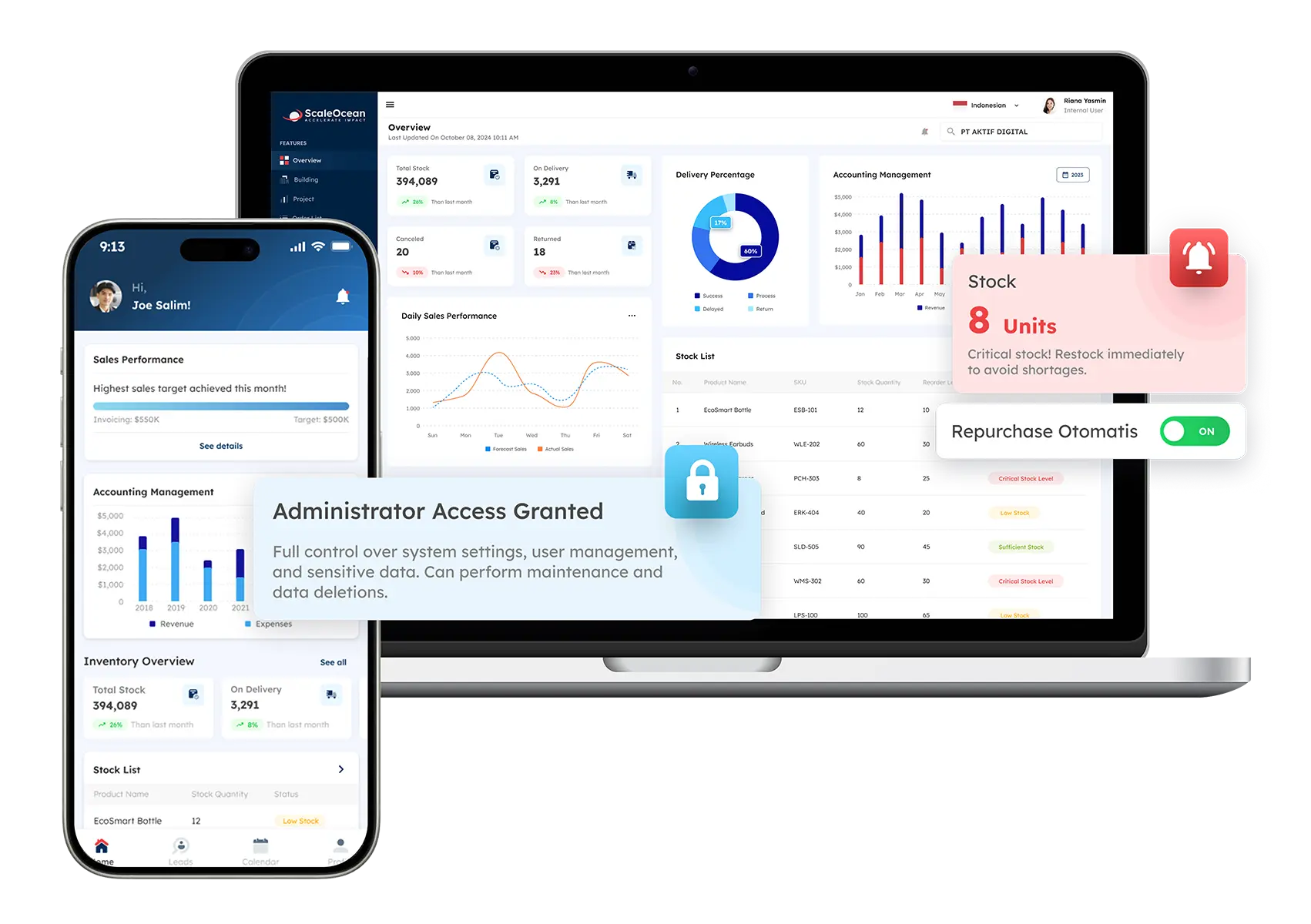
ScaleOcean is an enterprise resource planning (ERP) software provider that develops integrated business management solutions for medium and large enterprises across various industries. Its flagship product, ScaleOcean Atlas, connects financial, sales, inventory, procurement, production, and operational data through integrated ERP modules. This provides businesses with a consistent information foundation for analysing performance, identifying trends, and supporting demand and financial planning.
Additionally, ScaleMind is an AI Business Assistant embedded within ScaleOcean Atlas that allows managers to access connected information, analyse business conditions, and investigate operational trends through natural language prompts. For example, users can examine sales patterns, review inventory movements, and assess financial performance to support purchasing and operational decisions. More specialised predictive modelling requirements should be evaluated during implementation.
With unlimited users, configurable modules, and flexible enterprise workflows, ScaleOcean Atlas is suitable for organisations seeking integrated operational visibility rather than a separate data science application. Businesses can implement modules based on their requirements while maintaining connected information across departments. Schedule a consultation with ScaleOcean to explore how its ERP can support your business analytics and forecasting requirements.
Key Features:
- Integrated business data across accounting, sales, inventory, procurement, and operations
- Embedded ScaleMind AI Business Assistant for natural language analysis
- Real-time operational reporting and business performance visibility
- Multi-company and multi-branch management
- Configurable modules, reports, and approval workflows
- Unlimited users and flexible deployment options
| Pros | Cons |
|---|---|
| Connects analytics with operational ERP data instead of relying solely on separate data sources. | Its enterprise-focused capabilities may exceed the needs of small businesses seeking basic forecasting. |
| Supports flexible module selection and customisation according to business processes. | Implementation requires discovery and configuration to meet complex operational requirements. |
| Provides unlimited users and integrated multi-branch reporting. | Custom pricing requires a consultation rather than an instant subscription quote. |
| Offers embedded AI-assisted business analysis alongside purchasing, finance, and inventory workflows. |
ℹ️Why Choose ScaleOcean?
ScaleOcean Atlas connects business analytics with the operational data behind sales, inventory, purchasing, and financial decisions. Enterprises can customise their ERP modules and use embedded ScaleMind AI to investigate connected information without manually consolidating departmental reports. This approach is useful for businesses that prioritise integrated operational management alongside analytics.
Best for: Medium and large Singapore enterprises seeking integrated business analytics, AI-assisted insights, and connected ERP management.
2. SAS Viya — Best for Advanced Enterprise Forecasting
SAS Viya is an enterprise analytics and AI platform that supports statistical analysis, machine learning, forecasting, and model management. It allows organisations to work with complex datasets and develop analytical models for predicting business outcomes.
The platform includes capabilities for advanced forecasting and model governance, with functionality depending on the licensed SAS products. It is relevant to organisations with established analytical teams that require specialised modelling methods and controlled deployment processes.
Key Features:
- Statistical analysis and machine learning
- Advanced time-series forecasting
- Model development and evaluation
- Data visualisation and reporting
- Model management and governance
| Pros | Cons |
|---|---|
| Supports advanced forecasting and statistical modelling. | Specialised functions may require additional licensing. |
| Provides enterprise model management capabilities. | Effective deployment may require experienced analytics professionals. |
| Accommodates complex analytical workloads. | Implementation and training can increase total ownership costs. |
ℹ️Why Choose SAS Viya?
SAS Viya is suitable for organisations requiring advanced forecasting methods, statistical modelling, and structured model governance across enterprise analytical projects.
Best for: Medium and large enterprises with dedicated data science or advanced analytics teams.
3. IBM SPSS Modeler — Best for Statistical Predictive Modelling
IBM SPSS Modeler is a predictive analytics platform that helps organisations analyse data, discover relationships, and build statistical or machine learning models. It uses a visual workflow interface that allows analysts to create modelling processes without writing every step in code.
The software supports techniques such as classification, regression, and clustering. Businesses may use these capabilities to study customer behaviour, predict demand, or investigate factors associated with operational and financial outcomes.
Key Features:
- Visual predictive modelling workflows
- Statistical and machine learning algorithms
- Data preparation and transformation
- Classification, regression, and clustering
- Model evaluation and scoring
| Pros | Cons |
|---|---|
| Provides a visual interface for creating predictive models. | Interpreting model results still requires statistical knowledge. |
| Supports multiple statistical and machine learning approaches. | Business workflows may need separate operational integrations. |
| Helps analysts develop repeatable modelling processes. | Advanced deployment requirements may add configuration effort. |
ℹ️Why Choose IBM SPSS Modeler?
IBM SPSS Modeler provides a structured environment for organisations that need statistical analysis and visual predictive modelling without depending entirely on custom programming.
Best for: Medium and large businesses with analysts who regularly develop statistical predictive models.
4. SAP Analytics Cloud — Best for Financial Planning and Forecasting
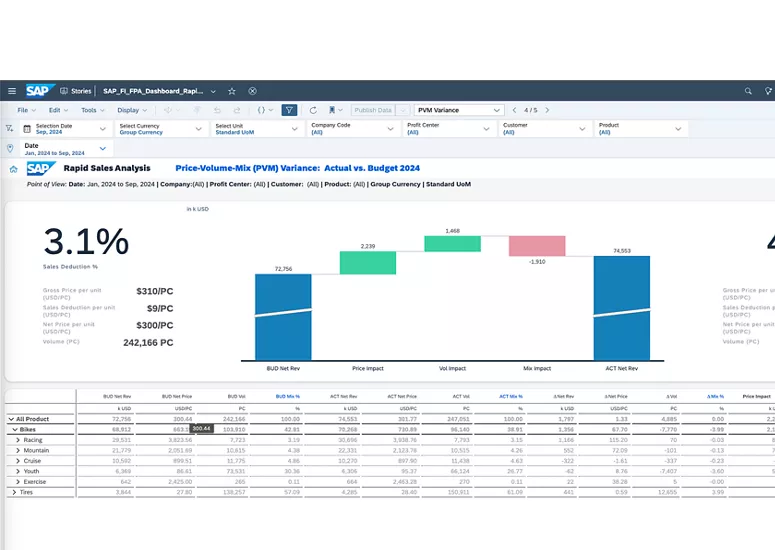
SAP Analytics Cloud is a cloud-based analytics and planning platform that combines business intelligence, financial planning, and predictive capabilities. It helps organisations analyse financial and operational performance while preparing forecasts and evaluating business scenarios.
Its predictive planning and Smart Predict capabilities can use historical information to generate forecasts and support planning activities. Businesses already operating within the SAP ecosystem may find its integrations relevant to their existing processes.
Key Features:
- Financial planning and budgeting
- Predictive forecasting and scenario analysis
- Business intelligence dashboards
- SAP data connectivity
- Collaborative planning and reporting
| Pros | Cons |
|---|---|
| Combines financial planning with analytics and forecasting. | Complex planning models can require significant configuration. |
| Supports integration with SAP business applications. | Organisations outside the SAP ecosystem should evaluate integration needs. |
| Offers predictive scenarios and collaborative planning. | Licensing and available features depend on the commercial package. |
ℹ️Why Choose SAP Analytics Cloud?
SAP Analytics Cloud is relevant to organisations that want predictive forecasting within a financial planning and business intelligence environment, especially when they already use SAP systems.
Best for: Medium and large enterprises with complex financial planning requirements.
5. Microsoft Power BI — Best for Business Intelligence and Forecast Visualisation
Microsoft Power BI is a business intelligence and data visualisation platform that helps organisations combine datasets, create dashboards, and monitor business performance. Its reporting capabilities can support sales analysis, financial reviews, and operational decision-making.
Power BI also includes forecasting for supported line-chart visualisations based on historical trends. However, businesses requiring advanced predictive modelling or custom machine learning deployment may need additional tools such as Microsoft Azure Machine Learning.
Key Features:
- Interactive dashboards and report
- Data connectivity and transformation
- Historical trend analysis
- Built-in line-chart forecasting
- Integration with Microsoft services
| Pros | Cons |
|---|---|
| Offers accessible dashboards and forecasting visualisations. | Built-in forecasting is limited to supported visual types. |
| Connects with a variety of business data sources. | Advanced predictive modelling generally needs additional tools. |
| Supports familiar Microsoft reporting workflows. | Sharing and enterprise capacity requirements can affect licensing costs. |
ℹ️Why Choose Microsoft Power BI?
Power BI is suitable for businesses that primarily need reporting dashboards, historical trend analysis, and basic forecast visualisations rather than a dedicated machine learning development platform.
Best for: Small, medium, and large businesses seeking business intelligence and forecast reporting.
6. Alteryx — Best for Data Preparation and Predictive Workflows
Alteryx is a data analytics and automation platform that helps organisations prepare, combine, and analyse information through visual workflows. Its Designer environment supports data transformation and predictive analysis, making it relevant to teams working with multiple data sources.
Predictive tools in Alteryx can support statistical modelling, model evaluation, and repeatable analysis processes. Depending on the edition and configuration, additional tools or packages may be required for specialised analytical tasks.
Key Features:
- Visual data preparation and blending
- Repeatable analytical workflows
- Predictive modelling tools
- Data transformation and cleansing
- Workflow automation and scheduling
| Pros | Cons |
|---|---|
| Simplifies complex data preparation through visual workflows. | Advanced modelling may require statistical knowledge or additional components. |
| Supports repeatable data transformation and analysis. | Workflow design and maintenance require user training. |
| Connects information from multiple business sources. | Pricing varies by edition, user role, and automation requirements. |
ℹ️Why Choose Alteryx?
Alteryx is relevant to organisations that need to prepare complex datasets and automate recurring analysis before developing predictive models or distributing analytical results.
Best for: Medium and large organisations with data analysts managing complex preparation and analytics workflows.
7. DataRobot — Best for Enterprise Automated Machine Learning
DataRobot is an enterprise AI platform that helps organisations develop, deploy, and manage predictive machine learning models. Its automated modelling capabilities support tasks such as forecasting, classification, and identifying business risks.
The platform provides model experimentation, evaluation, deployment, and monitoring functions. It is relevant to businesses that need to manage several predictive analytics projects while maintaining oversight of model performance and reliability.
Key Features:
- Automated machine learning development
- Predictive model experimentation
- Time-series forecasting
- Model deployment and monitoring
- Model governance and performance tracking
| Pros | Cons |
|---|---|
| Automates several stages of predictive model development. | Model governance and deployment still require technical oversight. |
| Supports model monitoring and performance management. | Enterprise implementation costs may be substantial. |
| Provides tools for managing multiple predictive projects. | Connecting predictions with existing operations requires integration planning. |
ℹ️Why Choose DataRobot?
DataRobot supports organisations managing multiple predictive models that require automated development, controlled deployment, and ongoing model monitoring.
Best for: Medium and large enterprises building and managing production predictive AI applications.
8. Qlik Predict — Best for No-Code Predictive Analytics
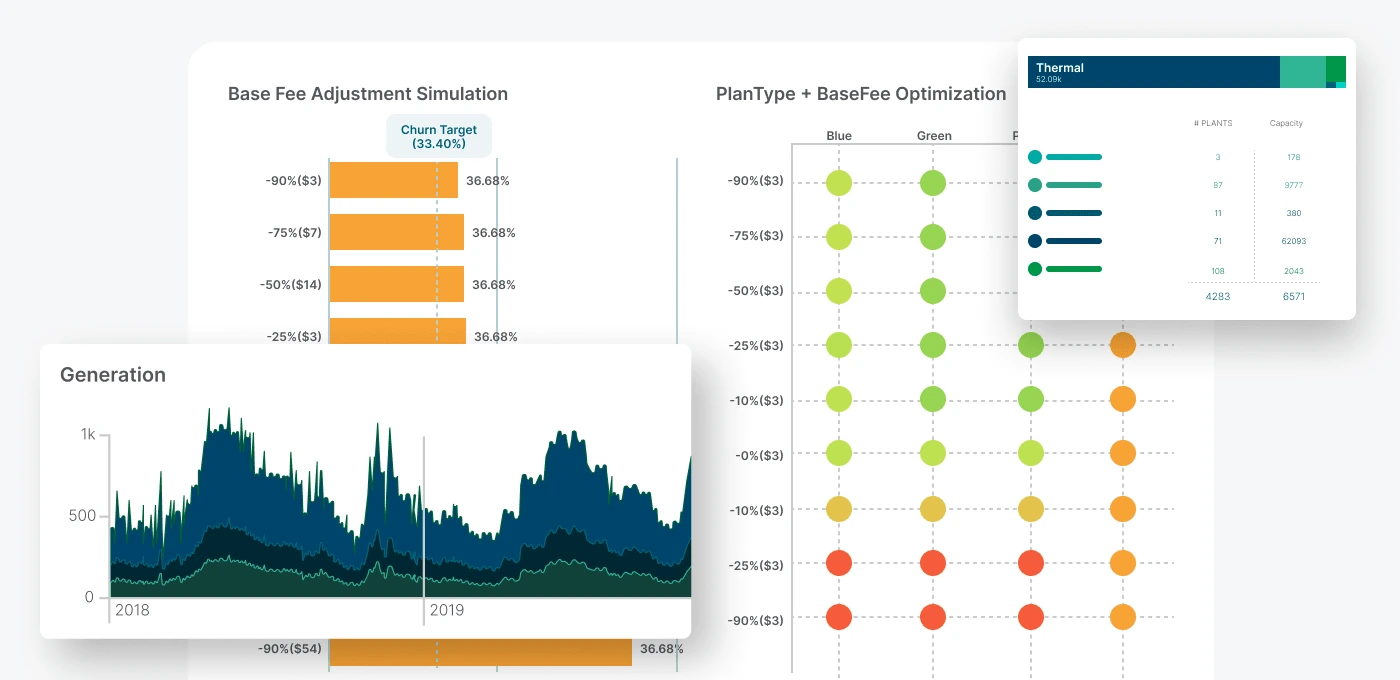
Qlik Predict is a no-code predictive analytics solution that allows users to develop machine learning models and generate predictions through a visual interface. Formerly known as Qlik AutoML, it is designed to make predictive analysis more accessible to business analytics teams.
The platform integrates with Qlik’s analytics environment, allowing users to explore predictions alongside business data visualisations. This can support forecasting projects where organisations want to reduce the amount of programming required for model development.
Key Features:
- No-code machine learning workflows
- Automated model training
- Predictive model explainability
- Integration with Qlik Cloud Analytics
- Prediction visualisation and analysis
| Pros | Cons |
|---|---|
| Supports predictive modelling without extensive programming. | Users still need to understand data quality and model evaluation. |
| Integrates predictive results with Qlik analytics. | Its value may depend on the organisation’s existing analytics ecosystem. |
| Provides automated model training and explainability. | Available capabilities and deployment limits depend on licensing. |
ℹ️Why Choose Qlik Predict?
Qlik Predict is an option for analytics teams that want to build and use predictive models with limited coding while keeping predictions connected to business reporting.
Best for: Medium and large businesses that want no-code predictive analytics within the Qlik ecosystem.
9. Microsoft Azure Machine Learning — Best for Enterprise ML Deployment
Microsoft Azure Machine Learning is a cloud platform for developing, training, deploying, and monitoring machine learning models. It provides tools for organisations that need scalable predictive analytics infrastructure and controlled model deployment.
The platform supports automated machine learning, development environments, model registration, and machine learning operations. Its flexibility makes it relevant to businesses with technical teams that develop forecasting systems or predictive applications for specialised requirements.
Key Features:
- Cloud-based machine learning development
- Automated ML experiments
- Model training and deployment
- Model monitoring and MLOps
- Integration with Azure cloud services
| Pros | Cons |
|---|---|
| Supports scalable development and deployment of custom ML models. | Requires substantial technical expertise for advanced use cases. |
| Offers machine learning lifecycle and monitoring tools. | Cloud compute and storage usage must be monitored carefully. |
| Integrates with Azure cloud infrastructure. | Deployment complexity can increase with multiple models and services. |
ℹ️Why Choose Microsoft Azure Machine Learning?
Azure Machine Learning is relevant to organisations that need technical control over model development, scalable cloud infrastructure, and managed machine learning deployment processes.
Best for: Medium and large enterprises with data science, engineering, and cloud development teams.
10. Dataiku — Best for Collaborative Enterprise Analytics
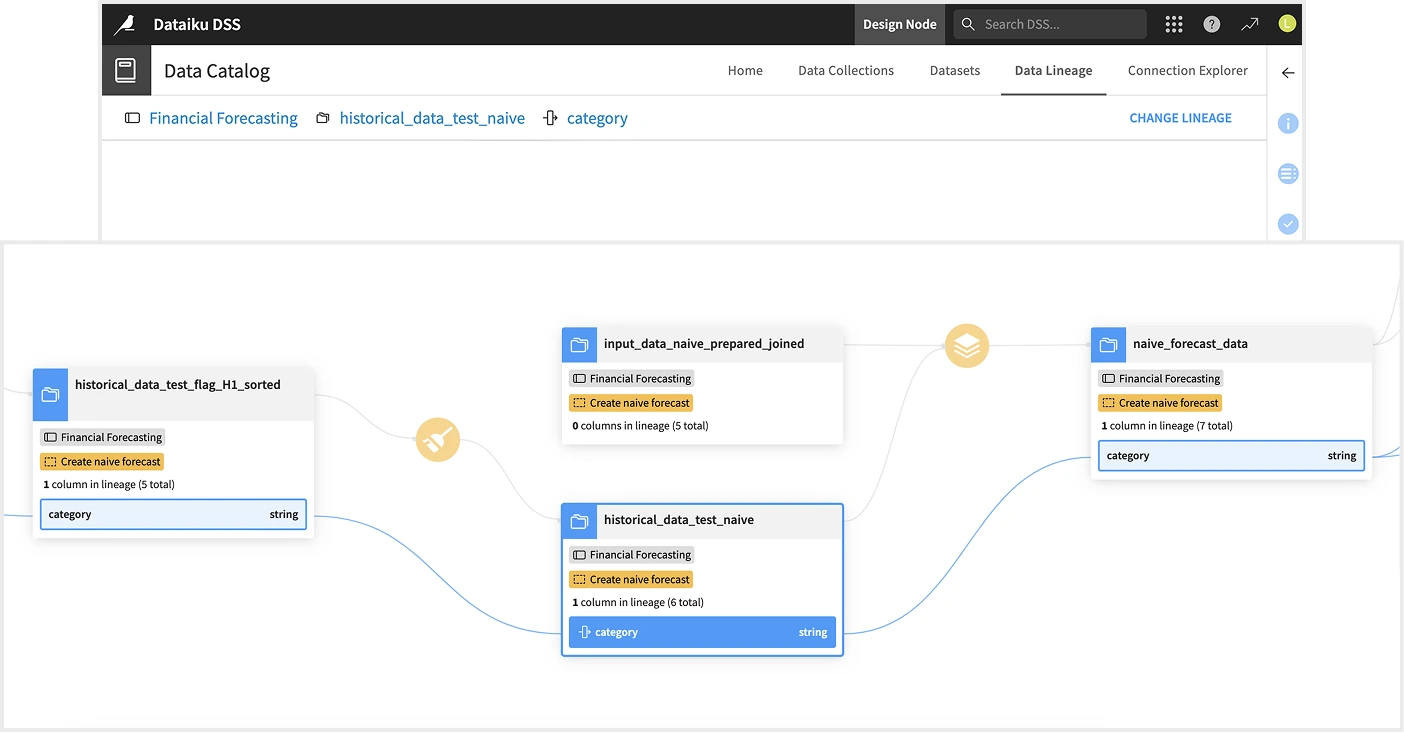
Dataiku is an enterprise data and AI platform that connects data preparation, analysis, machine learning, and model deployment within a collaborative environment. It supports visual analytical workflows alongside programming-based development.
The platform allows business analysts, data scientists, and technical teams to work on shared data projects. Organisations can use it to develop forecasting models, manage analytical processes, and coordinate predictive initiatives across departments.
Key Features:
- Collaborative data preparation
- Visual and code-based machine learning
- Model development and evaluation
- Data pipelines and workflow automation
- Model governance and monitoring
| Pros | Cons |
|---|---|
| Supports collaboration between technical and business teams. | Initial setup can require significant data integration work. |
| Combines visual analytics with code-based machine learning. | Advanced projects still benefit from experienced data professionals. |
| Provides model management and data governance capabilities. | Licensing and infrastructure requirements depend on the deployment scope. |
ℹ️Why Choose Dataiku?
Dataiku is suitable for enterprises that want analysts and data scientists to collaborate on predictive projects while maintaining consistent data preparation, model deployment, and governance processes.
Best for: Medium and large enterprises with cross-functional analytics and data science teams.
11. Google BigQuery ML — Best for SQL-Based Predictive Analytics
Google BigQuery ML is a machine learning capability within Google BigQuery that allows users to create and apply predictive models using SQL. It is designed for organisations that already store large datasets in BigQuery and want to perform machine learning tasks without moving all their data into separate modelling environments.
The platform supports different model types, including regression, classification, and time-series forecasting. Businesses can use these functions to analyse customer behaviour, estimate future sales, and investigate patterns within their existing cloud data.
Key Features:
- SQL-based machine learning
- Regression and classification models
- Time-series forecasting
- Model evaluation and prediction functions
- Integration with BigQuery data
| Pros | Cons |
|---|---|
| Allows model development using familiar SQL operations. | Requires SQL knowledge and an understanding of machine learning concepts. |
| Works directly with data in the BigQuery environment. | Usage costs depend on the queries, models, and compute resources involved. |
| Supports multiple predictive model categories. | Operational applications may require additional integration and development. |
ℹ️Why Choose Google BigQuery ML?
BigQuery ML is relevant to businesses that already use Google BigQuery and want to create predictive models directly from their cloud data using SQL-based workflows.
Best for: Medium and large organisations with cloud data warehouses and SQL-capable analytics teams.
12. H2O.ai — Best for Flexible Machine Learning Development
H2O.ai is an AI and machine learning technology provider offering solutions for predictive model development and automation. Its H2O-3 open-source platform and H2O Driverless AI product support different approaches to building machine learning applications.
H2O Driverless AI provides automated model development, feature engineering, evaluation, and explainability. This gives technical teams an alternative to developing every modelling step manually, although enterprise deployment and governance still require appropriate expertise.
Key Features:
- Automated machine learning
- Predictive model development
- Automated feature engineering
- Model interpretability
- Model deployment and monitoring options
| Pros | Cons |
|---|---|
| Offers flexible open-source and commercial machine learning options. | Technical expertise is necessary for complex model development and deployment. |
| Automates feature engineering and model experimentation. | Commercial capabilities are subject to licensing arrangements. |
| Supports model interpretation and predictive workflows. | Integration with business applications may require additional development. |
ℹ️Why Choose H2O.ai?
H2O.ai provides options for teams that need flexible machine learning development, including open-source tools and automated modelling capabilities for more advanced predictive projects.
Best for: Medium and large organisations with analytics teams building specialised machine learning applications.
What Is Predictive Analytics Software?
Predictive analytics software is a technology that analyses historical and current data using statistical methods, machine learning, and forecasting models to estimate future events or business outcomes. It helps organisations anticipate demand, recognise potential risks, and make decisions based on measurable patterns rather than assumptions alone.
For example, a Singapore manufacturer may use predictive analytics to estimate future product demand based on previous orders, seasonal trends, and production activity. Similarly, a logistics company may analyse delivery histories and order volumes to anticipate periods of higher distribution demand.
Unlike traditional reporting, which primarily describes past performance, predictive analytics focuses on what may happen next. However, predictions remain estimates, and their reliability depends on the quality of available data, the selected model, and changing business conditions.
How Does Predictive Analytics Software Work?

The process of predictive analytics software involves data collection, data preparation, pattern recognition, model development (statistical or machine learning), and forecasting. These findings can then be applied by businesses to their operations and to consider future scenarios.
There are generally four stages: First, integration of historical data; second, prediction monitoring; third, model improvement based on new data; and fourth, reintegration of historical data.
1. Collecting and Integrating Business Data
To act on predictive analytics, first you need to gather the relevant information from the business systems you’re using, such as ERP, CRM, accounting, inventory, procurement, production applications, and more. This can be historical sales, buying, financial deals, customer actions and business performance.
It is necessary to have valid and adequate data to make valid predictions. Having consistent information is sometimes one of the most important preparatory actions for some businesses with unconnected systems, as it could affect predictive results.
ScaleOcean Atlas supports this base through an integrated ERP environment that integrates data from sales, purchase, inventory, finance and other operational areas. This implies that the data is easily available to perform business analysis and potentially integrate with forecasting.
2. Identifying Patterns Using Statistical Models and Machine Learning
Once the data has been collected, predictive analytics software can be used to identify patterns in the data using statistical models or machine learning algorithms. For example, it might look at the effects of seasonal demand, promotions, or the lead time for suppliers.
Different analytical methods are appropriate for different business problems. Time-series models support forecasting over time, while classification models can estimate the likelihood of certain events, such as customer churn or payment default.
3. Generating Forecasts and Predictive Insights
After training and evaluating a model, the software can generate predictions based on new information. These outputs may include estimated sales quantities, demand forecasts, potential risks, or expected financial outcomes.
For example, a wholesale distributor may use historical order patterns to estimate future stock requirements. Purchasing teams can review these forecasts alongside current inventory and supplier lead times before deciding whether to replenish products.
4. Monitoring Results and Improving Predictions
Predictive models require ongoing monitoring because customer demand, market conditions, and operational processes change over time. Businesses should compare forecasts against actual outcomes to determine whether the model remains useful.
If forecast errors increase, analysts may need to update datasets, adjust variables, or retrain models. Integrating predictive analytics with business management software also helps organisations maintain consistent operational data, monitor performance, and improve forecasting accuracy instead of relying on models developed from outdated information.
Key Features to Look for in Predictive Analytics Software
The most suitable predictive analytics tools provide capabilities that support data integration, forecasting, model evaluation, and business decision-making. However, feature requirements depend on whether the organisation needs straightforward forecasts, advanced machine learning, or predictive insights connected to existing workflows.
Important features to evaluate include:
- Data Integration: Connects relevant information from ERP, CRM, accounting, databases, and other enterprise systems.
- Predictive Modelling: Supports statistical methods or machine learning algorithms appropriate for the intended business use case.
- Forecasting Capabilities: Generates estimates for future sales, demand, expenses, or other measurable outcomes.
- Data Preparation: Helps identify missing values, duplicate records, inconsistencies, and other data quality problems.
- Reporting and Visualisation: Presents forecasts, trends, and relevant performance information in understandable formats.
- Model Evaluation and Explainability: Provides methods for assessing prediction quality and understanding important contributing factors.
- Automation and Integration: Supports repeatable analytical processes and the transfer of predictions into business applications.
- Security and Governance: Includes appropriate permissions, audit capabilities, and controls over data and model access.
For enterprise organisations, integration with existing business processes is particularly important. A technically accurate forecast provides limited value if purchasing, finance, or operations teams cannot use it in their regular decisions.
Benefits of Predictive Analytics Software for Businesses

Predictive analytics software helps businesses anticipate potential changes in demand, costs, financial performance, and operational requirements. By analysing historical information, organisations can improve planning and reduce dependence on reactive decisions.
These capabilities are relevant to Singapore businesses facing cost pressures and uncertain market conditions. In a September 2026 survey, the Singapore National Employers Federation reported that 83% of surveyed employers identified rising manpower costs as a key challenge, reinforcing the importance of effective resource planning.
1. Improving Demand and Sales Forecasting
Predictive analytics helps businesses estimate future demand by examining historical sales, customer purchasing patterns, seasonal changes, and other relevant factors. These forecasts can support sales planning, purchasing decisions, and production scheduling.
For example, a Singapore retail chain may use previous sales data to anticipate demand during festive periods. Management can then adjust stock levels and staffing arrangements based on expected activity rather than relying entirely on estimates from individual outlets.
2. Reducing Operational Costs and Business Risks
Predictive analytics can help organisations identify potential cost increases, operational bottlenecks, and business risks before they become more significant. For example, models may estimate equipment failure risks or identify patterns associated with delayed supplier deliveries.
Businesses can use these insights to review maintenance schedules, purchasing plans, and operational resources. However, predictive outputs should support management judgement rather than replace established risk controls and decision-making processes.
3. Supporting Financial Planning and Cash Flow Management
Financial forecasting helps businesses estimate future revenue, operating expenses, cash requirements, and potential funding gaps. Predictive models may analyse historical financial performance alongside sales trends, customer payment behavior, and recurring expenses.
For example, a distribution company can compare expected customer collections against upcoming supplier payments to identify potential cash shortages. By integrating financial forecasting with the best ERP software Singapore businesses can use, finance teams can monitor payment schedules, manage expense budgets, and assess working capital requirements before liquidity problems develop.
4. Enhancing Inventory and Supply Chain Decisions
Inventory forecasting helps businesses estimate replenishment needs, assess seasonal demand, and recognise potential stock shortages or excess inventory. This is particularly useful for enterprises handling large product catalogues or multiple warehouses.
For example, a Singapore wholesaler may use historical sales and supplier lead times to estimate future stock requirements. When forecasts are reviewed alongside inventory and purchasing records, managers can make more informed replenishment decisions and reduce unnecessary warehouse investment.
ScaleOcean Atlas connects inventory, purchasing, sales, and finance information, allowing managers to examine the operational context behind these decisions. Its embedded ScaleMind AI Business Assistant can help users investigate inventory trends and purchasing conditions, while specialised predictive modelling can be assessed through the appropriate forecasting capabilities or integrations.
5. Improving Strategic Decision-Making
Predictive analytics provides management teams with forward-looking information that can support expansion planning, resource allocation, and financial decision-making. Instead of evaluating performance only after results are available, businesses can consider potential outcomes before committing resources.
For example, an enterprise planning a new branch may examine historical demand, projected operating costs, and expected revenue under different scenarios. These forecasts help management evaluate possible risks, although final decisions should also consider market research and qualitative factors.
Predictive Analytics Software Use Cases Across Singapore Industries
Predictive analytics applications vary according to industry requirements and the types of data businesses collect. Manufacturers may focus on demand forecasting and equipment maintenance, while retail businesses may prioritise inventory planning and customer purchasing patterns.
The following table outlines common business challenges and possible predictive analytics applications across industries relevant to Singapore enterprises. These are illustrative use cases, not claims that every listed software platform supports every scenario without configuration.
| Industry | Business Challenge | Predictive Analytics Application |
|---|---|---|
| Manufacturing | Uncertain production demand, equipment downtime, and material shortages. | Production demand forecasting, predictive maintenance, and material requirement planning. |
| Retail and E-Commerce | Fluctuating customer demand, overstocking, and stock shortages. | Sales forecasting, inventory replenishment, and customer purchase prediction. |
| Wholesale Distribution | Slow-moving inventory, variable bulk orders, and uncertain replenishment needs. | Demand forecasting, inventory turnover analysis, and stock requirement prediction. |
| Logistics and Warehousing | Unpredictable shipment volumes, delivery delays, and warehouse capacity constraints. | Shipment volume forecasting, delivery delay risk estimation, and capacity planning. |
| Financial Services | Credit exposure, customer churn, and uncertain financial outcomes. | Credit risk modelling, churn prediction, and financial forecasting. |
| Construction | Project cost overruns, material delays, and equipment utilisation problems. | Cost overrun risk estimation, resource demand forecasting, and equipment maintenance prediction. |
| Healthcare | Changing patient volumes, staffing requirements, and medical supply demand. | Patient volume forecasting, workforce planning, and medical inventory prediction. |
| Hospitality and F&B | Variable occupancy, customer traffic, staffing demand, and food wastage. | Occupancy forecasting, demand-based scheduling, and ingredient requirement prediction. |
Predictive Analytics Software vs Business Intelligence Software
Predictive analytics software and Business Intelligence (BI) software both help organisations understand data, but their primary purposes differ. Business intelligence focuses on monitoring and explaining business performance, while predictive analytics estimates what may happen in the future using statistical models and historical patterns.
For example, a BI dashboard may show that sales declined over the previous three months. Predictive analytics can go further by estimating future demand based on historical sales, seasonality, and other variables. Some platforms combine both capabilities, but businesses should confirm whether predictive functions involve actual modelling or only trend visualisation.
| Comparison Factor | Predictive Analytics Software | Business Intelligence Software |
|---|---|---|
| Main Purpose | Estimate future business outcomes. | Monitor and analyse historical or current performance. |
| Analytical Approach | Statistical modelling, machine learning, and forecasting. | Reporting, visualisation, aggregation, and trend analysis. |
| Typical Output | Forecasts, probabilities, risk scores, and estimated outcomes. | Dashboards, KPI reports, charts, and performance summaries. |
| Example | Predicting next quarter’s inventory demand. | Reviewing last quarter’s inventory turnover. |
| Business Value | Supports forward-looking planning and risk assessment. | Improves visibility into operational and financial performance. |
How to Choose the Right Predictive Analytics Software
Selecting the right predictive analytics software requires businesses to evaluate their forecasting objectives, existing systems, data readiness, and available technical resources. A platform designed for advanced machine learning may not be necessary for an organisation that primarily needs operational reporting and demand planning.
The following five considerations help Singapore enterprises choose an appropriate solution while balancing functionality, implementation complexity, and long-term value.
1. Identify Your Business Objectives and Forecasting Requirements
Begin by identifying the specific business problem predictive analytics should address. This may include forecasting sales, estimating inventory requirements, predicting customer churn, or identifying potential operational risks.
Define the expected outcome and how success will be measured. For example, a distributor seeking to improve demand planning may prioritise forecast accuracy, stock availability, and inventory turnover rather than advanced machine learning functionality that does not directly support purchasing decisions.
2. Evaluate Integration With Existing Enterprise Systems
Predictive analytics depends on access to relevant business information. Organisations should determine whether the software can connect with their existing ERP, CRM, accounting, inventory, and other operational platforms.
Integration also affects how easily employees can use predictive insights. For example, a forecast may be more useful when purchasing teams can review it alongside actual inventory, supplier orders, and financial commitments.
ScaleOcean Atlas provides an integrated operational data environment covering sales, inventory, purchasing, finance, and other business processes. Organisations can use this connected information for AI-assisted business analysis and evaluate additional predictive capabilities according to their forecasting requirements.
3. Consider Data Quality and Technical Expertise
Predictive models require sufficient historical information, consistent data definitions, and appropriate analytical methods. Businesses should assess whether their existing records are accurate and complete enough to support the intended predictions.
Technical expertise is another consideration. Some tools provide no-code interfaces, while others require SQL, Python, statistical knowledge, or dedicated data science teams. Selecting a platform that matches available skills can reduce implementation difficulties.
4. Assess Security, Data Governance, and Singapore Compliance
Businesses should evaluate how predictive analytics platforms store, process, and protect information. Important considerations include user permissions, data encryption, access logs, retention controls, and the location of data processing.
When predictive systems handle personal information, organisations must consider applicable obligations under Singapore’s Personal Data Protection Act (PDPA). The Personal Data Protection Commission’s AI guidelines explain considerations for using personal data in AI recommendation and decision systems, including consent and applicable exceptions.
5. Compare Total Cost of Ownership and Scalability
The total cost of predictive analytics software may include subscriptions, cloud resources, data integration, implementation, user training, model monitoring, and ongoing maintenance. Businesses should assess these expenses alongside expected operational improvements.
Scalability is equally important. A solution should accommodate growing data volumes, additional departments, and more complex forecasting requirements without creating unnecessary administrative or technical burdens.
How Much Does Predictive Analytics Software Cost in Singapore?
Predictive analytics software pricing varies according to the platform, licensing model, data volume, computing requirements, and level of implementation support. Some solutions charge per user, while cloud-based machine learning services may use consumption-based pricing for storage, model training, and prediction workloads.
Enterprise platforms frequently provide customised quotations based on selected capabilities and deployment requirements. Businesses should therefore compare total costs rather than relying on a single advertised subscription price.
The following table summarises the main pricing approaches used by predictive analytics software providers.
| Pricing Model | Description | Software Examples | Main Cost Considerations |
|---|---|---|---|
| Custom Enterprise Licensing | Pricing based on required capabilities, deployment scope, and implementation. | ScaleOcean Atlas, SAS Viya, DataRobot | Selected modules, deployment, implementation, and support. |
| Per-User Subscription | Recurring charges based on licensed users or roles. | Microsoft Power BI, certain Alteryx plans | Number of users, licence tier, and sharing permissions. |
| Tiered Platform Subscription | Different subscription tiers with defined capabilities or capacity. | Qlik Predict and Qlik Cloud Analytics | Available features, deployed models, and platform capacity. |
| Usage-Based Cloud Pricing | Charges based on the resources consumed by data processing and model workloads. | Google BigQuery ML, Azure Machine Learning | Compute usage, storage, training, inference, and data processing. |
| Open-Source and Commercial Options | Open-source tools may be used without a commercial software licence, while enterprise products have separate terms. | H2O.ai | Infrastructure, enterprise software licences, development, and maintenance. |
For example, a business using cloud-based predictive models should consider both model development and the recurring cost of generating predictions. Organisations deploying models frequently or processing large datasets may face different expenses from those conducting occasional forecasting exercises.
ScaleOcean Atlas uses a customised pricing approach based on enterprise requirements, selected ERP modules, integrations, and implementation complexity. Its unlimited-user model can also be relevant to organisations expanding analytics access across departments. Businesses should request a detailed quotation to understand the total investment.
How to Implement Predictive Analytics Software Successfully
Implementing predictive analytics software requires more than selecting a forecasting platform. Businesses must establish clear objectives, prepare reliable datasets, evaluate model performance, and ensure predictions can support practical decisions.
A structured implementation process reduces the risk of developing models that appear technically impressive but deliver limited operational value.
1. Define a Measurable Business Use Case
Start with a specific business problem that has measurable outcomes. Examples include reducing inventory shortages, improving monthly sales forecasts, or identifying customers at risk of leaving.
Establish performance indicators before implementation. For example, a wholesaler could measure forecast error, inventory turnover, and stockout frequency to determine whether predictive analytics improves replenishment planning.
2. Prepare and Integrate Historical Data
Collect relevant information from existing systems and review it for missing records, duplicate entries, incorrect values, and inconsistent definitions. Historical data should cover enough business cycles to represent meaningful patterns.
For example, seasonal demand forecasting may require information from multiple years rather than a few recent months. Businesses should also document important events that affected past results, such as unusual promotions or temporary disruptions.
3. Test Forecast Accuracy Before Deployment
Divide historical data into appropriate training and testing periods to evaluate how well the predictive model performs on information it has not previously seen. For time-dependent forecasts, the evaluation should preserve chronological order.
Businesses can use indicators such as Mean Absolute Error (MAE), Root Mean Squared Error (RMSE), or Weighted Absolute Percentage Error (WAPE) to assess forecasting performance. Compare against simple baseline forecasts to determine whether the new model provides meaningful improvement.
4. Integrate Predictions Into Operational Workflows
Predictive analytics becomes more useful when forecasts contribute directly to business decisions. Purchasing, sales, finance, and operations teams should understand how predictions affect their responsibilities and when management review is required.
For example, inventory forecasts may inform replenishment recommendations, while financial predictions support budget revisions. Integrating relevant information with ERP workflows can reduce the gap between analytical findings and actual business execution.
5. Monitor Results and Improve Model Performance
After deployment, businesses should regularly compare predicted outcomes with actual results. Changes in market demand, purchasing patterns, and operational processes may reduce model performance over time.
Organisations should establish responsibilities for model monitoring, data updates, retraining, and approval of significant changes. This helps keep predictive analytics useful as business conditions evolve.
Conclusion
Predictive analytics software helps organisations forecast future outcomes by analysing historical data using statistical methods, machine learning, and other forecasting techniques. Businesses can apply these capabilities to demand planning, financial forecasting, inventory management, risk assessment, and operational decision-making.
For Singapore enterprises, the main challenges often involve rising costs, unpredictable customer demand, fragmented business information, and limited visibility across departments. Choosing appropriate predictive analytics tools, preparing reliable data, and integrating forecasts with operational processes can improve planning and support more informed decisions.
ScaleOcean Atlas is an integrated ERP platform that connects financial, sales, purchasing, inventory, and operational data to support enterprise business analysis. With configurable modules and unlimited users, ScaleOcean supports organisations seeking integrated business visibility and AI-assisted analysis. Schedule a consultation to discuss how ScaleOcean Atlas can support your enterprise analytics and forecasting requirements.
Frequently Asked Questions About Predictive Analytics Software:
1. What Is the Best Predictive Analytics Software for Businesses?
The best predictive analytics software depends on business objectives, technical expertise, and integration requirements. ScaleOcean Atlas is relevant for integrated ERP business analysis, while SAS Viya, DataRobot, and Azure Machine Learning support more specialised predictive modelling and machine learning projects.
2. Can Predictive Analytics Software Work With ERP Systems?
Yes. Predictive analytics software can work with ERP systems through built-in integrations, APIs, data connectors, or supported data pipelines. Connecting forecasting tools with ERP information allows businesses to analyse sales, inventory, purchasing, finance, and other operational data.
3. Can Businesses Use Predictive Analytics Software Without Coding?
Yes. Some platforms provide no-code or low-code interfaces for building forecasts and predictive models. However, users still need to understand their business data, evaluate prediction accuracy, and interpret analytical results correctly.
4. What Data Is Needed for Predictive Analytics?
Predictive analytics typically requires relevant historical data, such as sales transactions, customer activity, inventory movements, financial records, or operational performance. Data quality, completeness, and consistency are important because inaccurate or insufficient records can weaken predictions.