


A barcode is a machine-readable code that stores product or asset information and allows businesses to capture data instantly through scanning. However, many companies still struggle with manual tracking, inventory inaccuracies, and slow operational processes that affect efficiency and decision-making.
When organizations rely on manual data entry or disconnected systems, operational errors become more common. Inventory discrepancies, misplaced products, and delayed shipments can quickly disrupt workflows and increase operational costs across warehouses, retail stores, and distribution networks.
The growing reliance on barcode technology reflects its importance in modern business operations. According to Future Market Insights, the global barcode scanner industry is projected to grow from USD 9 billion in 2026 to USD 16.9 billion by 2036, representing a 6.5% compound annual growth rate (CAGR).
This growth highlights how businesses increasingly adopt barcode systems to improve data accuracy, automate inventory tracking, and gain better supply chain visibility. As companies scale their operations, barcode technology continues to play a critical role in supporting efficient, data-driven business processes.
So in this article, we will understand what is barcode, how barcode systems works, the different types of barcodes and scanners, and how businesses use them to improve inventory management, operational efficiency, and supply chain visibility.
 Key Takeaways
- Barcode is a machine-readable codes that store product data, helping businesses identify items quickly, automate data capture, and reduce manual entry errors in inventory and logistics operations.
- Different barcode types, including 1D and 2D formats, store varying data levels, allowing businesses to choose the most suitable solution for identification, tracking, and operational needs.
- Barcodes benefits include enabling faster transactions, accurate inventory tracking, better traceability, and real-time visibility across retail, warehouses, and supply chain processes.
- ScaleOcean Warehouse Management System integrates barcode scanning with warehouse workflows and allows businesses to track inventory in real time and manage warehouse operations efficiently.

What Is a Barcode?
A barcode is a machine-readable code made of lines, spaces, or patterns that store information about a product, item, or asset. Scanners read the pattern and convert it into digital data that computer systems can process instantly.
This identification method allows businesses to label items with structured information. Instead of manual entry, employees can scan the code to retrieve product data quickly, improving operational speed, accuracy, and traceability across business processes.
A barcode system consists of barcode labels, scanners, and management software that work together to capture and process operational data. Each component plays a role in converting physical labels into usable digital information.
To better understand what is barcode system, businesses need to look at how scanners, barcode labels, and management software work together in daily operations.
Barcode labels contain encoded information, scanners read the code, and software records the data inside business systems. Once integrated with inventory or logistics platforms, the information becomes instantly available across departments.
How Do Barcodes Work?
Barcodes work by allowing scanners to read visual patterns and convert them into digital data. To understand how barcode system works, it is important to know that the scanner emits light that reflects differently from dark bars and white spaces within the code.
Barcodes encode numbers into patterns of vertical bars, dots, or boxes to store information. One-dimensional (1D) barcodes consist of a single row of vertical bars arranged in a specific sequence. In contrast, two-dimensional (2D) barcodes, such as QR codes, use a matrix of dots and boxes that can be scanned from multiple directions to reveal data.
Decoding barcodes may seem complex, but laser and image scanners can quickly read them. Laser scanners work by sweeping a laser beam across the barcode, while image scanners capture a photo of the code. The scanned patterns are then converted into alphanumeric data for interpretation.
For barcodes to be readable, there must be sufficient contrast between the code and its background, allowing light to reflect properly. This is why barcodes are typically printed in black on a white background. Without enough contrast, the likelihood of scanning errors increases.
To ensure accurate scanning, contrast and reflectance are important factors to consider for both 1D and 2D barcodes. Barcode readability is verified through specific testing procedures to maintain scanning reliability.
Common Uses of Barcode
Barcodes are widely used across industries to improve tracking, identification, and operational efficiency. By linking physical items with digital records, organizations can manage products, assets, and transactions with greater accuracy and speed.
Below are some of the most common industries that rely on barcode system technology in their daily operations.
- Manufacturing: Track raw materials, work-in-progress items, and finished goods across production stages to improve traceability, quality control, and production visibility.
- Retail: Enable faster checkout processes, improve product identification, and maintain accurate inventory records across multiple store locations.
- Pharmaceutical: Monitor drug batches, expiration dates, and product authenticity to ensure regulatory compliance and improve medication safety.
- Shipping and Logistics: Track packages, pallets, and shipments throughout the supply chain to improve delivery visibility and smart warehouse operations.
- Food and Beverage: Monitor product batches, expiration dates, and ingredient traceability across production and distribution processes.
- Government: Track assets, equipment, and official documents across departments to improve operational transparency and accountability.
- Inventory: Automate stock counting processes, reduce manual errors, and improve real-time inventory visibility within warehouses.
- Healthcare: Identify patients, medications, and medical equipment accurately to reduce treatment errors and improve hospital asset tracking.
- Travel: Manage boarding passes, baggage tags, and tickets to speed up passenger processing and improve traveler identification.
Because of these advantages, barcode technology has become a fundamental tool for modern operations. Many organizations rely on barcode systems to improve data accuracy, reduce operational costs, and maintain visibility across complex workflows.
Barcode Components
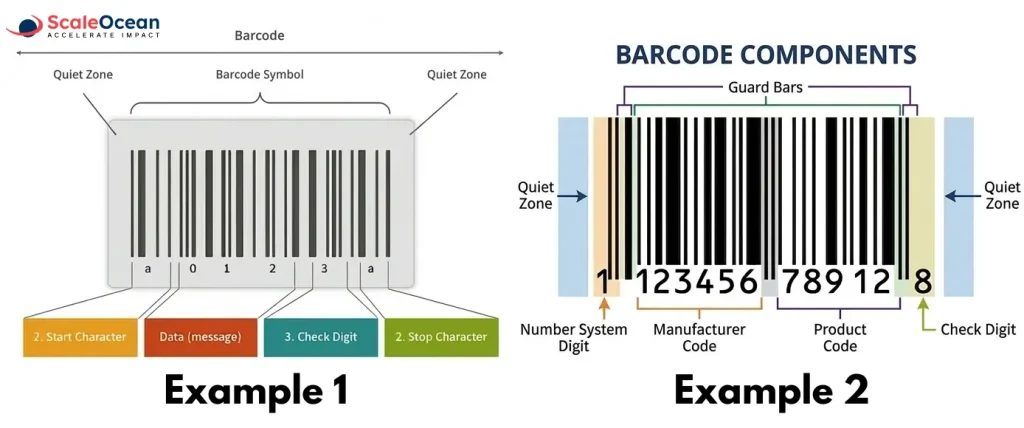
Barcodes contain several structured sections that allow scanners to identify and verify product information accurately. Each component serves a specific role in ensuring reliable scanning and correct data interpretation.
Understanding these elements helps businesses manage product identification more effectively. As a result, organizations can improve tracking accuracy and maintain consistent product records across operational systems.
- Quiet Zone: The quiet zone is the blank space located before and after the symbols. This margin helps scanners clearly detect where the bar begins and ends. Without it, surrounding graphics or text may interfere with scanning accuracy.
- Number System Digit: This digit appears at the beginning and identifies the classification of the product. It also indicates the numbering structure used in the format, which helps systems interpret the encoded data correctly.
- Manufacturer Code: The manufacturer code identifies the company responsible for producing or distributing the product. Barcode authorities assign this code to registered manufacturers so their products can be uniquely recognized across supply chains.
- Product Code: The product code identifies the specific item created by the manufacturer. Each product variation typically receives its own code, allowing systems to retrieve the correct product information when the code is scanned.
- Check Digit: The check digit is the final number used to verify the accuracy of the code. Systems calculate this digit using a mathematical formula, which helps detect scanning errors and prevent incorrect data entry.
How Do You Read a Barcode?
You read a barcode by interpreting the numbers encoded within its standardized structure. Although scanners typically process this information automatically, humans can still understand the structure by examining the numbers printed below the bar.
As shown above, a standard 12-digit UPC might appear as 1 123456 78912 8. Each group of numbers represents a specific type of product identification information used within the barcode system.
- Number System Digit: Usually, the digit 0 indicates a retail product.
- Manufacturer Code: Products marked with 12345 belong to the manufacturer associated with that GS1-assigned code.
- Product Code: The number 67890 identifies the specific item within the manufacturer’s range.
- Check Digit: A calculation converts the entire code into a single verification number, which in this case is 5.
However, these numbers alone rarely provide meaningful information to humans. In practice, businesses rely on barcode scanners connected to databases that instantly retrieve product details such as item names, prices, and inventory records.
What Types of Barcodes Are There?
Barcodes generally fall into two main categories based on how they store and represent data. These categories determine how much information a barcode system can hold and how scanning devices read the encoded data.
When businesses ask what is barcode type, they are usually referring to the different formats used to store and represent product data. For example, some industries prioritize simplicity and speed, while others require higher data capacity and advanced tracking capabilities.
1D
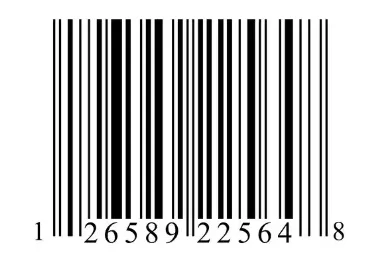
1D barcodes, also known as linear barcodes, store data using a sequence of vertical lines and spaces with varying widths. Scanners read these patterns horizontally to convert them into numerical or alphanumeric information.
Because of their simple structure, 1D are widely used in retail and inventory management. Common formats include UPC, Code 39, and Code 128, which primarily store identification numbers rather than large data sets.
2D

2D barcodes store information in both horizontal and vertical patterns, usually arranged as squares, dots, or geometric shapes. As a result, they can hold significantly more data than traditional linear.
Many industries use 2D barcodes for advanced tracking and digital interactions. Examples include QR codes and Data Matrix codes, which can store URLs, product information, serial numbers, or authentication data within a compact symbol.
9 Product Codes of Barcode
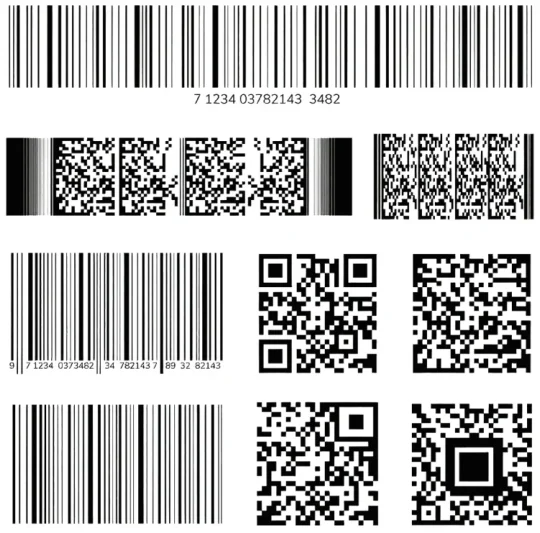
Different industries use different barcode standards depending on their operational needs. Each format stores data in a specific structure and supports different scanning environments.
Therefore, understanding these formats helps businesses determine what is barcode type is best suited for product identification, tracking, and inventory management.
UPC Code
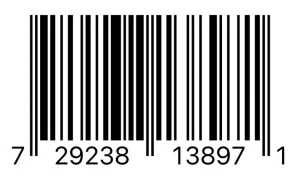
The UPC (Universal Product Code) is one of the most widely used formats in retail. It typically appears on consumer goods and helps stores identify products quickly during checkout.
Retailers use UPCs to manage pricing, product identification, and inventory tracking. Because of its simplicity and standardization, it remains a core barcode format in global retail operations.
EAN
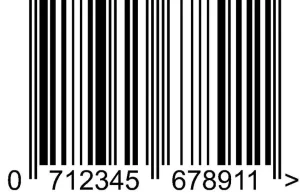
The EAN (European Article Number) is similar to the UPC but is used internationally. It contains additional digits that help identify products across different countries and markets. Because of this global compatibility, many international retailers rely on EAN codes to support cross-border product identification and supply chain tracking.
Code 39
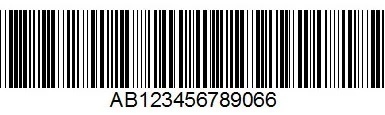
Code 39 is a linear barcode format that supports both numbers and uppercase letters. It was originally developed for industrial environments that require flexible product labeling. Many manufacturing and logistics operations still use Code 39 because it is easy to generate and scan. However, it stores less data compared to newer formats.
Code 128
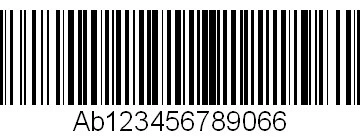
Code 128 is a high-density linear barcode that can encode a large amount of alphanumeric data. It is commonly used in shipping, warehousing, and distribution systems. Because of its compact structure and high data capacity, Code 128 supports efficient labeling for packages, pallets, and logistics documentation.
Codabar (NW-7)

Codabar is a simple format often used in libraries, blood banks, and logistics applications. It allows quick printing and scanning without complex encoding requirements. Although it is older than many modern barcode formats, some industries still rely on Codabar because of its reliability and ease of use.
Interleaved 2 of 5
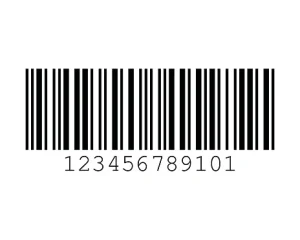
Interleaved 2 of 5 is a numeric-only format commonly used in warehousing and logistics. It encodes numbers by pairing digits together within the pattern. Because of its compact design, businesses often use this format for labeling cartons, shipping containers, and industrial inventory items.
QR Code

QR codes are two-dimensional barcodes capable of storing large amounts of information. Unlike linear ones, they store data in both horizontal and vertical patterns. As a result, QR codes can store URLs, contact details, product data, and authentication information. Many businesses use them for marketing, payments, and digital product interactions.
PDF417

PDF417 is a stacked two-dimensional barcode format designed to store large amounts of structured data. It often appears on identification documents and transportation tickets.
Because of its high storage capacity, organizations use PDF417 for applications that require detailed encoded information, such as government IDs or shipping documentation.
Data Matrix

Data Matrix is a compact two-dimensional barcode that stores large amounts of data in a small space. It is commonly used in electronics manufacturing and the healthcare industries.
Manufacturers often use Data Matrix codes to mark small components or medical devices. Even when printed in tiny sizes, scanners can still read the encoded information accurately.
Business Benefits of Barcodes
Barcode technology helps businesses improve operational efficiency while reducing manual work across operational processes. By linking physical products with digital records, businesses can capture accurate data quickly and maintain better visibility across inventory, logistics, and production workflows.
As companies scale operations, manual tracking becomes inefficient and prone to human error. Therefore, many organizations adopt the technology to streamline data capture, improve process speed, and support more reliable decision-making across supply chains and operational management.
Faster Transactions
Barcode scanning significantly accelerates transaction processes compared with manual product entry. Instead of typing product numbers or searching databases, employees simply scan the code and retrieve item details instantly, which helps reduce queues and improve operational efficiency.
Because the scanning process requires only a fraction of the time needed for manual input, businesses can process more transactions within the same operational period while maintaining higher accuracy and smoother customer or operational workflows.
Rapid Inventory Counts
Traditional inventory counting requires employees to manually record product numbers, which often takes considerable time and increases the risk of recording mistakes. Barcode scanning simplifies this process by allowing staff to capture item data instantly during inventory checks.
As a result, organizations can perform inventory counts more frequently without interrupting daily operations. This capability allows businesses to maintain more accurate stock records while quickly identifying discrepancies, shortages, or misplaced items.
Real-Time and Accuracy Data
Barcode technology captures and transfers information instantly whenever an item is scanned. Once recorded, the data automatically updates the connected operational system, allowing managers to monitor inventory levels, product movement, and operational activities in real time.
Because data updates occur immediately, decision-makers gain more accurate operational insights. This visibility supports better planning, faster responses to stock changes, and improved coordination between warehouses, distribution teams, and operational departments.
Better Traceability
Barcodes allow businesses to track products across every stage of the supply chain. Each scan records product movement, creating a digital trail that documents when items enter warehouses, move through distribution centers, or reach final delivery points.
This traceability becomes particularly important for industries that require strict product tracking. Businesses can quickly identify product origins, trace batch numbers, and manage product recalls more efficiently when issues arise.
Enhanced Customer Experience
Barcode technology improves service efficiency by reducing waiting times and minimizing transaction errors. Customers benefit from faster checkout processes, accurate product pricing, and quicker service across retail, logistics, and service-based environments.
In addition, accurate inventory tracking helps businesses maintain product availability. When stock information remains reliable, organizations can reduce out-of-stock situations and provide a more consistent customer experience.
Accuracy
Manual data entry frequently introduces errors that affect inventory records, product identification, and operational reporting. Barcode scanning eliminates much of this risk by capturing information directly from the label rather than relying on human input.
Because scanners read standardized patterns, the captured data remains highly consistent. This improved accuracy helps organizations maintain reliable operational records and reduce costly mistakes related to inventory management or order processing.
Reduced Training
Barcode systems are relatively easy for employees to learn compared with more complex tracking technologies. Staff members typically require only short training sessions to understand scanning procedures and basic system interactions.
As a result, organizations can onboard new employees quickly and maintain operational productivity even when workforce changes occur. The simplicity of the technology supports consistent operational performance across different teams.
Low Cost
Barcode technology remains one of the most affordable identification and tracking solutions available for businesses. Barcode labels can be printed at low cost, and scanning devices are widely available across different operational budgets.
Because implementation costs remain relatively low, businesses can deploy barcode systems without large infrastructure investments. This accessibility allows both small and large organizations to benefit from improved operational tracking and automation.
How to Use Barcodes?

Businesses use barcodes to simplify data capture and improve operational tracking across various processes, demonstrating how barcode system works in real operational environments. By scanning it instead of manually entering information, organizations can record product movement, identify assets, and process operational data more efficiently.
In practice, how barcode system works is that companies will integrate their technology into multiple business functions. This integration allows teams to automate routine tasks, maintain accurate records, and improve operational visibility across departments.
Tracking Inventory
Businesses use barcodes to monitor inventory movement across warehouses, stores, and distribution centers. Each time employees scan a product, the system records the item’s location, quantity, and transaction details within the inventory management platform.
Because barcode scanning captures data instantly, inventory records remain consistently updated. This real-time visibility allows organizations to identify stock shortages, prevent overstocking, and maintain accurate inventory levels across multiple storage locations.
Tracking Assets
Organizations also use barcodes to track physical assets such as equipment, tools, and office devices. Each asset receives a unique label that employees can scan whenever the item is moved, inspected, or assigned to a specific department.
This approach helps businesses maintain accurate asset records while reducing the risk of misplaced or untracked equipment. Consequently, organizations can monitor asset usage, schedule maintenance, and improve accountability across operational teams.
Invoicing
Barcodes simplify invoicing processes by linking products directly to billing information. When employees scan product codes during sales or shipping activities, the system automatically retrieves pricing, product descriptions, and transaction details.
As a result, businesses can generate invoices faster while reducing the risk of billing errors. Automated data capture also improves financial record accuracy and supports smoother transaction processing.
Many organizations use barcodes to manage internal and external mail distribution. By labeling envelopes or packages with barcodes, staff can scan items at each processing stage to record their movement and delivery status.
This method improves visibility throughout the mail handling process. As a result, organizations can track documents, reduce lost mail incidents, and ensure reliable delivery across departments or external recipients.
Mail Merges
Barcodes can also support mail merge operations, especially for large-scale document distribution. Organizations generate unique codes for each recipient, which allows systems to match documents with the correct mailing information automatically.
Because each of them links to a specific record in the database, businesses can manage bulk mailings more efficiently. This automation reduces manual sorting efforts and helps ensure accurate document distribution.
How to Create Barcodes?
Businesses can create barcodes using several methods depending on their operational needs. Small organizations sometimes use free online tools or mail merge features to generate the images and print them with standard office printers.
However, this approach quickly becomes inefficient as the number of products increases. Managing large volumes of labels requires more reliable systems that can connect barcode data directly to product records.
Therefore, many companies use inventory, accounting, or warehouse management software to generate them. These systems link each barcode to a product database, which allows businesses to manage items, prices, and inventory records more efficiently.
In addition, organizations that distribute products through retailers often register with GS1. This organization provides a GS1 Company Prefix that becomes part of official product barcodes used across global supply chains.
As businesses manage larger product volumes and complex warehouse operations, barcode systems become vital for accuracy and efficiency. ScaleOcean WMS enhances this by integrating scanners, inventory records, and workflows into one platform, ensuring real-time updates of stock levels, locations, and order status with every scan.
If you want to streamline barcode-based inventory tracking and improve warehouse efficiency, ScaleOcean WMS provides the tools to make it possible. Discover how ScaleOcean can help your business automate inventory updates, improve stock visibility, and manage multi-warehouse operations more effectively. Request a free demo today.

How Barcodes Help Business?
Barcodes help businesses track products, assets, and transactions with greater speed and accuracy. By replacing manual data entry with automated scanning, organizations can capture operational data more efficiently and reduce the risk of human error.
Over the past several decades, the technology has become one of the most widely adopted tracking tools in business operations. Its simplicity, reliability, and low implementation cost make it practical for organizations of various sizes.
Companies that implement the best warehouse barcode systems gain stronger inventory control and better operational visibility. Each scan records product movement, allowing managers to monitor stock levels, shipments, and warehouse activities in real time.
This improved visibility helps organizations control operational costs while maintaining accurate inventory records. As a result, businesses can respond faster to demand changes, prevent stock shortages, and improve supply chain coordination.
Ultimately, these systems support better customer service and operational efficiency. When inventory data remains accurate and accessible, businesses can fulfill orders more reliably and deliver a more consistent customer experience.
Barcode Technology
Barcode technology works through several integrated components that allow businesses to generate, scan, and manage product data efficiently. Each component plays a specific role in ensuring accurate data capture and smooth operational workflows.
Together, these technologies enable organizations to automate tracking processes, reduce manual input, and maintain reliable operational data across inventory, logistics, and distribution activities.
In practice, if you ask, what is barcode system? It refers to the combination of hardware and software that enables businesses to generate, scan, and manage data efficiently.
- Printer: Barcode printers generate the physical labels that contain barcode symbols. Businesses attach these labels to products, packages, equipment, or documents so employees can scan them during operational activities.
- Scanner: Barcode scanners read the printed patterns and convert them into digital data. Once scanned, the device sends the information directly to connected systems, allowing businesses to process transactions and update records instantly.
- Central Database: The central database stores all information connected to each barcode. When a code is scanned, the system retrieves the associated product or asset data, enabling accurate tracking and real-time operational updates.
What Are the Types of Barcode Scanners?
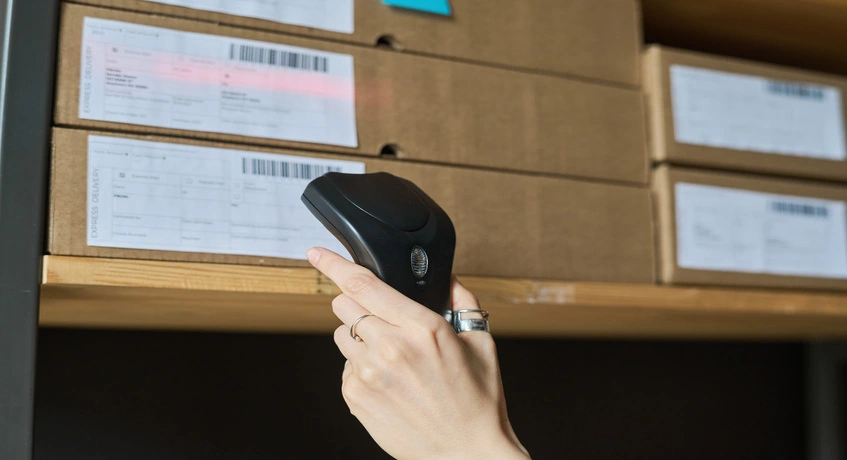
Barcode scanners come in several forms depending on how they capture and interpret patterns. Each scanner type uses a different technology to read them, which affects scanning speed, distance, and compatibility with formats.
Businesses typically select scanner types based on operational environments and what is barcode type used in their systems. For example, retail stores prioritize fast checkout scanning, while warehouses often require scanners that can read labels from longer distances.
1. Laser Scanner
Laser scanners read barcodes by projecting a laser beam across the barcode pattern. The sensor then measures the light reflected from the black bars and white spaces to convert the pattern into digital data.
Because laser scanners are highly accurate for linear codes, many retail stores and warehouses rely on them for scanning traditional 1D barcodes during checkout, inventory management, and product tracking processes.
2. Linear Imager
Linear imagers use a small camera sensor instead of a laser to capture the barcode image. The device analyzes the captured image and converts the pattern into readable data.
Unlike laser scanners, linear imagers can read barcodes even if they are slightly damaged or poorly printed. Therefore, many businesses use them in environments where labels may experience wear.
3. Array Imager
Array imagers use a two-dimensional imaging sensor to capture a full picture of the barcode. This technology allows the scanner to read both 1D and 2D barcodes from multiple angles.
Because of this flexibility, array imagers are widely used in logistics, healthcare, and manufacturing environments. They support advanced barcode formats such as QR codes and Data Matrix while maintaining high scanning accuracy.
History and Evolution of Barcodes
Barcode technology began as a way to automate product identification and speed up retail checkouts. It started in 1948 when a supermarket executive asked Drexel Institute researchers to develop automatic product reading.
Graduate students Bernard Silver and Norman Joseph Woodland created the first barcode concept in 1949, designing a circular “bull’s-eye” code and filing a patent granted in 1952.
Early adoption was slow due to bulky computers and limited scanning technology, requiring expensive equipment. Advances in the 1960s, including the laser and better computing, made barcode scanning practical.
By 1970, retailers and manufacturers collaborated to create the Universal Product Code (UPC), which was officially adopted in 1973. IBM engineer George Laurer designed the familiar rectangular barcode with vertical lines.
The first commercial barcode scan took place on June 26, 1974, at a Marsh supermarket in Ohio, scanning a pack of Wrigley’s Juicy Fruit gum. The what is barcode system quickly expanded worldwide through the 1980s and 1990s, becoming essential for inventory, logistics, and automated checkouts.
Today, barcode technology continues to evolve with 2D barcodes, mobile scanning, and integrated software systems, enabling businesses to store more data, track products globally, and maintain real-time supply chain visibility.
What Is the Difference Between a Barcode and a SKU?
A barcode is a machine-readable visual representation of product information, while a SKU is an internal identification code created by a business. Although both identify products, they serve different purposes in inventory management.
Barcodes are standardized identifiers that scanners read automatically. Businesses use them across supply chains to track products during manufacturing, distribution, and retail transactions.
In contrast, a Stock Keeping Unit (SKU) is a unique code created by a company for internal inventory tracking. Businesses design SKU structures based on their own product categories, sizes, or variations.
For example, a barcode may identify a product globally, while a SKU helps a company manage its internal catalog. Together, these identifiers help businesses organize products, monitor inventory levels, and streamline operational processes.
Barcode Trends and Future Technologies
Barcode technology continues to evolve as businesses demand greater supply chain visibility, automation, and product traceability. Innovations combine traditional barcode systems with digital technologies to improve data capacity, tracking accuracy, and operational intelligence.
The following developments represent some of the most important trends shaping the future of barcode technology across retail, logistics, manufacturing, and global supply chains.
- GS1 Digital Link: GS1 Digital Link connects traditional product barcodes with online data sources. When scanned, the barcode can link directly to digital content such as product information, traceability records, sustainability details, or authentication services.
- Hybrid Identification: Hybrid identification combines multiple technologies such as barcodes, QR codes, and RFID within the same tracking system. This approach allows businesses to choose the most effective identification method for different operational environments.
- Sustainability & Linerless: Companies increasingly adopt sustainable barcode labeling solutions, including linerless labels that reduce material waste. These labels eliminate the backing liner typically discarded during label application, helping businesses lower packaging waste.
- Invisible Barcode (Digital Watermarks): Digital watermark technology embeds invisible barcode patterns directly into product packaging or printed materials. These codes remain invisible to human eyes but can be detected by specialized scanners, improving product tracking without changing packaging design.
- AI-Powered Scanning: Artificial intelligence enhances barcode scanning systems by improving detection accuracy in complex environments. AI-powered scanners can read damaged, poorly printed, or partially obstructed barcodes more reliably than traditional scanning systems.
- Smart Labels & Sensors: Smart labels integrate barcode identification with sensors that monitor environmental conditions such as temperature, humidity, or product handling. This technology is particularly useful for industries such as pharmaceuticals, food distribution, and cold-chain logistics.
- Blockchain Integration: Blockchain technology can connect barcode scanning events to secure digital records. Each scan creates a verified transaction, allowing businesses to maintain transparent product histories and improve supply chain traceability.
How ScaleOcean WMS Optimizes Barcode Usage
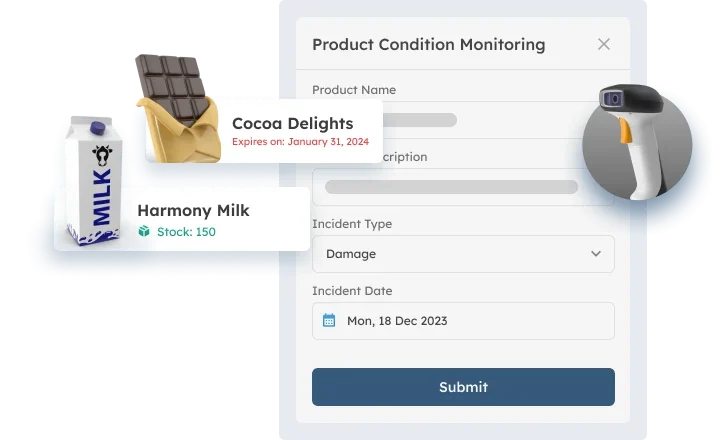
ScaleOcean’s warehouse management system provides an all-in-one warehouse management system that integrates key operational modules, including inventory, purchasing, sales, and shipping or logistics. This unified platform allows businesses to manage barcode-driven operations across the entire warehouse workflow.
The system also supports multi-warehouse integration, enabling companies to connect multiple branches or business units within a single platform. As a result, organizations can track inventory across all warehouses while managing transfers between locations more efficiently.
In addition, ScaleOcean WMS offers customizable workflows and dashboards that adapt to each company’s operational processes. Businesses can configure barcode scanning workflows and simplify scanning screens, ensuring warehouse operators can work faster with an intuitive user interface.
The platform also supports unlimited users and is designed to meet CTC grant requirements. This flexibility allows organizations to scale their warehouse operations while maintaining consistent barcode-based data management across teams and facilities.
Key features of ScaleOcean WMS that optimize barcode usage include:
- Mobile Scanning and Cloud Integration: The system integrates with mobile scanning applications compatible with Android, iOS, and handheld barcode scanners. All scanning activities synchronize with cloud-based inventory data in real time.
- Serial Number and Batch Tracking: Businesses can track product batches based on manufacturing dates while assigning unique serial numbers to individual items. This feature helps support warranty claims, product traceability, and recall management.
- Directed Putaway and Picking: When employees scan incoming products, the system automatically recommends the most efficient storage location. During order fulfillment, barcode scanning also guides operators toward optimal picking locations.
- Multi-Format Barcode Support: The platform supports multiple barcode formats, including 1D, 2D, and QR codes. This flexibility allows businesses to implement barcode systems across different operational processes and product categories.
- Automated Label Generation: ScaleOcean WMS includes tools for designing and printing internal barcode labels. Businesses can generate customized labels that match operational requirements for products, packages, or warehouse storage locations.
Implementing a barcode system becomes more effective with integrated warehouse management software like ScaleOcean WMS. It helps businesses automate barcode tracking, improve stock accuracy, and manage inventory across multiple locations in real time, reducing errors and improving operational efficiency.
To get the solution specified for your business, schedule a free demo with ScaleOcean today and consult with our team to see how barcode-powered warehouse management can streamline your operations and support scalable business growth.
Conclusion
Barcodes are essential for modern operations, helping businesses capture data quickly, track inventory accurately, and enhance supply chain visibility. By understanding barcode types and using scanners and management systems, companies can streamline their processes effectively.
However, barcode systems deliver the greatest value when integrated with a reliable warehouse management platform. ScaleOcean’s warehouse management system helps businesses optimize barcode usage through real-time inventory tracking, automated workflows, and multi-warehouse visibility within a single system.
With ScaleOcean WMS, companies can simplify barcode-based operations while improving accuracy, efficiency, and operational control. Request a free demo with ScaleOcean today to see how an integrated barcode-driven warehouse management system can support smarter and more scalable business operations.
FAQ:
1. How to generate the barcodes?
You can generate barcodes using online barcode generators, inventory software, or ERP systems. The tool converts product data into a scannable code and prints it on labels using a standard or barcode printer.
2. What are the differences between QR codes and standard barcodes?
Standard barcodes are 1D codes that store small amounts of numeric data and require linear scanning. QR codes are 2D codes that store much more information, support error correction, and can be scanned from different angles.
3. Why is a bar code used?
Barcodes are used to quickly identify and track products or assets. They enable fast scanning, reduce manual data entry, and improve accuracy in processes such as retail checkout, inventory tracking, logistics, and manufacturing operations.
4. What are the disadvantages of bar codes?
Barcodes store limited data, often only numbers, and require clear line-of-sight scanning. They can also become unreadable if damaged or poorly printed, and they usually need dedicated scanners to capture the information.
























.png)