
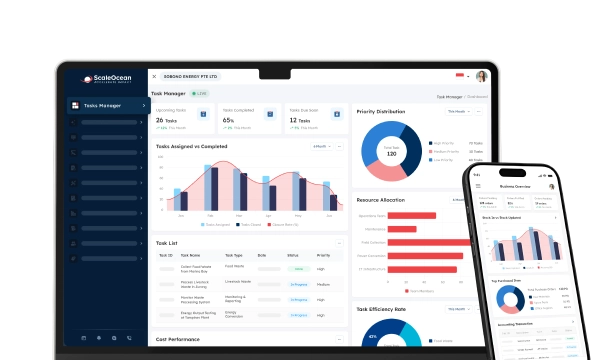

Mobile ERP is an enterprise resource planning solution that allows businesses in Singapore to manage finance, inventory, and operational activities via smartphones and tablets. This gives you secure real-time access to the business intelligence you need from anywhere in the world today.
Mobile ERP has become instrumental for those businesses in Singapore who require more agility, faster decision-making, and operational flexibility. This technology allows teams to remain connected, increases overall productivity, and enables the quick adaptation of business activities to changing demands, supporting business growth in Singapore.
This game-changing capability allows you to operate with maximum efficiency and flexibility, providing unsurpassed scalability for your business. Unifying all core business operations under one single ERP module gives your business a real competitive advantage. This article will cover the following aspects: definition, benefits, features, and role of mobile ERP in growing businesses.
 Key Takeaways
- Mobile ERP is essentially an extension of core ERP functions to smartphones and tablets. It gives employees secure, real-time access to key data, like inventory, finance, and HR
- Key benefits of mobile ERP include enhanced operational efficiency, real-time data access, improved collaboration, and more.
- Key features of mobile ERP encompass powerful reporting and analytics tools, offline capabilities, real-time data access, and more.
- ScaleOcean Atlas’ mobile app gives Singaporean businesses unrivaled flexibility and productivity. It allows access to critical functions, like inventory tracking and sales approvals, from anywhere
What is Mobile ERP?
Mobile ERP means accessing your core ERP systems on your smartphone and tablet and allows you to control your business in a real-time manner, from anywhere, with secure access to key data elements such as financial, inventory, and operational reports.
With mobile ERP, managers may view, approve, and respond to business transactions while working on the go, which leads to faster decision-making and increased productivity. We discovered via TechTarget that businesses need access from a range of mobile apps, so user-friendliness is of paramount importance.
How Does the Mobile ERP Work?
This works by placing business data onto the cloud, accessed via your tablet or smartphone. This offers real-time access to the key modules of your business, such as ERP finance modules and inventory. They synchronize information, which enhances the decision-making process for smart, up-to-date information.
Through special mobile-specific features like push notifications and role-based dashboards, mobile ERP systems allow workers on the move to execute operational activities easily and efficiently.
It runs on the cloud, so data is securely hosted in one place and accessed simultaneously from different locations, increasing collaboration, speed of approvals, and responsiveness.
Key Benefits of Mobile ERP

Mobile ERP provides your business with an additional increase in efficiency and mobility by enabling real-time access to business operations.
Implementing a cloud ERP enhances it even further by providing data access seamlessly regardless of the location of your employees, ensuring smarter decisions through enabling faster and more accurate decision-making. Given below are the benefits of mobile ERP:
Enhanced Operational Efficiency
The mobile ERP streamlines daily operations by integrating workflows into a mobile interface where tasks can be updated in real time. This speeds up the processes from business approval to task completion as staff can readily make entries whilst in the field.
The workflows and forms are embedded in the mobile app, enabling managers to quickly respond, reassign work, or change schedules when traveling.
This helps turn idle time into productive work and leads to increased overall work output. A statement we got from Indeed, we came across this statement and believe that this will save costs for your business.
Real-Time Data Access
Instant access to live sales figures, stock positions, or actual cash value enables managers to keep track of operational outputs, whether the business is on track for the target or if something is falling behind.
By linking on-premises and cloud data (hybrid ERP), you provide users with access to a uniform and flexible overview of all company operations. This allows executive personnel to efficiently study detailed charts that appear on mobile, and for tactical decisions, they will be guided by exact information.
Improved Collaboration Across Teams
Using mobile ERP will ensure collaboration between teams because every user gets to view identical information on their mobile device.
Salespersons working together with the warehouse staff and finance department have instant confirmation of the quantities ordered, thus eliminating issues relating to delays or wrong orders, which is what typically occurs.
Employees can make use of various functions within the mobile application, such as inserting photos or recording relevant discussions along with activities performed. The mobile users receive constant updates on the same information in real time, eliminating emails and endless threads.
Greater Flexibility for Remote Work
This ability ensures that remote teams remain connected. Workflows and processes don’t stop just because personnel have to submit forms and obtain approvals on the move.
To take advantage of this functionality to its full extent, you must choose the best mobile ERP software that enables easy accessibility for all mobile ERP users.
It ensures that operational procedures remain unaffected when extraordinary events cause normal business operations to be interrupted, whether for orders, inventory checks, or responding to queries.
Better Customer Relationship Management
This tool allows your customer service and sales department access to client history, specific prices, and any outstanding cases on the fly. You will be able to speak directly with the clients and tailor your offers to their exact needs while knowing exactly what their requirements may be.
Software such as SaaS ERP gives you access to all this critical information whenever it may be needed to manage customer relations effectively.
Field representatives can immediately make notes after appointments, record outcomes on their tablet, and update business opportunity descriptions. Faster and more accurate documentation allows for improved client service and greater retention.
Cost Savings Through Automation
The reduction of operational costs is easily achieved through the use of mobile ERP, where data capture can be automated through efficient means, for example, mining industry software.
By automatically entering information into the system, there will be a significant reduction in data entries, leading to a considerable drop in errors as administrative employees can direct their energies toward other critical tasks.
Furthermore, documents are not printed, and paper inventory is minimized, along with all relevant costs of storage, disposal, and purchasing. Similarly, reliance on obsolete terminals is decreased as work is enabled through mobile devices.
Faster Decision-Making Processes
Mobile ERP provides mobile dashboards for managers on which they can quickly look at important key performance indicators, hence avoiding the delay in decision-making pending the production of traditional reports.
They can scan key indices or exceptions for anomalies instantly by reviewing trends that have popped up and then immediately taking action to keep them within acceptable limits.
With such immediacy of reporting, you can shorten your planning cycle and enhance learning rate with multiple tests and adjustments of plans and implement them immediately via the mobile interface, see how they work, and amend.
Enhanced Scalability for Growing Businesses
As the business grows, mobile ERP becomes incredibly flexible by allowing a variety of new users or work areas to be added to the same system with relative ease.
New business areas simply log into the mobile app and use their business standard procedures and input relevant data onto the consolidated reporting stream.
The organization benefits from integrating further modules with the system even if employee utilization of the same module has not changed at all, thus enabling scope to grow without the need for new solutions.
Robust Data Security Features
Using encrypted connections and verified logging in each time access is obtained assures users of data security.
Access for each user is limited to particular screens and fields on a role basis, reducing any possible risk and unintentional data loss in connection with a security breach that can lead to accidental data disclosure.
The system also applies regular security updates and keeps records of auditing, meeting PDPA and AI Framework requirements relevant to Singapore regulations. In case unauthorized access is detected, administrators have clear proof that all data is securely stored and controlled.
Improved Inventory and Supply Chain Management
Mobile ERP gives your warehouse and logistics teams live visibility of item movements, orders, and deliveries using scanning and mobile screens. Accurate quantities mean better replenishment decisions, allowing teams to easily cut down on stock-outs and over-stocking of items.
Across the greater supply chain, planners can spot changes in demand or supplier performance faster on mobile ERP dashboards and reschedule deliveries, reroute shipments, and communicate quickly with partners to maintain service levels while costs stay firmly in control.
To leverage those benefits fully, businesses must choose a mobile ERP built for evolving operations and to scale. ScaleOcean Atlas combines mobile access with integrated workflows and AI-assisted tasks to make it easier for your staff to work quickly, stay connected, and scale effectively.

3 Essential Components of Mobile ERP
Mobile ERP combines crucial components that can really streamline your business operations. Every function works together to ensure better decision-making, work performance, and seamless integration through your various business processes. It is all about making business faster and smarter. Let’s examine the core components:
1. Mobile Application User Interface
The mobile app interface of ERP systems focuses on intuitive design, making it highly usable for every user level in ERP for oil and gas.
- Key UI considerations, like simplicity and easy navigation, are crucial for ensuring accessibility and effective use on smaller mobile devices.
- Data visualization is also vital for the mobile app interface. Integrating charts, diagrams, and graphs allows users to quickly interpret complex data, making it much easier to monitor key metrics and make informed decisions directly on their phones.
2. Offline Functionality
- Offline functionality is a vital feature of mobile ERP, letting employees access critical data even without an internet connection. This guarantees business continuity in remote areas or during outages, empowering users to complete essential tasks regardless of their current connectivity status.
- Mobile ERP also has data synchronization to ensure offline changes are reflected in real-time. Once the device is back online, the mobile ERP system automatically syncs the data, updating records across the platform. Preventing ERP system failures and data loss is key to maintaining accurate and up-to-date information.
3. Security Measures
Business-critical data transmitted over the internet requires robust security, and mobile ERP systems are no exception. Security measures for mobile ERP typically fall into three areas:
- Data Protection: Strong authentication methods, such as multifactor authentication, prevent unauthorized access to mobile ERP. Additionally, secure enclaves within mobile devices and mobile device management ensure compliance with security policies.
- Role-based Access Controls: Role-based access controls apply the principle of least privilege, restricting users to specific data and functions based on their roles.
- Encryption Protocols: Encryption protects data both at rest and in transit, allowing only authorized personnel to access it. Secure communication protocols like HTTPS, SSH, and SSL/TLS also encrypt data and ensure secure remote access.
Key Features of a Mobile ERP
Mobile ERP is designed to support a wide range of essential business operations and has several significant features to provide these crucial functions. These range from features enhancing your decision-making to improving productivity across your workforce and supporting effective business integration. Let’s discuss them further here:
Reporting and Analytics Tools
Mobile ERP contains the use of comprehensive reporting and analytics capabilities that allow a business to provide truly detailed reporting information. These tools can allow businesses to see vital performance metrics and analyze trends to enable quick data-based decisions to be made anywhere by anyone.
Access to mobile reporting and analysis enables managers to identify potential problems instantly and analyze business performance from wherever they are. Dynamic dashboards and easy-to-read graphs ensure business information can be quickly analyzed for use throughout your business, empowering agility and quick decision-making.
Offline Functionality
Offline capability is an essential function of mobile ERP where employees need to continue to work offline. These capabilities can prove to be invaluable to those out of office and need to record information. A two-tier ERP function will enhance this as there will be a support function between the mobile device and the central office system.
Once it is possible to connect to the network, mobile ERP will sync that offline information and update your business system in real time, ensuring that all modifications have been applied across your business information. It is the simplest way to keep the entire business on track with information recorded wherever necessary.
Access to Real-Time Data
Mobile ERP solutions offer a system to all members of the business who have access on mobile devices or through your ERP system to real-time data from within your company, which can provide access to your latest business information.
This ability can be crucial to making business decisions quickly and adapting to market changes with minimal delay.
Managers can easily monitor all vital parts of your business from any location, allowing you to keep track of things like inventory, sales performance, and financial data without having the restriction of a physical location.
Platforms like ScaleOcean Atlas, Oracle NetSuite, SAP Business One, Zoho ERP, and Synergix ERP allow access to this, so you must understand how your business could use this form of technology while choosing your best enterprise software in financial management.
Inventory Tracking and Control
It really enhances the tracking of your inventory with real-time updates of item status, purchase orders, and delivery details. It will allow you to control stock levels, minimize missing item stock-outs, and manage stock easily.
Your members of staff can easily record inventory items, scan barcodes, etc via their mobile device and update the ERP data all from the field and be integrated immediately.
Management of Workflows
Your business operations can be integrated and streamlined via the use of mobile ERP by allowing you to monitor all workflow processes and control those that are critical to your operation.
Automating and streamlining processes removes unnecessary handoffs, which will drastically increase speed and productivity across your entire business operation.
Workflows from your managers can monitor the progress and adjust assigned jobs when required, thus allowing effective task control and allocation throughout your business, ensuring that important processes and deadlines are met.
Supply Chain Optimization
Mobile ERP can also enable the effective streamlining of your supply chain with real-time tracking of items and materials, allowing you to monitor and review stock deliveries, suppliers’ performance, and how the logistics process can be improved.
Providing access to your business data on mobile devices will allow you to give your partners access to information and make quicker decisions to optimize your business’s supply chain more effectively.
Customer and Sales Management
It enables you to have access to all customers and sales-related data within your business via mobile access; this includes sales and purchasing history and prices. ERP consolidation integrated multiple systems, which will increase the ease with which it is operated as data will not need to be duplicated.
Having this capability, your salespeople will have the capacity to call back leads at the appropriate time, take order information quickly, and manage customer contacts more effectively; it is about being reactive and maintaining excellent customer service and loyalty.
Access and Security Controls
Mobile ERP allows you to fully control and administer access to the sensitive and important data within your business. Role-based access will ensure that the correct and relevant individuals are granted access to information and business data.
Encryption will also allow you to ensure that your business data is completely secure both in transit and in storage. The use of mobile ERP solutions allows for enhanced security for a fully functioning business to avoid business-sensitive information being exposed.
Mobile Approval Workflows
Mobile ERP will allow your managers to view and approve purchase orders, vendor invoices, and worker holiday requests directly from their own mobile device, enabling quicker decision-making to avoid time delays because there is no access to the office computer system.
By allowing decision-making from anywhere, this feature will enhance operational agility. It will also make it possible for individuals within the team to get decisions made quickly and increase the efficiency of workflows and processes.
Device-Based Functionality
Built-in device functions such as cameras, barcode scanners, and the use of touchscreen technology within mobile ERP allow employees to record and store data via mobile devices with minimal effort.
The ability to capture images, barcodes, and digital signatures via device technology means an entire job can be done using just one piece of equipment as opposed to needing multiple devices with manual input of business information.
Mobile ERP allows instant update of information as the recorded details can be integrated back to the business ERP system without necessarily returning to a desk computer. This feature increases data input accuracy and speed.
Instant Mobile Alerts
Instant notifications on your mobile device alert individuals to key events that need to be acted upon and immediate response to improve the running and efficiency of your business operations. Events that need action are such things as low inventory levels, order tracking, and approaching supplier payment deadlines.
Alerts allow managers to monitor significant business processes and make decisions about them instantly. You can make quick decisions by being notified of issues before there is damage to stock, logistics, or the financial processes of your business.
Challenges of Mobile ERP
Though Mobile ERP brings numerous benefits to a business, it also comes with certain challenges that need to be handled appropriately.
Whether this is compatibility issues with older systems, security risks, or a lack of functionality, there could be issues in how effective the mobile solution actually is for your business. Below are some of the major challenges:
Compatibility Problems with Current ERP Systems
Mobile ERP can be problematic with existing systems since compatibility could be an issue with outdated or too-modified software, leading to an expensive upgrade or middleware.
As far as custom ERP vs off-the-shelf ERP cost comparison is concerned, custom has always required more integration costs than off-the- shelf options.
You should surely look at your own existing ERP solutions and test them for compatibility with Mobile ERP solutions before starting. In certain cases, it would be imperative to install a middleware or get rid of old systems entirely.
Security Risks Associated with Mobile Devices
Mobile systems can increase the data leakage and data intrusion risks simply due to the portability of information. It’s very easily available for any attacker to steal valuable data while not on a secure network.
You will surely need strong security protocols to guard against any form of attack. You should implement factors like multi- authentication, end-to-end encryption, and mobile device management(MDM) features to secure access. Employees would need to have a secure access method and install timely updates to devices to lessen security risk.
Possible Limitations in Features Compared to Desktop Versions
While a user on the mobile gets the benefit of carrying business information, it’s possible that some advanced features like a powerful business intelligence module, an advanced planning and scheduling capability, or detailed reporting might not be available in the mobile version of the ERP.
Companies should have essential applications on the desktop and use the mobile for quick operations, and use the business intelligence and other advanced features on the desktop. They should also look for solutions that are continuously improving and adding advanced features.
Empowering Business Flexibility with ScaleOcean Atlas’ Mobile App
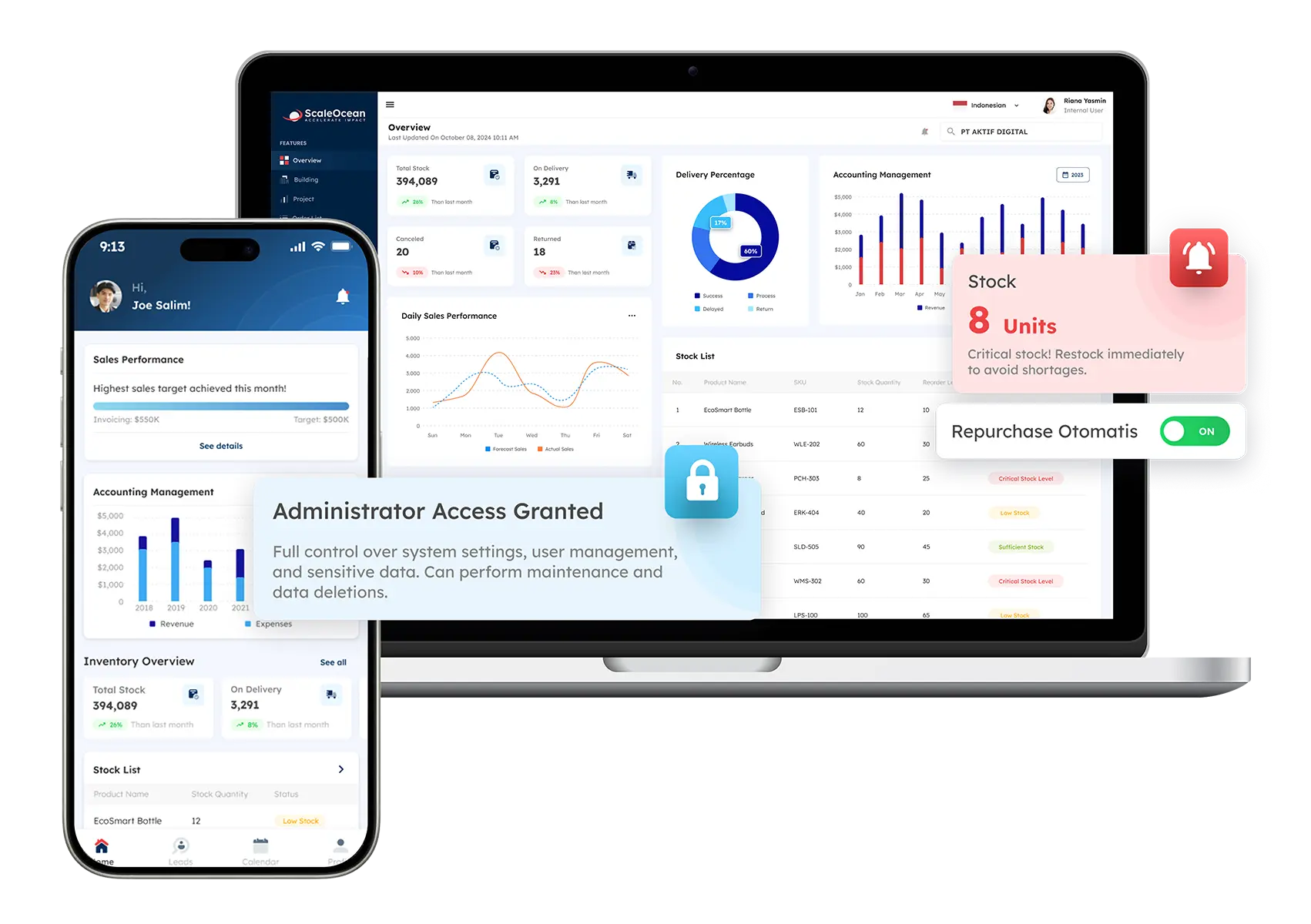
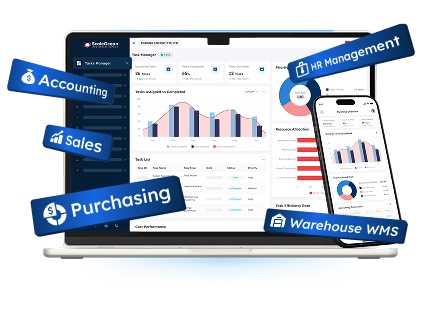
The mobile ERP from ScaleOcean Atlas empowers any business in Singapore with flexible productivity. You can carry access to your critical business operations, i.e., inventory management, sales approval, etc, in your hand, ensuring a seamless workflow on the go. This mobility will permit rapid decision-making in our dynamic market.
The mobile app integrates seamlessly with core ScaleOcean Atlas, granting you access to real-time data across all departments and will allow remote access. The mobile app has robust security systems incorporated with it to protect sensitive business data via end-to-end encryption and strict access controls.
- Real-Time Access to Business Data: Mobile ERP allows decision-makers to access up-to-date information anytime, improving responsiveness and agility in business operations.
- Streamlined Approvals and Workflows: Managers can approve purchase orders, invoices, or leave requests instantly through mobile ERP, reducing delays and accelerating workflows.
- Enhanced Field Operations Management: Field teams can input data, check inventory, or update project statuses directly from their devices, ensuring seamless process execution outside the office.
- Improved Collaboration Across Departments: Mobile ERP fosters collaboration by enabling teams to share and access centralized data, streamlining cross-departmental workflows.
- Increased Process Visibility: With mobile dashboards and reports, stakeholders gain real-time visibility into critical processes, supporting better tracking and informed decision-making.
To enable these benefits, businesses can schedule a consultation with the ScaleOcean consultants in Singapore to discuss their current business and future development plans. With flexible and scalable solutions adapted to every unique business, ScaleOcean is definitely one of the top picks for businesses in Singapore.
Conclusion
A mobile ERP is definitely a game-changing tool that has allowed businesses to access their data from anywhere on a real-time basis, enhance collaboration among employees, and improve workflow to quicken the speed of decision-making.
Scalability has aided businesses in future planning, and with automation, cost effectiveness has increased by eliminating errors in business operations.
These kinds of business implementation costs and maintenance challenges exist, but knowledge is power; understanding them will allow you to make the most out of your mobile ERP solution.
For any business in a highly dynamic market like Singapore, the mobile ERP from ScaleOcean Atlas can improve workflow, efficiency, and increase business responsiveness.
FAQ:
1. Which are the three types of ERP?
The three primary ERP types are on-premise, cloud-based, and hybrid systems. On-premise ERP is installed on local servers, cloud-based ERP is hosted remotely, and hybrid ERP combines both, offering businesses flexibility and scalability in operations.
2. What will replace ERPs?
While no direct replacement exists for ERP systems, technologies like Artificial Intelligence (AI), machine learning, and Industry 4.0 are transforming ERP capabilities. These innovations aim to enhance automation, decision-making, and integration with other business tools.
3. Why do 75% of all ERP projects fail?
Around 75% of ERP projects fail due to factors like inadequate planning, lack of training, resistance from employees, and minimal engagement from key stakeholders. Often, ERP systems fail to align with business needs, leading to implementation struggles and poor adoption.
4. What is the average life of an ERP system?
Typically, ERP systems have a lifespan of 10 to 15 years, depending on business needs and technology updates. However, businesses may need to upgrade or replace their ERP systems sooner to meet changing demands, market conditions, and technological advancements.



















.png)