A document management system is a digital platform that stores, organizes, and tracks business documents in a centralized environment, helping teams retrieve files quickly while maintaining structured records across departments and handling large volumes of operational documentation daily.
Even nowadays, many businesses still rely on email, local drives, and shared folders to manage files, so employees waste valuable time searching for the latest document versions instead of focusing on strategic, revenue-generating tasks.
A DMS can improve operational efficiency and support regulatory compliance by enabling faster document retrieval, structured version tracking, and automated workflow routing, reducing reliance on manual paperwork and traditional paper-based storage across organizational processes.
In addition, data our team recently found from Research Nester shows the document management system market exceeded USD 9.34 billion in 2025 and may surpass USD 37.13 billion by 2035, reflecting rapid adoption as organizations increasingly rely on digital document solutions.
Therefore, companies increasingly seek structured solutions that standardize document workflows and improve accountability, because organized information access supports faster decisions and strengthens overall operational reliability across departments consistently.
In this article, we explore the fundamentals of document management systems, their benefits, essential features, implementation strategies, and practical considerations for selecting software that supports efficient, reliable document workflows.
Key Takeaways
A document management system is a centralized solution that stores, organizes, and retrieves files efficiently while reducing reliance on manual and paper-based workflows.
Choosing a DMS software requires identifying workflow pain points, evaluating integrations, and selecting deployment models that support long-term operational efficiency.
Key features of a DMS include essential tools such as access control, centralized storage, workflow automation, and advanced search functionality for managing records efficiently.
DMS Software by ScaleOcean Atlas is an enterprise solution that centralizes workflows, automates document handling, and enables scalable, compliance-ready operations for growing businesses.
A document management system is a platform used to create, capture, store, manage, and track electronic documents throughout their lifecycle, helping organisations maintain a systematized record and support everyday document management.
In most cases, a DMS scans and digitizes paper documents, and electronic document indexing happens automatically, enabling workers to use keywords to find files instead of skimming through folders across different storage locations.
In addition, modern systems provide version control, access rights, and workflow automation that help organizations keep documents consistent while ensuring authorized personnel handle protected documents in line with business policies.
Since companies are moving to cloud platforms, Document Management System DMS technology provides a very conducive way for employees working remotely to access documents off-premises without losing data or the quality of work expected.
Key Benefits of Implementing a DMS
A document management system helps you measure operational efficiency through consistent file management, reduced paper-based processes, and increased data accuracy in areas where timely information flow is critical.
In addition, you can gain more insight into the document lifecycle and use dashboards and reports to identify deficiencies immediately, with the goal of implementing enhancements that, on an ongoing basis, increase workflow effectiveness.
A Document Management System DMS increases data centralization and automation, which in turn increases collaboration and accountability between employees, making sure the right people have the right version of the right document without delays from misplaced, lost, or duplicated documents.
Ultimately, these benefits enable organizations to create well-structured information spaces that support long-term growth, so managers can manage risk more efficiently while adhering to policies.
1. Enhanced Security
A DMS enhances security by limiting access through permissions and encryption, ensuring only approved individuals handle sensitive data and that document use is closely monitored.
In addition, audit logs record a complete trail of all document activity by default, so administrators can see what has changed, easily identify any potentially malicious activity, and prevent unauthorized or accidental access to data while ensuring transparency.
2. Improved Efficiency
Automated workflows speed up routine tasks with automatic document routing, approvals, and alerts, saving time by removing repetitive manual steps and keeping your workflow moving.
Moreover, search functions make it easy for users to find needed documents in seconds instead of wasting time searching through folders, boosting departmental productivity on busy days or for time-sensitive projects.
3. Regulatory Compliance
A DMS supports compliance by storing documents in an organized way and applying retention rules, helping companies meet requirements like Singapore’s PDPA, including the accountability and record-keeping obligations tied to having a Data Protection Officer, while preventing accidental or intentional deletion or edits during an audit.
Furthermore, automated reporting lets you instantly produce compliance-ready reports, helping organizations quickly demonstrate PDPA and audit compliance while drastically reducing time and lowering the risk of penalties due to missing or non-compliant documentation.
4. Collaboration and Accessibility
A DMS lets multiple users open and work on documents at the same time, preventing duplicate copies or different versions of the same file during joint project work.
Similarly, because these stored documents are accessible via the cloud, this is a great way to keep a remote or hybrid team working efficiently from anywhere in the world, while securely accessing data and ensuring conversations continue smoothly from one department to the next.
5. Cost Savings
DMS reduces costs by cutting paper use, printing, and storage. This lets companies redirect resources to more strategic initiatives that significantly impact productivity and long-term business performance.
Automation also eliminates manual administrative tasks involved in processing, minimizing delays and costly mistakes, so you can stay as lean as possible and run a more efficient, financially leaner organization with systematic, trustworthy document management policies.
10 Popular Document Management Systems
Organizations evaluating Document Management System solutions often compare multiple platforms before selecting one, because each system offers different capabilities, scalability, and integration strengths that affect long-term operational efficiency.
Vendor
Best For
Price
ScaleOcean
Customized enterprise workflows tailored to specific business needs
Custom pricing with unlimited users, no hidden costs, and flat pricing based on business size and modules
Google Workspace
Small to mid-sized teams needing basic cloud document collaboration
Starts from ~SGD7,6–SGD8,9/user/month depending on plan
Dropbox Business
Small to mid-sized teams focusing on file sharing and storage
Custom or tier-based pricing
Laserfiche
Government, legal, and regulated industries require structured workflows
Starts from ~SGD67,6/user/month for cloud plans
M-Files
Mid-sized organizations with metadata-driven document workflows
Typically ~SGD51–SGD102/user/month depending on configuration
Egnyte
Mid to large enterprises needing secure file governance
Starts at ~SGD28/user/month for business plans
KRIS Document Management System
Mid-sized organizations requiring structured digital archiving
Custom pricing based on implementation scope
OpenText
Large enterprises with complex compliance and content governance needs
Enterprise custom pricing
eFileCabinet
Small to mid-sized organizations managing HR and accounting documents
Starts from ~SGD19/user/month, depending on plan tier
Revver
Small to mid-sized businesses needing structured document workflows
Starts from ~SGD31/user/month, depending on features
Therefore, reviewing several well-known Document Management Systems helps decision-makers identify solutions that match their operational requirements, regulatory expectations, and collaboration workflows while supporting secure and structured document handling across departments consistently.
1. ScaleOcean Atlas
Document Management System by ScaleOcean Atlas supports enterprise document management with unlimited user access and no additional licensing constraints. It lets organizations connect multiple departments while maintaining consistent document access across finance, HR, legal, and operational teams.
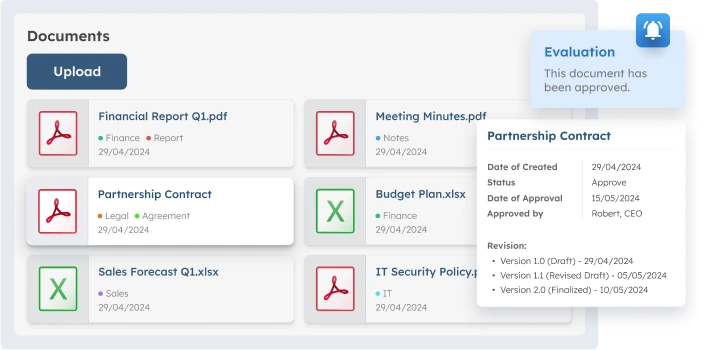
ScaleOcean Atlas also improves operational accuracy through ScaleMind AI’s automated document routing, verification, and archiving. With its flagship platform, ScaleOcean Atlas provides real-time reporting dashboards that offer immediate visibility into approval statuses, expiration timelines, and revision tracking for faster managerial decision-making.
ScaleOcean Atlas enables long-term business growth through scalable infrastructure, ongoing client support, and flexible deployment models. Designed to support Singapore business requirements, the platform helps organisations manage GST-related reporting processes while supporting digital transformation initiatives such as PSG funding of up to 50% and CTC programmes of up to 75%.
Key Features of ScaleOcean:
Centralized Enterprise Repository: ScaleOcean consolidates finance, HR, procurement, and operations documents into one trusted system, ensuring consistent access and eliminating scattered storage.
AI-Powered OCR Automation: The system quickly extracts structured data from documents, minimizing manual errors, speeding up indexing, and enhancing data accuracy.
Role-Based Security and Compliance: ScaleOcean enforces permission-based access and keeps detailed audit logs, helping organizations control user activity and meet strict regulatory and data governance standards in regulated environments.
Seamless Module Integration: The platform integrates with accounting, HR, and procurement systems, enabling synchronized processes like invoice matching and employee records without standalone apps.
Pros
Cons
Designed for enterprise document environments with complex approval flows and high-volume records.
Needs-based pricing ensures organizations invest only in document capabilities aligned with operational priorities.
End-to-end enterprise ecosystem reduces document silos across finance, HR, and operational units.
Consultative implementation approach helps align document workflows with actual business processes.
ScaleOcean has many varied features and modules, so you must first consult with the ScaleOcean team to get the right solution.
ScaleOcean is less suitable for small companies because it offers features and modules for large businesses with complex processes.
Best For: ScaleOcean suits medium to large enterprises managing complex workflows, multi-entity operations, and high document volumes that require scalable systems supporting long-term governance, compliance readiness, and structured digital transformation strategies consistently.
2. Google Workspace
Google Workspace’s document management system provides cloud-based tools that let teams create, store, and manage documents in shared online environments. It supports collaboration through integrated applications designed for everyday office productivity workflows.
Although it’s best known as a productivity suite, it also includes file storage and document-sharing features that help teams organize files systematically while maintaining version history across collaborative editing sessions.
Key Features of Google Workspace:
Cloud-based document storage
Real-time document collaboration
Version history tracking
Role-based file permissions
Pros
Cons
Easy-to-use interface
Strong collaboration tools
Widely accessible across devices
Limited advanced document automation
Requires a stable internet connection
Storage expansion increases cost
Best For: Small to mid-sized businesses needing basic document collaboration and shared file storage without requiring advanced workflow automation tools.
3. Dropbox Business
Dropbox Business document management software focuses on secure file storage and synchronization. It lets teams manage documents across devices while keeping shared folders centralized in collaborative work environments.
The platform emphasizes simplicity and accessibility, letting users share files through links and track activity history to keep workflows organized while supporting distributed work across locations.
Key Features of Dropbox Business:
File synchronization across devices
Secure file sharing links
Version recovery system
Third-party integrations
Pros
Cons
Simple file sharing system
Reliable synchronization
User-friendly interface
Limited workflow automation
Storage-based pricing structure
Less suitable for regulated industries
Best For: Small to mid-sized teams prioritizing document sharing and storage accessibility across multiple devices and remote work environments.
4. Laserfiche
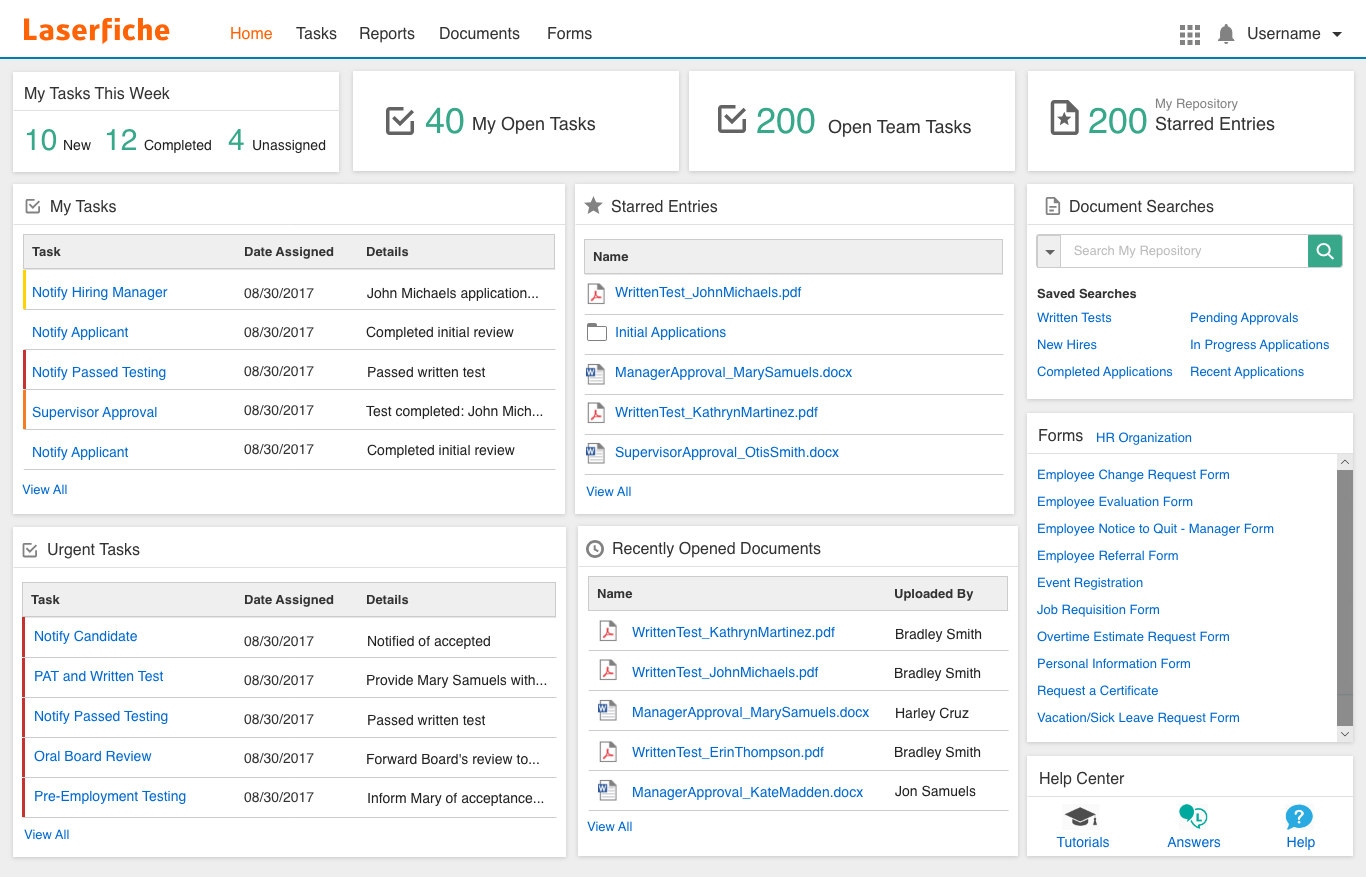
Laserfiche document management system software provides enterprise-level document storage and workflow automation tools. It is designed to help organizations manage records systematically while maintaining structured document governance across departments handling sensitive information regularly.
The system includes tools that support compliance tracking and automated approvals, allowing organizations to manage document lifecycles more effectively while reducing reliance on manual document processing methods across operational workflows.
Key Features of Laserfiche:
Workflow automation tools
Records retention management
Metadata-based search
Audit tracking capabilities
Pros
Cons
Strong workflow automation
Supports compliance management
Scalable enterprise architecture
Requires user training
Higher implementation complexity
Can involve higher costs
Best For: Mid to large enterprises operating in regulated industries requiring structured document governance and automated workflow management capabilities.
5. M-Files
M-Files document management system organizes documents using metadata instead of traditional folder structures. It enables users to locate files based on content attributes rather than storage locations across distributed repositories.
This approach supports workflow automation and structured document handling, allowing organizations to maintain document visibility. It also improves compliance readiness and ensures accurate version tracking across collaborative operational environments.
Key Features of M-Files:
Metadata-based document organization
Automated workflow routing
Version control system
Enterprise system integrations
Pros
Cons
Efficient document search capability
Supports workflow automation
Flexible deployment options
Requires structured metadata setup
Customization may require expertise
Pricing varies by configuration
Best For: Mid-sized to large organizations managing complex document workflows that require structured metadata classification and automated document lifecycle management processes.
6. Egnyte
Egnyte document management system software provides secure file storage and sharing capabilities designed to help organizations manage documents across cloud and on-premises environments while maintaining structured access control for different user groups.
The platform supports collaboration through centralized file management and governance tools, allowing teams to control document visibility and maintain organized workflows across departments that regularly handle large volumes of shared business files.
Key Features of Egnyte:
Hybrid cloud file storage
Secure file sharing controls
File governance tools
Integration with business applications
Pros
Cons
Strong security controls
Supports hybrid deployment
Reliable file governance tools
May require IT setup for configuration
Pricing may increase with storage growth
Advanced features may require higher-tier plans
Best For: Mid to large enterprises requiring secure document sharing and governance across hybrid cloud environments and distributed operational teams.
7. KRIS Document Management System
KRIS document management system software provides structured document storage and archiving capabilities that help organizations digitize paper-based records while maintaining centralized access across departments handling operational documentation regularly.
The system supports indexing and retrieval functions thatlet users locate files efficiently, helping organizations maintain organized digital archives, improve document accessibility, and reduce reliance on physical storage.
Key Features of KRIS Document Management System:
Digital document archiving
Document indexing tools
Search and retrieval system
Access permission controls
Pros
Cons
Supports digital archiving workflows
Improves document retrieval speed
Helps reduce paper storage needs
Advanced automation features may be limited
Customization may depend on the implementation scope
Integration options may vary by deployment
Best For: Mid-sized organizations transitioning from paper-based records to digital document storage systems requiring structured archiving and retrieval capabilities.
8. OpenText
OpenText document management system software provides enterprise-level information management capabilities designed to support large organizations handling extensive document volumes across multiple departments and compliance-driven operational environments.
The platform includes tools for document lifecycle management and regulatory compliance, allowing organizations to maintain structured documentation processes while consistently meeting governance requirements across highly regulated industries.
Key Features of OpenText:
Enterprise content management
Document lifecycle tracking
Compliance management tools
Integration with enterprise systems
Pros
Cons
Comprehensive enterprise capabilities
Supports regulatory compliance
Highly scalable architecture
Implementation may require specialized expertise
Costs may be higher for enterprise deployments
Configuration complexity may increase setup time
Best For: Large enterprises managing high-volume documentation that requires structured governance, compliance tracking, and scalable enterprise-level document management solutions.
9. eFileCabinet
eFileCabinet document management system software focuses on digital file storage and organization tools that help businesses manage records electronically while maintaining structured access to documents across departments, andhandling routine administrative workflows.
The platform supports document scanning and secure storage, allowing organizations to digitize files efficiently while maintaining organized document libraries that support retrieval and collaboration across operational teams.
Key Features of eFileCabinet:
Document scanning tools
Secure digital storage
Workflow approval routing
File access permissions
Pros
Cons
Supports digital file organization
Easy-to-use document storage tools
Suitable for administrative workflows
Limited advanced customization features
May require additional storage upgrades
Advanced integrations may be limited
Best For: Small to mid-sized businesses managing administrative and accounting records requiring structured digital storage and simplified workflow management tools.
10. Revver
Revver document management software provides workflow-driven document control tools that help organizations manage document approvals. It also maintains structured file organization across collaborative business environments that require consistent document tracking.
The system includes activity monitoring and automation tools that help organizations improve document visibility while maintaining controlled workflows across departments that regularly handle approval-based documentation.
Key Features of Revver:
Workflow automation tools
Document activity tracking
Version management system
Cloud-based storage access
Pros
Cons
Supports workflow-based document control
Provides document tracking visibility
Cloud-based access flexibility
Advanced customization may require configuration
Pricing may vary depending on features
May require training for workflow setup
Best For: Mid-sized organizations requiring workflow-based document management systems that support approval processes and structured document tracking across collaborative operational teams.
Before selecting a document management platform, organizations should consider how an integrated solution supports long-term operations. Solutions like the Document Management System by ScaleOcean Atlas help centralize documents, automate approvals, and reduce manual coordination across departments managing daily workflows.
ScaleOcean suits growing enterprises that need structured document governance beyond simplestorage tools. With customizable workflows and integrated modules, ScaleOcean Atlas streamlines document lifecycles while supporting scalable operations. Schedule a consultation today to explore ScaleOcean Atlas’s capabilities.
How to Choose a Document Management System Software
The right document management system should reflect internal operational flows, meet regulatory compliance standards, and account for record volume, because an ill-fitting system can worsen information-sharing inefficiencies rather than create efficiencies across teams.
As such, organizations need to consider their record lifecycle needs at each stage, such as storage, approval processes, and retrieval time. This ensures the selected system can scale efficiently with organizational growth and integrate with current tools.
1. Assess Your Current Pain Points
Organizations should first identify current challenges such as record-keeping, slow retrieval times, multiple copies, and lengthy approval workflows to better understand which features the record management solution must address.
This step involves evaluating how each issue affects organizational productivity, regulatory compliance readiness, and inter-team collaboration to ensure the selected solution addresses operational pain points while supporting seamless record lifecycle management across groups.
2. Prioritize “Tier 1” Essential Features
Organizations should then determine which core features are must-haves for their record management needs. This includes secure storage, audit trails, search functionality, and mobile access, so they can compare offerings systematically and avoid paying for features they don’t need.
Furthermore, comparing feature sets across vendors helps organizations identify the most cost-effective options that still meet essential operational demands.
3. Choose a Deployment Model
Selecting the appropriate deployment option, such as cloud, on-premises, or hybrid, involves assessing organizational IT capabilities, data security requirements, and existing technological infrastructure, because each option has advantages and trade-offs.
For example, cloud deployments typically offer ease of access and scalability, while oon-premisessolutions provide greater control over sensitive data.
4. Evaluate Future-Proofing (AI and Integration)
Evaluating an organization’s ability to integrate the record management system with other enterprise applications, such as financial or ERP systems, and whether it supports emerging technologies like AI, is critical for ensuring long-term operational synergy.
AI features, for instance, can enhance automatic data categorization, speed up workflows, and reduce manual effort, future-proofing the organization’s document-handling capabilities.
5. Deployment Strategy
A phased deployment approach lets organizations gradually implement the system acrossdepartments, minimizing disruption and ensuring operational workflows adapt smoothly to the new processes.
Additionally, comprehensive user training and ongoing support resources contribute to successful adoption and long-term operational integration.
Key Features of a Document Management System
An effective document management system enables secure storage, fast searching, and structured workflows so a business consistently follows the same process for handling documents across departments that manage thousands of operational records each day.
These features also enhance accountability and transparency by giving organizations control over document activity. In addition, it can minimize the risk of misplaced documents, unauthorized access, or obsolete versions across integrated operational processes.
1. Security & Access Control
Security and access control modes prevent unauthorized users from viewing documents, helping organizations protect the confidentiality of business information and prevent unauthorized access across departments that handle confidential operational information.
Moreover, with permission-based controls, administrators can categorize users systematically so document visibility aligns with user accountability and remains consistent across business processes.
2. Centralized Repository
A central repository lets an organization house all its documentation in one digital location, and employees can access files quickly without searching through unrelated file cabinets or storage locations during daily operations.
This structure also minimizes duplication and improves document consistency, allowing teams to maintain a single source of truth and collaborate more easily on shared documentation processes.
3. Search Functionality
The right document management software should allow you to search for files quickly using keywords, metadata, or file properties. Search features should save time otherwise spent on lengthy folder browsing.
Advanced search features also let you filter by date, author, or document type, so teams can find specific files quickly while managing information flow in an ever-expanding document database.
4. Document History for Auditing and Tracking
Document history lets companies track every change to a file, along with approvals and access. This can help prevent record manipulation, as all departments that handle documentation are held accountable.
It also helps you prepare for audits by providing a complete chronology of edits, making it easy to verify what was done and ensuring transparency in processes subject to strict audit controls.
5. Version Control
Version control maintains your organization’s correct set of documents by preserving previous versions and making them available for comparison and retrieval when others edit documents or you need to revert changes.
Additionally, it reduces confusion from files revised or copied multiple times, allowing teams to work from the latest version while retaining older versions for accountability across document sharing and storage.
6. Workflow Automation
Workflow automation enables organizations to route documents automatically through predefined approval stages, reducing delays from manual coordination while improving consistency across departments that regularly handle repetitive document-processing tasks.
Additionally, automated notifications alert responsible users when action is required, ensuring documents move through approval cycles efficiently while supporting structured workflows, such as the best contract lifecycle management software for managing agreement approvals and renewals.
7. Ease of Use
The ability to use a document management system effectively is also a primary concern, since we want to use it with as little mental effort as possible to ensure proper use.
Additionally, a well-built layout with straightforward navigation and process flow minimizes training requirements while maximizing productivity, so employees don’t have to rely on others to use document tools effectively.
8. Seamless Integration
To avoid disconnected workflows, your DMS should integrate directly with the tools you already use. For small businesses, the must-have connections are typically email, CRM, accounting, and ERP software, letting documents move automatically from their point of origin straight into central storage.
Best Practices for Successful DMS Implementation
Adopting a document management solution requires careful planning and implementation across all departments that handle daily documentation needs, as unstructured implementation can create confusion and significantly reduce the productivity benefits anticipated.
According to Technavio, the document management systems market size is valued to increase by USD 10.23 billion, at a CAGR of 16.6% from 2025 to 2030. Rapid advancement of AI and machine learning integration will drive the document management systems market.
As a result, organizations should follow proven implementation protocols to ensure workflow readiness, employee acceptance, and effective transaction processing to achieve the long-term value they seek from their investments in digital document management across their operational environments.
1. Assess Needs
Once a company adopts a system, it should decide which applications suit document handling, identify document types, determine storage locations, and establish the required approval processes.
This assessment also informs storage requirements, compliance, and workflow complexity, emphasizing the importance of aligning system capabilities with productivity and minimizing manual document processing across environments.
2. Evaluate Integration
Integration assessment verifies that your document management application can interface with enterprise applications such as accounting, human resources, or purchasing that perform document-driven activities and require this document workflow to stay in sync with the process.
Moreover, seamless integration eliminates duplicate data entry, enabling units to use common information consistently while improving interaction between applications that handle interconnected business processes in one place.
3. Choose the Right Document Management System Software
Before selecting a system, compare vendors’ capabilities against operational requirements. The software should also be scalable to accommodate higher document volumes as the organization grows.
Furthermore, companies need to assess vendor credibility, implementation support, and customization flexibility, and ensure the selected platform fits long-term documentation plans and meets regulatory compliance needs across all working environments.
4. Use Free Consultation
Companies can experience the system’s features firsthand, making it easier for decision-makers in departments that handle documentation-related procedures.
Moreover, you can test real workflows during demonstrations to highlight potential configuration issues and adapt installation approaches, while ensuring the selected system meets operational expectations reliably and effectively.
5. Train Your Team
Structured training also educates employees on the system’s workflow, related authorization & access points, and the division of responsibilities across departments. This helps them use the online content management system to its full potential.
Furthermore, the training sessions provide an opportunity to learn best practices for document management and sharing, enabling teams to implement unified processes that enhance collaboration while streamlining document lifecycle management across all organizational activities.
6. Standardize Document Formats
Standardized document formats help to establish document naming conventions, formats, and classification methods, enabling employees to locate and retrieve documents promptly from centralized repositories and large holding areas that store thousands of documents.
This consistency also significantly improves workflow automation accuracy, helping systems process documents automatically without errors caused by differing formats across departments performing the same repetitive tasks.
7. Monitor and Optimise
Tracking system performance can help organizations identify workflow bottlenecks, storage issues, and user-adoption challenges that can reduce productivity for users who depend on consistent, ongoing document processing.
Additionally, optimization initiatives should include revising usage procedures and updating workflows periodically to ensure the document management system supports changing operational requirements and organizational efficiency.
Trends in Document Management Systems
As the digital revolution rapidly transforms business operations, document management systems must support smarter workflows, stronger compliance, and faster data retrieval so organizations can seamlessly scale the increasing volumes of documents they handle across their operational environments.
Learning about new document management trends can help organizations stay ahead of the technological curve by keeping systems scalable while enabling secure document workflows that meet modern operational and compliance needs.
1. AI-Powered Document Insights
First, artificial intelligence lets document management systems automatically analyze file contents, extract structured information, and improve classification accuracy while reducing manual processing for teams managing large volumes of operational documentation.
In addition, AI-based insights reveal document patterns and enable smarter filecategorization, helping employees find information faster and make more informed decisions based on organized, quickly accessible documentation throughout operational workflows.
2. Blockchain for Document Verification
Furthermore, blockchain introduces secure validation mechanisms that record document transactions in tamper-proof ledgers. It helps organizations maintain integrity in documentation workflows that require rigorous data integrity and authentication standards.
As a result, organizations can build more reliable document verification processes to reduce the risk of unauthorized edits while strengthening audit-trail transparency across regulated and security-sensitive environments.
3. Role-Specific User Access Control
Third, role-specific access control lets administrators set specific permissions tied to job roles or responsibilities, ensuring employees see only relevant files and maintaining confidentiality across sensitive business operations.
This level of control helps organizations strengthen governance and track document usage while reducing the risk of inadvertent data leaks or unauthorized sharing of sensitive business data across interconnected operational systems.
4. Native e-Signature Integration
Meanwhile, integrated electronic signature appsallow users to approve documents digitally within the same platform. This eliminates delays caused by switching between systems during approval-based workflows across document-intensive operational environments.
In addition, integrated signatures improve compliance documentation by maintaining verified digital approval records, enabling organizations to track authorization history while reducing administrative delays in processes that require frequent document approvals.
5. Advanced Metadata Tagging
Finally, advanced metadata tagging lets organizations categorize files with well-structured tags such as departmental associations or project identifiers, improving retrieval across large collections of operational files.
Furthermore, condition-driven workflows trigger actions based on specific tags, giving teams better control over document processing and adding automation to routine workflows around information-rich operational data sets.
Conclusion
Document management systems play a critical role in organizing digital records, improving workflow efficiency, and maintaining compliance across departments, enabling organizations to manage document lifecycles effectively while significantly reducing manual handling and operational inefficiencies.
Therefore, organizations seeking long-term efficiency should consider platforms designed to support enterprise-level document workflows. For example, the Document Management System by ScaleOcean Atlas centralizes records, automates approvals, and strengthens collaboration across departments handling high-volume documentation daily.
Additionally, ScaleOcean supports scalable operations through customizable workflows and integrated enterprise modules, enabling organizations to maintain structured document governance. Schedule a consultation today to explore how ScaleOcean Atlas improves operational efficiency and document visibility.
FAQ:
1. What is a document management system?
A document management system (DMS) is a digital repository for electronic documents that simplifies collaboration and document handling. Its features often include storage, search, version control, and workflow management.
2. What is an example of DMS?
Managing documents can be as simple as storing Word and Excel files on your computer or using file cabinets for paper documents. Document management refers to how all documents, both digital and physical, are organized and stored.
3. What are the types of DMS?
1. Document Imaging: Converts paper to digital images.
2. Enterprise Content: Manages content across departments.
3. Records Management: Stores and tracks official records.
4. Workflow Management: Automates document processes.
5. Quality Management: Manages quality and compliance docs.
6. Email Management: Organizes and archives emails.
4. How does a DMS support PDPA compliance in Singapore?
A DMS does not automatically make a company PDPA-compliant, but it provides important controls that help businesses protect personal data, manage access, maintain audit records, enforce retention policies, and respond to data requests more efficiently.











 Key Takeaways