How much time and money are you losing due to inaccurate employee attendance tracking? Without a reliable attendance tracking system, even minor errors can spiral into costly payroll mistakes and overtime confusion, directly impacting your bottom line.
Beyond just the numbers, poor tools can actually frustrate your team. According to HRWorld Southeast Asia, a survey by Engage Rocket found that 13% of employees struggle with inadequate hardware, while 3% face challenges due to software, which can further impact work-life harmony.
Having a solid attendance tracking system isn’t just nice to have. It’s a must for businesses. The right system can help you prevent costly errors, improve payroll accuracy, and even boost team satisfaction. Plus, it gives you one less thing to worry about, so you can focus on growing your business.
So with those problems in mind, this article will explore the world of attendance tracking system tools, helping you understand what they are and how to pick the right one. We’ll look at the best attendance tracking software options available, such as ScaleOcean, Buddy Punch, and Jibble, and also what features truly matter for your business growth.
Key Takeaways
Attendance tracking software is a digital tool that helps companies track when employees clock in and out, monitor hours worked, and keep an eye on absences or overtime.
Explore the best attendance tracking software reviews on various platforms like ScaleOcean, Buddy Punch, Jibble, Clockify, and more.
The benefits of attendance tracking systems extend beyond simple timekeeping, offering improved payroll accuracy, enhanced productivity, and better legal compliance.
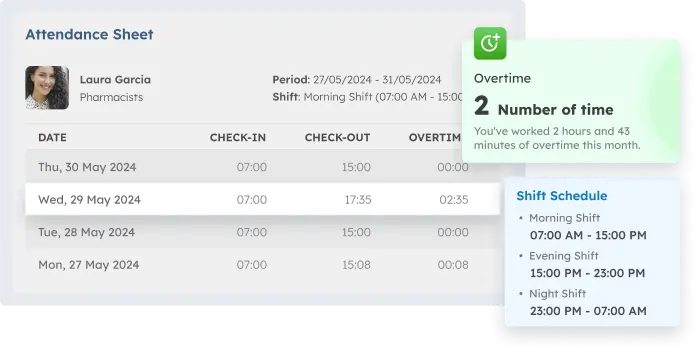
ScaleOcean Smart Attendance System provides a real-time tracking system to record clock-in and clock-out times, work hours, and overtime.
Attendance tracking software is a digital tool that helps companies track when employees clock in and out, monitor hours worked, and keep an eye on absences or overtime. It automates the absence management process, replacing the need for manual time sheets and ensuring accurate records.
These systems often include features like mobile apps or biometric devices that allow employees to check in from anywhere. With real‑time tracking and integration with payroll or HR systems, they make managing employee attendance simple and efficient for HR teams.
Best Attendance Tracking System Solutions Comparison
Finding the right attendance tracking system can be a challenging task with so many options available. To help you make an informed decision, we’ve compared some of the best solutions, each tailored to meet various business needs and preferences.
Here’s a detailed comparison table of the best attendance tracking system solutions:
Tool
Best For
Trial Info
Price
ScaleOcean
Medium to large-scale enterprises require a customizable system.
Free demo available
This software offers a flexible plan that supports unlimited users with no hidden costs
Buddy Punch
Small to medium-sized businesses with mobile teams.
14-day free trial
$4.49 – $10.99 per user + $19 base fee/month
Jibble
This system is best suited for small to medium-sized businesses (SMBs)
Medium-sized companies require work hour transparency.
7-day free trial for Pro features
From $3.99/user/month (annual billing)
Connecteam
This software is ideal for small businesses or larger, remote, and mobile workforces.
14-day free trial
Starts at $29/month for 30 users (annual billing)
Deputy
Retail, healthcare, and hospitality sectors with shift-based work.
31-day free trial
From $5/user/month
Rippling
Medium to large enterprises want full system integration.
No free trial
From $8/employee/month (custom pricing)
OneTap
Small to medium-sized organizations and educational institutions.
Free plan available for up to 20 users
Starts at $9.99/month; enterprise plans from $100/month
Hubstaff
Small to medium businesses managing remote teams or field agents.
14-day free trial
$4.99 – $5.83/user/month (annual billing)
Zoho People
Small to medium-sized companies using Zoho applications.
30-day free trial
$1.25 – $4.50/user/month
Best Attendance Tracking Software Reviews
Finding the best attendance tracking software, especially with so many options out there, can honestly feel a bit much to sift through. We’ve gone through some of the top players in the market here, aiming to give you a clearer picture of what each one brings to the table. Here are the best attendance tracking software in Singapore:
1. ScaleOcean Smart Attendance Software
ScaleOcean Smart Attendance System provides a real-time tracking system to record clock-in and clock-out times, work hours, and overtime. This easy-to-use platform is simple to customize and integrate, ensuring all data is captured accurately.
The software functions as an all-in-one solution with seamless integration across various business modules. It connects attendance data directly to Payroll, KPI, Contract, Project, and Finance to eliminate data silos and manual entry errors.
Users can customize the system to match specific company workflows through advanced smart configuration. The platform allows for dashboard personalization per division, ensuring the module alignment fits the unique operational flow of any department.
ScaleOcean works with TÜV SÜD as a Certified Consultant, which provides high confidence in its professional standards. Furthermore, the software is a perfect match for the CTC grant in Singapore to support your digital transformation goals. Also, ScaleOcean offers a free demo so you can try it beforehand.
Key Features:
Payroll & CPF Integration: Synchronize attendance data directly to payroll systems for accurate salary and CPF calculations.
AI Biometric Attendance: Utilize automated e-attendance features, including facial recognition and secure fingerprint identification.
Timesheet Management: Record work activities in real-time with automated calculations for total work hours and overtime duration.
Performance Analytics: Correlate attendance with KPI data automatically to identify and evaluate employee productivity levels.
Third-Party Integration: Customize connections between the attendance platform and your existing external business systems.
Pros
Cons
Flexible system that is easy to customize and configure for any specific need.
Implementation begins with a consultative approach to understand your business.
The modular structure allows you to activate specific system features step-by-step.
Reach faster ROI with an overall business improvement of 45–75 percent.
Designed specifically to handle the complex requirements of large enterprises.
Not suitable for very small businesses or those with simple requirements.
Focuses on long-term solutions with a 2 to 6-month implementation period.
Price: The pricing for this service is straightforward, with no hidden costs. ScaleOcean offers a flexible plan that supports unlimited users, ensuring that your business can scale without worrying about additional fees as your team grows or your needs evolve.
Best For: This service is highly suitable for medium to large-scale enterprises that require a personalized system. Its scalability allows adjustment to various industrial sectors with complex business processes that need integrated data.
2. Buddy Punch Attendance Software
Buddy Punch is a web and mobile-based application that functions to track employee clock-in and clock-out times. This software provides a mechanism for managers to accurately monitor staff work durations through various digital devices.
The primary function includes location restrictions for attendance and identity verification to prevent time fraud. With this tool, attendance administration can be carried out structurally through the available management monitoring dashboard.
Key Features:
Time tracking with user profile photos.
Location restriction via geofencing.
Automated integration with accounting.
Push notifications for work schedules.
Management of time-off requests.
Pros
Cons
Easy to set up in a very short time.
High accessibility via mobile devices.
Detailed data reporting capabilities.
Functional facial recognition features.
Organized staff scheduling system.
Customization features are quite limited.
Occasional lag occurs in the application.
Standard-looking interface design.
Report navigation needs adjustment.
Data synchronization is sometimes delayed.
Price: The subscription model uses a tiered monthly system per user, typically ranging from $4.49 to $10.99 per person. There is a flat base fee of $19 per month applied in addition to the per-head cost for system access.
Best For: This tool is suitable for small to medium-sized businesses that require easy access through mobile devices. The focus is on the efficiency of time tracking for teams with high mobility without requiring a complex infrastructure.
3. Jibble Attendance Monitoring System
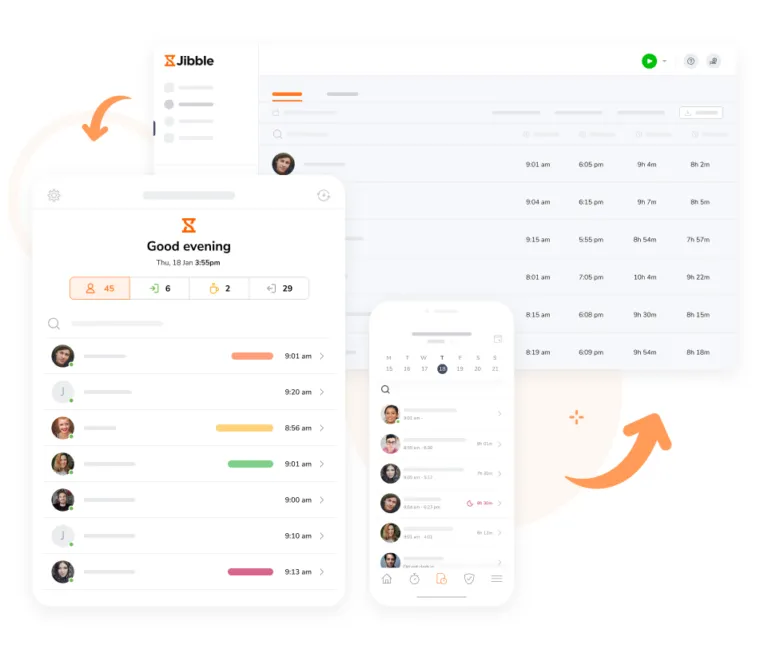
Jibble is an attendance monitoring system that emphasizes the use of biometric technology and location-based tracking. This tool functions to record attendance through facial recognition on mobile devices or tablet terminals at the workplace.
The main use is to validate user identity during attendance to ensure data integrity. This system also provides timesheet summaries that can be used for daily productivity analysis of all employees within the organization.
Key Features:
Biometric facial verification for users.
Location tracking via GPS systems.
Daily automated staff timesheets.
Teamwork activity statistics.
Access via browsers and applications.
Pros
Cons
Very fast registration process.
Supports many physical devices.
Adequate facial recognition accuracy.
Easy-to-use report filters.
Offline mode for remote locations.
Advanced features are only in the paid version.
Scheduling settings are quite basic.
Limited integration to some apps.
Notifications arrive late sometimes.
High mobile battery consumption.
Price: A free forever plan is available for unlimited users with core features. For advanced features, the Premium plan is $3.49 per user, and the Ultimate plan is $6.99 per user per month based on an annual billing cycle.
Best For: This system is best suited for small to medium-sized businesses (SMBs) that need efficient attendance tracking with a focus on simplicity and affordability. It’s ideal for companies looking for a reliable, user-friendly solution to manage their workforce attendance effectively.
4. Clockify Attendance Tools
Clockify is a time tracking tool that provides features to manage attendance and project work hours. Its function allows employees to record work start and end times and track the duration of specific tasks within a single system.
This tool helps management see the distribution of employee work hours across all departments transparently. Its function extends to leave management and tracking labor costs for internal evaluation needs within an organization.
Key Features:
Auto timer for task tracking.
Employee leave and holiday management.
Work hour scheduling calendar.
Web-based productivity tracking.
Team performance analytics dashboard.
Pros
Cons
Large user capacity support.
Easy management of organizational structure.
Comprehensive reporting nature.
Available on many system platforms.
Smooth data synchronization process.
Audit features only at high levels.
Lacks built-in biometric features.
Complex access permission settings.
Mobile version lacks report features.
Requires routine manual input.
Price: Advanced attendance features such as scheduling, leave management, and labor cost tracking are available in paid plans. Prices start from $3.99 per user per month, with the billing method carried out on an annual basis.
Best For: This device is suitable for medium-sized companies that have many projects and require work hour transparency. The primary focus is on time efficiency management and the distribution of employee workloads in office or remote environments.
5. Connecteam Attendance Software
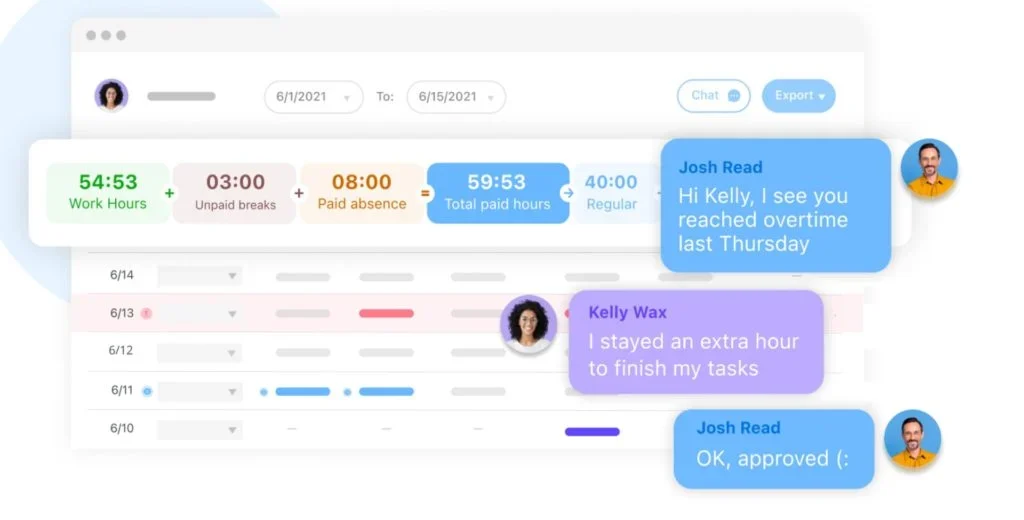
Connecteam is an operational application providing attendance solutions for non-desk employees or field workers. This tool functions as a communication and time-tracking hub through smartphones carried by every single employee.
Its functions include location verification during clock-in and the ability to attach notes or photos during attendance. This helps management monitor the daily operations of teams working in various locations simultaneously.
Key Features:
Time clock with GPS validation.
Photo attachments during clock-in.
Management of shifts and schedules.
Digital forms for reporting.
Internal team communication tools.
Pros
Cons
Specific design for field workers.
Multifunctional within one application.
Easy coordination of team schedules.
Real-time location monitoring.
Detailed access permission control.
Expert features can be very complex.
Admin navigation takes time to learn.
Too many features for small teams.
Requires new phone specifications.
Limited customization in basic plans.
Price: A free version is available for small businesses. For HR and skills features, the price starts from $29 per month for the first 30 users, with Advanced options at $49 and Expert plans at $99 per month based on annual billing.
Best For: This software is ideal for small businesses (free for up to 10 users) or larger, remote, and mobile workforces. It effectively manages teams that work outside of traditional office settings, providing flexibility and ease of use for a variety of industries.
6. Deputy Attendance Tracking System
Deputy is a workforce management system focusing on automated scheduling and attendance tracking. This tool functions to automatically match shift schedules with actual employee attendance within the software system.
The tool assists in managing work hour compliance and ensuring that every position is filled according to operational needs. Its function facilitates instant communication regarding shift changes through mobile notifications.
Key Features:
Requirement-based smart scheduling.
Attendance via tablet or mobile.
Work rule compliance management.
Shift swapping between employees.
Data export to payroll systems.
Pros
Cons
Very neat scheduling workflow.
Helps in controlling labor costs.
Attendance data integrity is maintained.
Effective team communication.
Easy integration with POS systems.
Admin interface takes time to learn.
Report features could be more flexible.
Adding users takes some time.
Occasional sync interruptions occur.
Customization options are not wide.
Price: As of early 2026, this system offers subscription prices starting from US$5.00 per user per month. Subscription plans are categorized based on user focus, whether on scheduling only, time tracking, or a combination of both.
Best For: Suitable for medium-sized companies in the retail, healthcare, and hospitality sectors that rely on shift work systems. This system supports management that requires orderly scheduling and integrated employee attendance validation.
7. Rippling Attendance System
Rippling is a workforce management platform that unifies attendance with HR and IT administration systems. This system functions by automating all workflows from recording work hours to salary payments in one database.
Its primary function is to ensure that attendance data flows automatically to other modules without the need for manual re-entry. This tool helps reduce administrative burdens through the automation of cross-departmental processes.
Key Features:
Attendance workflow automation.
Direct integration with IT modules.
Time tracking on various devices.
Synchronized leave management.
Integrated HR data analytics.
Pros
Cons
Single database for all needs.
Highly efficient in processing data.
Enterprise-grade data security.
Easy for HR departments to manage.
Extensive integration setup.
The initial setup process is very technical.
Customer support could be faster.
Platform navigation is quite deep.
Dependent on the Rippling ecosystem.
Requires routine data maintenance.
Price: Pricing is tailored to the user’s business needs, but generally starts around $8 per employee per month for the core system. There are additional costs for specific modules such as time tracking, payroll, and benefits management.
Best For: Suitable for medium to large enterprises wanting total integration between attendance, payroll, and IT device management. Very effective for organizations looking to eliminate manual data entry across various applications.
8. OneTap Attendance Tracking Software
OneTap is an attendance tracking application that emphasizes ease of access using QR codes or profile scanning. This tool functions to record individual attendance at events, classes, or work environments with a single tap.
The system facilitates instant attendance list creation and real-time monitoring of visitor or employee statistics. Its function is very useful for environments requiring a fast and uncomplicated check-in process.
Key Features:
Unique QR code-based check-in.
Kiosk mode for tablet devices.
Participant or staff profile management.
Automatic in and out notifications.
Instant data reporting dashboard.
Pros
Cons
Very efficient check-in process.
Easy kiosk device setup.
Very simple user interface.
Supports multi-event management.
Can be used without physical cards.
Leave management features are basic.
Lacks payroll integration features.
Dependent on the device’s camera.
Data analytics less comprehensive.
Visual customization is very limited.
Price: A free tier is available for up to 20 profiles. Paid subscriptions start from around $9.99 per month and can increase to $100 per month for enterprise plans. Annual options are available at approximately $1,560 for high volume.
Best For: This software is suitable for small to medium-sized organizations and educational institutions holding frequent physical activities. It serves businesses needing a fast system to identify and record attendance for large groups in real-time.
9. Hubstaff Attendance Monitoring Platform
Hubstaff is an attendance monitoring platform that also includes productivity management features for remote or field teams. This tool functions by recording work hours and user activity levels as long as the device is active.
Its primary function provides data on time spent on specific tasks, accompanied by proof of work location. This gives management an objective view of operational hours and staff performance in a transparent manner.
Key Features:
Activity-based automated timesheets.
Location tracking with GPS technology.
Productivity monitoring during work.
Project and time budget management.
Team shift and attendance scheduling.
Pros
Cons
High work activity transparency.
Very deep reporting details.
Supports many third-party apps.
Facilitates remote team management.
Accurate lateness notifications.
Privacy issues for some staff.
High computer memory usage.
Desktop features can feel intrusive.
Dashboard navigation needs adjustment.
Project settings require precision.
Price: The pricing scheme is based on the number of users, starting from $4.99 to $5.83 per user per month for annual billing. There is a minimum registration requirement of 2 user seats to use this attendance monitoring service.
Best For: This platform is appropriate for small to medium businesses managing remote teams or field agents requiring proof of work. It provides a structured solution for management to monitor attendance and productivity across distributed workforces.
10. Zoho People Attendance Tracking Tools
Zoho People provides attendance tracking tools as part of a cloud-based human resource management system. This tool functions to manage attendance, leave, and employee shifts within a single integrated environment.
Its uses include IP address restrictions for office attendance and the use of biometrics for validating staff at locations. The system simplifies HR administration by providing attendance data ready for performance analysis.
Key Features:
Web and mobile-based check-in.
Attendance restriction via IP address.
Integrated leave and attendance.
Employee shift work scheduling.
Specialized attendance reports.
Pros
Cons
Wide integration with the Zoho ecosystem.
Easy configuration of leave policies.
Clean and easy-to-understand interface.
Data access via mobile application.
Employee self-management system.
Syncing sometimes feels slow.
Advanced features need technical setup.
The mobile version has fewer features.
Reports are sometimes hard to customize.
Dependent on cloud connectivity.
Price: A free plan is available for up to 5 employees. Paid plans range from approximately $1.25 to over $4.50 per user per month, depending on the functionality chosen and the billing cycle used by the organization.
Best For: Ideal for small to medium-sized companies looking for an integrated HR management solution that includes attendance. Very effective for users already using other Zoho applications to synchronize office operational data.
Choosing the right attendance tracking system can streamline your business operations and enhance productivity. Among the many options, ScaleOcean ERP stands out as one of the comprehensive solutions. It integrates attendance seamlessly with payroll, performance, and other key business modules.
What Makes Great Attendance Tracking Software? Must-Have Features
So, when you’re looking into new attendance tracking software, there are definitely some features that are just essential for any modern setup to really work well. These are the ones that actually deliver value and make the system truly effective, you know, the non-negotiables.
Let’s dig into what you should really be looking for in a good attendance tracking system:
Automated Tracking and Monitoring
Ideally, your attendance tracking software should just handle clock-ins, clock-outs, and breaks all on its own, without HR having to lift a finger. This kind of automation is a real game-changer, saving a ton of time and cutting down on those expensive errors.
This really is the backbone of any effective attendance system, making sure all your data is captured accurately and consistently across the entire company, which is pretty vital.
Digital Clock-In/Out
Your team should be able to clock in and out without fuss, whether they’re on their computer, a mobile device, or a dedicated kiosk. This kind of flexibility is pretty critical for businesses that have all sorts of different work environments, as it just makes sense.
Offering various ways to clock in really boosts convenience for everyone involved, and it’s truly about delivering a seamless user experience for your employees.
According to The Straits Times, which surveyed by The Straits Times and JLL’s Workforce Preference Barometer 2025, found that 69% of Singaporean employees now face structured office attendance mandates, working a set number of days in the office, emphasizing the importance of efficient digital clock-in/out systems.
Time and Attendance Sync
A solid attendance tracking system should sync time data in real-time, giving managers an instant, up-to-date look at who’s on the clock. This insight is incredibly important for making those immediate staffing decisions and generally keeping things running smoothly.
Beyond that, it ensures that when payroll rolls around, your data is totally current and accurate, basically creating a single source of truth for all employee hours.
Verification Methods
To stop “buddy punching” in its tracks, the software really needs verification methods like photo capture or PIN codes. This helps confirm that the person clocking in is actually who they claim to be, which is a practical way to boost security.
These kinds of security measures are absolutely vital for keeping your attendance data honest, adding a layer of accountability to the process that older, manual systems simply can’t offer.
GPS/Geofencing Tracking
If you’ve got mobile or field employees, GPS tracking and geofencing become pretty much non-negotiable for your attendance tracking system. Geofencing, for example, lets you set up a virtual boundary, so people can only clock in when they’re actually within that specific area, which is pretty clever.
This feature gives you solid proof of presence for your off-site team members, making it a really powerful tool for managing a distributed workforce effectively and just knowing everyone is where they should be.
Authentication and Biometrics Systems
For those seeking a higher level of security, some attendance tracking tools come with biometric authentication, like fingerprint or facial recognition. This really is the most secure method out there for preventing time theft and ensuring accurate, tamper-proof records.
Biometrics offer irrefutable proof of identity, making them spot-on for high-security settings, and honestly, this technology represents the gold standard in authentication for employee attendance.
Event-Based Tracking
You’ll find some attendance systems that can even track attendance for particular events, like training sessions or important company meetings. This is super handy for keeping tabs on compliance or simply seeing who participated in required activities, which often come up.
This capability is especially useful for project-based teams or any business needing to document training hours, offering a more granular tracking experience beyond just the typical workday.
Leave Management
A truly great attendance tracking system will almost certainly include a built-in leave management module. This means employees can request time off directly through the software, and managers can then approve or deny those requests all in the same convenient spot.
Bringing leave management into the system really simplifies the entire process for everyone involved, keeping all time-off information organized and easily accessible within one central system, which is a big plus.
Payroll and HR Integration
Honestly, seamless integration with your current payroll and HR software isn’t just nice to have; it’s a total must-have for any attendance tracking system. This integration automates data flow, completely doing away with the need to manually enter hours for payroll, saving everyone a headache.
This kind of connection saves an enormous amount of time and helps prevent those frustrating errors that often pop up during manual data transfers. A well-integrated timesheet system really makes the entire payroll process much smoother and more reliable.
Privacy, Data Security, and Compliance
Any attendance tracking software you choose simply has to be secure and fully compliant with data privacy regulations, like GDPR, especially important for companies operating globally or in places like Singapore. It really should protect sensitive employee data with robust encryption and secure access controls.
Data security isn’t just some added feature. It’s a fundamental, absolute requirement in today’s world. You absolutely need to be confident that your employees’ information is always protected, no questions asked.
Real-Time Reporting and Analytics
The best attendance tracking tools will offer real-time reports and dashboards, giving you clear insights into attendance patterns, overtime, and those critical labor costs. This kind of data is truly crucial for any strategic planning, helping you stay ahead.
Effective reporting tools are what really transform raw data into actionable information, allowing you to quickly spot trends and make more data-driven decisions to consistently improve your business operations.
Benefits of Attendance Tracking Software
Attendance tracking software streamlines operational management by providing precise data on employee work hours and schedules. This digital transition enhances overall business transparency and efficiency through the following benefits:
Payroll Precision: Attendance tracking software automatically computes work hours, overtime, and leave, ensuring employees receive accurate pay without manual adjustments. This leads to fairer compensation based on actual time worked.
Legal Compliance: This software helps businesses stay compliant with labor laws by tracking maximum work hours and required breaks. It ensures all legal requirements are met, reducing the risk of violations and penalties.
Instant Access to Data: Managers get up-to-the-minute data on employee attendance, knowing who’s present or absent right away. This real-time insight helps them make informed decisions and maintain smooth operations.
Decreased Administrative Work: By automating attendance records, the software reduces HR teams’ workload, eliminating the need for manual data entry and correcting mistakes. This saves time and boosts overall efficiency in managing employee attendance.
What to Look For When Considering an ATS
So, when you’re actually looking into an Attendance Tracking System (ATS), there are quite a few important things that really ought to be considered. Keeping these points in mind helps ensure you find something that doesn’t just work now but can actually grow right alongside your business, which is key for any long-term partnership.
Here are key points to look for in an Attendance Tracking System (ATS):
Scalability: It’s pretty crucial that whatever attendance tracking software you pick out is truly able to handle your company as it grows. This means it needs to perform just as well for a smaller team of 50 people as it would for, say, 500 employees, ensuring no hiccups as you expand.
Integration: You really want a system that can, without too much fuss, link up with your current software setups, especially when we talk about things like payroll and HR platforms. This kind of seamless connection is what helps avoid those annoying data silos, making sure everything talks to each other properly.
User Requirements: The attendance tracking system needs to be straightforward for everyone to use, both your employees and their managers. If it’s too complicated or clunky, you’ll likely see really poor adoption rates, which means no one will actually use it right.
Responsive Customer Service: It’s a smart move to make sure the provider of your best attendance tracking software offers truly reliable support, because things do happen. When issues inevitably pop up, you’re going to want quick, helpful assistance, not endless waiting games.
Real-Time Syncing: The data within your attendance tracking system really ought to be updating in real-time, all the time. This is super important for getting accurate reports and making immediate, informed decisions when you need to.
How to Choose Attendance Tracking Software
Selecting the right attendance tracking software requires a deep understanding of your operational needs and organizational structure. Identifying these key factors early ensures a successful implementation that delivers long-term value for your team:
What Problem are You Trying to Solve: You really need to nail down the main issue first. Is it about reducing payroll errors, maybe managing your remote workers more effectively, or just making leave requests a whole lot simpler? Defining that core goal upfront is a practical choice in most scenarios.
Who Will Need to Use It: It’s critical to think about all the different people who will actually be using this new attendance tracking software. That means everyone from folks on the factory floor, perhaps, right up to your HR managers in the main office; the system genuinely has to be accessible to everyone involved.
What Other Tools Does It Need to Work With: You’ll definitely want to list out all your current software, which things like payroll, your HRIS, or even project management tools. The new attendance system really needs to integrate smoothly with these existing platforms, so it’s not an isolated island.
What Outcomes are Important: So, what does success even look like for your organization with this new system? Maybe it’s about seeing reduced administrative time, or perhaps lower overtime costs, and of course, much better compliance overall, which are all key outcomes to consider.
How it Would Work Within Your Organization: Consider the whole implementation process, and importantly, how this new system will truly fit right into your existing workflows. Ensuring a smooth transition is absolutely key here, because it just makes everything easier for everyone involved.
Technologies and Trends in Attendance Tracking Systems Tools
The way we track attendance is really changing, which is constantly evolving with new technologies that just make these systems smarter, you know, more efficient for everyone.
Being aware of these kinds of trends can genuinely help you pick an attendance tracking system that can be paired with a recruitment management system software that will last and truly use the newest innovations available out there.
Here are some of the latest technologies and trends in attendance tracking systems:
Biometrics: Using things like fingerprints, facial recognition, or even iris scans for clocking in is definitely getting more common, especially as part of a robust attendance tracking software. This method offers a really high level of security, making it quite hard to cheat the system when it comes to time theft.
RFID/NFC: So, Radio-Frequency Identification (RFID) and Near Field Communication (NFC) setups let employees clock in just by tapping a card or a tag, which is super convenient. It’s truly a very fast and practical method for quick entry, something many businesses find useful for their attendance tracking system tools.
Mobile Apps & QR Codes: Mobile apps are pretty much the standard now for best attendance tracking software, with lots of companies also using QR codes for really quick, touchless clock-ins. This approach is incredibly handy, especially for teams that are hybrid or often out in the field.
Cloud-Based Systems: Honestly, most modern attendance tracking software Singapore businesses are looking at is cloud-based, meaning you can get to it from pretty much anywhere you need to be. This also makes life easier because there are no on-site servers to keep up with, and all those updates? They just happen automatically.
Conclusion
At its heart, an attendance tracking system is a smart digital tool that records work hours and leave. By automating these logs, it does more than track time. It also boosts payroll accuracy and keeps your business legally compliant.
Transitioning to these automated solutions is a game-changer for any modern team. Finding the best attendance tracking system allows you to ditch messy spreadsheets, cut down on errors, and finally focus on growing your business.
To truly streamline your workflow, ScaleOcean’s smart attendance system offers a flexible, all-in-one system that adapts to your unique needs. You can see how easily it fits your team’s rhythm by booking a friendly, free demo with ScaleOcean today.
FAQ:
1. Is attendance tracking legally required?
The Fair Labor Standards Act (FLSA) mandates employers to maintain accurate records of employees’ hours worked, including regular hours, overtime, and compensable time, ensuring compliance with federal record-keeping requirements.
2. How Do I Track My Employees’ Time and Attendance?
1. Mobile timesheets allow employees to log hours remotely.
2. Scheduling tools integrate with calendars for easy shift management.
3. Biometric time clocks and apps, like fingerprint or facial recognition, ensure secure attendance tracking.
3. What are the different types of attendance trackers?
1. Manual (spreadsheets, paper logs)
2. Punch clocks or swipe cards
3. Biometric and RFID systems
4. Browser-based and mobile apps
5. SMS/text-based systems
4. How to automate attendance tracking?
Automated attendance systems capture in/out times with shift rules, approvals, payroll integration, and audit trails. This eliminates manual uploads and corrections, providing accurate, real-time data for better efficiency.












 Key Takeaways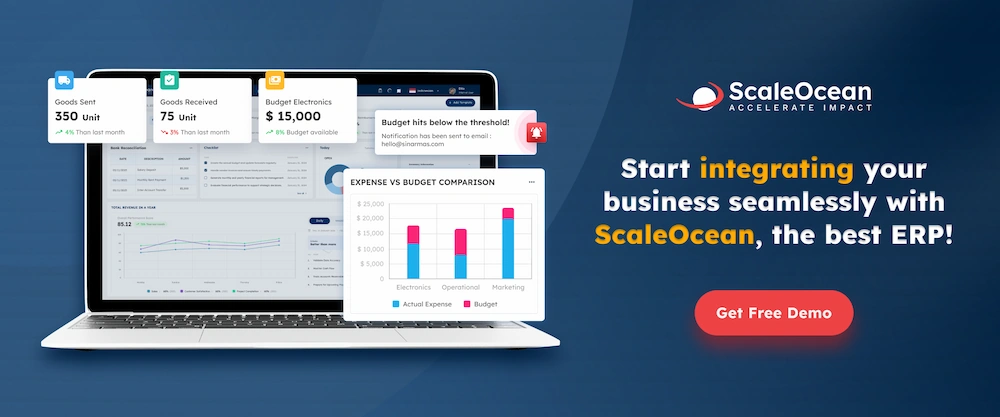
 Jibble is an attendance monitoring system that emphasizes the use of biometric technology and location-based tracking. This tool functions to record attendance through facial recognition on mobile devices or tablet terminals at the workplace.
 Connecteam is an operational application providing attendance solutions for non-desk employees or field workers. This tool functions as a communication and time-tracking hub through smartphones carried by every single employee.
 Attendance tracking software streamlines operational management by providing precise data on employee work hours and schedules. This digital transition enhances overall business transparency and efficiency through the following benefits: