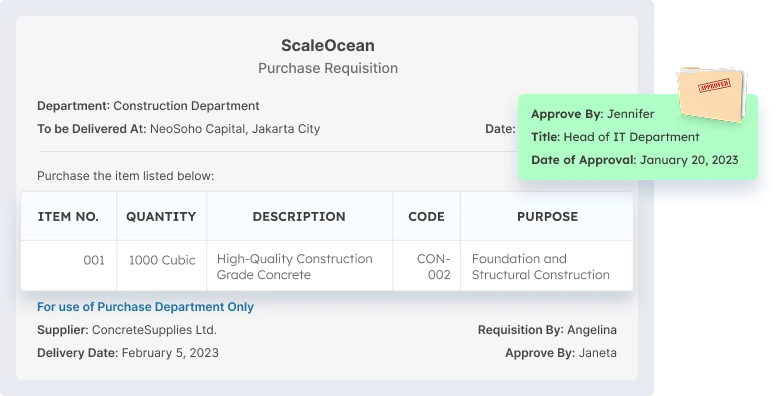
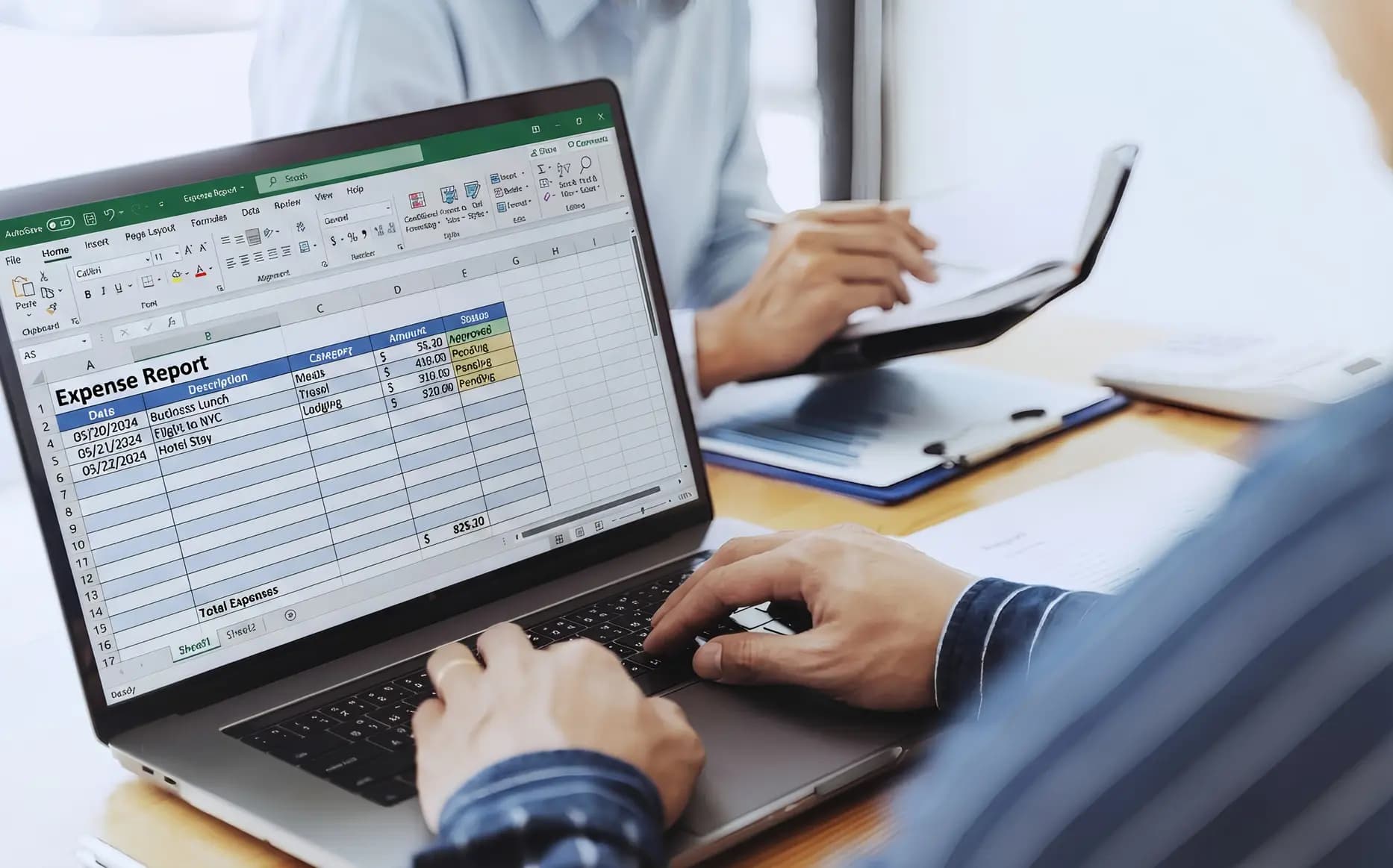
An inaccurate or incomplete procurement report format makes it challenging to manage budgets and supplier relationships. Without the right data, tracking spending and performance is a struggle, often leading to wasted funds or shipping delays that can slow down your entire operation.
According to PWC, the target for digital procurement in the Asia Pacific is 63% by 2027, compared to the global 70%. This indicates that many companies are still working diligently to refine their processes, utilizing integrated systems to remain competitive and efficient.
This article highlights must-have reports like PO status, spend analysis, and supplier performance. These tools don’t just keep costs in check. They offer the insights you need to make smarter decisions and keep your business running much more efficiently.
Key Takeaways
Procurement reporting matters as it helps businesses control costs, track supplier performance, and manage risks, ensuring procurement decisions align with long-term goals.
Common issues in procurement reports, like manual data entry and inconsistent formats, often hinder procurement reporting accuracy and efficiency.
Procurement reports are detailed documents that track your buying habits, giving you a clear look at supplier habits and spending. Using tools like PO Status and Spend Analysis helps you make smart, data-driven choices and ensures your resources are used where they matter most.
Essentialreports like Spend Analysis find ways to save money, while Supplier Performance reports show who you can really count on. Plus, Inventory Ageing reports flag slow-moving stock, helping you manage your warehouse better and keep everything running smoothly.
So without further ado, here are some of the most important procurement report types and examples to keep in mind:
1. Purchase Order (PO) Status Report
Keeping tabs on where each purchase order stands is something that makes a big difference in procurement. A PO status report gives you a simple way to stay on top of the full order process, without losing track of the details that usually get buried.
You’ll get a better view of which orders are good to go, which are stuck, and which ones need a nudge. By using the best purchase order system, teams can act quickly, especially when delays start to accumulate or approvals become stagnant.
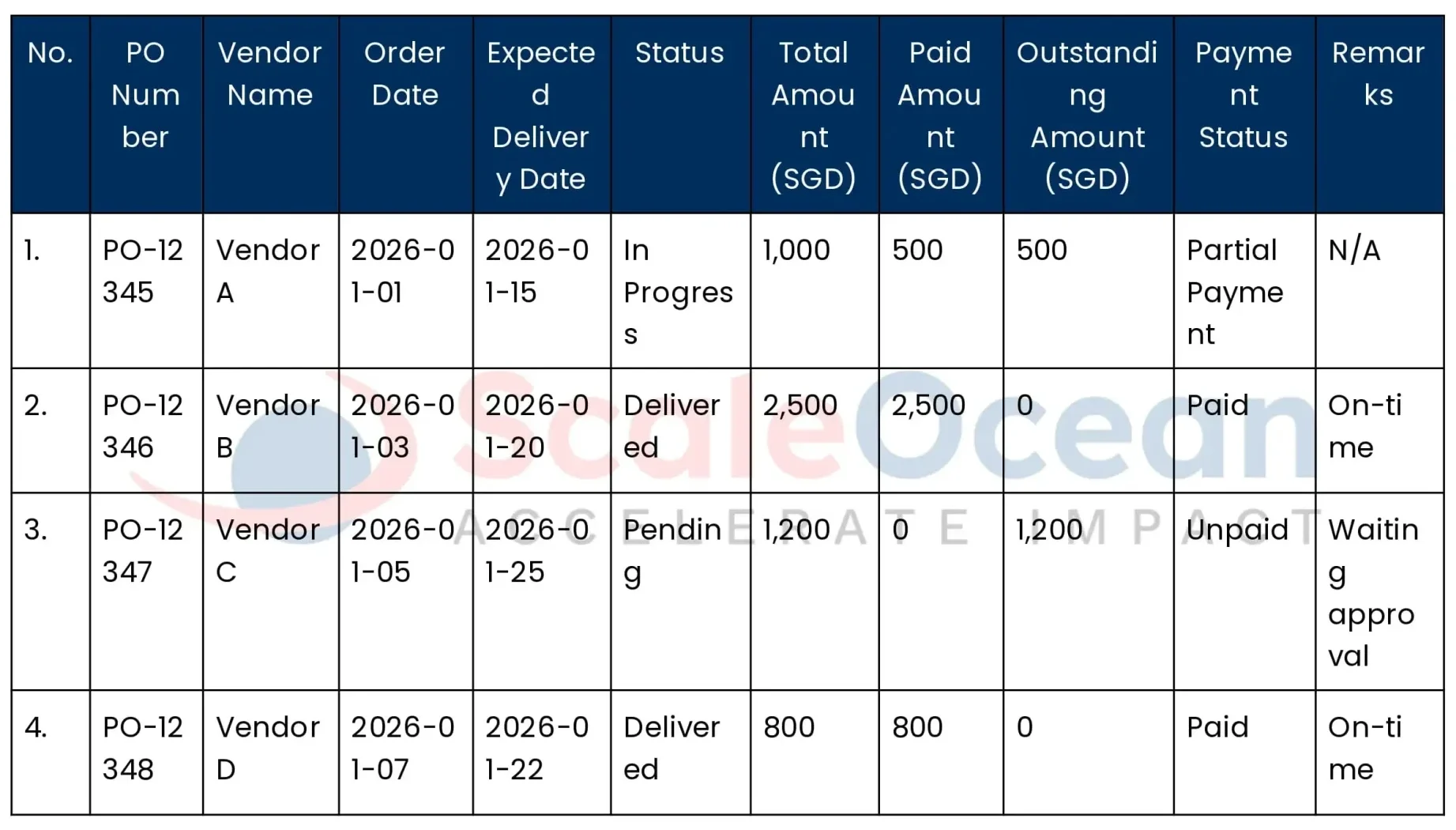
Here are the examples of the PO Status Report, and a download link for the report template:
A spend analysis report is basically a way to map out where the money’s actually going, across teams, vendors, and over time. It’s not just about tracking expenses, but spotting patterns that can lead to better decisions or even cost-cutting in areas you didn’t expect which you can streamline using vendor management system.
Procurement folks usually lean on this to identify waste and find leverage in supplier negotiations. And having that visual breakdown makes it a lot easier when explaining spending priorities to finance, especially when things start to get tight budget-wise.
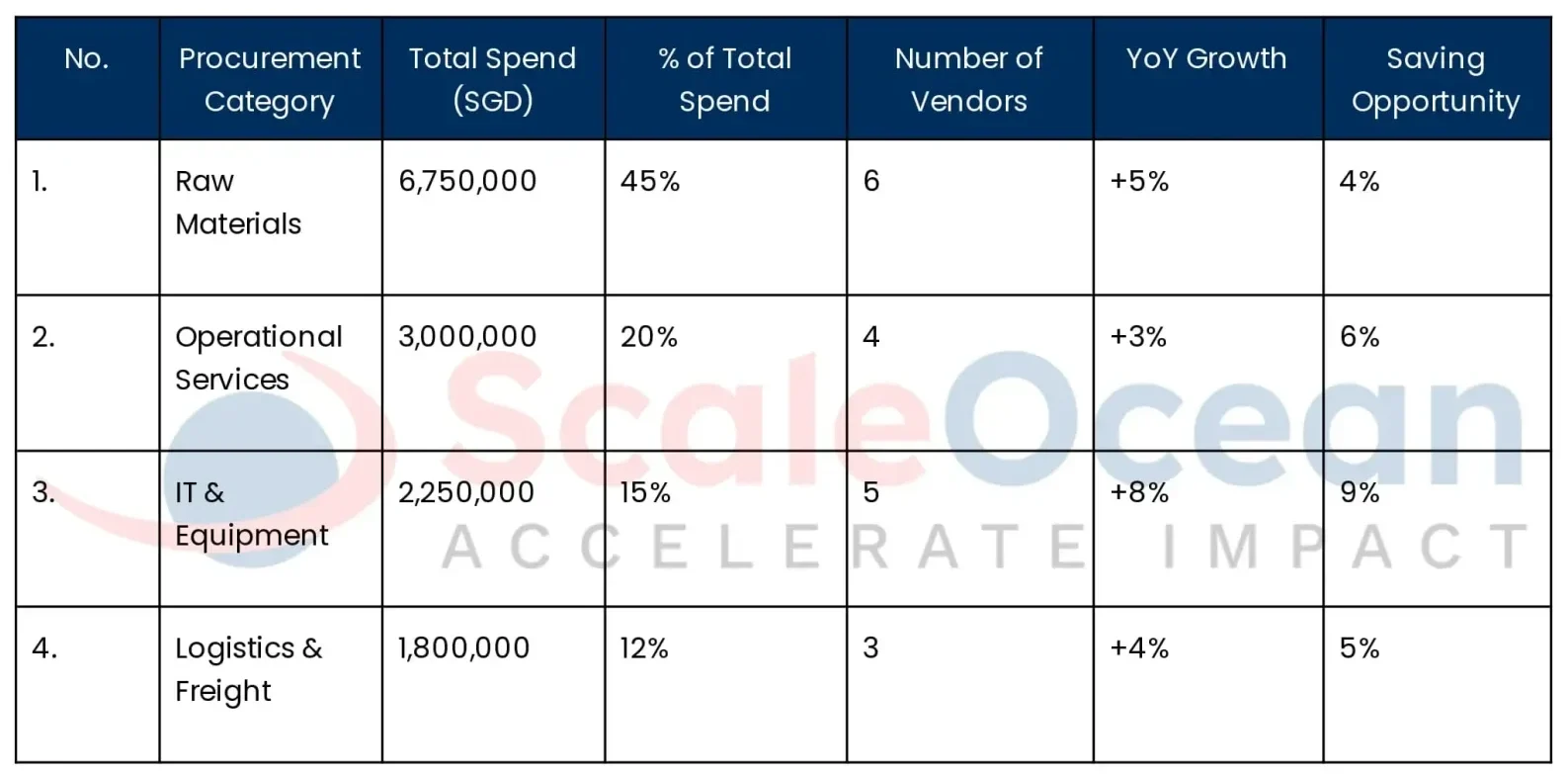
Here are the examples of the spend analysis report, and a download link for the report template:
Stock that sits there isn’t harmless. It’s money stuck on a shelf. That’s where an inventory ageing report really comes in handy, because it gives a clear picture of how long products have been sitting untouched.
It’s not uncommon to spot items that haven’t moved in months, and in most cases, those are the ones you’ll want to rethink, such as either discount, bundle, or shift them elsewhere. This type of report also tends to work well for refining purchase planning, as it helps avoid repeating the same overstock mistakes.
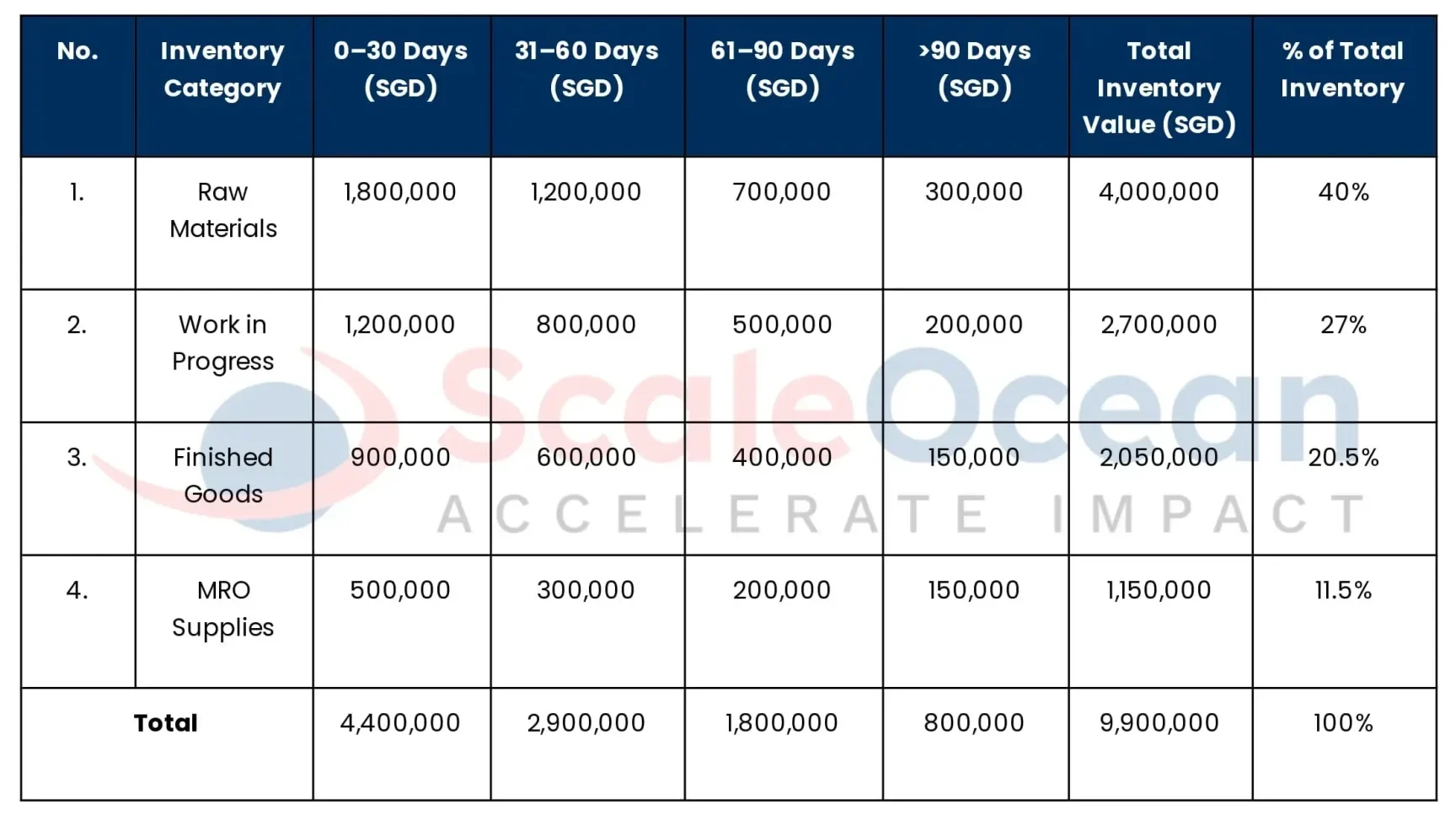
Here are the examples of the inventory ageing report, and a download link for the report template:
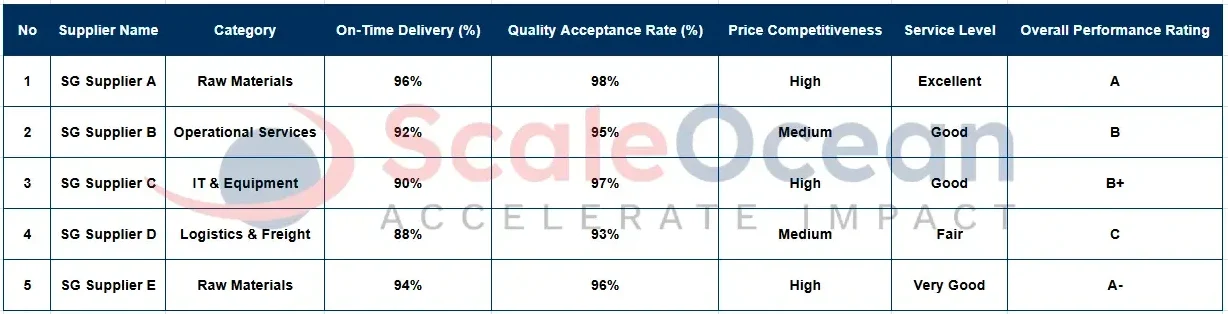
Not every supplier hits the mark consistently, which is exactly why a supplier performance report is something teams tend to lean on. It gives a clearer picture of delivery delays, product issues, and how quickly (or not) a supplier is to respond.
Most procurement leads look at this report when it’s time to renew contracts or flag suppliers that might be more risk than reward. It also helps during onboarding, especially when you’re trying to evaluate new supplier reliability before things get too far in.
Here are the examples of the supplier performance report, and a download link for the report template:
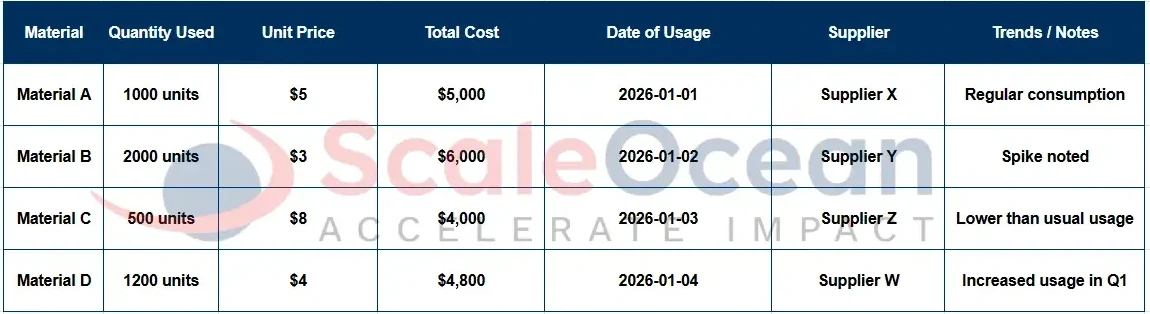
At its core, this report gives you a clearer picture of how much material is being used over time. A material consumption report is one of those things that quietly keeps supply issues in check, so less risk of over-ordering or running out when it matters.
What it really helps with is spotting patterns, which can be surprisingly useful. Tracking material trends over time gives procurement teams a way to stay in step with production, and it can also highlight strange spikes that might point to mistakes, or sometimes even misuse.
Here are the examples of the material consumption report, and a download link for the report template:
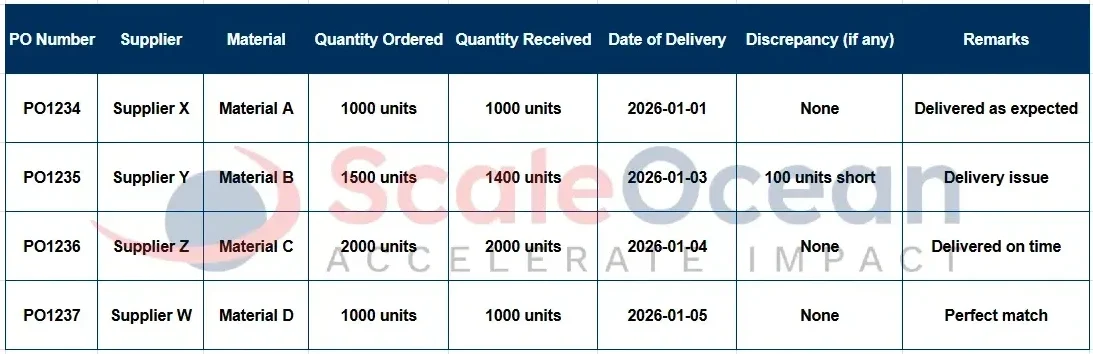
The Goods Received Note (GRN) report is basically the point where you double-check what came in versus what was expected. It’s not just a formality, because it plays a pretty central role in how procurement flows from order to delivery.
It helps you make sure the quantities received match the PO, which avoids confusion later on. This step also matters when it comes to clearing payments and keeping tabs on how reliable your suppliers really are.
Here are the examples of the Goods Received Note (GRN) report, and a download link for the report template:
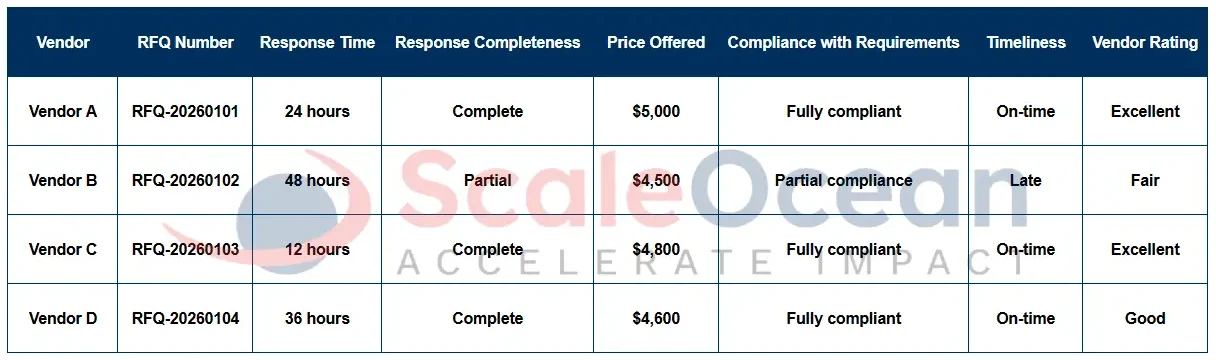
A Request for Quotation (RFQ) performance report basically looks at how vendors are handling quote requests, like how fast they reply, how complete their responses are, and things like that. It’s a practical way to narrow down which suppliers are actually worth moving forward with.
Procurement teams can usually spot patterns, like who’s always late or who skips key details. That kind of insight makes it easier to choose vendors who match your workflow instead of constantly slowing it down.
Here are the examples of the Request for Quotation (RFQ) performance report, and a download link for the report template:
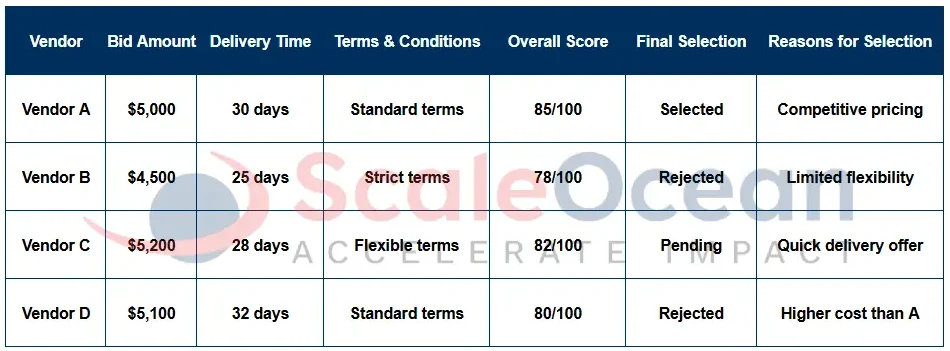
When you’ve got several vendors in the mix, a bid analysis report basically lays everything out so you’re not just guessing who’s the better fit. It takes into account the pricing, delivery times, and a few other terms that usually end up making a big difference later on.
This kind of report gives some structure to decision-making, especially when things get complicated. It also helps with transparency, so it’s not just for the team, but for anyone who needs to understand why a certain vendor got the green light.
Here are the examples of the bid analysis report, and a download link for the report template:
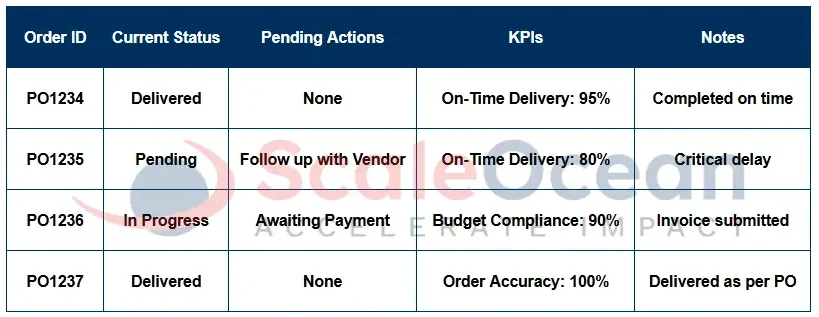
Procurement Status Reports, or PSRs as most people call them, are basically a snapshot of how things are moving across procurement. A PSR is typically pulled together for stakeholders just to give a quick but useful sense of what’s going on and where things stand.
You’ll usually find a mix of numbers, like KPIs, plus summaries of outstanding orders or even bottlenecks. Having these reports show up regularly really helps with aligning procurement efforts to what the larger business is aiming for.
Here are the examples of the Procurement Status Reports (PSR), and a download link for the report template:
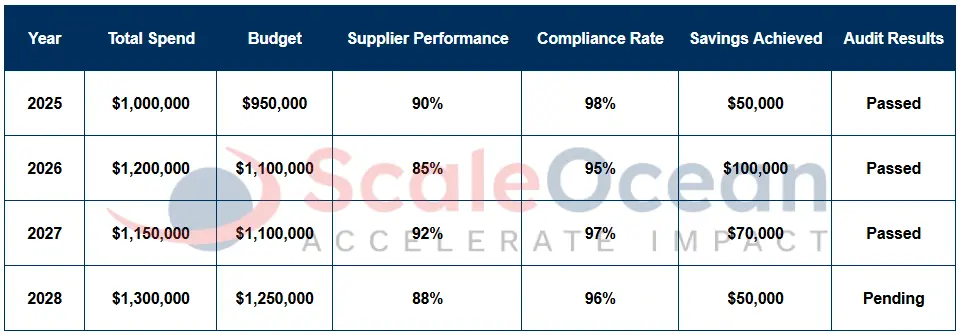
Each year, teams pull together what worked and what didn’t, across all procurement activity. An annual procurement report gives a pretty useful snapshot of supplier performance, plus how things lined up with the actual budget.
It’s the kind of report that really comes in handy when planning for the next cycle or when you’re facing an audit. It also gives some clear perspective on compliance and whether internal policies were actually followed the way they were meant to be.
Here are the examples of the annual procurement report, and a download link for the report template:
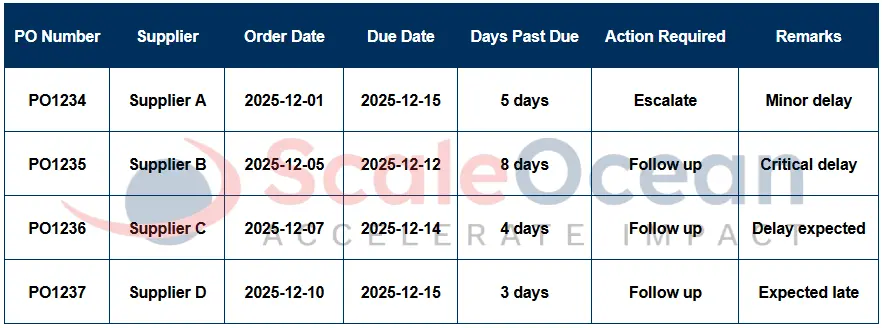
It’s not unusual for purchase orders to slip past their due dates, but when that happens too often, production timelines can take a real hit. That’s where a past due PO report comes in, so it can give teams a heads-up before small issues turn into bigger ones.
The report helps flag which vendors need a nudge or maybe a more direct escalation. It gives procurement teams something concrete to act on, which usually keeps things moving and avoids surprises down the line.
Here are the examples of the past due PO report, and a download link for the report template:
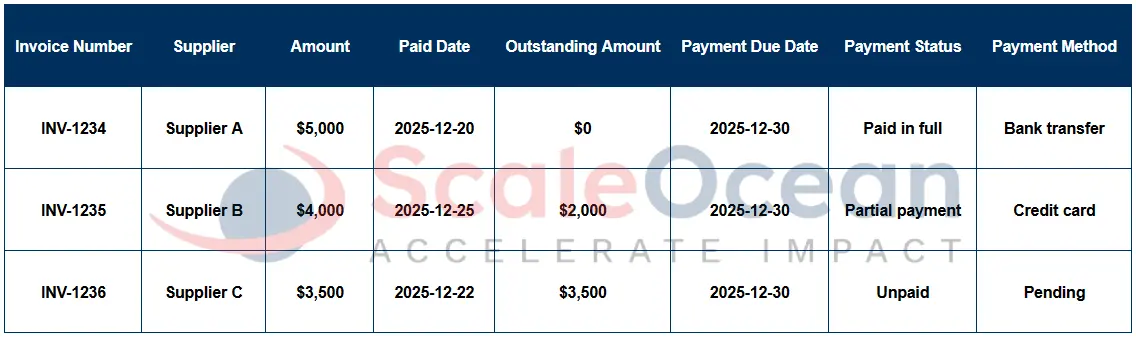
Finance and procurement don’t always move at the same pace, which can lead to some confusion. A payment status report is a simple but useful way to see who’s been paid and who’s still waiting on their invoice.
It’s one of those tools that helps keep things from slipping through the cracks, like double payments or missing a deadline completely. Over time, it also builds better supplier trust and cash flow visibility, which is always good for smoother operations.
Here are the examples of the payment status report, and a download link for the report template:
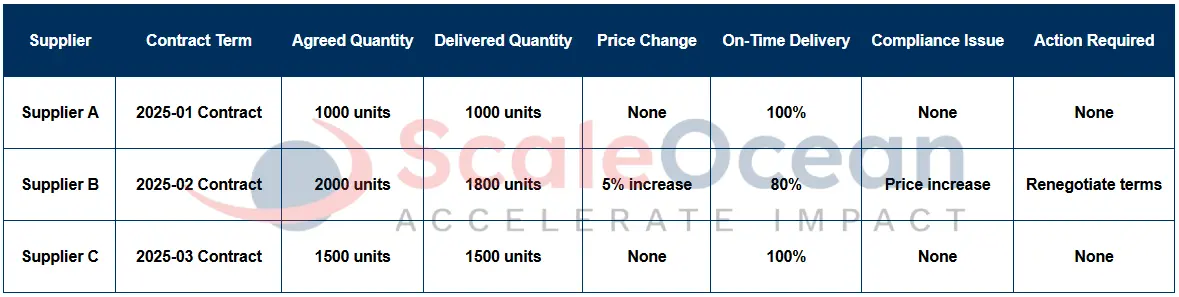
A contract compliance report is basically there to make sure suppliers are holding up their side of the deal. It usually spots issues like price changes, delivery delays, or when the order volume doesn’t match what was agreed, which happens more often than you’d think.
By catching these early, you can cut down on legal exposure and keep your budget from slipping off track. It also gives procurement teams a bit more leverage when it’s time to renegotiate or set terms for the next round.
Here are the examples of the contract compliance report, and a download link for the report template:
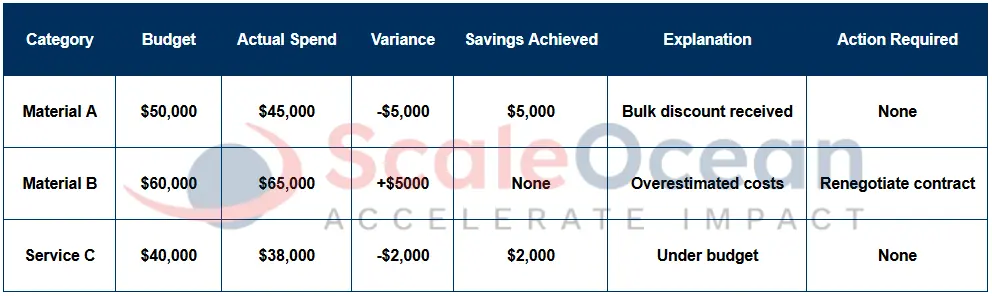
Think of this as a way to track the story behind the numbers, such as how much was actually spent vs. what was planned, and where real savings happened. A savings and budget report gives a clearer picture of how procurement contributes beyond just cost-cutting.
This kind of report tends to resonate with leadership because it surfaces procurement’s actual return on investment. It’s also pretty useful when making a case for better tools or upskilling. It basically helps connect performance to future needs.
Here are the examples of the savings and budget report, and a download link for the report template:
Procurement reporting is vital because it turns daily buying into clear, useful insights. By tracking spending, supplier habits, and risks, these reports help you control costs and stay accountable. It’s the best way to ensure your buying choices match your long-term goals. So, here is why:
Strategic Decision-Making
Instead of relying on instinct or assumptions, procurement reports give decision-makers reliable data to evaluate supplier performance and identify where sourcing strategies need improvement. This makes it easier to connect day-to-day purchasing with bigger business targets. It’s a way to shift procurement from reactive to more forward-looking.
By applying AI in procurement, businesses can uncover purchasing patterns, detect potential risks, and receive actionable recommendations more quickly.
ScaleOcean, as one of the best procurement software solutions with an AI Business Assistant, helps companies connect daily purchasing activities with broader business goals. This allows procurement teams to move beyond reactive decisions and adopt a more strategic, forward-looking approach.
Cost Optimization
It’s easy to lose track of small expenses over time, but reports help surface exactly that. By pointing out wasteful spending and areas that could be negotiated down, they offer a clearer picture of the cost landscape.
With that insight, teams can refine sourcing strategies or push for better bids. Not huge changes overnight, but enough to stack up to real savings over the year.
Transparency & Accountability
Without proper reporting, procurement can easily become a black box. Reports bring visibility to each stage, so it’s clearer who did what and when.
This not only keeps teams and suppliers in check but also helps build credibility with other departments. It creates a more trustworthy procurement process overall.
Risk Management
Risks don’t always announce themselves because sometimes they show up in the data first. Reporting tools offer early warnings around things like vendor issues or price jumps, playing a key role in procurement risk management to help teams identify potential problems before they escalate.
They also help keep an eye on compliance gaps and delays that could snowball later. It’s not perfect, but it definitely helps teams stay a step ahead.
Achieving Broad Goals
Procurement plays a bigger role in mission-driven goals than most people think. Reports help map metrics to mission, whether that’s ESG targets, diversity, or local sourcing.
In fact, in 2023, the International Trade Administration said nearly 80 percent of all procurement opportunities for FY23 will be open to SMEs, emphasizing the importance of supporting smaller businesses.
It gives you something measurable to show progress, not just intentions. This tends to resonate more with leadership, and rightly so, as these goals directly align with broader organizational values and contribute to long-term sustainability.
How Procurement Reports are Used?
Procurement reports are vital for keeping everyone on the same page and making better choices. They keep both your team and outside partners in the loop, ensuring operations run smoothly. With clear insights, everyone can work toward the same goals. Here is how they help:
Internal Stakeholders
Procurement reports are vital for keeping internal teams like finance, operations, and leadership on the same page. With accurate and timely insights, these teams can make well-informed decisions, ensuring that everyone is aligned and working toward shared business goals.
These reports also assist department heads in setting clear targets and measuring success. Without the right data, it’s easy for things to slip through the cracks, and potential issues may go unnoticed until they become bigger problems.
External Stakeholders
Suppliers appreciate having clear visibility into their performance and payment status, and procurement reports help provide that transparency. Sharing these reports fosters better relationships and makes working together smoother and more reliable for both sides.
Reports are also crucial for compliance purposes, giving auditors and regulators the visibility they need to ensure everything is running as it should. By staying on top of these reports, businesses can reduce risks and avoid potential legal or regulatory issues down the line.
Challenges in Procurement Reporting
While procurement reports are key for smart, data-driven moves, hitting the mark on accuracy and speed isn’t always easy. These hurdles can make it tough to keep track of buying habits and might even lead to missed chances. Let’s look at the most common challenges you might face:
Still Using Manual Data Entry
Relying on manual data entry can be a real time sink for procurement teams. It’s easy to make mistakes, and when that happens, it creates a chain reaction of delays and rework, preventing teams from focusing on the more important aspects of procurement.
Instead of guiding decisions, the process becomes reactive. It wastes precious time that could be spent understanding the data and using those insights to make smarter choices and drive improvements.
Often Excessive Data
In procurement, it’s easy to get lost in a sea of data. When there’s too much information without clear filters, teams often find themselves overwhelmed, struggling to pinpoint the most important insights to make decisions.
The key is to focus on what truly matters. Instead of trying to capture every bit of data, it’s more effective to hone in on what will drive the best decisions and cut through the noise that can often cloud judgment.
Data Access Is Not Real-Time
Having outdated data can be a huge setback for procurement teams. Without access to real-time information, decisions are made based on old data, making it harder to react quickly when problems arise and often leading to higher costs throughout the procurement life cycle.
Delays in data can also affect relationships with suppliers. When procurement teams don’t have the latest info, it can create confusion and erode trust, slowing down progress and potentially straining vendor partnerships.
Reporting Inconsistencies
When different teams approach reports in different ways, it creates inconsistency that can make comparisons tricky. This lack of uniformity can lead to confusion and mixed results, making it difficult for procurement teams to move forward with clear decisions.
Standardizing the reporting process is key. By having everyone follow the same approach, teams can work more efficiently, comparing data seamlessly and making decisions with confidence based on the same set of rules and metrics.
Still Difficulty Standardizing Reports
Even with templates in place, some companies still struggle with standardizing their procurement reports. When tools and formats don’t align, it creates unnecessary confusion, and teams often find themselves spending time fixing reports rather than acting on them.
This is where system integration comes in. By ensuring that everything works together smoothly, teams can access clean, consistent reports that make it easier to move forward with informed, actionable decisions.
To beat procurement reporting hurdles, you need a mix of automation, live data, and steady processes. ScaleOcean’s ERP fixes these issues by simplifying data entry and automating reports, giving you real-time access for much more accurate and efficient management.
Best Practices for Easy Procurement Reporting
Building great procurement reports can feel tricky, but the right approach makes it much simpler. By focusing on best practices, you can smooth out your reporting, sharpen your data, and make smarter decisions faster.
Let’s look at how to simplify the process and get the most from your data:
Leverage Automated and Integrated Technology: Procurement Software
Using tools like the best e-Procurement software can really take the edge off repetitive tasks, like reports that get auto-generated, and the data tends to be a lot cleaner. Less manual input usually means improved accuracy, which is a win in most teams.
When systems like ScaleOcean’s software are integrated with your finance and inventory platforms, everything stays in sync seamlessly. This eliminates the need for manual data tracking, ensuring smoother operations, better accuracy, and enhanced decision-making across all departments.
Determine the Appropriate Reporting Frequency
How often you run procurement reports depends on your business needs. While some teams prefer daily reports to stay on top of things, others find that weekly or monthly reports work better. The key is to figure out what frequency suits your operations and stakeholder expectations.
Sending reports too often can lead to information overload, making it easy for key details to get lost. On the flip side, waiting too long between reports can cause you to miss out on important red flags. Finding the right balance ensures timely action without overwhelming your team.
Stay Focused on Actionable Insights
Procurement reports are meant to highlight what really matters. Instead of just throwing a bunch of data together, focus on the insights that need attention. This way, decision-makers can easily see what needs to be addressed and prioritize tasks that will make the biggest impact.
Dashboards are a great tool for this. They make trends and issues stand out visually, allowing teams to spot potential problems before they grow bigger. This approach makes it easier to take proactive steps, rather than just reacting to situations as they arise.
Implement Data Visualization Tools
Interpreting numbers can be tough, especially for those who don’t work with data every day. Using simple visual tools like graphs and charts helps break down complex information, making it much easier for your team to understand the bigger picture and make faster decisions.
Presenting data visually not only makes reports easier to digest but also makes your meetings more engaging. Stakeholders can quickly see the most important trends, leading to more productive discussions and quicker decision-making without sifting through endless spreadsheets.
Align Report Formats with Applicable Standards
To make your reports consistent and easy to compare, align them with internal templates and industry standards. This helps ensure that everyone is on the same page, making it easier to track performance over time and ensuring compliance during audits.
Standardizing report formats also makes training easier. When everyone follows the same structure, new team members can quickly get up to speed on how to create and interpret reports, streamlining the process and improving team efficiency from day one.
How ScaleOcean Simplifies Procurement Reporting
ScaleOcean’s advanced e-procurement software is a total all-in-one hub for creating and managing reports. Using smart AI, it builds reports for you and fits them to your unique workflow. Plus, it works across cloud or hybrid setups, giving you the flexibility you really need.
This integration makes procurement reporting a breeze, ensuring everything matches how your team actually works. Whether you’re on the cloud or using a hybrid system, your team can collaborate from anywhere while keeping every detail accurate and efficient.
Even better, you can claim up to 70% of the CTC grant to help your business go digital. This government initiative makes it much cheaper to adopt ScaleOcean’s procurement system, letting you upgrade your tech and grow without the heavy implementation costs.
Here are the unique features of ScaleOcean’s procurement software:
Multi-Branch Integration: Seamlessly integrates data across multiple branches, enabling consistent and real-time procurement management from any location.
Procurement Automation: Automates procurement tasks and processes from start to finish, reducing manual input and increasing efficiency throughout the cycle.
Digital Approval Management: Streamlines the approval process with digital tools, ensuring faster decision-making and improved accountability.
Vendor Management: Offers robust vendor management features, allowing for efficient tracking and monitoring of supplier performance and contracts.
Real-Time Reporting: Provides real-time insights into procurement data, helping teams stay on top of spending, supplier performance, and potential issues.
Beyond the unique tools we’ve discussed, ScaleOcean also features customizable dashboards and smooth financial integration to make your reporting even easier. To see how it all works, ScaleOcean also offers a free demo so you can explore every feature first-hand and see the benefits for yourself.
Conclusion
Procurement reporting is key to managing costs, tracking suppliers, and sharpening your buying process. Reports like PO status and spend analysis offer the insights you need for smarter choices, while avoiding the slow, tiring grind of manual data entry.
So, ScaleOcean’s software makes reporting easy by automating data and giving you real-time insights. With their software, making data-driven choices is effortless. So go ahead and claim your free demo today to see how ScaleOcean’s tools can help your business reach its full potential!
FAQ:
1. How do you write a procurement report?
1. Set objectives: Identify the purpose of the report and what it needs to address.
2. Gather data: Collect relevant procurement data such as purchase orders and supplier performance.
3. Organize information: Clean and arrange the data for clarity and accuracy.
4. Analyze insights: Review spending trends, supplier performance, and risks.
5. Write the report: Structure the report with clear sections and visuals.
6. Review: Ensure the report is accurate and easy to understand.
2. Does procurement report to the CFO or the COO?
Procurement typically reports to the CFO for financial oversight, but it often collaborates with the COO to ensure smooth operational execution, especially for supply chain and logistics efficiency.
3. Who should the procurement report to?
Procurement should report to either the CFO for financial management or the COO for operational alignment, depending on the organization’s structure and the strategic goals of the department.
4. Should procurement report to finance or operations?
Procurement can report to either finance for cost control or operations for better supply chain integration. The decision depends on the company’s focus on financial management versus operational efficiency.











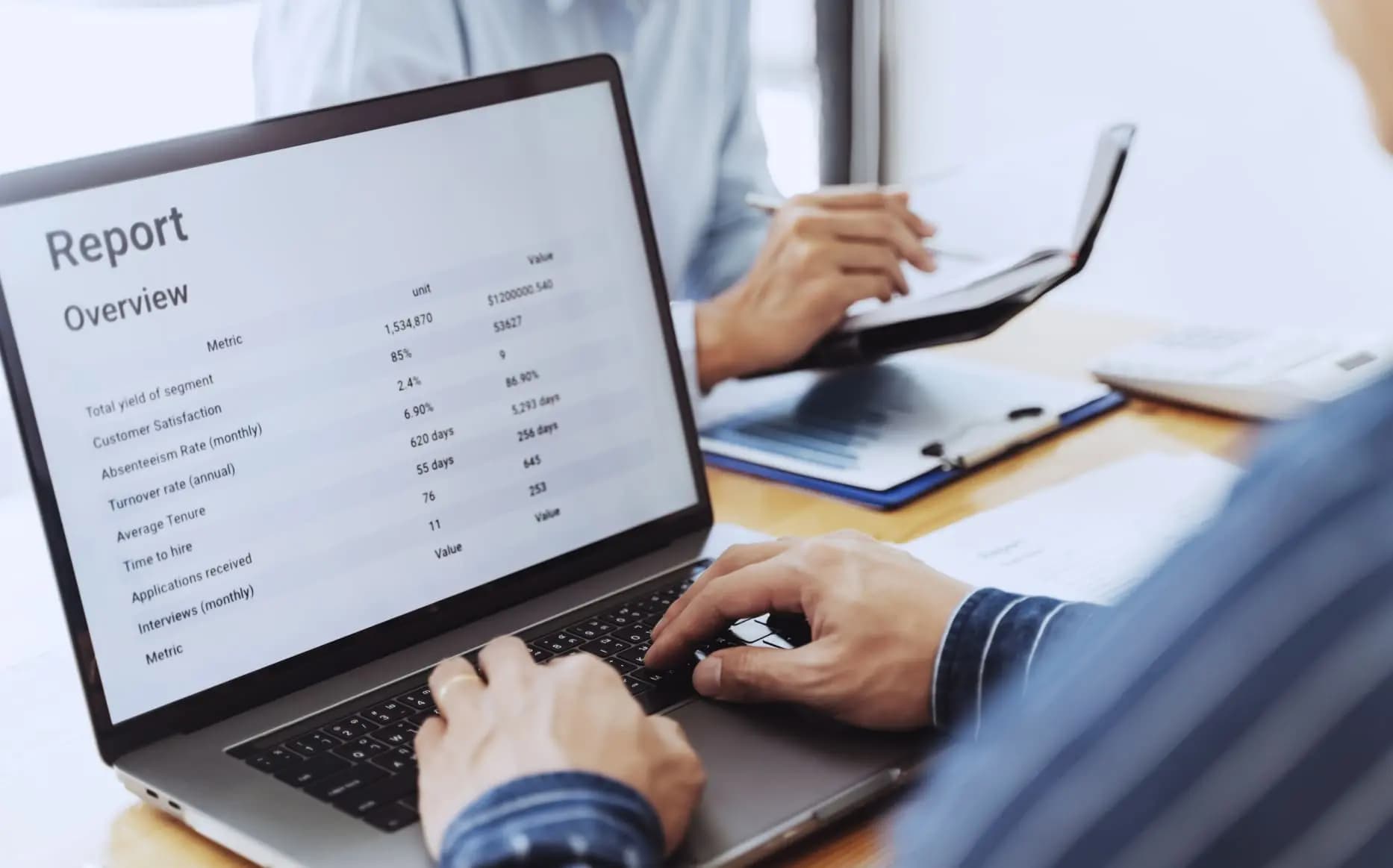
 Key Takeaways