
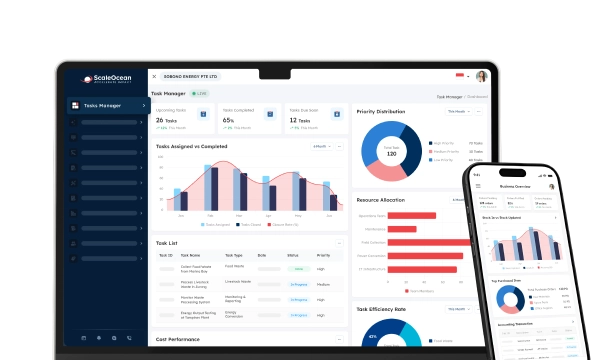

The leave management system is software that helps organizations automate leave requests, approvals, tracking, and reporting within a single system. For working professionals who expect faster, transparent, compliant, and optimized leave administration processes, organizations can now rely on technology.
Many HR departments still use Excel spreadsheets, email, and paper-based recordkeeping systems to track employee leave. This can lead to managers experiencing delays in approval, loss or variance in records, and limited visibility into workforce data.
In addition, overlapping leave periods could lead to a resource shortfall during peak customer demand. The lack of a process in this area makes resource scheduling difficult and affects efficiency and customer service levels.
A contemporary leave management system for employees solves these problems by providing more streamlined workflows, increased transparency, and the control needed to ensure policy adherence. In effect, organizations can minimize administrative effort while improving the experience for staff.
 Key Takeaways
- Choosing the right leave management software requires assessing workflows, compliance obligations, payroll integration, and organizational structure.
- Recommendations for the best leave management software include ScaleOcean HRIS, Talenox, Swingvy, QuickHR, and Employment Hero
- Leave management software is a platform that automates leave requests, approvals, tracking, and reporting while improving workforce visibility and administrative efficiency.
- Common leave management software features include employee self-service, automated approvals, policy customization, and payroll synchronization.
- ScaleOcean HRIS helps businesses streamline leave management, automate HR processes, and efficiently support long-term workforce growth.

Comparison Chart of Best Leave Management Software
Before reviewing each solution in detail, it is helpful to compare the leading leave management software options based on their ideal use cases, pricing structures, and standout capabilities. While many platforms offer leave tracking and approval workflows, their strengths vary significantly across payroll integration, compliance support, scalability, and workforce management.
| Tools | Best For | Pricing | Signature Features |
|---|---|---|---|
| ScaleOcean HRIS | Medium to large-sized businesses seeking a customizable, enterprise-grade leave management solution that adapts to unique organizational workflows | Unlimited users with no hidden cost and flat pricing based on business size and modules | AI-powered HR insights, all-in-one HRIS & ERP ecosystem, configurable enterprise workflows, multi-entity workforce management, Singapore compliance support |
| Talenox | Small businesses and startups seeking affordable HR and leave management | Starts from approximately SGD $21.80/month for the first 5 employees (Leave module) or S$4.36 per employee/month | Leave tracking, multi-level approvals, payroll synchronization |
| Swingvy | SMEs looking for modular HR software with leave and claims management | Starts from S$4.25 per user/month (annual billing) | Leave management, claims processing, and employee database |
| QuickHR | Singapore businesses requiring HR, leave, payroll, and compliance tools | Starts from approximately S$2–5 per employee/month, depending on plan and eligibility | Leave management, payroll integration, and scheduling |
| Employment Hero | Mid-sized businesses seeking employee engagement and HR automation | Custom quotation | Leave management, payroll, employee benefits, and onboarding |
| Factorial HR | SMEs requiring easy-to-use workforce and leave management software | Starts from custom pricing | Time-off management, document storage, shift planning |
| eDays | Organizations with complex leave policies and international teams | Custom quotation | Global leave compliance, absence management, workforce analytics |
| Rippling | Businesses seeking unified HR, IT, and workforce management | Custom quotation | Leave management, payroll, device management, and compliance tools |
| Timetastic | Small businesses focused primarily on leave and holiday tracking | Starts from per-user subscription pricing | Holiday planner, leave approvals, team calendars |
| BrioHR | Southeast Asian SMEs need integrated HR and leave management | Custom quotation | Leave management, attendance tracking, and employee records |
This comparison provides a high-level overview, but each platform differs in functionality, flexibility, and long-term value. Therefore, the following sections examine each leave management software solution in greater detail, including its functions, features, and advantages.
1. ScaleOcean HRIS
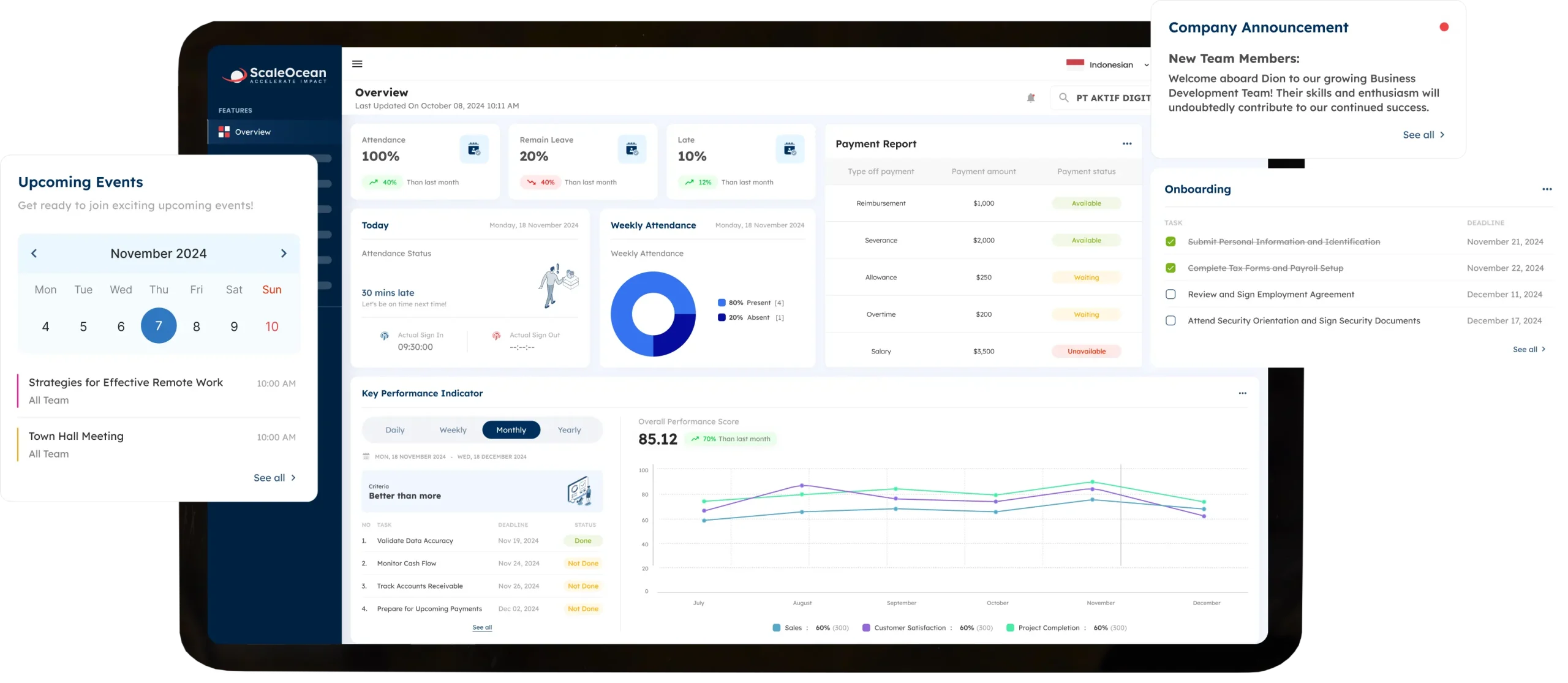
ScaleOcean HRIS Software is an all-in-one HR and leave management platform designed to support growing businesses and enterprises in Singapore. Unlike standalone leave applications, it integrates leave management, payroll, attendance, employee records, contracts, and workforce management into a single, integrated ecosystem.
The platform supports unlimited users without additional licensing fees and offers customizable workflows that align with company policies. Moreover, ScaleOcean supports Singapore GST compliance and local financial reporting standards and may qualify for up to 50% funding through the Enterprise Development Grant (EDG).
You can request a free demo to explore how ScaleOcean automates leave requests, approvals, attendance tracking, and payroll integration while supporting your organization’s unique workflows and compliance requirements.
Standout Features of ScaleOcean HRIS:
- MOM Statutory Leave Calculator: Automatically calculates leave entitlements based on Singapore employment regulations.
- GPL Report Exporter: Generates leave reports for faster Government-Paid Leave reimbursement claims.
- PDPA-Compliant Data Security: Protects employee and medical data in accordance with PDPA requirements.
- Shared Team Calendar Integration: Syncs approved leave with Google Calendar, Outlook, and workplace collaboration tools.
- Digital MC Upload & Verification: Allows employees to submit and manage digital medical certificates directly online.
| Pros | Cons |
|---|---|
|
|
Why You Should Choose This: ScaleOcean is more than a standalone leave management solution because it supports broader workforce and business management needs as organizations grow. Its flexible architecture, enterprise-focused design, and configurable workflows make it suitable for companies with complex approval structures.
Best For: Medium-sized businesses, large enterprises, multi-entity organizations, and companies in Singapore and for asia/global companies as well that require scalable leave management integrated with broader HR, payroll, attendance, finance, and operational processes. It is particularly suitable for organizations seeking long-term digital transformation.
2. Talenox
Talenox leave management system is a cloud-based HR software platform that helps businesses manage employee leave, payroll, and personnel records. The system is designed to help companies track vacation days and personnel information. It provides an easier way to do routine HR tasks and avoid spreadsheets.
It offers essential HR features for handling employee leave requests, recording employee data, and managing payroll. Moreover, the simple interface makes it easy to use for teams with sparse HR personnel.
Standout Features of Talenox:
- Leave Management
- Payroll Processing
- Employee Database
- Google Calendar Integration
| Pros | Cons |
|---|---|
|
|
Why You Should Choose This: Talenox could be an effective solution for organizations that prefer to automate leave and payroll processes but do not want to set up a large HRMS module. Furthermore, the platform is centered on basic HR needs, with a simple design for users and administrators.
Best For: Ideal for small to medium-sized enterprises, new enterprises, and startups that deal with the issues of payroll, leave, and employee information management on the same platform. It’s the best fit for companies that have a simple HR process and can manage with a smaller HR department.
3. Swingvy
Swingvy leave management system for employees is an HR system that allows you to manage leave requests, attendance, employee records, and claims online. It consolidates all HR workforce data to increase transparency in daily operations.
The software offers employee self-service features to enable workers to use HR services on their own. This streamlines administration while enhancing availability for managers and employees.
Standout Features of Swingvy:
- Leave & Claims Management
- Employee Self-Service
- Attendance Tracking
- Mobile Application
| Pros | Cons |
|---|---|
|
|
Why You Should Choose This: Swingvy is well-suited for organizations seeking a middle ground between leave management and general HR administration. It provides features across different aspects of workforce management with an easy-to-use interface.
Best for: Small- to medium-sized businesses, remote teams, and organizations looking for a cloud-based HR platform that includes leave management, employee records, and attendance management, with no complex setup.
4. QuickHR
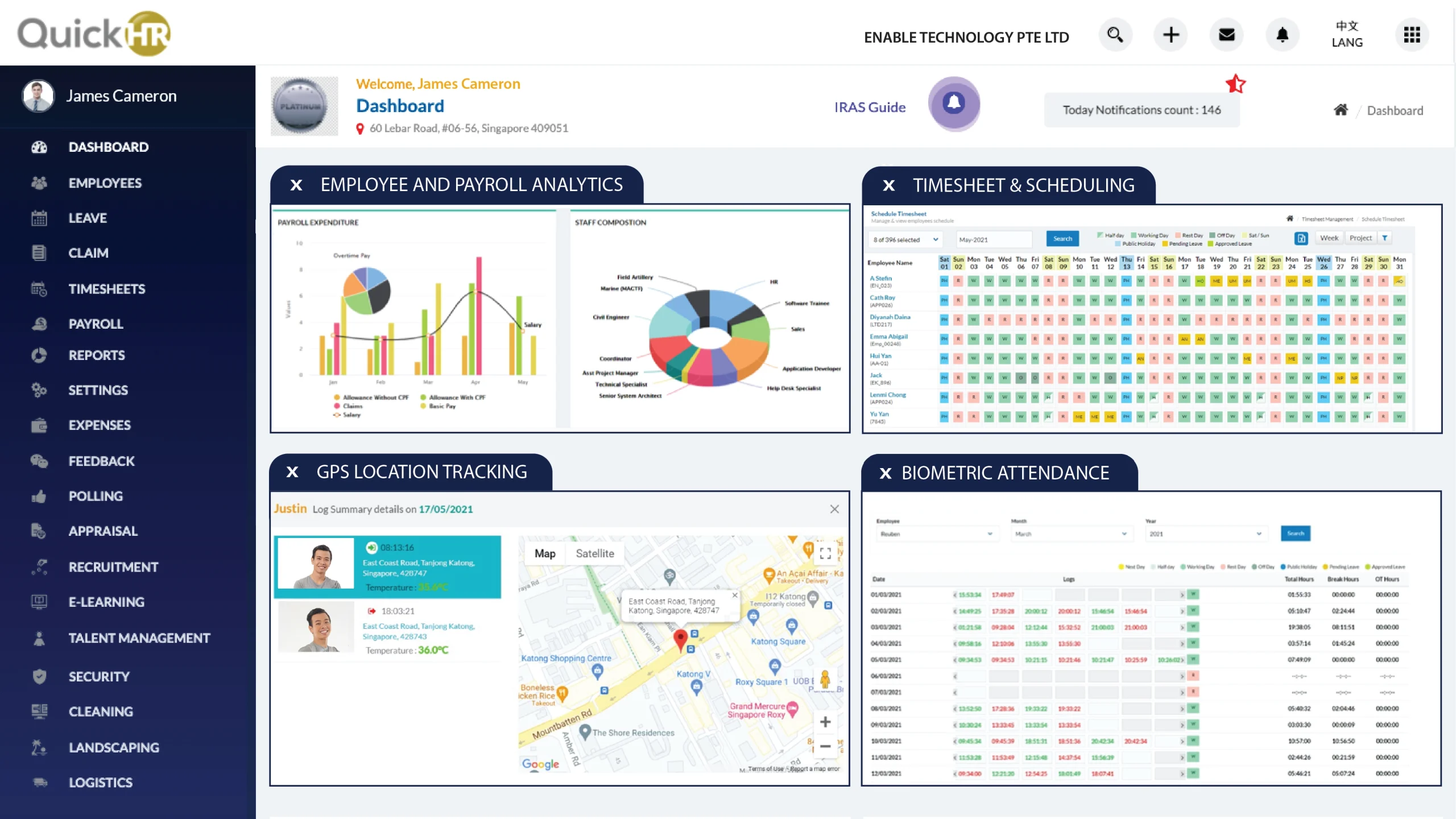
QuickHR leave management system is a workforce management solution that supports leave administration, attendance tracking, employee records, and shift scheduling. The system is a centralized environment that manages the company’s day-to-day HR functions.
The software can integrate workforce management functions into a single process. The software helps businesses to keep employee data and leave records efficiently. Also, the software helps business organizations with systematic attendance and scheduling processes.
Standout Features of QuickHR:
- Leave Management
- Shift Scheduling
- Attendance Tracking
- Employee Records
| Pros | Cons |
|---|---|
|
|
Why You Should Choose This: QuickHR could be a viable option if an organization prefers to have leave management integrated with scheduling and attendance administration. It packs a range of workforce management tools into a single system.
Best For: small to medium-sized businesses, retail, and service firms. Businesses with shift workers that need to track leave/schedule/time, and manage attendance.
5. Employment Hero
The Employment Hero leave management system provides an HR and workforce management platform that simplifies workforce management, individual management, employee administration, onboarding administration, and payroll processes. The product focuses on automation and self-service.
Tools for communication with your workforce and employee engagement are also available within the software. With this integrated approach, organizations are empowered to handle a variety of HR processes within a single system.
Standout Features of Employment Hero:
- Leave Management
- Employee Self-Service
- Payroll Integration
- Employee Benefits Platform
| Pros | Cons |
|---|---|
|
|
Why You Should Choose This: If your organization prefers to have leave management as part of a wider HR system, then Employment Hero might be an option for you. An HR-focused portal that merges elements of workforce management with the employee self-serve:
Best for: Growing companies, mid-to-large enterprises, and businesses looking for leave management along with onboarding, payroll, employee benefits, and workforce administration together in one package.
6. Factorial HR
Factorial HR leave management system for employees is an online HR solution that enables organizations to monitor employees’ leave and attendance and maintain the workforce records electronically in one place. The system is designed to simplify day-to-day HR administration by using online procedures instead of manual ones.
Supports both workforce management and time-off tracking, enabling organizations to store employee information and attendance records in a single location. Easy for HR and employees to use.
Standout Features of Factorial HR:
- Time-Off Management
- Employee Document Storage
- Attendance Tracking
- Workforce Reporting
| Pros | Cons |
|---|---|
|
|
Why You Should Choose This: For those who want a fairly simple HR system that handles basic HR tasks and also covers attendance, leave management, and employee recordkeeping, this HR offering could be what they are after.
Best For: Small to medium businesses, Companies with expanding teams, and those moving away from spreadsheets to a more sophisticated, digital system. The easiest hand to hold for managing leave is to have it on the same platform as more fundamental HR processes.
7. EDays
EDays leave management system is dedicated absence management software for managing employee leave, sickness, and workforce availability. It primarily provides organizations with visibility into employee leaves and absences.
Tools within the software also support leave administration through policy support and absence reporting. Hence, the software helps the organization consistently track the workforce’s availability.
Standout Features of eDays:
- Absence Management
- Global Leave Policies
- Leave Reporting
- Team Availability Tracking
| Pros | Cons |
|---|---|
|
|
Why You Should Choose This: eDays might be a good fit if managing absences and leave is a top concern for your business. The product is dedicated to enabling firms to observe actual leave patterns, apply policies, and optimize resource planning and reporting.
Best For: Large and mid-sized organizations, multinational corporations, and organizations with complex leave needs across multiple offices, countries, and regulations.
8. Rippling
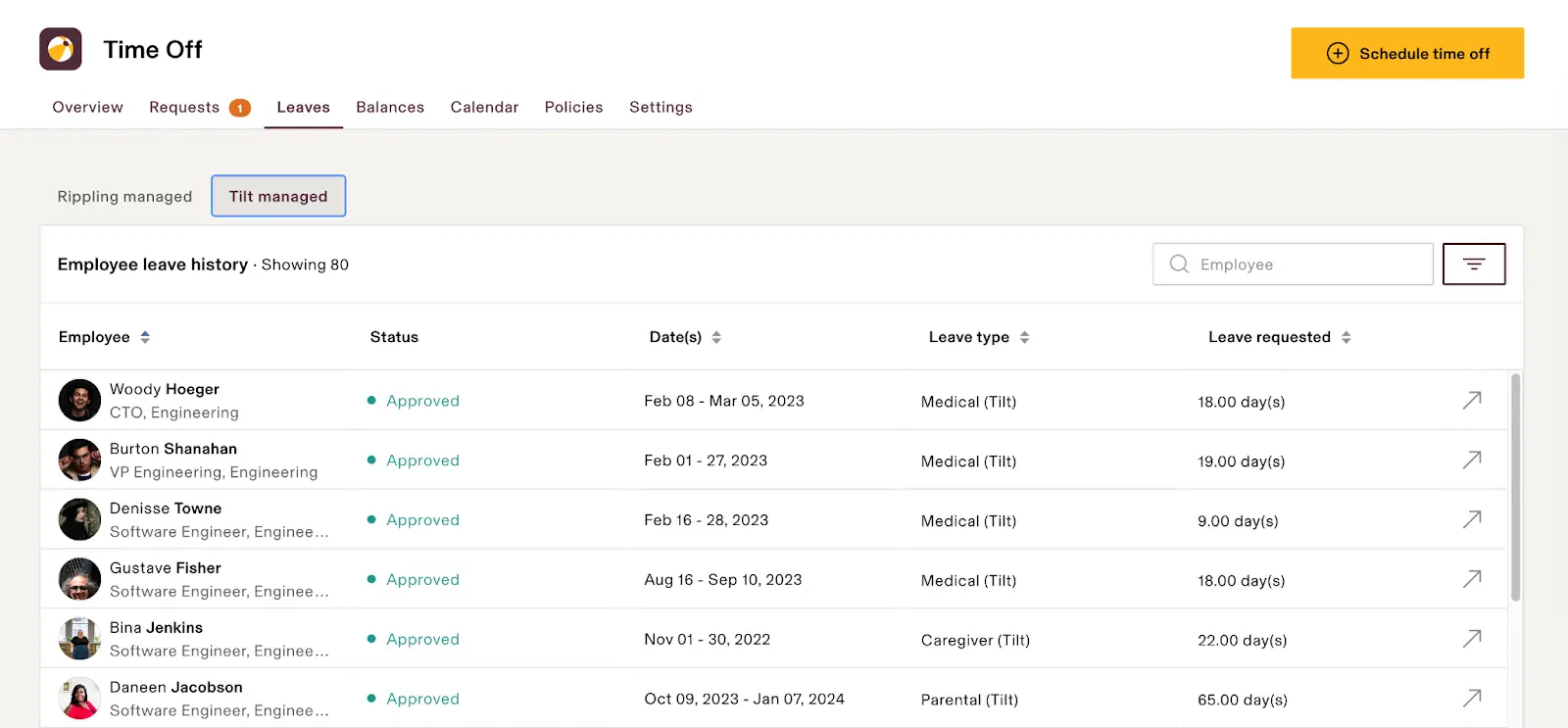
Rippling leave management system is embedded within a comprehensive workforce management system that bundles HR, payroll, IT, and employee administration tools. It helps organizations keep their employee information in one place while providing easy access to leave requests.
Primarily, the software focuses on automation and process handling. This means the organization can automate various employee-related activities through a single software platform that encompasses multiple operational processes.
Standout Features of Rippling:
- Leave Management
- Payroll Automation
- Workflow Automation
- Device & App Management
| Pros | Cons |
|---|---|
|
|
Why You Should Choose This: It could be a good fit for companies that prefer to make leave administration a seamless part of their broader workforce and business operations. The system provides a single view of overall employee management across departments within the organization.
Best For: Medium and large businesses, tech companies, and other organizations in search of an all-in-one solution for leave management, HR administration, payroll, and operational management.
9. Timetastic
Timetastic leave management system online is a platform for managing holidays and time off. It provides a simple approach to managing absences and primarily assists teams in administering employee leave.
The system displays the current status of personnel availability to managers and users through shared calendars and the leave approval procedure. This allows businesses to schedule work more effectively, reduce management workload, and streamline employee leave administration.
Standout Features of Timetastic:
- Holiday Planner
- Shared Leave Calendar
- Leave Approval Workflow
- Google & Microsoft Integrations
| Pros | Cons |
|---|---|
|
|
Why You Should Choose This: Timetastic may be a practical option if your primary goal is to manage employee leave and holiday schedules. The software focuses on core leave management functions and minimizes unnecessary features.
Best For: Small businesses, startups, professional services organizations, and teams looking for a dedicated leave management system online that does not require payroll, attendance, or other HR functionality.
10. BrioHR
The BrioHR leave management system is a cloud-based HR platform for receiving employee leave requests, monitoring attendance, and managing employee data electronically. They sought to provide an easy-to-use system to reduce the hassle of everyday HR administration and make the workforce more manageable.
The system offers an integrated tool for Attendance Management and core HR functions, enabling the organisation to maintain employee records and access various employee activities in one place. This reduces manual electronic data.
Standout Features of BrioHR:
- Leave Management
- Attendance Tracking
- Employee Database
- Workflow Automation
| Pros | Cons |
|---|---|
|
|
Why You Should Choose This: BrioHR could be a good option for companies interested in leave management and simple HR administration. It provides a unified system for employee record keeping, attendance tracking, and leave administration.
Best for: Small and medium, regional organizations, and Southeast Asia enterprises with a one-stop HR solution for leave management, attendance, and record keeping on employees.
 Also Read: Best 15 HR Software Solution in 2026
What Should You Consider When Choosing a Leave Management System for 2026?
Selecting an appropriate leave management system is not solely about features and price, however. You should consider how easily it can be used going forward, whether it will meet regulatory requirements, whether it is scalable to support future business growth, and how easily it will integrate with other systems.
With ever-evolving workforce structures, organizations require systems that support growth and meet future workforce demands. Hence, decision-makers need to be aware of the key evaluation criteria for selecting software for long-term use.
1. Scalability
The best leave management system should support organizational growth without requiring significant system changes. Growth in the number of employees within organizations should not affect the services provided by the leave management system online.
Furthermore, an extensible framework facilitates the growth of the company’s department workforce groups in the same environment. Therefore, organizations can be exempt from the future expensive replacement of software.
2. Additional Signature Features
Beyond simple leave tracking, many other functions can be added to simplify administration and increase workforce satisfaction. Hence, the organization should look for factors that facilitate automation, visibility, and workforce planning.
- Employee Self-Service Portal: Employees can independently view balances, policies, and request statuses. This has significantly reduced the administrative time HR staff spend on answering the same questions.
- Automated Approval Workflows: approval requests are sent to managers, who then comment and approve or deny by following a predetermined approval path. This allows companies to avoid bottlenecks and retain control of departmental approval.
- Leave Analytics and Reporting: Real-time reports show leave trends and the current state of the workforce, leading to better staffing and resource decisions.
- Mobile Access: With mobile devices, employees and managers can manage leaves anywhere. In addition, organizations support flexible work-life balance without affecting the administration process.
3. Integrations
The best leave management system should be part of the existing business applications. This would avoid duplicate entry and improve the consistency of information between business functions.
Furthermore, integrating attendance, payroll, and human resource management creates a single environment for employee data. As a result, high data accuracy along with reduced manual workload for admin staff.
4. Data Security and Compliance
Employee leave records contain personally identifiable information and require careful handling by data administrators. For this reason, a company should emphasize solutions that include strong security controls and a robust compliance management infrastructure.
Other Singapore-specific considerations include regulations and the handling of employee data. Organizations in Singapore face compliance requirements, and established security methodologies help minimize compliance risks while maintaining the security of sensitive workforce information.
5. Customer Support
Dependable customer support is essential for sustained system availability and user acceptance. No matter how good, no software is invulnerable to the need for technical assistance or operational advice.
In addition, responsive support staff enables companies to address problems efficiently, reducing interruptions to workflow. Thus, businesses can remain effective while achieving the highest return on their software investment.
6. Usability
An intuitive and flexible interface helps users easily access and use the system, thus speeding up implementation and use across all user levels, including employees, managers, and HR. Organizations should consider this when choosing new HRIS software in Singapore, such as whether users can complete tasks easily.
Moving from slow, difficult navigation to simple, predictable workflows also reduces processing errors and administrative frustrations. As a result, the business achieves higher utilization while improving the employee experience.
7. Ease of Implementation
The usability of an application can also impact delivery project timelines, cost, and employee adoption rates. It is wise for the organization to evaluate the deployment needs before opting for the best leave management system.
Depending on your workflow complexity, a relatively straightforward workflow can be supported by a simple, quick-to-implement configuration that minimizes risk and helps achieve operational readiness. Therefore, a company will begin to see returns on its investment much sooner, with less internal resource overhead.
How to Choose the Right Leave Management Software for Your Team

Choosing a leave management application involves an organized assessment process to align technology with the organization’s needs. The organization needs to consider current pain points and future needs before making a decision.
This systematic method also helps organizations avoid cost implications by identifying incorrect solutions and providing best practices for sustained adoption over time. Additionally, of great importance in making the decision is meeting strategic requirements for compliance, performance, and staff satisfaction.
1. Understand your Workflow and Attendance Needs
Most companies deal with leave requests, attendance, and approval processes differently. For this reason, businesses should document their current processes before considering their software choices.
This analysis enables an organization to identify areas within the workforce management process that are experiencing operational bottlenecks or leading to approval delays or reporting difficulties. This lets the organization focus on the needs most commonly encountered in this process.
2. Choose a System That Suits Your Business’s Growth
Businesses differ in their requirements for emerging, growing, and existing enterprises. However, one should choose the appropriate enterprise software based on current conditions and expansion plans.
A system designed with growth goals in mind avoids this sort of complexity and remains scalable. Companies get more value from their technology investments in the long run.
3. Automatically Comply with MOM (Employment Act) Regulations
Employers in Singapore are required to administer leave benefits in line with employment laws. Companies should focus on systems that enable compliance with such regulations through automated rule administration.
Automation of compliance functions reduces calculation errors and ensures policy consistency across departments. Therefore, businesses can enhance governance and reduce administrative and legal risks.
4. Check the Ease of Claiming Government-Paid Leave
Organizations frequently administer several government-supported schemes, under which documentation is required. Organizations should consider whether the software makes it easier to complete this documentation.
Automated systems for claim processing reduce administrative time and lead to more accurate submissions. This can be beneficial for organizations, as it saves time and ensures employees receive the benefits they are entitled to.
5. Evaluate Data Security Standards (PDPA Compliance)
Employee data is private, and companies need to ensure that it is appropriately protected by any software companies they work with. Companies need to establish whether software providers have robust security and privacy controls.
Settings developed with PDPA compliance considerations in mind may make it easier to promote responsible data on the techniques. In addition, organizations can bolster trust and reduce their regulatory compliance problems.
6. Ensure Integration with CPF and Local Payroll Systems
Leave data impacts payroll calculations, benefits administration, and workforce reporting activities. For this reason, organizations should focus on delivering integration points that work well with the local payroll software in Singapore.
Integrated systems minimize the need for manual reconciliation and substantially enhance payroll accuracy. As a result, companies simplify administrative procedures to eliminate expensive payroll errors.
7. Consider your Team Structure
Various organizational charts may have different leave approval procedures or access controls. In this case, a company should consider whether the software can cater to current reporting relationships.
Flexibility in configuration allows it to adapt to different departments, locations, and managerial structures. Consequently, organizations can afford the complexity of the work while maintaining a standard process.
8. Be Sure to Test the System in Real-Time Before Implementing It
Software demonstrations provide useful information, but real-world testing reveals actual usability and performance. Hence, the institute plans to run some pilot tests by managers, employees, and HR end users.
Testing highlights gaps within processes and integration, determines system configuration needs, and uncovers adoption issues before deployment. As a result, companies can roll out solutions with greater certainty and minimize impacts to ongoing operations.
What is Leave Management Software?
Leave management software is a digital system that automates employee leave applications, authorizations, recording, and reporting. Instead of keeping manual documentation, an organization can use software to handle all leave administration.
The leaves software gives managers, employees, and human resources staff a way to view leave data in real time. No more delays in processing requests or inaccurate leave logs, and visibility of what employees are available and when.
A modern leave management solution can handle various types of leave, approval chains, and legal compliance requirements. They also connect to attendance and payroll systems to ensure HR data is consistent.
Why Do Companies Need to Use Leave Management Software?

As organizations grow and their structures become more complex, manual leave management becomes increasingly difficult, prompting them to consider a leave management tool to leverage the advantages of paperless technology.
Without a centralized solution, businesses often encounter approval delays, inaccurate records, and workforce planning challenges. These results negatively impact the productivity, employee morale, and administrative performance across the departments.
1. Prevent Scheduling Conflicts
The leave management system application enables managers to see at a glance whether employees are available or absent. Thus, the right people can have their leave approved.
The system also identifies scheduling conflicts in leave applications, enabling organizations to prevent understaffing of business processes while meeting requirements.
2. Reduce Administrative Burden
Manual leave administration often requires HR teams to manage spreadsheets, emails, and approval follow-ups. Time that could otherwise be focused on strategic initiatives.
Automation makes it easier to process requests, calculate balances, and submit approvals across the organization. Which means HR people can devote more time to important work instead of admin.
3. Ensure Compliance
Within enterprises, the leave policy should be applied in line with employment legislation and the business’s internal policies. It is therefore necessary for businesses to have systems that apply the rules uniformly across all employee types.
Leave management software automates entitlement calculation and policy enforcement throughout the leave process. As a result, organizations can reduce their compliance risks while preserving accurate, consistent leave management policies.
4. Simplify Employment Audit Preparedness
For employment audits, an organization may need detailed leave history and approval history. Best practice is to keep records easily accessible and complete.
Software also stores leave transactions, approvals, and policy modifications in a centralized database, enabling the business to quickly access this information during an external audit or regulatory review.
5. Reduce Leave Leakage Costs
Leave leakage occurs when incorrect tracking results in overpayment of leave, inaccurate balances, or policy breaches. This leads to unnecessarily increased labor costs and admin complexity.
Automated calculations enhance the accuracy and stability of leave balances, ensuring their updates are made regularly. Thus, businesses can reduce financial losses while maintaining fair and equitable leave administration.
6. Simplify Foreign Workforce Management
Numerous organizations employ people with varying leave entitlements, conditions of contract, and contractual requirements. Consequently, this management can complicate administration if handled extensively by hand.
Leave management software enables flexible leave policies to be maintained for different employee types and workgroups. Companies, therefore, have greater control over how local and foreign staff work together within the same system.
What are the Leave Management Software Features That Companies Commonly Use?
Most leave management applications offer companies advantages in optimizing administration while providing a good user experience. We advise each company to identify the features that will bring the most value to their daily operations.
While the software features differ from vendor to vendor, the range of features is common to most providers. In addition, they enable businesses to automate leave management and effectively enhance their personnel insights.
1. Employee Self-Service
Employees can use the employee self-service to request leave, view leave balances, and check approval status. This reduces the need for employees to contact HR personnel.
This functionality also reduces repetitive inquiries about leave entitlements and the progress of requests. Consequently, HR teams improve efficiency while employees experience greater convenience and transparency.
2. Automated Approval Workflows
The automated workflow routes the leave request to the designated manager based on the approval hierarchy. Hence, companies eliminate approval time lag and standardize the process among departments.
The system automatically generates notifications, reminders, and status updates during the approval process. As such, managers will reply more quickly, and employees will get their decisions on time.
3. Policy Customization
Associations may have diverse leave policies depending on their workforce composition and business goals. The leave management tool should support flexible policy configuration.
Organizations can customize entitlement rules, accrual methods, approval paths, and leave categories. As a result, the organization can comply with policies while meeting various people’s demands for workforce management.
4. Payroll & Attendance Sync
Leave records directly impact payroll calculation, work attendance, workforce planning, etc. So, integration with the related system can enhance the corresponding operation more effectively.
Payroll and Attendance automatically synchronize approved leave applications from the integrated system to the other system. Hence, the organization can minimize manual input.
Success Stories of Implementing Leave Management Software in Business
Recent industry advancements, including leave management software, are no longer just for leave tracking but also serve as workforce management solutions. With the complexity of rules and regulations and employees’ higher expectations, more companies have begun using these management platforms to drive their businesses more efficiently.
According to a report from HRnews, managing leave across multiple countries has been one of the most difficult challenges for multinational companies. With different rules for annual leave, public holidays, parental leave, and carry-over policies, managing these manual processes can be challenging for HR teams.
The article outlined how organizations tend to move toward configurable leave administration systems that automatically enforce the country’s regulations and entitlements. This results in simplified administration for the organization, less risk of non-compliance, and a clearer picture of employee leave balances worldwide.
Another example is shown in a Business Wire article, which reported that the launch of Sparrow Guided by 2026 demonstrated a process that streamlines the employee leave experience through personal guidance and automated support. Instead of self-guided navigation through multiple rules and regulations, individuals are.
As noted by Sparrow, rising needs in caregiver and medical care leave management have increased the complexity of managing leave in the workplace. As a result, requirements for systems that seamlessly complete documentation demands and approval processes, and carry out the requirements of compliance were needed, and still are.
In conclusion, these recent examples demonstrate how modern leave management software solutions enable organizations to meet their employees’ operational needs. Thus, organizations can effectively improve compliance, reduce administrative burden, and facilitate the leave management system application for all parties.
Conclusion
A leave management system provides companies with a way to streamline leave requests, increase workforce visibility, ensure compliance, and reduce administrative effort within the organization. Hence, the best system for an organization will depend on its size, the complexity of its operations, and emerging future needs.
You can consider ScaleOcean’s HRIS Software to be more than just simple leave management software. It integrates leave management with payroll, attendance, employee records, and workflow automation in a single system. It helps companies streamline workforce management processes and achieve longer-term digital transformation.
Request a free demo today to explore how the platform can streamline your leave management and support your broader HR operations with a solution tailored to your organization’s needs.
FAQ:
1. Is this leave management software a standalone leave tracker or a complete HR & Payroll platform integrated with CPF and IRAS?
You can choose a standalone leave tracker or upgrade to a complete HR and Payroll suite. Full suites automate CPF contributions and IRAS tax filings directly from your leave data.
2. What software is suitable for our business scale, both for start-ups (SMEs) and large companies with many foreign workers?
SMEs thrive on agile, low-cost tools like JustLogin or Swingvy. Large firms with heavy foreign labor demands require robust ERP or compliance engines like ScaleOcean, Talenox, or Info-Tech to centralize complex work passes, quota tiers, and multi-industry shift tracking.
3. Can this leave management system be integrated with our team’s daily communication tools like Microsoft Teams, Slack, or WhatsApp?
Yes, most modern software integrates directly with Microsoft Teams and Slack to enable instant leave approvals via chatbots. However, direct WhatsApp integration is rare and usually requires third-party API setups.
4. How does the leave management system handle complex leave carry-forward, prorating, and encashment rules at the end of the financial year?
The software automates statutory policies in accordance with employment laws. It calculates maximum carry-forward limits, enforces expiration dates, and pushes encashment data directly to the payroll module for accurate final payouts.
























.png)