



Sales management software is a robust tool designed to organize every stage of the selling cycle. It enhances productivity and close rates by streamlining sales processes through lead organization, deal monitoring, and task automation.
Based on the data we found from IMDA, SMEs fuel Singapore’s economy, employing two-thirds of the workforce and accounting for half of the GDP. However, many risk falling behind due to manual tracking, which often leads to lost leads and messy, inaccurate sales forecasts.
Getting a sales management system in place is vital to avoid these pitfalls. It offers the clarity needed to track performance and manage customers effectively, ensuring any business stays organized and competitive in a very busy market.
This article will explore what sales management software is, and the best sales management software with capabilities like AI-driven forecasting, mobile access, and visual pipeline management, such as Scaleocean, Salesforce, HubSpot, Pipedrive, and Zendesk, and explain why it plays a critical role in driving business success, ensuring efficiency and sustainable growth.
 Key Takeaways
- Sales management software is a central hub that streamlines sales by managing leads, tracking customers, and analyzing performance.
- The top 10 sales management software in Singapore for 2025 include ScaleOcean, Salesforce, HubSpot, and Pipedrive.
- Key Features for Sales Management Software include managing customer data, tracking leads, AI automation, performance analysis, team collaboration, integrations, and mobile access for seamless sales operations.
- ScaleOcean’s sales management software provides a comprehensive solution that addresses these challenges, offering robust analytics and automation to drive significant business growth.

What is Sales Management Software?
Sales management software is a centralized, automated sales tool that is designed to simplify the sales journey of a responsible employee. It is a powerful system that tracks every lead and automates repetitive tasks, allowing reps to focus on closing deals.
These platforms play an important role in gaining real-time visibility into the sales pipeline. Organizing customer data in one place makes sure employees can provide the clear insights needed to forecast future growth and boost overall sales.
Who Uses the Sales Management Software?
Sales management software is essential for a wide range of professionals, from sales managers to business development representatives (BDRs) and RevOps specialists. It acts as a central hub, aligning the entire revenue team and helping them work together to meet growth targets.
The software empowers every team member by providing the tools they need to succeed. Sales managers can track progress and coach their team, while RevOps professionals can make accurate forecasts with sales forecast software and streamline processes, ensuring seamless operations and growth.
- Sales Managers: Sales managers forecast demand using the software. Managers require real-time dashboards in Singapore’s market to advise their staff based on data-driven decisions and determine which deals are likely to close.
- Business Development: Business development is the primary user as they use it to track leads, log meeting notes after meeting with a client, and manage their sales channel to ensure they hit monthly targets.
- RevOps Specialist: RevOps specialists use sales management software to unify data across marketing, sales, and customer success departments. They leverage the platform to automate cross-departmental workflows and analyze performance metrics, ensuring all teams are aligned to drive efficient and predictable business growth.
Why Sales Management Software is Essential for Your Business

Sales management software is more than a minor change. It transforms sales outcomes and overall business health by enabling smarter, sustainable growth. Here are the key reasons why this software is essential for your business:
1. Higher Revenue
When you streamline your sales efforts, it’s pretty natural that you’ll end up closing more deals. This sales management software really helps you pinpoint those top leads and makes sure nothing important gets missed, which is a common worry for many teams. You can also refer to the case study ScaleOcean for PT. Bukaka Inti Aircon to see real proof.
With improved visibility into your sales pipeline, your team can genuinely move prospects through the stages much more effectively. This often shortens the sales cycle, letting you manage more deals within the same timeframe, which is a big plus for any business.
2. Increased Team Productivity
Automation is a pretty significant component of these sales management system software platforms. They take care of all those repetitive admin tasks, things like data entry or sending out follow-up reminders, which can really eat up time. This essentially frees your sales team to focus on their core strength.
When all the information is centralized, your team isn’t wasting precious time digging around for data anymore, which is a common problem. They’ll have everything they need, like contact history and past communications, right there, accessible. This really helps make their workflow a lot smoother, contributing to a team that’s more efficient overall.
3. Improved, Data-Driven Decision-Making
Sure, gut feelings have their place, but it’s really data that underpins genuinely smart business decisions. Good sales management software offers up really detailed reports and analytics across all parts of your sales operations. This means you get a clear, unbiased picture of what’s actually working, and what might not be, which is incredibly valuable.
These insights reveal top reps, effective strategies, and areas needing improvement. They guide smarter decisions, moving beyond guesswork. This evidence-based approach is vital for creating a strong sales contract and boosting overall sales performance.
4. Better Customer Relationships
Truly understanding customers is the foundation of lasting relationships. This type of sales management tool stores interactions and preferences, enabling more personalized and consistent experiences.
When your team has this full 360-degree view of a customer, they can actually anticipate needs and just provide genuinely better service, which is fantastic for engagement. This approach not only helps you keep customers longer but also turns those happy customers into real brand advocates.
The Top 10 Sales Management Software for Singapore in 2026
The sales management software market in Singapore is growing rapidly, with businesses seeking tools to streamline their sales processes, enhance team collaboration, and boost revenue. The right software can significantly improve efficiency and decision-making.
Here’s a comparison table showcasing the top 10 sales management software options for Singapore in 2026:
| Software | Best For | Key Features | Price | Free Plan |
|---|---|---|---|---|
| ScaleOcean | Medium to large enterprises with customizable solutions for various business processes. | Real-time pipeline visibility, automation, mobile access, and real-time analytics. | Flat pricing based on implementation complexity. | Yes |
| Salesforce | Mid to large enterprises need advanced features and customization. | Customizable CRM, AI forecasting, workflow automation, third-party app ecosystem. | S$32 to S$700+/user/month (billed annually). | Yes |
| HubSpot | SMBs looking for an easy-to-use and scalable solution. | Integration with marketing tools, email tracking, deal management, and reporting dashboards. | S$19-S$25/user/month. | Yes |
| Pipedrive | Sales-focused SMBs that need an intuitive CRM to track pipelines. | Visual pipeline, sales reporting, email/calendar sync. | S$18 to S$126/user/month with free trials. | Yes |
| Zendesk | Small to mid-sized businesses need a mobile-first CRM. | Mobile-first support, Zendesk integration, sales activity tracking. | S$24/agent/month with a 14-day free trial. | Yes |
| Freshsales | SMBs and startups need an AI-powered CRM with scalability. | AI lead scoring, built-in phone/email system, automation, customizable reports. | S$11 to S$90/user/month. | Yes |
| Copper | SMBs using Google Workspace that need deep integration. | Google Workspace integration, automatic data capture from Gmail, and pipeline management. | S$14 to S$216+/user/month with 14-day free trial. | Yes |
| Keap | Small to mid-sized businesses seeking an all-in-one CRM, sales, and marketing automation. | CRM with marketing automation, lead nurturing, task automation, and payment/invoicing tools. | S$164-S$253/month with a S$635 onboarding fee. | Yes |
| Zoominfo | Medium to large enterprises need a B2B intelligence platform. | Lead generation, real-time company insights, and CRM integration. | S$19,000/year with a free trial. | Yes |
| Insightly | SMBs need CRM and project management in one platform. | CRM with project management, pipeline tracking, and workflow automation. | S$36 to S$126/user/month with a free trial. | Yes |
So, after the short comparison above, here’s a detailed breakdown of what looks like some of the top sales management software contenders for 2026, to help you get started:
1. ScaleOcean’s Sales Management Software
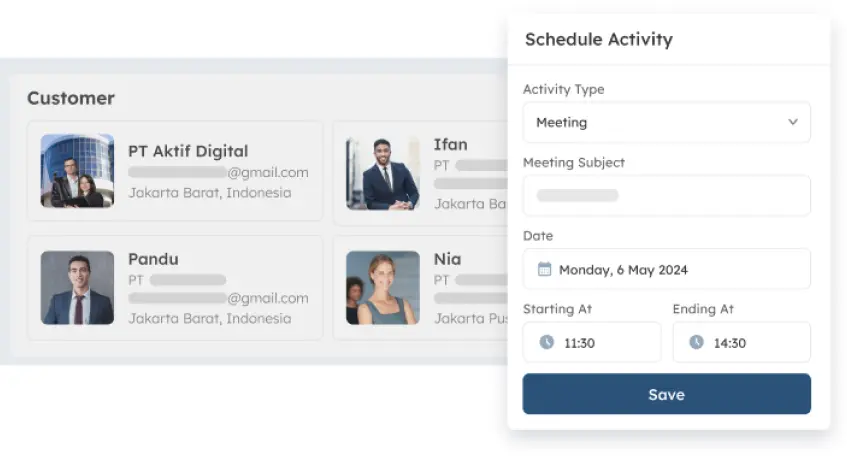
ScaleOcean’s sales management system is built with growing businesses in mind, offering a powerful yet intuitive system to use. Its standout features are definitely its excellent pipeline management and some truly robust reporting capabilities, making it easy to see your whole sales management clearly.
ScaleOcean offers a comprehensive solution to common sales management challenges. Automation and advanced analytics help teams work smarter and increase productivity. Supported by the CTC grant up to 70% of funding, ScaleOcean enables businesses to adopt these digital tools affordably and sustainably.
Key Features:
- Seamless End-to-End Pipeline Visibility: Clear pipeline view to track, manage, and accelerate sales from lead to closing.
- Smart Automation that Boosts Productivity: Automates tasks and workflows to save time and increase team sales efficiency.
- Real-Time Analytics for Smarter Decision-Making: Provides real-time insights for better decisions, sales tracking, and performance monitoring.
- Anywhere Access for Field Sales Teams: Mobile access enables field teams to update and manage sales tasks in real time.
- Integrated Contact & Lead Management System: Centralizes leads and contacts with auto-tracking, scoring, and prioritization features.
| Pros | Cons |
|---|---|
|
|
Price: ScaleOcean offers a free demo and provides a flat price with no hidden costs, tailored to the scope and complexity of your business’s implementation needs.
Best For: Ideal for medium to large enterprises, with customizable solutions for all business processes across various industries.
2. Salesforce Sales Cloud
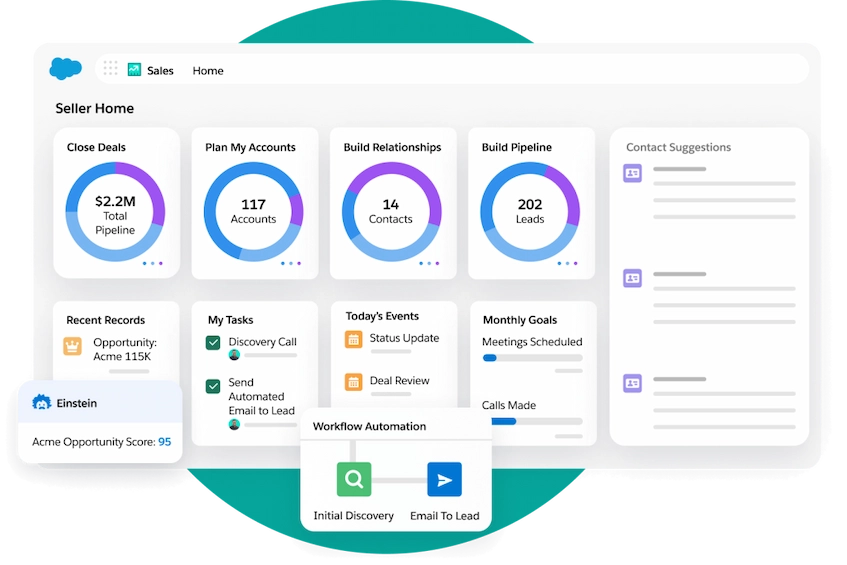 There is a good reason why Salesforce is still regarded as one of the leading brands in the sector. It is a platform appropriate for large-scale enterprise operations since it provides a wide range of tools that can be tailored for different business needs.
However, its intricacy may be a disadvantage, particularly for smaller groups. The extensive feature set frequently leads to a steep learning curve. Nonetheless, it continues to be a well-known choice in the industry for those who need its wide range of features.
Key Features:
- Highly customizable CRM framework
- AI-powered sales forecasting
- Advanced workflow automation
- Wide third-party app ecosystem
| Pros | Cons |
|---|---|
|
|
Price: Salesforce Sales Cloud provides a 30-day free trial, with pricing ranging from S$32 to S$700 per user/month (billed annually) in 2026.
Best For: Best for mid-sized to large enterprises due to its complexity and higher implementation cost, offering advanced features for large teams.
3. HubSpot Sales Hub
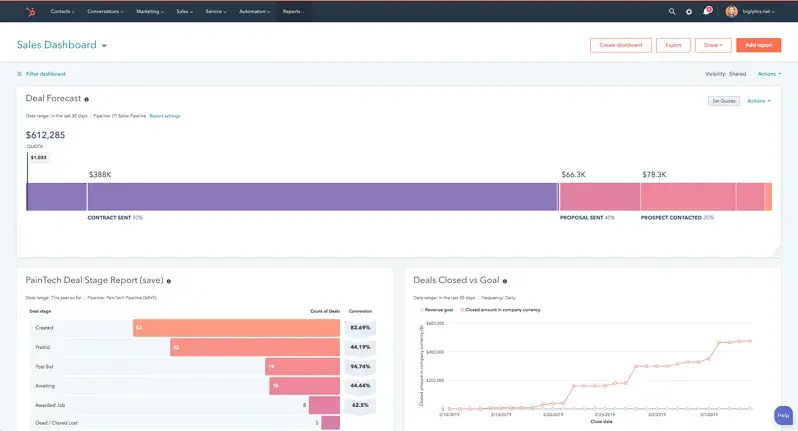
HubSpot‘s user-friendly interface and emphasis on inbound marketing have helped it become a well-known brand. A unified platform for managing the customer journey from beginning to end is created by the Sales Hub’s seamless integration with various marketing and service technologies.
They also provide a free version, which is a good place for small businesses to start. You can choose more sophisticated features as your company expands, providing flexibility that many businesses seeking scalable solutions find appealing.
Key Features:
- Integrated with HubSpot marketing tools
- Email tracking and automation
- Deal pipeline management
- Built-in reporting dashboards
| Pros | Cons |
|---|---|
|
|
Price: HubSpot offers a free, limited version of its CRM platform, with paid plans starting at S$19-S$25 per user/month.
Best For: Perfect for small-to-medium businesses (SMBs) looking for a scalable and easy-to-use solution that grows with the business.
4. Pipedrive Sales System
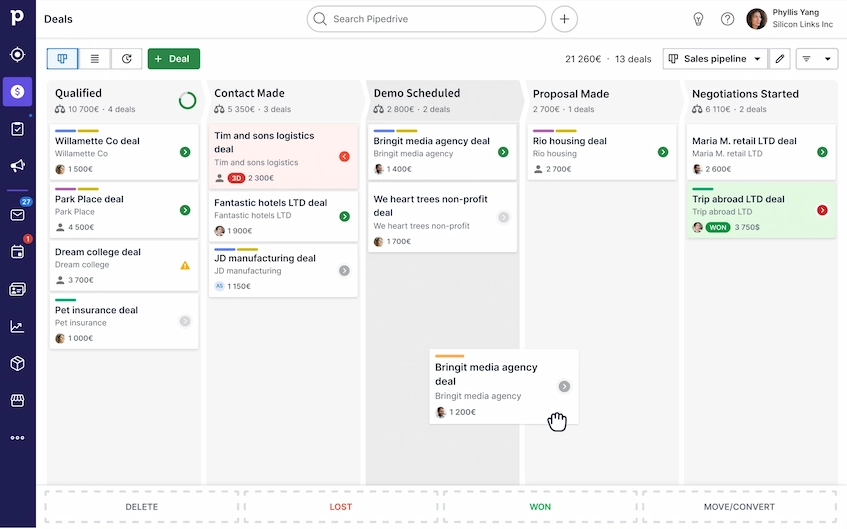 Because Pipedrive is based on the idea of a sales pipeline, it is simple to use and intuitive. Teams are able to easily track deals through all stages because of its simple visual interface. The design prioritizes usability to meet the demands of sales teams.
It might work well for small and medium-sized companies seeking an easy-to-use, activity-based sales tool. By providing a platform that prioritizes goal achievement and outcomes, it assists teams in maintaining focus on the steps that result in closing agreements.
Key Features:
- Visual pipeline management
- Activity-based selling tools
- Sales reporting and insights
- Email and calendar sync
| Pros | Cons |
|---|---|
|
|
Price: Pipedrive plans start at S$18 to S$126 per user/month, with a 14-day to 30-day free trial available.
Best For: Best suited for sales-focused SMBs that need to manage pipelines, track activities, and close deals effectively.
5. Zendesk Sell Sales Management Solution
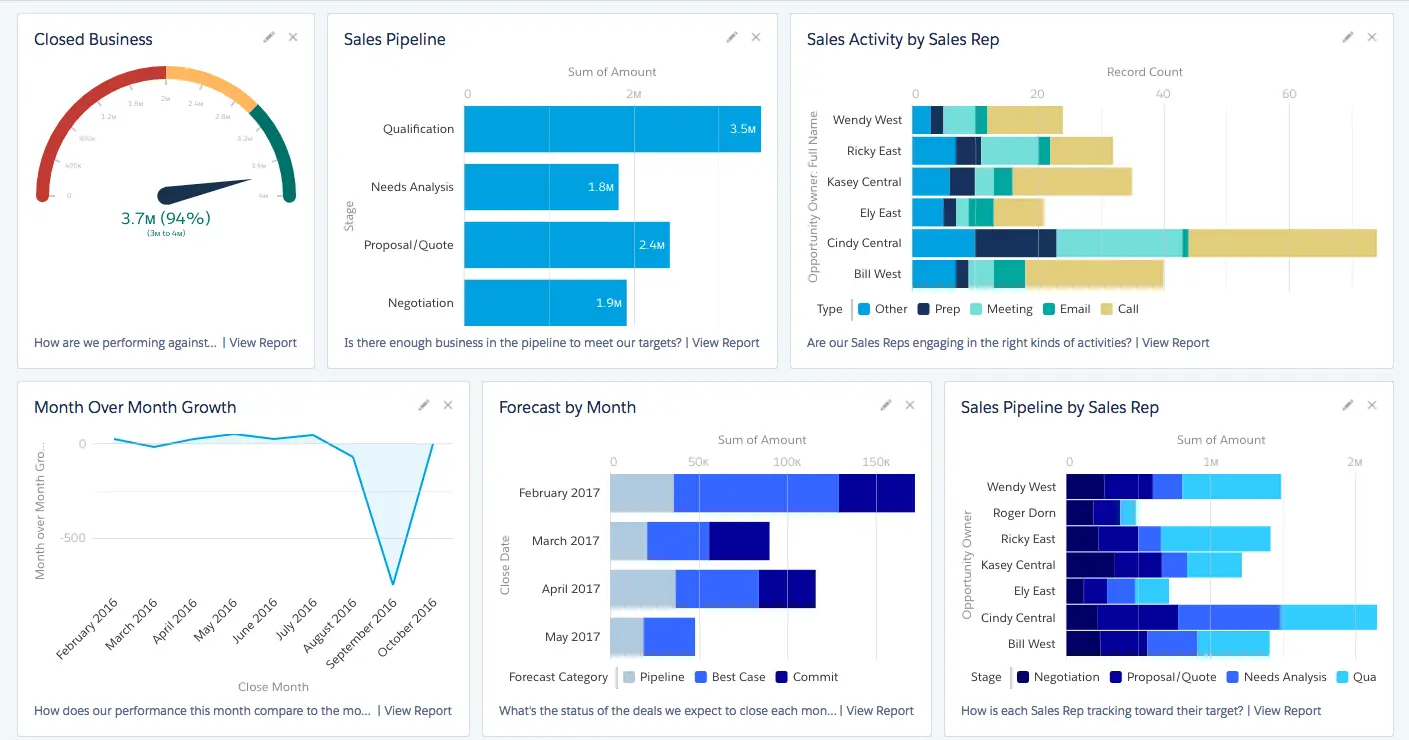
With Zendesk Sell, Zendesk, which was first recognized for its customer support solutions, has entered the sales CRM market. It is a useful choice for sales teams who must manage activities while on the go because of its clear interface and strong mobile capabilities.
Its combination with Zendesk’s support platform, which offers a comprehensive view of every customer, is what makes it unique. By bringing the sales and support teams closer together, this integration promotes a more unified strategy that enhances the client experience as a whole.
Key Features:
- Clean, modern interface
- Strong mobile app support
- Integration with Zendesk Support
- Sales activity tracking
| Pros | Cons |
|---|---|
|
|
Price: Zendesk offers a mobile-first CRM experience starting at S$24 per agent/month, with a 14-day free trial available.
Best For: Designed for small to mid-sized businesses (SMBs) looking for a user-friendly and affordable CRM solution for their sales teams.
6. Freshsales System
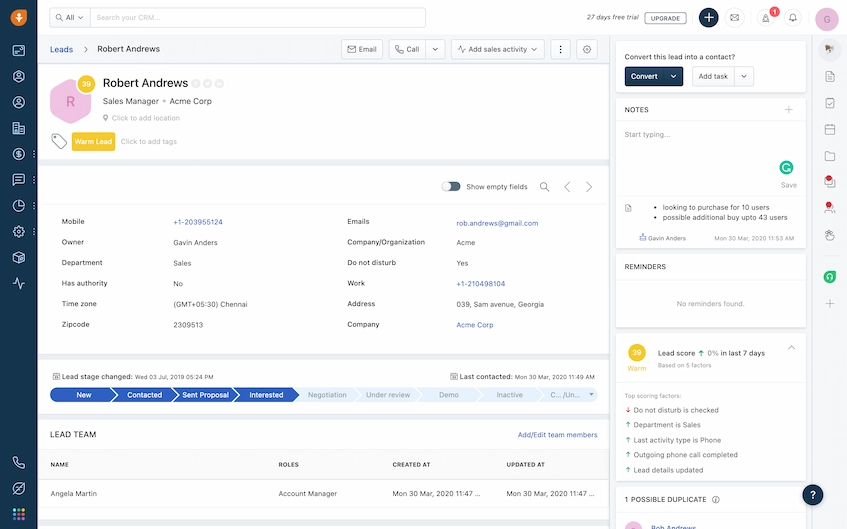 The AI-powered features of Freshsales, a component of the broader Freshworks ecosystem, are well-known. It positions itself as a complete sales solution by providing features like lead scoring, analytics, and workflow automation that help sales teams operate more effectively.
Its integrated phone and email system, which combines communication, is a useful feature. With a suite of tools that offer a multitude of functions to help teams with their everyday activities, this connection streamlines the process.
Key Features:
- AI-powered lead scoring
- Built-in phone and email system
- Workflow automation
- Customizable reports and analytics
| Pros | Cons |
|---|---|
|
|
Price: Freshsales offers a free plan for up to 3 users, with paid plans ranging from S$11 to S$90 per user/month, depending on the tier.
Best For: Ideal for small to medium-sized businesses (SMBs) and startups that need an AI-powered CRM at a competitive price point, offering scalability.
7. Copper Sales Management System Software
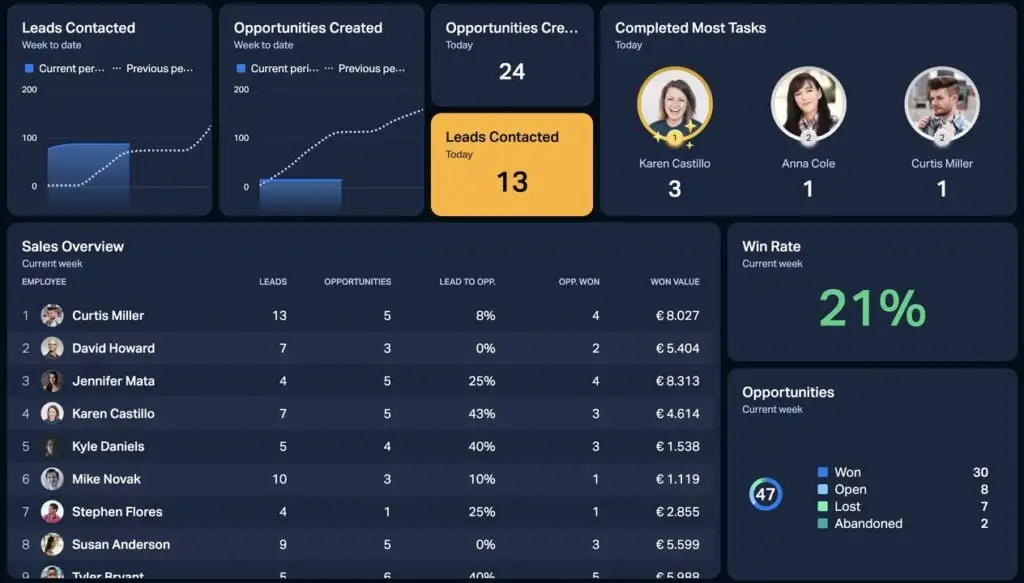
Copper is a CRM made especially for Google Workspace users. It offers a time-saving solution by reducing manual data entry and increasing workflow efficiency through direct integration with Gmail and other Google apps.
Copper can be a suitable choice for sales management if your team uses Google Workspace extensively. With an emphasis on simplicity and increasing productivity across sales operations, the integration makes adoption easier for the majority of users.
Key Features:
- Deep integration with Google Workspace
- Automatic data capture from Gmail
- Pipeline management tools
- Reporting and insights
| Pros | Cons |
|---|---|
|
|
Price: Copper’s pricing ranges from S$14 to S$216+ per user/month, with a 14-day free trial available.
Best For: Perfect for small to medium-sized businesses (SMBs) that heavily use Google Workspace, offering deep integration with Gmail, Calendar, and Drive.
8. Keap Sales Management System
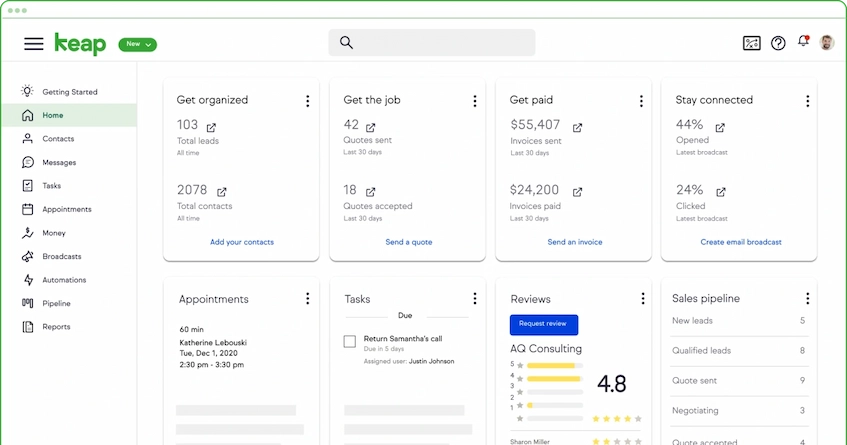 Keap, previously known as Infusionsoft, provides a suite of tools for small businesses that integrate sales and marketing automation with CRM. Automating several phases of the sales process, it assists companies in managing client connections and nurturing prospects.
Its automation features make it appropriate for companies that need substantial support for their sales operations, even though it might seem more complicated than some other sales management systems. For those seeking these features, it remains a good choice.
Key Features:
- CRM with marketing automation
- Lead nurturing workflows
- Task and appointment automation
- Payment and invoicing tools
| Pros | Cons |
|---|---|
|
|
Price: Keap offers a 14-day free trial, with Pro Plans starting around S$164-S$253/month and Max Plans starting at S$253-S$380/month.
Best For: Best for small to mid-sized businesses (1–15 employees) seeking an all-in-one CRM, sales, and marketing automation platform with expert coaching.
9. Zoominfo Sales Management
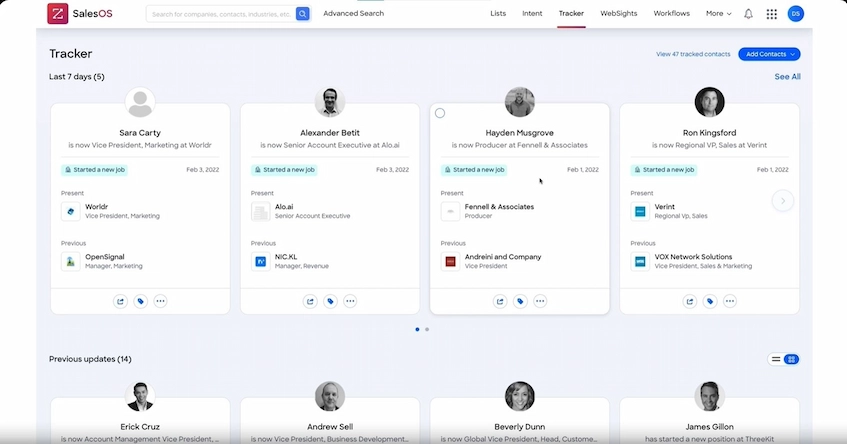 ZoomInfo SalesOS is a complete B2B intelligence platform in addition to being a CRM. It gives teams access to a sizable database of contacts and business data, facilitating the efficient identification and communication with important decision-makers.
For focused prospecting and lead generation, this platform is helpful. For organizations concentrating on outbound sales tactics, its high-quality data makes it a viable choice, providing helpful insights and resources for identifying possible leads.
Key Features:
- Massive B2B contact database
- Advanced lead generation tools
- Real-time company insights
- Integration with major CRMs
| Pros | Cons |
|---|---|
|
|
Price: Zoominfo’s pricing starts around S$19,000 per year for entry-level plans, with a free trial available.
Best For: Primarily suited for medium to large enterprises that need detailed data on leads, accounts, and sales performance across multiple teams.
10. Insightly Sales Software
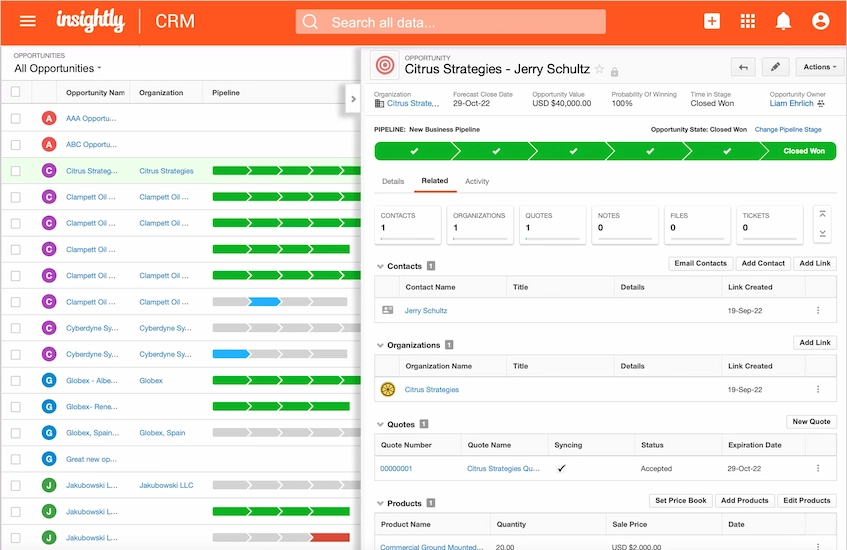 Insightly is a flexible platform that blends project management and CRM functionalities. Businesses with intricate, multi-stage sales cycles or significant post-sale projects would particularly benefit from this integration, which keeps everything organized and on track.
One practical benefit is its capacity to immediately connect projects to agreements and relationships. This feature, which offers a single workflow for increased efficiency, is especially helpful for service-based firms or those with lengthy, intricate implementation processes.
Key Features:
- CRM with project management features
- Pipeline and opportunity tracking
- Workflow automation
- Contact and project linking
| Pros | Cons |
|---|---|
|
|
Price: Insightly’s pricing ranges from S$36 to S$126 per user/month, with a free trial and a limited free tier for up to 2 users.
Best For: Best for small to mid-sized businesses (50–250 employees) that require a combined CRM and project management solution for efficient workflow management.
Key Features to Look For in Sales Management Software
When you’re out there looking at different sales management software options, it’s pretty common to get swamped by all the fancy features and extra bells and whistles.
But really, there are just some core functions that are totally essential for any decent system to have. Here are the key functions and features to consider:
1. Manages Customer and Lead Data
Sales management software should provide a centralized place to store all your customer and lead data. With everything in one spot, sales teams can easily access the info they need, stay organized, and respond quickly to customer inquiries, which you can also pair with the best lead management software.
Keeping all data organized reduces the chances of mistakes or duplication. With detailed histories and records, sales reps can personalize their outreach and connect more effectively with customers, boosting the chances of converting leads into sales.
2. Tracks Leads, Deals, and Pipeline
One of the key features of sales management software is the ability to track your leads, deals, and the entire sales pipeline. This lets you see exactly where each lead is in the sales process, helping your team stay on top of every opportunity, including sales account management.
With a clear view of the pipeline, sales teams can identify potential roadblocks and focus on the most promising leads. This helps ensure no opportunity slips through the cracks while also providing insights to optimize the sales process and close more deals.
3. AI and Automation Features
AI features in sales management software can save time by automating repetitive tasks like lead scoring and follow-ups. This lets your sales team focus on the high-value tasks that require a personal touch, such as closing deals and building relationships.
AI also gives your team smarter tools by analyzing data and offering recommendations. When connected with quoting software, these insights can help teams prepare more accurate offers, respond faster to opportunities, and make better-informed sales decisions.
4. Analyzes Performance and Sales Reporting
Sales management software provides detailed analytics that help monitor sales performance. With the ability to generate real-time reports, you can quickly see what’s working and what’s not, making it easier to adjust strategies on the fly.
Having access to performance metrics lets managers spot top performers and areas for improvement. It also helps with forecasting, so your team can allocate resources more effectively and ensure consistent growth across all stages of the sales process.
5. Facilitates Team Collaboration
Sales management software should make collaboration between team members easier. With shared access to lead management data, deals, and notes, everyone stays on the same page, which means less time spent searching for information and more time focusing on closing deals.
Collaboration tools like task assignments, messaging, and document sharing help the team stay connected no matter where they are. When sales teams work seamlessly together, they close deals faster and operate more efficiently, resulting in better overall performance.
6. Integrates with Other Business Tools
For sales management software to be truly effective, it needs to integrate well with other tools your business uses, like CRM systems, marketing platforms, and accounting software. This ensures everyone in your organization is on the same page and working with the same data while enabling smarter insights and automation through AI for sales capabilities.
These integrations streamline workflows by reducing the need for manual data entry. They also help increase efficiency across departments, creating a more cohesive system that allows your business to run smoothly from end to end.
7. Access on Mobile Devices
Mobile access is essential for modern sales teams, especially when connected to an order management system. It allows sales representatives to manage tasks, track leads, monitor orders, and communicate with clients while travelling or attending in-person meetings.
This flexibility keeps your team connected and ensures they can access important information whenever they need it. For field sales reps, having mobile access means nothing gets missed, and important tasks can be handled promptly even when they’re away from the office.
Conclusion
The appropriate sales management software is determined by each company’s specific requirements. The goal is to find a platform that not only organizes data but also enables teams to work more efficiently, manage sales better, and generate long-term corporate success.
ScaleOcean provides solutions for lead management, task automation, and reporting, which directly address daily sales difficulties. These products provide a visible ROI for teams. Schedule a free demo today to learn more about how ScaleOcean may help your business expand.
FAQ:
1. What is the best sales management software?
Choosing the best sales management software depends on business needs and budget. Salesforce fits large enterprises, HubSpot works well with marketing, and Pipedrive focuses on pipelines. ScaleOcean is another excellent option, offering smart, user-friendly solutions for growing teams.
2. Which CRM software is best?
The ideal CRM software should be flexible, scalable, and easy to use. Salesforce is highly customizable, HubSpot links sales with marketing, while Zoho CRM is cost-effective. ScaleOcean provides a balance of simplicity and analytics, making it a great fit for expanding businesses.
3. Which CRM is best for beginners?
Beginners often prefer CRMs that are easy to set up and navigate. HubSpot’s free plan is accessible, Zoho CRM delivers affordable entry options, and Copper integrates directly with Google Workspace. ScaleOcean also offers a straightforward platform, perfect for new teams.
4. What is sales management software?
Sales management software is designed to organize sales tasks, track leads, and analyze team performance. It consolidates activities in one platform, automates routine processes, and offers insights that improve efficiency, helping businesses achieve stronger sales results.
























.png)