




CMMS software is a computerized maintenance management system that centralizes maintenance planning, asset records, and work orders. As a result, company operations can eliminate duplicate effort, maintain better equipment life, and improve operational consistency.
Most Singapore companies face problems with unexpected equipment failures and difficulty controlling repairs to maintain consistency across many plants. Maintenance crews use paper, separate apps, or spreadsheets to manage assets, which prevents managers from viewing performance in real time and hinders quick responses during operations.
Modern CMMS software helps automate maintenance by providing centralized data and creating consistent procedures. In addition, companies achieve more reliable maintenance, enhanced quality control, and optimized asset utilization.
 Key Takeaways
- CMMS software is a software that helps a maintenance department manage all its work through a single, integrated system
- CMMS software benefits include lower costs, regulatory compliance, optimized resource use, extended asset lifespans, and reduced operational disruptions.
- Modern CMMS software features include work order management, preventive maintenance, asset tracking, inventory control, reporting, and mobile accessibility.
- Comparing the best CMMS tools, including ScaleOcean, UpKeep, and SafetyCulture, helps businesses choose a provider that improves asset reliability, maintenance efficiency, and quality management.
- ScaleOcean Quality Management Software helps companies and enterprises centralize maintenance, optimize asset performance, and support sustainable business growth through integrated operations.

What is a CMMS (Computerized Maintenance Management System)?
A Computerized Maintenance Management System (CMMS) is software that helps a maintenance department manage all its work through a single, integrated system. The system maintains all asset data, schedules and monitors preventive maintenance, and records work history.
Here, common operational data serves as a bridge among the maintenance departments, including technicians, supervisors, and the management system. Personalized maintenance and different operating philosophies or work practices can be observed, but, among other things, recording will be simplified.
How Do CMMS Systems Work?
The CMMS systems gather maintenance data on assets, users, schedules, inspections, and work orders, consolidating it into a single database. The software then automatically creates maintenance tasks based on service strategies and operating conditions.
Technicians view digital work orders from mobile devices, complete maintenance activities, and update asset conditions on the spot. Managers then use dashboards, reports, and maintenance history to monitor maintenance performance.
Additionally, a CMMS stores documentation, inspection reports, spare parts inventory, and calibration schedules in one place. As a result, companies make audits less complex and ensure better teamwork and quality management through precise Maintenance documentation.
Example in Manufacturing: According to a Forbes article, modern manufacturers increasingly integrate CMMS with manufacturing execution systems (MES), machine sensors, and analytics dashboards to continuously monitor equipment performance.
This combination allows maintenance teams to analyze machine conditions, downtime history, and production data from a centralized platform before failures occur. Furthermore, analytics help identify recurring equipment issues, automatically prioritize maintenance work orders, and align maintenance schedules with production plans.
According to Forbes, combining MES and CMMS creates richer operational insights that improve condition-based maintenance, reduce unplanned downtime, and optimize overall equipment effectiveness across manufacturing facilities.
What are the Benefits of Using a CMMS in Your Industry?

Every industry relies on equipment reliability to protect productivity, ensure product quality control, and maintain operational safety. Implementing a CMMS system can provide quantifiable benefits throughout the entire maintenance lifecycle.
In addition to daily upkeep, CMMS software enables enhanced planning, resource management, regulatory compliance, and effective long-term asset performance. This is how businesses become more visible while reducing the risks associated with maintenance activities.
1. Fewer Breakdowns
The CMMS software automatically schedules preventive maintenance based on running time, operating hours, meters, and calendar time intervals. As a result, the maintenance department tends to perform service tasks before equipment failure or quality degradation occurs.
Plus, thorough maintenance histories enable technicians to quickly identify recurring equipment problems, troubleshoot efficiently, and address underlying causes. Thus, organizations can reduce the need for urgent repairs and enhance equipment reliability across all lines of operation.
2. Lower Costs
Unforeseen equipment failures lead to costly repair bills, production losses, and urgent part transactions. CMMS system reduces these expenses by scheduling maintenance to avoid sudden breakdowns.
Additionally, the head of maintenance makes the best use of labor, inventory availability, and maintenance priorities with the help of the best quality management system, informed by integrated operational data. Hence, organizations experience reduced maintenance waste and enhanced operational and financial efficiencies.
3. Ensure Regulatory Compliance
Various industries require rigorous adherence to maintenance, inspection, calibration, and safety regulations on a daily basis. The CMMS software thus autonomously tracks maintenance work with precise day and time stamps and graphic-based records.
Additionally, centralized maintenance records help streamline regulatory audits by making all maintenance history and inspection evidence immediately available. But an organization gains compliance assertively and lessens the administrative burden during external or internal audits.
4. Easy Mobile Accessibility
Using modern CMMS tools, technicians can get work orders on their cell phones or tablets anywhere. As a result, maintenance personnel are working on sites without going to maintenance offices many times.
The other great advantage is that technicians can upload photos, signatures, inspection reports, and maintenance reports from equipment locations. Thanks to that, managers are kept up to date on upcoming maintenance, and communication between the maintenance and Quality departments is facilitated.
5. Extended Asset Lifespan
Preventive maintenance prevents equipment damage due to harsh conditions and infrequent inspections. As a result, important business machinery remains available for much longer operational lifecycles.
In addition, maintenance history information indicates trends and provides detailed asset condition data, which results in better maintenance planning and asset replacement decisions. This means that companies optimize their asset value and avoid needless high capital spending for premature asset replacements.
6. Increase Transparency and AccountabilityThe
CMMS system automatically tracks all work orders, technician assignments, completed work, and work status so managers have complete information on maintenance requirements without relying on scattered documentation.
Furthermore, centralized maintenance records facilitate communication among the production, maintenance, and quality management divisions. Thus, companies foster accountability while establishing transparent maintenance procedures in every practical facility.
7. Lower Maintenance Expenditures
Offers preventive maintenance. Preventive maintenance minimizes the cost of unscheduled repairs, often necessitating rush replacement parts and necessitating night or weekend labor. Maintenance departments thus have tighter control of operating expenses over the life of the equipment.
Furthermore, the CMMS enhances maintenance planning by providing a clear overview of spare parts consumption rates and the number of maintenance activities performed. As a result, companies can prevent excessive inventory costs and maintain the right level of inventory.
8. Reduces Unplanned Downtime
Unscheduled downtime due to equipment failure can negatively affect production schedules, customer product delivery, and process efficiency. Hence, CMMS software can help determine the required maintenance before the breakdown occurs.
In addition, work order and asset data and history are available immediately to maintenance groups, enabling quick response. Hence, production stoppages are minimized, and equipment is returned to availability faster.
9. Optimizes Resource Allocations
Maintenance managers allocate work effectively according to asset criticality, operating risk, and equipment condition because technicians tend to perform maintenance on high-value assets more than on low-priority assets.
Furthermore, a CMMS maintenance management system helps distribute the workload fairly among technicians, crew planners, and available spare parts through centralized scheduling. Thanks to this, companies have increased efficiency and maximized their operational capacity.
Capabilities & Features of CMMS Software Systems

CMMS software offers an array of intuitive tools that make performing maintenance easier and that enhance equipment reliability and maintenance transparency. As a result, companies eliminate isolated maintenance functions in favor of uniform workflows that optimize operational performance.
Apart from scheduling maintenance, a CMMS maintenance management system today also consolidates and stores information about assets, maintenance history, inventory, and performance data on a single platform. Businesses can thus reduce operational risks, administrative workload, and maintenance downtime.
1. Work Order Administration
Work order administration enables maintenance teams to issue, assign, prioritize, and monitor maintenance requests from a single, accessible window. As a result, technicians receive comprehensive directives, and managers have end-to-end visibility into each maintenance activity.
Furthermore, CMMS software automatically tracks labor hours, maintenance notes, failure modes, parts, and completion information. With this integration in the programs, companies will take greater responsibility and maintain comprehensive maintenance histories to support troubleshooting and learning.
2. Preventive Maintenance
Preventive maintenance prearranges inspection and servicing based on calendar time, number of hours or production runs, or based on specific usage measures (such as counters or meters), thereby ensuring that equipment is serviced prior to costs or inconvenience.
Additionally, automated reminders help prevent missed maintenance on several buildings and manufacturing lines simultaneously. This helps the company enhance asset reliability without incurring expensive downtime or responding to mechanical emergencies.
3. Asset Tracking
Asset tracking saves detailed information about every piece of equipment. It contains location, specs, service time, warranty, and work condition in a single database. The maintenance team can quickly find the correct information when real equipment needs maintenance.
In addition, CMMS software persistently records maintenance activities for each work order or inspection. As a result, the company has full asset visibility and makes informed decisions regarding maintenance and replacement.
4. Inventory Management & Spare Parts
An automatic inventory management system tracks the availability of spare parts, stock movements, supplier information, and reordering levels across the various maintenance workflows integrated with this process. As a result, technicians can quickly find the spare parts they need without delaying maintenance.
Furthermore, CMMS software often automatically links small-part usage to completed work orders and tracked equipment histories. So, businesses utilize asset investments more efficiently and avoid delays in repair, replacement, and maintenance due to a lack of spare parts.
5. KPI & Analytics Reporting
KPI and analytics reporting takes maintenance data and creates dashboards that show equipment reliability, downtime, maintenance costs, technician productivity, etc. In this way, managers work on more precise operational data than impressions.
Additionally, reporting capabilities enable effective maintenance planning by evaluating lost-time failures, maintenance trends, and asset performance over time. Hence, maintenance effectiveness is constantly improved to meet the quality management goals.
6. Mobile Accessibility
Mobile Access-with mobile access, technicians can receive work orders, do inspections, and update maintenance records while on equipment. This keeps maintenance rolling without being hindered by paperwork or office computers.
Furthermore, technicians record images, digital signatures, inspection checklists, and maintenance evidence electronically and instantly using mobile devices. As a result, companies can reduce communication delays, speed up reporting, and keep proper maintenance records at every work location.
What’s the Difference Between EAM vs. CMMS vs. ERP?
Although EAM, CMMS, and ERP support business operations, they serve different operational objectives and management scopes. Therefore, understanding these differences helps organizations invest in software that matches their maintenance and business requirements.
CMMS primarily focuses on maintenance execution, EAM manages complete asset lifecycles, and ERP integrates enterprise-wide business processes. Consequently, many organizations combine these systems to maximize operational efficiency and organizational performance.
| Feature | EAM | CMMS | ERP |
|---|---|---|---|
| Primary Focus | Maintenance management | Enterprise asset lifecycle management | Enterprise-wide business management |
| Main Users | Maintenance teams and technicians | Asset managers, maintenance, operations | Finance, HR, procurement, sales, operations |
| Asset Management | Tracks maintenance history and servicing | Manages assets from acquisition through disposal | Stores basic asset financial information |
| Inventory Management | Maintenance spare parts | Enterprise asset inventory | Company-wide inventory management |
| Financial Management | No | Limited | Comprehensive financial management |
| Procurement | Basic maintenance purchasing | Asset procurement support | Complete procurement management |
| Best For | Maintenance-focused organizations | Asset-intensive enterprises | Businesses managing all core operations |
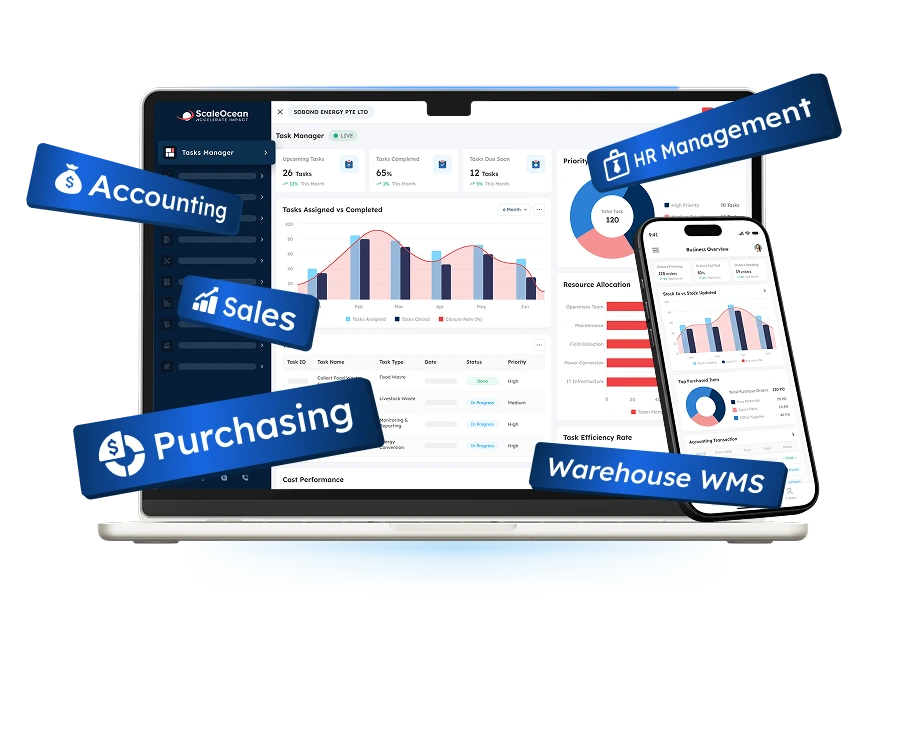
However, many businesses struggle with disconnected maintenance systems that reduce operational visibility. ScaleOcean CMMS Software centralizes work orders, preventive maintenance, asset records, and inventory, and integrates seamlessly with finance, purchasing, and other business functions to provide greater operational visibility.
With flexible implementation, business-specific configurations, and support for Singapore GST compliance, EDG, and CTC grant requirements, ScaleOcean helps enterprises modernize maintenance with confidence. Request a free demo to discover how ScaleOcean CMMS Software can streamline maintenance across your organization.
Common CMMS Use Cases by Industry
For companies that require machinery availability, scheduled maintenance, and consistent operation in daily activities, using a CMMS is inevitable. As a result, the majority of firms apply CMMS to minimize equipment downtime and enhance maintenance scheduling and asset transparency.
Regardless of the industry, maintenance automation provides tangible benefits to all types of business operations. That is why CMMS software is so flexible and can be adapted to a single business operation while remaining scalable for future development. To understand what CMMS software is, below are the use cases from different industries.
1. Manufacturing
Manufacturers rely heavily on scheduling to ensure the smooth operation of their products. CMMS software helps production properly schedule and carry out preventive maintenance, minimizing unwarranted breakdowns by effectively maintaining manufacturing tools and equipment.
Furthermore, maintenance teams track equipment histories and focus on recurring failures and maintenance procedures through centralized maintenance records. As a result, manufacturers optimize operational dependability and reduce the expensive production downtime and maintenance inefficiencies.
2. Facility Management
Facility management companies use CMMS to manage heating, ventilation, and air-conditioning systems, lifts, electrical systems, plumbing equipment, and other assets within a building. As a result, maintenance teams can react quickly to problems and guarantee the safety and efficiency of the facilities.
Furthermore, preventive maintenance and automated inspections minimize service disruptions experienced in commercial buildings, university campuses, and industrial plants. Facility managers thus enhance tenant satisfaction and the expansion of building assets.
3. Fleet Operations
Using a CMMS ensures that fleet operators can plan vehicle maintenance, track service history, and effectively manage inspection needs. As a result, transportation companies minimize vehicle breakdowns and enhance fleet utilization.
Furthermore, the maintenance team records all data on spare parts, their maintenance costs, and vehicle maintenance related to fuel and performance in centralized maintenance records. So, it helps organizations optimize fleet utilization and minimize maintenance costs throughout a vehicle’s life.
4. Healthcare
Healthcare organizations rely on CMMS to properly maintain their medical, laboratory, and diagnostic equipment, as well as other hospital facilities. As a result, the Maintenance Department ensures that vital equipment is kept available for patient care.
In addition, automated maintenance schedules and comprehensive maintenance records greatly ease future regulatory and accreditation processes. As a result, the organization maximizes equipment reliability while safeguarding patient safety and remaining operationally prepared.
The Best CMMS Software Tools in 2026
Choosing the right CMMS software helps businesses compare CMMS software companies to improve asset reliability, maintenance efficiency, and quality management. Therefore, businesses should carefully compare functionality, scalability, integration capabilities, and long-term implementation support.
The best CMMS solutions in 2026 provide automation, mobile access, analytics, and enterprise integration for growing organizations. Moreover, they support compliance, multi-site management, and sustainable business expansion across industries. To know what CMMS software is, below are the leading CMMS tools that you can use.
1. ScaleOcean
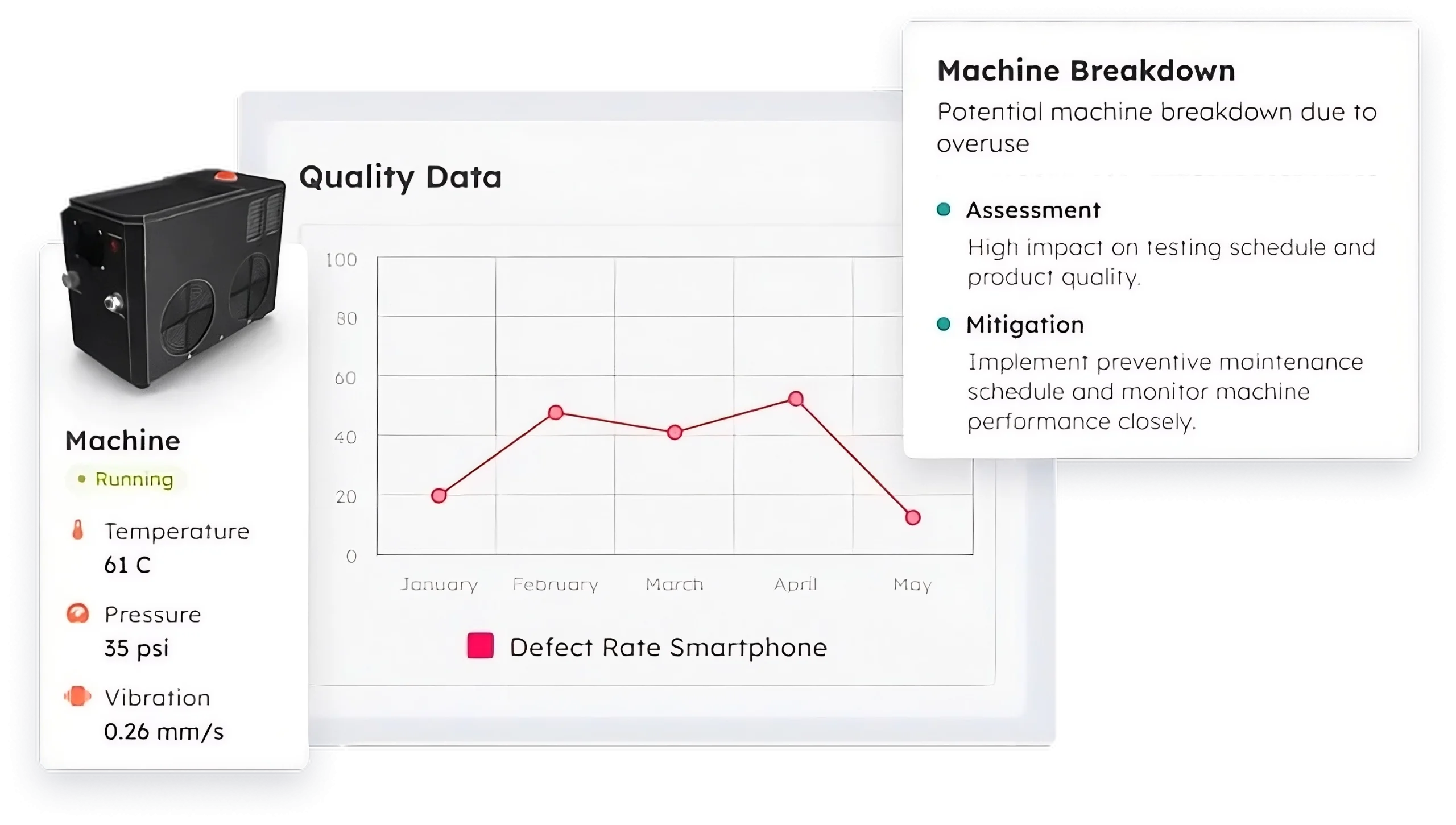
ScaleOcean Quality Management Software combines CMMS with procurement, inventory, finance, and HR within a fully integrated ERP ecosystem. Consequently, businesses gain real-time visibility, AI-driven insights, control over the asset lifecycle, and standardized enterprise reporting.
Additionally, ScaleOcean offers unlimited users, customizable workflows, and scalable modules for enterprise growth. Furthermore, the system supports Singapore GST compliance, local financial reporting, and EDG and CTC grant requirements.
Request a free demo today to see how the ScaleOcean CMMS software can streamline maintenance, enhance asset reliability, and help your organization grow over the long term.
Key Features of ScaleOcean CMMS:
- Predictive & Preventive Maintenance Scheduling: Automatically schedules maintenance based on time, usage, or asset condition to reduce unexpected equipment failures.
- WSH & Audit-Ready Reporting: Maintains digital maintenance records, permit-to-work documents, and audit trails to simplify compliance requirements.
- Mobile App with Real-Time Alerts: Enables technicians to receive work orders, update job status, and submit photo evidence directly from mobile devices.
- IoT Sensors & ERP Integration: Connects machine sensor data with ERP modules for real-time monitoring, maintenance planning, and financial visibility.
- Inventory & Spare Part Optimization: Tracks spare part availability, automates purchase requests, and prevents maintenance delays caused by stock shortages.
| Pros | Cons |
|---|---|
| Flexible approval workflows and reports adapt to existing maintenance processes. | Prioritizes long-term system stability over rapid deployment. |
| Modular implementation lets businesses expand capabilities at their own pace. | Pricing requires a consultation to accurately match the implementation scope. |
| Consultative implementation aligns the system with operational objectives. | |
| Transparent implementation timeline based on business process analysis. |
Best For: Medium to large enterprises seeking an integrated, highly configurable CMMS solution that supports complex maintenance workflows, multi-site operations, regulatory compliance, and long-term digital transformation.
2. UpKeep
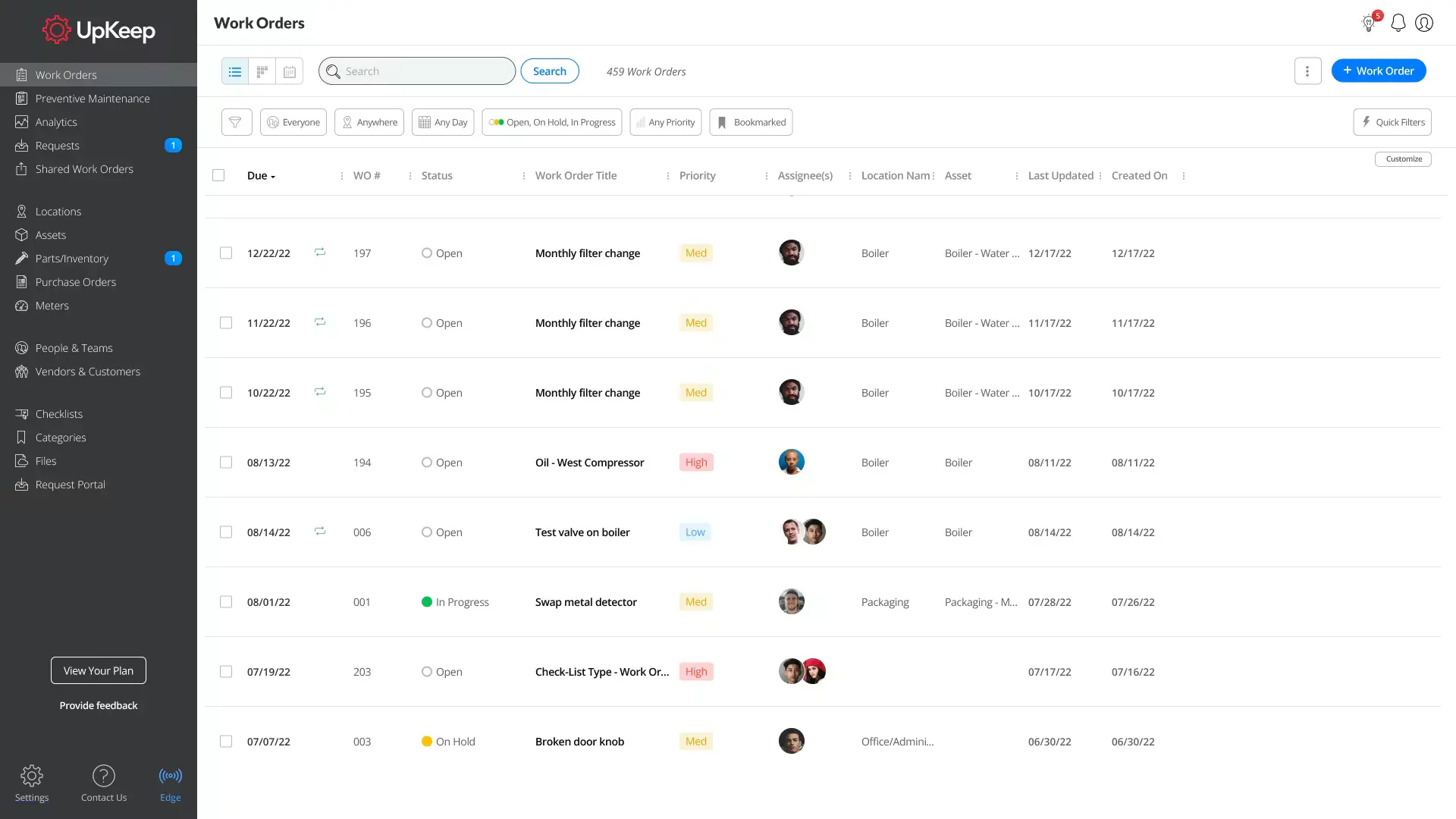
UpKeep CMMS software system helps organizations manage maintenance operations through digital work orders, preventive maintenance scheduling, and asset tracking. It is commonly used to organize maintenance activities and improve equipment visibility.
The platform also provides mobile access for field technicians and basic reporting capabilities. As a result, maintenance teams can monitor work progress and maintenance records in a single system.
Key Features of UpKeep:
- Preventive maintenance scheduling
- Digital work order management
- Mobile maintenance application
- Asset and equipment tracking
| Pros | Cons |
|---|---|
|
|
Best For: Small to mid-sized businesses that need a straightforward CMMS solution for preventive maintenance, work orders, and field maintenance management.
3. SafetyCulture
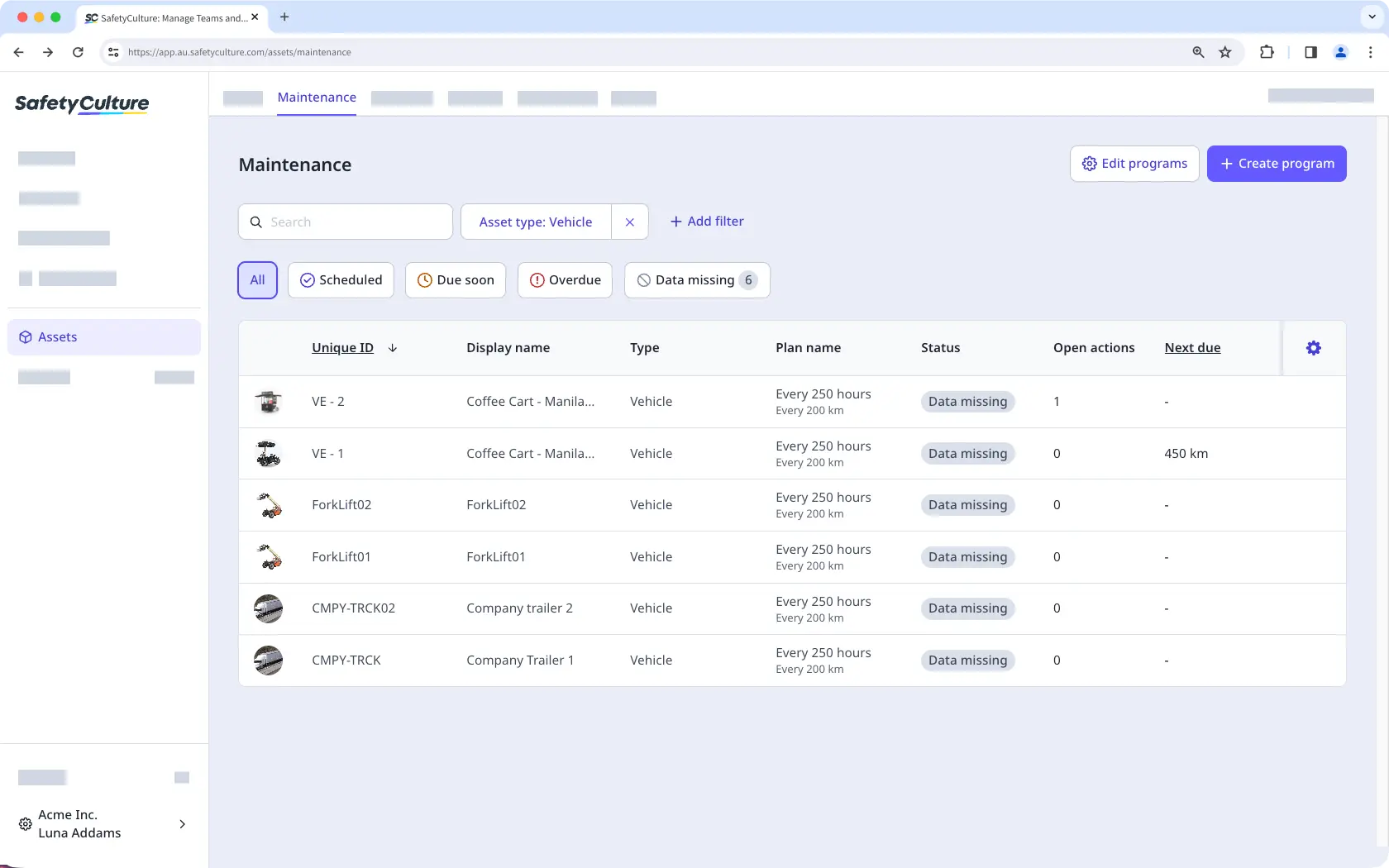
SafetyCulture CMMS software focuses on maintenance inspections, workplace safety, and digital operational checklists. It helps businesses standardize inspections while documenting maintenance and compliance activities.
The platform also supports mobile inspections, issue reporting, and workflow automation. Therefore, teams can improve operational consistency across multiple facilities.
Key Features of SafetyCulture:
- Digital inspection checklists
- Maintenance issue reporting
- Workflow automation
- Mobile inspection tools
| Pros | Cons |
|---|---|
|
|
Best For: Small to medium businesses that prioritize safety inspections, compliance documentation, and routine facility maintenance.
4. TMA Systems
TMA Systems CMMS software helps organizations manage maintenance requests, preventive maintenance, and facility assets through a centralized platform. It supports maintenance teams with scheduling and operational reporting.
Additionally, the system includes asset tracking and maintenance analytics to improve maintenance planning. This enables organizations to monitor equipment performance more efficiently.
Key Features of TMA Systems:
- Preventive maintenance planning
- Asset lifecycle tracking
- Maintenance request management
- Reporting and dashboards
| Pros | Cons |
|---|---|
|
|
Best For: Mid-sized to large organizations managing facilities, campuses, healthcare buildings, or multiple maintenance locations.
5. Cryotos
Cryotos CMMS software provides maintenance management tools for tracking assets, scheduling preventive maintenance, and managing work orders. It helps organizations digitize maintenance activities through cloud-based workflows.
The software also supports maintenance analytics and technician collaboration using mobile devices. Consequently, businesses can improve maintenance visibility across operational sites.
Key Features of Cryotos:
- Preventive maintenance scheduling
- Work order management
- Asset tracking
- Maintenance dashboards
| Pros | Cons |
|---|---|
|
|
Best For: Small to medium-sized companies looking for a cloud-based CMMS to manage maintenance operations without extensive implementation complexity.
How to Ensure Successful CMMS Usage & Implementation?
The implementation of a CMMS is not just software installation. The whole organization has to work properly along with the system. Implementation strategies need to be defined to adopt the system within the organization.
Furthermore, companies that meticulously plan their CMMS deployment will experience faster user acceptance, reduced maintenance costs, and improved overall ROI. As a result, the CMMS software system is used as a business tool, rather than another poorly used app on the network.
1. Define Clear Goals and Scope
Before installing the software, companies need to establish clear, measurable maintenance objectives to evaluate the effectiveness of any implemented control measures. This ensures that decisions made at each stage are aligned with business goals, such as reducing downtime or enhancing asset reliability.
In addition, detailing the project scope in the implementation phase avoids overcomplication during deployment and sets realistic aims for the expected changes. As a result, maintenance teams regard realistic operating enhancements as being required from the start.
2. Build a Dedicated Implementation Team
Ensuring an implementation is successful calls for a team of representatives from maintenance, operations, IT, quality, and Management, all moving in the same direction. Therefore, all departments bring operational wisdom to bear during the implementation.
This approach also expedites decision-making and reduces communication gaps during the deployment of a software product. So firms face implementation hurdles with minimum flaws and enjoy steady project execution.
3. Clean and Standardize Data
The organization must verify the asset register, system names, maintenance schedules, spare parts lists, and stores before the data conversion to CMMS tools. In this way, staff will obtain accurate, complete maintenance data in accordance with defined standards.
Furthermore, when several systems are installed in different facilities, having strict naming criteria makes reports more reliable while minimizing maintenance history analysis and future comparisons. This prevents confusion during the operation.
4. Prioritize Training and Change Management
Employees require knowledge of how to use CMMS software, as well as the rationale for why using a standardized approach to performing a maintenance task enhances business performance. This results in high usage, effective utilization, and reduced resistance to change.
Additionally, recurrent training enables other groups, such as technicians, supervisors, and managers, to apply the advanced features of a CMMS more effectively. As a result, companies take full advantage of the software and increase their reliability between various sites.
5. Audit, Refine, and Scale
After the system goes live, organizations should continually monitor it for maintenance success, user satisfaction, and performance. As a result, managers will be able to identify areas for improvement before minor problems occur.
In addition, once deployed, companies may slowly extend CMMS to other work locations, operational units, or equipment types. This extended roll-out enables the entire enterprise to manage costs more efficiently.
Conclusion
Choosing the right CMMS software helps businesses reduce equipment downtime, improve preventive maintenance, strengthen compliance, and maximize asset performance. Therefore, evaluating features, implementation strategies, and business requirements ensures organizations select a solution that supports long-term operational efficiency.
For organizations that require more than standalone maintenance software, ScaleOcean Quality Management Software is an integrated CMMS that connects maintenance to procurement, inventory, finance, and other critical business operations.
Consequently, businesses gain greater process visibility while supporting sustainable digital transformation across multiple departments. Request a free demo today to discover how ScaleOcean CMMS Software can optimize maintenance management, improve asset reliability, and support your organization’s long-term growth.
FAQ:
1. How do I choose the right CMMS software for my company?
Choose a CMMS that matches your maintenance processes, asset complexity, budget, and future growth. Prioritize ease of use, scalability, reporting, mobile access, and ERP integration to ensure long-term value.
2. Does maintenance team size affect CMMS software selection?
Yes. Smaller teams often benefit from simple, easy-to-deploy CMMS solutions, while larger maintenance teams typically require advanced workflows, multi-site management, user permissions, and scalable licensing options.
3. Can CMMS software integrate with ERP systems?
Yes. Many modern CMMS platforms integrate with ERP systems via APIs or native connectors, enabling maintenance, inventory, purchasing, and financial data to flow seamlessly across departments.
4. Is CMMS software only for large enterprises?
No. CMMS software is available for businesses of all sizes, from small companies managing basic maintenance to large enterprises requiring advanced asset management, compliance, and multi-site maintenance capabilities.





















.png)