

Construction scheduling software is a software system that a contractor uses to assist in planning the project timeline, tracking deadlines, managing dependencies, and allocating resources more appropriately. The system allows project managers to create plans for tasks, labor, vendors, materials, permits, and site progress within a single program.
Many construction companies struggle with ever-changing construction schedules, particularly for large and multiple construction projects with various vendors, consultants, subcontractors, and field teams all working at once. When schedules get out of control, project teams often experience further delays, increased operating costs, poor coordination, and communication gaps between the scheduling team and field workers.
This is where construction scheduling software becomes a practical solution. By using an integrated system, companies can manage master schedules, approval milestones, drawing revisions, procurement timelines, and subcontractor allocation more efficiently. This helps teams reduce rework and keep every stakeholder updated with the latest project information.
Based on data our team collected from Autodesk, 52% of construction rework is caused by poor project data and miscommunication. This shows why contractors need better scheduling, document control, and real-time coordination to keep complex projects on track and reduce avoidable delays.
Learn about the basics of construction scheduling software, the importance for modern-day contractors, the best 10 construction scheduling software for 2026, and how to choose the best construction software for your construction project in this article.
 Key Takeaways
- Construction scheduling software is a specific software application used to schedule, track, and manage all construction projects throughout their lifecycles.
- Top recommendations for construction scheduling software are ScaleOcean, Oracle Primavera P6, Microsoft Project, SmartPM, Planera, Outbuild, Buildertrend, Fieldwire, Procore, and CoConstruct.
- A comparison of construction scheduling software can help contractors choose the right solution by reviewing pricing and integration capabilities based on their project and business needs.
- Essential construction scheduling software features include automated CPM, baseline comparisons, and mobile access to optimize project workflows.
- ScaleOcean construction software is an integrated solution that supports advanced project scheduling, procurement control, cost tracking, automated workflows, and flexible modules for complex construction operations.

What Is Construction Scheduling Software?
Construction scheduling software is a specific software application used to schedule, track, and manage all construction projects throughout their lifecycles. This software allows construction contractors and project managers to plan out tasks, allocate labor and equipment, monitor progress, and update the overall project timeline.
Unlike project planning spreadsheets or digital calendars, construction scheduling software manages simple dependencies, approval requirements, required resources, and construction activities at a given site. Construction scheduling software is important. The core advantage of the software lies in its ability to develop and maintain a linked, real-time project timeline.
If one stage in a project timeline is delayed-whether it’s due to delays in foundation work, materials delivery, or required plan approval-the software will highlight the impact the delays will have on upcoming project milestones. This capability empowers project managers to identify and manage risks more quickly, keep the project schedule current more efficiently, and prevent smaller setbacks from ballooning into major project issues.
The right construction scheduling software effectively acts as the project timeline. Field teams, subcontractors, project managers, and senior stakeholders can access and view the identical updated schedule, clearly identify current task priorities, and focus on the project’s critical path, leading to reduced misunderstandings, enhanced coordination, and construction projects completed on schedule.
 Also Read: Top 12 Construction Cost Management Software for 2026
Construction Scheduling Software Comparison Matrix
Finding the right construction scheduling software for your business requires selecting construction scheduling software that finds a sweet spot between user-friendliness on the job site and the robust logic needed for managing construction workflows. It should make it easy for teams to manage tasks and dependencies, labor resources, equipment, documentation, and live site progress updates without impacting overall field operations.
A comparison of construction management software can aid in making a choice, evaluating products based on a project comparison matrix that takes into account your business’s specific needs. Beyond brand recognition, contractors should compare the pricing structures, target users, advanced scheduling features, collaboration capabilities, and integration potential of different software solutions.
Construction Scheduling Software Comparison Matrix
| Software | Best For | Rating | Key Features |
|---|---|---|---|
| ScaleOcean | Medium to large construction firms that need integrated scheduling, cost control, procurement, and project visibility. | 5.0/5 (G2) | Project scheduling, budget tracking, procurement management, inventory control, approval workflows, cost monitoring, and real-time reporting. |
| Oracle Primavera P6 | Large infrastructure, engineering, and capital construction projects with complex timelines and dependencies. | 4.4/5 (G2) | CPM scheduling, baselines, dependencies, resource allocation, portfolio scheduling, earned value tracking, and project control analytics. |
| Microsoft Project | Teams already using Microsoft 365 that need structured project scheduling and resource planning. | 4.0/5 (G2) | Gantt charts, task dependencies, milestones, baselines, resource planning, timeline tracking, and Microsoft ecosystem integration. |
| SmartPM | Contractors that need schedule analytics, delay insights, forecasting, and project risk visibility. | 4.9/5 (Software Advice) | Schedule quality checks, delay analytics, baseline comparison, project forecasting, automated reports, risk insights, and performance dashboards. |
| Planera | Planning teams that want visual CPM scheduling and collaborative construction schedule review. | N/A | Whiteboard-style planning, CPM scheduling, collaborative timelines, resource loading, baseline comparison, and schedule quality checks. |
| Outbuild | Lean construction teams managing lookahead planning, weekly work plans, constraints, and field coordination. | 4.9/5 (Software Advice) | Master schedules, lookahead planning, constraint tracking, roadblock management, trade coordination, field updates, and progress tracking. |
| Buildertrend | Home builders, remodelers, and specialty contractors managing residential construction workflows. | 4.3/5 (G2) | Drag-and-drop scheduling, job costing, client portal, change orders, daily logs, document sharing, and mobile project updates. |
| Fieldwire | Field teams and site supervisors that need mobile task coordination and jobsite visibility. | 4.5/5 (G2) | Task scheduling, plan viewing, punch lists, forms, field reports, real-time updates, and mobile jobsite collaboration. |
| Procore | Contractors that need an all-in-one construction project management platform for large-scale operations. | 4.6/5 (G2) | Project timelines, RFIs, submittals, budget tracking, documents, daily logs, collaboration tools, and mobile field access. |
| CoConstruct | Custom home builders and remodelers managing client communication, selections, schedules, and budgets. | 4.1/5 (G2) | Project schedules, estimates, budgets, client selections, change orders, communication tools, and residential project tracking. |
Top 10 Construction Management Scheduling Software Platforms
Based on 2026 reviews, the top construction scheduling software options focus on project timeline planning, resource coordination, progress tracking, and collaboration between office and field teams. Some solutions work best for basic task scheduling, while others support complex construction projects, CPM planning, risk analysis, portfolio management, integrated project controls, and construction project management connectivity.
1. ScaleOcean
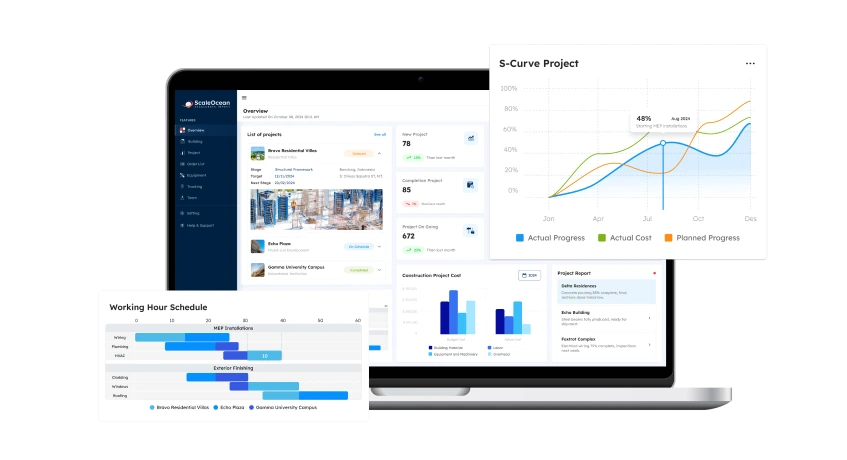
ScaleOcean is an integrated construction scheduling software that serves medium to large-sized companies that deal with complex project scheduling needs. It provides robust solutions for multi-site operations, procurement, vendors, cost management, and material tracking. Besides task scheduling, the platform offers configurable modules, automated workflows, approvals, reports, and custom integrations that adapt to various construction companies’ workflows.
The right construction scheduling software is the best solution to minimize construction project delays, optimize site coordination, and provide total visibility across planning. ScaleOcean can also integrate with existing ERP solutions, thus streamlining project scheduling, procurement, inventory, accounting, vendor management, and reporting all in one place.
To explore how the system fits your construction needs, you can request a free demo to review its features, workflow, and implementation options in more detail. The solution may also be eligible for Singapore’s EDG digitalization grant scheme, which can cover up to 50% of qualifying costs, subject to approval.
Key Features:
- Real-time 4D/5D BIM integration
- Critical path method automation
- Workforce and subcontractor allocation7
- Equipment and machinery scheduling
- MOM compliance and WSH inspection scheduling
- BCA progress claim and milestone tracking
- Just-in-Time delivery and DFMA logistics planning
| Pros | Cons |
|---|---|
| Connects project schedules with budget usage, purchase orders, material readiness, and approval status, helping teams spot potential delays before they affect project costs. | May be less suitable for small contractors that only need a simple calendar, task list, or basic project tracking tool. |
| Offers flexible configuration for dashboards, approvals, reports, and workflows, so the system can follow each company’s construction process instead of forcing a generic setup. | This software emphasizes stability, scalability, and long-term readiness rather than fast implementation with limited features. |
| Gives management clearer visibility into cost variance, material movement, subcontractor progress, and approval bottlenecks across active construction projects. | Does not use mass-market templates, so each implementation is unique and adjusted to the customer’s business characteristics. |
| Uses a consultative implementation approach, helping companies design a scheduling system based on real project workflows, role responsibilities, and business readiness. |
Best for: Medium to large enterprises in Singapore and Asia that manage complex construction project timelines, multi-site operations, procurement, contractors, inventory, cost control, approval workflows, and ERP-connected project reporting.
2. Oracle Primavera P6
The Oracle Primavera P6 planning tool to track and schedule project timelines. It’s built to track progress, resources, and costs across multi-activity, multi-team projects with varying levels of dependency. It is suitable for industrial construction, infrastructure, engineering, and big commercial builds when a more defined project plan is needed to control progress, and for schedule and resource management.
Construction teams use this tool to help schedule the project, determine critical path activity, allocate resources, track project performance, and centralize information from a single point.
Key Features:
- Activity-based project scheduling
- Resource allocation planning
- Project baseline comparison
- Multi-project portfolio control
- Schedule risk analysis
- Custom project reporting
| Pros | Cons |
|---|---|
| Gives project managers stronger control over timelines, progress, and resource usage. | May be less suitable for small contractors that only need a simple calendar, task list, or basic project tracking tool. |
| Helps standardize planning processes across departments and project teams. | It may be too complex for companies that only need basic task management. |
| Handles large project schedules with many activities, dependencies, and work phases. | Training and implementation costs can be a concern for smaller businesses. |
Best for: Large businesses that need detailed project scheduling, resource planning, multi-team coordination, and project reporting for complex long-term projects.
3. Microsoft Project
Microsoft project used to organize your tasks, time, resources, and dependencies for each part of your project. Many construction teams that already utilize this environment for their other needs will use this scheduling software and track progress through report documents.
The platform is more general-purpose than construction-specific. It can support office-based project scheduling, but companies may need additional tools when they require field communication, daily reports, RFI tracking, or document workflows for construction operations.
Key Features:
- Gantt chart scheduling
- Resource planning
- Project budget tracking
- Standard project reporting
- Microsoft 365 integration
- Project templates
| Pros | Cons |
|---|---|
| Helps office teams manage schedule visibility in a clear format. | Advanced setup can require project management experience. |
| Suitable for building structured schedules with tasks, milestones, and dependencies. | May not be ideal for companies needing an all-in-one construction management platform. |
| Familiar with teams already using Microsoft tools in daily operations. | Does not include many construction-specific workflows by default. |
Best for: Small to medium businesses that need project scheduling, task planning, resource management, and Microsoft 365 integration in a structured platform.
4. SmartPM
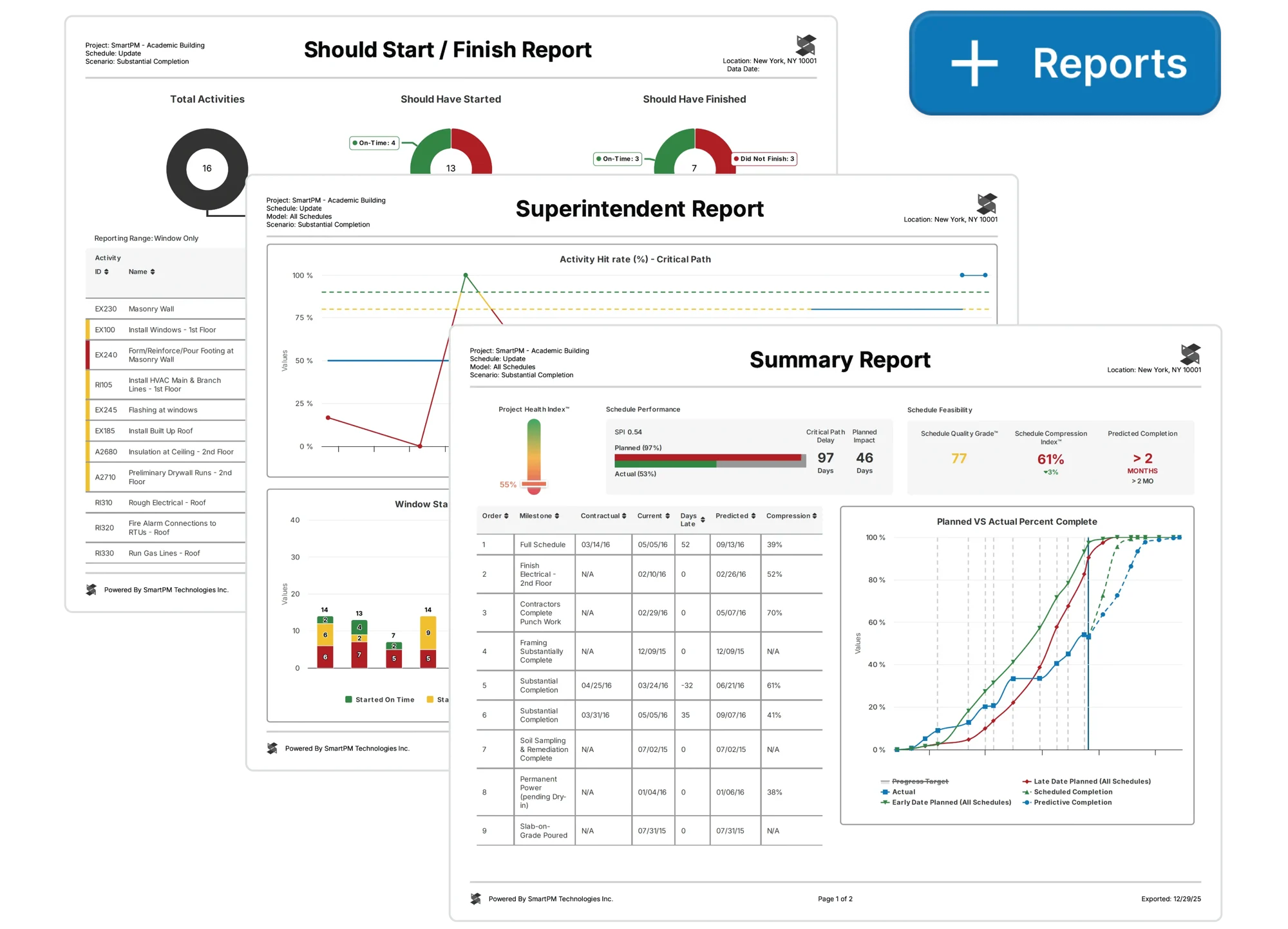
SmartPM that analyzes construction schedules to assess the quality of project progress, potential schedule delays, and risks. It doesn’t replace your existing construction project management or scheduling software, such as Microsoft Project or Primavera, but it will analyze the schedule data that is output.
It’s excellent for companies that already have a solution in place, such as a scheduling tool, but they want to gain deeper analysis and risk visibility for project control, with the ability to create clear executive-level reporting.
Key Features:
- Schedule quality analysis
- Delay risk detection
- Project health dashboards
- Schedule variance review
- Portfolio-level schedule insights
- Integration with scheduling platforms
| Pros | Cons |
|---|---|
| Helps identify schedule risks that may not be obvious in standard timeline views. | Depends on the quality and completeness of the schedule data from other tools. |
| Provides useful project health insights for executives and control teams. | May be less suitable for teams that only need basic project scheduling. |
| Helps companies make decisions based on schedule trends and risk indicators. | Requires existing scheduling processes to deliver the best results. |
Best for: Medium to large businesses that need schedule analytics, project risk visibility, delay detection, and performance reporting from existing scheduling data.
5. Planera
Planera is a construction planning and scheduling platform designed to support collaborative project planning, especially during pre-construction. It helps teams create, compare, and adjust schedule scenarios before the project moves into execution.
The system focuses on making construction planning more visual and accessible for project teams. It can support CPM scheduling, risk modeling, and scenario planning, making it useful for contractors who want to improve schedule quality before work begins on site.
Key Features:
- Collaborative schedule planning
- Schedule review and adjustment
- Scenario comparison
- Pre-construction planning tools
- Schedule risk modeling
- Visual timeline creation
| Pros | Cons |
|---|---|
| Makes early-stage project planning easier for teams to understand and discuss. | May not cover the full range of construction management needs. |
| Supports better schedule preparation before construction activities begin. | Companies may still need other systems for field execution or cost control. |
| Encourages collaboration between planning, project, and construction teams. | Feature depth should be reviewed for highly complex enterprise portfolios. |
Best for: Medium to large businesses that need collaborative construction planning, CPM scheduling, scenario comparison, and pre-construction schedule review.
6. Outbuild
Outbuild is a construction scheduling and lookahead planning platform used to coordinate project schedules with field teams and trade partners. It helps teams manage short-term planning, weekly work schedules, and subcontractor participation in one collaborative environment.
The platform is mainly used to connect master schedules with field-level execution. It supports communication between general contractors, foremen, and subcontractors so project teams can align daily and weekly work activities more clearly.
Key Features:
- Lookahead planning
- Weekly work planning
- Trade partner scheduling
- Collaborative schedule updates
- Field team coordination
- Master schedule connection
| Pros | Cons |
|---|---|
| Makes short-term planning easier for teams working directly on site. | Requires consistent team participation to keep schedules accurate. |
| Helps field teams and subcontractors participate more actively in schedule updates. | Not always suitable as the only project management system for complex projects. |
| Supports better coordination between office planning and site execution. | Adoption may take time if subcontractors are not used to digital planning tools. |
Best for: Medium to large businesses that need lookahead planning, weekly work scheduling, subcontractor coordination, and field team collaboration.
7. Buildertrend
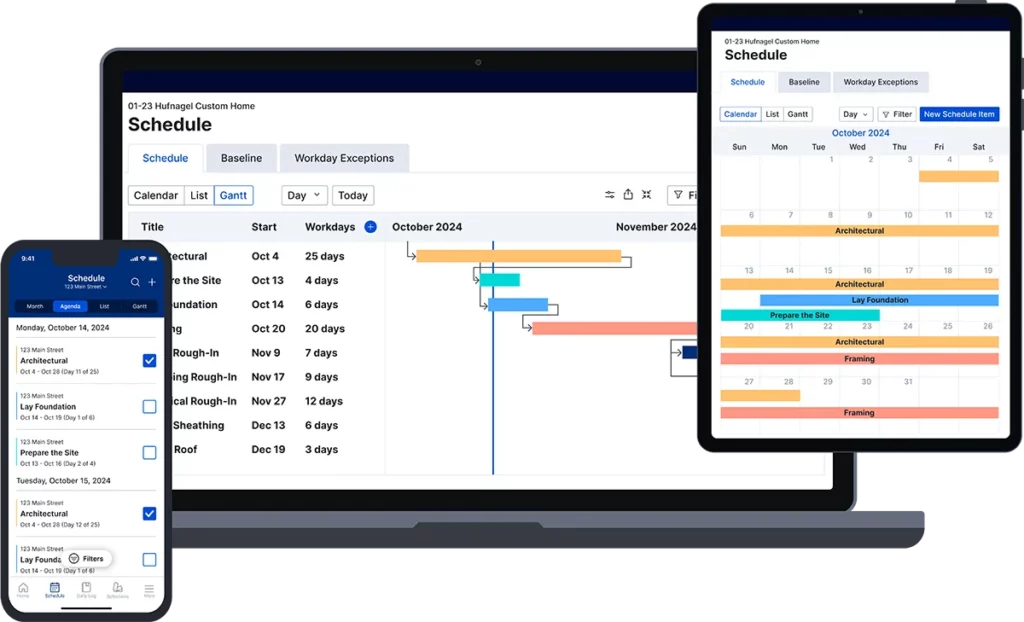
Buildertrend is a construction management platform designed mainly for residential builders, remodelers, and specialty contractors. It combines scheduling with project communication, financial tools, client management, and task coordination in one system.
The platform helps residential construction businesses organize project activities from sales to completion. It is commonly used when builders need a structured system to manage schedules, clients, subcontractors, and project updates without using many separate tools.
Key Features:
- Project scheduling
- Client communication portal
- Task and to-do management
- Estimate and proposal support
- Budget and payment tracking
- Subcontractor coordination
| Pros | Cons |
|---|---|
| Suitable for improving organization across daily residential project activities. | Pricing and feature fit should be reviewed for very small teams. |
| Combines several residential construction workflows in one platform. | Advanced users may find certain project controls less detailed than enterprise systems. |
| Reduces the need to manage schedules and communication across separate tools. | May not provide enough depth for large commercial or industrial projects. |
Best for: Small to medium businesses that need residential project scheduling, client communication, budgeting, and subcontractor coordination in one platform.
8. Fieldwire
Fieldwire is a field management platform used to connect jobsite teams with project tasks, drawings, documents, and issue tracking. It helps construction teams manage daily work activities and keep field crews aligned with project plans.
The platform is commonly used for short-term scheduling, task assignments, plan viewing, and site progress updates. It can support contractors that need a mobile-friendly tool for improving communication between field teams and project managers.
Key Features:
- Field task management
- Plan and drawing viewing
- Issue tracking
- Mobile jobsite access
- Document sharing
- Progress updates
| Pros | Cons |
|---|---|
| Helps crews understand daily tasks, drawings, and site issues more clearly. | May not replace full CPM scheduling tools for complex projects. |
| Useful for improving visibility into field progress and task completion. | Broader financial and project control features may require other systems. |
| Supports faster communication between office teams and field workers. | Larger companies may need integrations with enterprise scheduling platforms. |
Best for: Small to large businesses that need field task management, drawing access, issue tracking, and mobile jobsite coordination in one platform.
9. Procore
Procore is a construction project management platform used to manage project documents, communication, financials, quality, safety, and scheduling. It provides a centralized environment where construction teams can connect schedule information with other project workflows.
The platform is often used by companies that need more than basic scheduling. It supports project coordination across office teams, field teams, owners, subcontractors, and other stakeholders involved in construction execution.
Key Features:
- Construction schedule management
- Project document control
- Drawing and specification management
- Budget and financial management
- Quality and safety tools
- Field communication
| Pros | Cons |
|---|---|
| Provides better context around how schedule changes affect project operations. | Costs may be high for smaller contractors with limited project volume. |
| Connects scheduling with broader construction project workflows. | Some advanced scheduling needs may still require integration with specialized tools. |
| Supports collaboration between the office, field, and external stakeholders. | May feel too extensive for companies that only need simple scheduling. |
Best for: Medium to large businesses that need construction project management, document control, scheduling, financial tracking, and field coordination in one platform.
10. CoConstruct
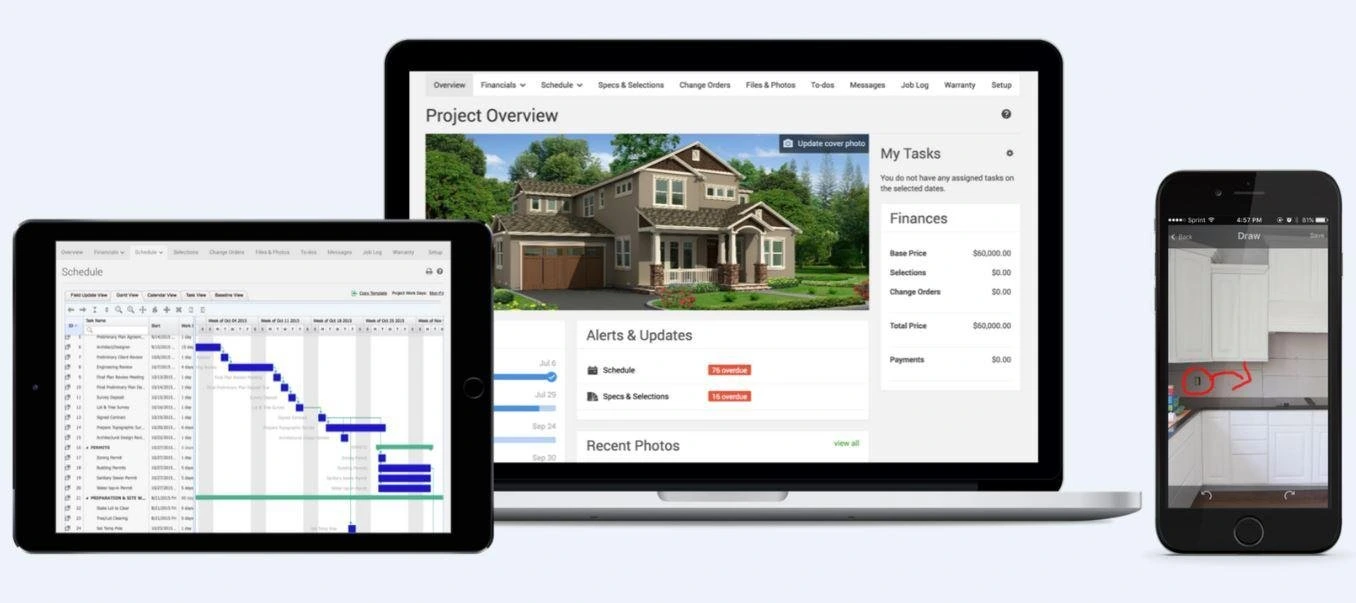
CoConstruct is a construction management platform designed for home builders and remodelers that integrates project schedules, estimates, and selections, along with client communication, into one unified system.
The platform is commonly used by residential contractors who need to keep homeowners, subcontractors, and internal teams aligned. Its scheduling tools support project visibility, communication, and expectation management throughout the homebuilding process.
Key Features:
- Client communication tools
- Estimating support
- Selection management
- Budget tracking
- Subcontractor coordination
- Project update sharing
| Pros | Cons |
|---|---|
| Useful for reducing misunderstandings around project progress and changes. | Less suitable for large commercial or infrastructure projects. |
| Helps residential builders keep clients informed throughout the project. | Feature fit should be reviewed for contractors outside the residential segment. |
| Combines scheduling, estimates, and communication for homebuilding workflows. | May not include the same depth of enterprise-level project controls. |
Best for: Small to medium businesses that need residential scheduling, estimating, client communication, selections, and change order management in one platform.
Choosing the right construction management scheduling software helps contractors plan timelines, allocate resources, monitor progress, and reduce the risk of costly project delays. Among the top 10 construction scheduling software platforms, ScaleOcean stands out not only for its advanced scheduling capabilities but also for supporting the entire construction process through integrated budgeting, procurement, inventory, project monitoring, and real-time reporting.
As an industry-focused software provider, ScaleOcean can also be customized to fit different business models, project workflows, approval structures, and operational needs, making it a flexible solution for construction companies that need more than basic scheduling. Try our free demo today and see how your construction team can manage every project stage with better control and clearer visibility.

What Features Should Software Have to Optimize Construction Scheduling?
The best construction scheduling software offers tools to facilitate the critical path method (CPM) as well as mobile-first access to the construction site, resource loading capabilities, and stakeholder communication. Other supportive features, such as lean construction approaches (Pull Planning) and data-driven AI analytics, are also very effective.
1. Automated Critical Path Method (CPM)
One of the most important features construction scheduling software can have is an automated CPM, which automatically detects the critical path of a project. This path indicates the smallest possible time required to complete the project, and identifies tasks that could directly affect the completion date if they were delayed.
This feature eliminates the need for project managers to manually determine task interdependencies. The critical path can be updated whenever tasks are changed, and the project manager can always be aware of any tasks that could possibly be subject to delays, arriving at the top of the critical path.
2. Baseline Comparison
By comparing with the approved project schedule at baseline setting, real progress can be monitored using baseline comparison. This reference point (baseline) can be used in construction schedule management software to monitor progress by comparing it with an expected schedule, milestones, and completion dates.
Schedule variance is a part of the baseline comparison, which more precisely detects and defines schedule differences. This information can be used to monitor teams and activities, including those in progress, delayed, and at risk, for making decisions and reporting. A solid baseline can also be used to back project reviews, communications with stakeholders, and future planning.
3. Master to Lookahead Syncing
Understand how to synchronize a master schedule with short-term planning in site operations to provide a long-term planning perspective. Master schedules provide a longer-term overview of activities, and lookahead schedules give a daily, weekly, or bi-weekly plan for activities on site.
This enables updates from the field to be transferred back to the master schedule, helping project managers to monitor the project’s progress more accurately. This element will save the effort of manual operations and the communication between the team located in different offices or sites, and keep the project schedule in sync with the site conditions.
4. Plan-Centric Task Linking
This function allows project teams to tie plan activities to various project documents, including drawings, specifications, RFIs, submittals, photographs, and daily reports. Thus, it enables the field teams to have access to all the information they need for a specific task, which makes it a more user-friendly work planning tool.
For instance, an HVAC installation project supervisor can easily go to the proper mechanical drawings or accepted documents, saving the time spent searching, minimizing the risk of utilizing outdated info, and enhancing the quality of execution on site.
5. Offline Mobile Updates
It’s important to use offline mobile updates as internet connections are not always reliable on construction sites. The ideal construction project scheduling software should allow the field staff to view their schedules, multiple documents, project updates, and add notes using any mobile device, even without an internet connection.
The system automatically updates the main schedule in real time, helping reduce data loss, reporting delays, and manual follow-ups while improving user adoption. With ScaleOcean construction software, teams can manage schedules, resources, and project progress in one integrated platform for better control from planning to execution.
6. Automated Resources Leveling
Constructing a schedule with automated resource leveling can help construction teams detect and resolve project schedule resource conflicts. If, for example, the schedule requires a greater number of resources (workers or equipment) than are available, the system will indicate this and recommend changes to avoid over-allocation.
This is a great asset in creating realistic and attainable project plans. The automation features enable project managers to proactively manage resource and equipment usage and reduce delays without having to review every resource clash. This helps in effective planning of the budget, too, by minimizing idle time and schedule impact.
7. Weather Integration
Weather information can be combined with construction scheduling software, which can account for the potential effects of weather on project activities. Weather conditions may impact the accuracy of site tasks, including concrete pouring, excavation, roofing, logistics, and other site tasks, improving schedule accuracy by linking the forecast to the schedule.
Project managers can proactively identify weather-related risks, adjust the schedule before it becomes a problem, record schedule changes due to weather, and provide justification for schedule changes. This also aids in developing more realistic schedules and in avoiding project planning surprises.
8. Lead-Time Tracking
Lead-time tracking helps project teams include construction procurement timelines directly in the construction project schedule. Materials and equipment with long delivery times, such as structural steel, custom windows, or specialized machinery, can affect the entire project if they arrive late.
By tracking lead times inside the schedule, teams can plan purchasing activities earlier and reduce the risk of material-related delays. This feature also supports construction procurement by giving better visibility into ordering timelines, delivery expectations, and site readiness for incoming materials.
9. Automated Trade Notifications
Automated trade notifications make it easier to keep subcontractors and trade partners up to speed on project schedules. The system can be used to provide team members with news on upcoming tasks, changing deadlines, status reports on tasks, and schedule adjustments, while always working on the latest project plan.
This capability eases the need for manual calls, email, and follow-ups. It also builds a stronger communication history, helping to hold people accountable within the project. Automated notifications also reduce confusion and ensure that subcontractors are aware of the changing requirements of the project timetable.
10. AI Risk Analysis
AI risk analysis, for construction teams, is one of the most advanced tools at their disposal. By analyzing project data, historical information, task patterns, and performance trends, AI can help to identify activities or sets of tasks that are likely to experience delays.
This capability helps to foster more proactive project management, allowing teams to make changes in project plans, resource allocations, and tasks before problems occur. Effective risk analysis in project management software with AI increases the reliability of the construction schedule, control of costs, and timely delivery of the project.
Why is Software Needed to Manage Construction Schedules?

Construction scheduling software is a system that connects teams, breaks down communication silos, and streamlines planning by automating timelines to cut back on wasted labor and materials as it eliminates expensive delays and rework by bringing office teams and field teams into real-time with schedule and blueprints updates.
Construction projects are no longer simple enough to manage only with spreadsheets, whiteboards, or scattered manual updates. As timelines become tighter and teams become more distributed, scheduling errors can affect labor planning, equipment usage, subcontractor coordination, and overall project delivery.
This is why construction scheduling software is needed to create a more structured and reliable planning process. It helps teams manage dependencies, track progress, update schedules, and understand how one delay can affect the next stage of work. The insight our team collected from DOZR explains how poor planning, weak scheduling, communication gaps, and material or equipment issues can delay construction projects.
1. Eliminating the Cascading Error Trap
Complex projects rely on interdependent tasks, and an error with a particular stage will surely affect other aspects of the project. Delay in foundation work, for example, may create knock-on impacts such as the delay of structural work, plumbing, electrical tasks, inspections, and ultimately, the project’s completion and handover.
Construction schedule management software helps project teams visualize task dependencies more clearly. When one activity is delayed, teams can quickly assess its impact on related tasks and the overall timeline, enabling faster corrective action before delays spread across the project. With ScaleOcean, businesses can connect scheduling, budgeting, procurement, and reporting in one integrated system. Request a free demo to see how it improves project visibility and control.
2. Preventing Expensive Labor and Equipment Idle Time
Idle labor and unused equipment can create high hidden costs in construction projects. A team may arrive on site but be unable to start because the previous work is unfinished. Equipment can also remain unused when schedules are not updated properly, site readiness is unclear, or construction asset management is not aligned with the project timeline.
Construction schedule management software creates a shared source of truth for project timelines, task progress, and site coordination. Subcontractors can see when they are expected on site, while project managers can confirm that prerequisite tasks are completed before assigning the next team. This helps reduce downtime, improve resource usage, and support better cost control.
3. Preserving Contractual and Legal Protection
Construction schedules contain key contract terms related to deadlines, possible extension provisions, and penalty clauses for delays. In cases such as a late design approval or unforeseen site conditions, where construction delays become unavoidable, companies should be able to refer to a clear document that substantiates their claims, including the cause of delay, the extent of delay, and mitigation measures undertaken.
With construction schedule software, companies have access to a detailed digital document containing the baseline schedule, revisions, documented changes, and causes of delays over the duration of the project. This comprehensive record can also be utilized for internal discussion with clients, extension requests, and dispute resolution.
4. Bridging the Field-to-Office Communication Gap
One common challenge in construction project management, which leads to many delays, is the disparity between project managers at the office and onsite personnel who implement the schedule. Plans made by a project manager from an office setting may not align with the on-ground realities faced by construction teams on site, resulting in misunderstandings, delays, and rework.
Using cloud-based construction scheduling software, a team spread across different locations, from site foremen to back-office staff, will be able to access the latest, real-time updates on the project. The field team will be able to report progress directly from the job site via mobile applications, allowing office teams to adjust schedules on time, resulting in increased accuracy and efficiency.
How to Choose the Right Construction Scheduling Software?

Choosing the right construction scheduling software involves matching your project complexity with team capabilities. Prioritize an intuitive mobile app for the field, automated predecessor notifications to prevent crews from mobilizing prematurely, and seamless integrations with your existing payroll and accounting tools.
When choosing construction scheduling software, these are seven things you will need to take into account:
1. Project Size & Complexity
Before choosing construction scheduling software, companies need to understand the scale and complexity of their projects. A residential contractor will usually have different scheduling needs from a company managing commercial buildings, infrastructure projects, or large industrial facilities.
Selecting software that matches the project size helps avoid unnecessary costs and operational limitations. A simple tool may be enough for small projects, while complex projects require stronger scheduling, reporting, resource planning, and multi-team coordination capabilities.
| Project Size | Recommended Software |
|---|---|
| Small projects | Microsoft Project, Fieldwire |
| Small to medium projects | Microsoft Project, Buildertrend, CoConstruct |
| Medium projects | Planera, Outbuild, Procore, ScaleOcean |
| Complex projects | ScaleOcean, Oracle Primavera P6 |
| Large projects | ScaleOcean, SmartPM, Procore |
| Enterprise projects or portfolios | ScaleOcean, Oracle Primavera P6, Oracle Primavera Cloud |
This comparison helps businesses choose a platform based on real project requirements. Small projects may only need basic task scheduling and progress updates, while complex and enterprise projects need deeper control over timelines, resources, costs, documents, and cross-team collaboration.
2. Ease of Use
A powerful construction project scheduling software will not deliver results if the team finds it difficult to use. Ease of use is important for both office teams and field users, especially superintendents, foremen, and subcontractors who need quick access to schedules during daily operations.
Before making a decision, companies should review the interface, mobile experience, and learning curve. A free trial or detailed demo can help users test whether the software fits their workflow. Feedback from daily users is essential because strong adoption will determine the long-term value of the system.
3. Affordability & Pricing Model
Pricing is an important factor when evaluating construction schedule management software. Some platforms charge per user, while others use project-based, volume-based, or annual pricing models. Each structure can affect total cost differently, especially as the company grows.
Businesses should also review additional costs such as implementation, training, support, integrations, and advanced features. A low starting price may become expensive if essential functions require paid add-ons. Clear and transparent pricing helps companies plan their software investment more accurately.
4. Core Scheduling & Task Management Features
The right construction scheduling software should provide essential scheduling features that match project needs. These may include Gantt charts, CPM scheduling, baseline comparison, task dependencies, milestone tracking, and resource planning. These core capabilities help teams build and manage more reliable project schedules.
Task management should also be reviewed in detail. A useful platform should allow teams to assign tasks, attach documents, add photos, update progress, and track responsibility clearly. Strong task management improves coordination between office planning and field execution.
5. Team Collaboration & Cloud Assess
Construction projects involve many stakeholders, including contractors, subcontractors, architects, engineers, owners, and field teams. Construction schedule management software should support collaboration by giving each stakeholder access to relevant schedule information, updates, and communication tools.
Cloud access allows teams to view the latest project schedule from different locations and devices. This reduces the risk of working from outdated files or printed documents. Real-time access helps improve coordination, decision-making, and accountability across the project team.
6. Mobile Accessibility
Mobile accessibility is essential because most construction activities happen on-site. A reliable construction project scheduling software should allow field teams to view schedules, update task progress, add notes, upload photos, and communicate from mobile devices.
The mobile app should be easy to use, fast, and stable in field conditions. Offline access is also important for projects in areas with weak internet connections. A strong mobile experience can improve field adoption and keep schedule updates closer to actual site progress.
7. Automation & AI-Powered Features
Automation can help construction teams manage schedules more efficiently. Features such as automated resource leveling, delay alerts, weather integration, and risk analysis can help teams identify potential problems before they affect the project timeline.
AI-powered features are also becoming more relevant in construction scheduling software. These capabilities can support predictive insights, schedule risk detection, and smarter decision-making. While not every company needs advanced automation immediately, it is useful to choose software that can support future growth.
8. Integration with Other Tools
Construction scheduling software should connect with other systems used by the business, such as accounting, estimating, procurement, inventory, document management, and project management tools. Integration helps reduce manual data entry and prevents information from being separated across different platforms.
For example, schedule data connected with financial systems can support progress billing, cost monitoring, and project performance review. Companies with complex operations may also consider the best construction ERP software that already includes scheduling as part of a wider integrated system.
9. Customization & Scalability
Every construction company has different workflows, approval processes, reporting needs, and project structures. This is why construction schedule management software should offer enough flexibility to support custom fields, report templates, user permissions, task categories, and workflow settings.
Scalability is a key factor for long-term project management. As the company grows, the chosen platform should support more users, larger project scopes, additional modules, and broader operational needs. With scalable construction software such as ScaleOcean, businesses can protect their initial investment while building a more efficient, integrated, and sustainable project management process.
Conclusion
Construction scheduling software is a digital solution that helps construction companies plan, organize, and monitor project timelines more accurately. It replaces disconnected spreadsheets with a centralized system that supports task scheduling, resource coordination, progress tracking, and delay management.
With the right software, businesses can reduce scheduling errors, prevent cost overruns, and improve accountability across project teams. ScaleOcean construction software supports complex project planning through integrated scheduling, resource management, cost visibility, and real-time collaboration.
The system helps companies connect office planning with field execution, so project teams can manage timelines, updates, and project performance in one platform. Try the free demo to see how ScaleOcean can help improve construction project scheduling and operational control.
FAQ:
1. How to determine if a project requires CPM scheduling capabilities?
A project needs Critical Path Method (CPM) scheduling when it has complex task dependencies, tight deadlines, or involves multiple contractors, where one delay can affect the entire timeline. CPM is especially useful for identifying schedule float, or slack, and determining the longest sequence of activities that directly impacts the project completion date.
2. What factors should be considered when selecting construction scheduling software?
When choosing construction scheduling software, focus on ease of use for field teams, cloud-based real-time data synchronization, and smooth integration with existing accounting and ERP systems. The right solution should match the complexity of your construction projects while remaining accessible to your workforce, ensuring faster adoption and consistent usage.
3. Do you need standalone construction scheduling software or an integrated construction management system?
Standalone scheduling software is ideal when your main focus is advanced visual planning, such as Critical Path Method (CPM) modeling, or when you need to create and manage complex project timelines without being tied to one vendor’s ecosystem.
4. How can construction scheduling software support different project types and team sizes?
Construction scheduling software supports various project types and team sizes through scalable modules, flexible workflows, and real-time collaboration features. From small residential renovations to large commercial high-rise projects, these solutions help improve operational efficiency, minimize delays, and optimize resource allocation.
























.png)