
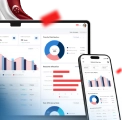



Lead Management Software is a centralized digital system that captures, organizes, and tracks potential customers from first contact through final conversion, helping businesses manage complex sales processes with greater visibility and accuracy.
From the data our team has collected from The Business Research Company, the lead management software market continues to expand due to increasing pipeline complexity and centralized tracking demand. It is projected to grow from $11.06 billion in 2025 to $16.69 billion in 2030 at an annual growth rate (CAGR) of 8.4%.
Today, businesses attract prospects from websites, social media, and events, yet increasing lead volumes often create confusion when teams rely on scattered spreadsheets or disconnected inboxes for daily follow-up activities and coordination.
However, many companies lose valuable opportunities because sales teams fail to respond quickly to new inquiries, allowing interested prospects to turn cold and move toward faster competitors in crowded markets today.
Therefore, understanding how structured lead management tools automate reminders, assign responsibilities, and centralize information is essential for organizations seeking consistent follow-ups and predictable revenue growth across expanding customer acquisition channels today.
To build a stronger understanding, this article will explore the definition, features, and selection factors of lead management software, including the recommendation of the 10 best lead management software, such as ScaleOcean, HubSpot, Salesforce, and Zoho Corporation.
 Key Takeaways
- Lead management software is a digital platform that captures and tracks leads. It organizes potential customer data across channels.
- The top 10 lead management software of 2026 reviews widely used platforms to help businesses compare capabilities and identify suitable systems for operational needs.
- Benefits of lead management software include improved efficiency, better communication, enhanced decision-making, and stronger conversion performance across growing customer pipelines.
- How to choose the best lead management software outlines practical evaluation steps such as feature testing, compliance checks, and matching systems to business requirements.
- ScaleOcean Lead Management Software supports centralized tracking, automation, and scalable workflows that improve lead conversion outcomes.

What is Lead Management Software?
Lead Management Software is a digital platform that captures and tracks. It organizes potential customer data across channels, allowing businesses to manage every interaction systematically while consistently improving response speed and sales productivity.
Businesses rely on this software to manage growing volumes of inquiries from websites, social media campaigns, and offline events, ensuring that teams store lead data in a single centralized system rather than scattered documents.
Moreover, structured lead management tools automate repetitive tasks such as follow-up reminders, lead assignment, and scoring, which helps sales teams focus on qualified prospects rather than spending time on administrative activities.
As companies scale operations, they require reliable visibility into pipelines and customer behavior, making choosing the best lead management software essential for maintaining consistency, improving collaboration, and increasing conversion rates across sales workflows.
Quick Comparison Table of Lead Management Software
The following table compares ten widely used lead management software platforms based on their starting prices, ideal use cases, and standout features. Pricing structures vary widely depending on features and scalability requirements.
| Software | Start Price | Best For | Standout Features |
|---|---|---|---|
| ScaleOcean | Unlimited users with no hidden cost and flat pricing based on business size and modules | Customized enterprise workflows tailored to specific business needs | All-in-one solution with integrated sales, CRM, and marketing modules in a single unified platform. Supported by AI-powered analytics and industry-specific system design. |
| HubSpot | Free plan available. Paid version starts from ~$15/user/month | Startups and small businesses are adopting inbound marketing | Marketing, sales, and service tools with automation features |
| SalesForce | From ~$25/user/month | Large enterprises requiring advanced customization | Integrated workflows with integrations and AI analytics |
| Pipedrive | From ~$14/user/month | Sales-focused teams need visual pipeline management | Drag-and-drop pipeline interface with activity-based selling tools |
| Zoho CRM | Free plan available; paid from ~$14/user/month | Budget-conscious small businesses | Affordable pricing with an AI assistant and deep ecosystem integrations |
| Brevo (Sendinblue) | Free plan available; paid plans from ~$25/month | Businesses combining email marketing and CRM | Built-in email automation and contact segmentation tool |
| Vtiger | Free plan available; paid from ~$12/user/month | Small to medium businesses seeking an all-in-one CRM | Integrated sales, marketing, and helpdesk modules |
| Leadfeeder by Dealfront | From ~$99/month | B2B companies identifying website visitors | Website visitor tracking and lead intelligence features |
| Keap | From ~$249/month | Service-based businesses with high-value leads | Advanced automation and payment integration features |
| Monday.com CRM | From ~$12/user/month | Teams combining project management with CRM | Integrated dashboards and collaborative workflow management |
Most modern CRM and lead management platforms offer entry-level plans priced between $12 and $25 per user per month, while enterprise systems scale significantly based on automation and customization requirements.
1. ScaleOcean
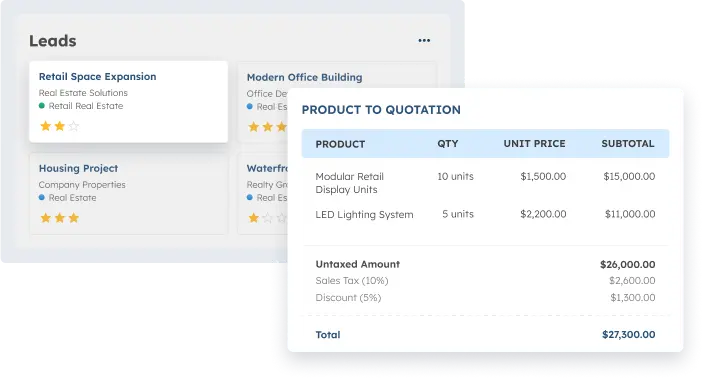
ScaleOcean’s Lead Management Software provides unlimited user access without additional licensing fees, allowing companies to onboard large sales and marketing teams while maintaining predictable operational costs as business activities expand across multiple departments and customer channels.
Moreover, ScaleOcean delivers an all-in-one solution with integrated modules such as Sales, CRM, and Marketing, enabling businesses to manage the full lead lifecycle from initial inquiry to final conversion within one unified system.
Additionally, the platform uses transparent, flat pricing structures that simplify budgeting, enabling organizations to forecast software expenses accurately and avoid hidden costs that often arise during long-term system implementation.
Furthermore, ScaleOcean is built based on real industry practices, ensuring compatibility with evolving business standards in Singapore and supporting organizations that require reliable systems aligned with practical operational workflows and compliance expectations.
Beyond operational advantages, this system is optimized for Singapore tax compliance, including GST handling and standardized financial reporting. It may qualify for government-supported digitalization grants, such as the PSG or CTC Grant, which provide subsidies of 50–70%.
Key Features of ScaleOcean Lead Management Software:
- Workflow Automation: Automates lead workflows from capture, scoring, and routing to the appropriate sales teams, ensuring faster response times while reducing repetitive manual tasks across departments.
- Module Integration: Connects seamlessly with other enterprise modules such as HR, finance, and inventory systems, allowing businesses to synchronize operational data and maintain consistent information across multiple functional areas.
- Cross-Division Lead Management: Supports coordination among marketing, sales, and customer service teams, enabling shared visibility into lead activities and preventing duplication of effort during complex sales cycles.
- Real-Time Analytics & Reporting: Provides live dashboards and detailed performance reports that help managers monitor conversion rates, evaluate ROI, and make data-driven decisions based on accurate and up-to-date insights.
| Pros | Cons |
|---|---|
|
|
Best For: ScaleOcean is best suited for medium to large enterprises that manage complex sales processes, multi-branch operations, and structured workflows, especially when organizations prioritize scalability, long-term system reliability, and controlled digital transformation planning.
2. HubSpot
HubSpot Lead Management Software is a cloud-based system that helps businesses capture, organize, and track leads from multiple channels within one centralized database. It allows teams to monitor customer interactions while maintaining clear records across marketing and sales activities.
The platform also supports coordination between marketing and sales teams through shared tools that manage pipelines and communication histories. As a result, organizations maintain structured follow-ups and improve response consistency across growing lead volumes.
Key Features of HubSpot:
- Contact Management
- Email Automation
- Pipeline Tracking
| Pros | Cons |
|---|---|
|
|
Best For: HubSpot is suitable for small to mid-sized businesses that require structured lead tracking without highly complex configuration requirements. It supports organizations that want to align marketing and sales processes while gradually scaling customer acquisition activities.
3. Salesforce
Salesforce Lead Management Software is an enterprise-focused platform that helps businesses manage large volumes of leads through customizable workflows and structured pipeline tracking. It supports centralized data management that allows teams to maintain consistent records across multiple departments.
The system also provides tools for reporting and automation that help organizations monitor performance and standardize internal sales processes. Therefore, businesses gain better visibility into pipeline activities while maintaining control over complex operational requirements.
Key Features of Salesforce:
- Workflow Customization
- Advanced Reporting
- Integration Marketplace
| Pros | Cons |
|---|---|
|
|
Best For: Salesforce is suitable for large enterprises that manage complex sales structures across multiple departments or regional branches. It supports organizations that require detailed reporting, scalable workflows, and structured system governance.
4. Pipedrive
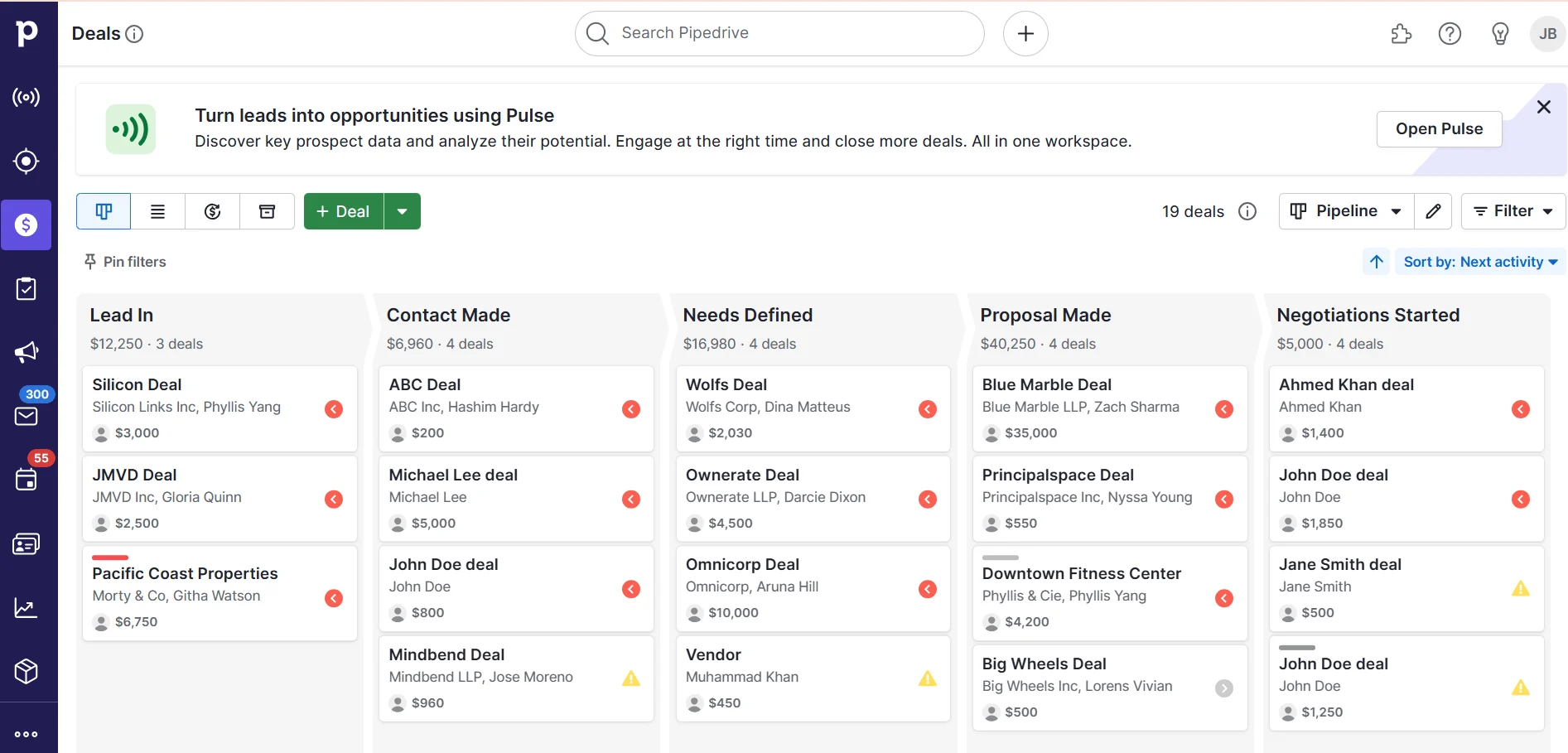
Pipedrive Lead Management Software is designed to help teams manage leads through visual pipeline stages that simplify tracking and follow-up activities. It provides a structured layout that allows users to monitor deal movement across different stages.
The platform also supports activity-based scheduling that helps teams maintain consistent daily tasks and reminders. As a result, organizations improve visibility into ongoing opportunities while maintaining organized sales routines.
Key Features of Pipedrive:
- Visual Pipeline
- Activity Scheduling
- Sales Tracking
| Pros | Cons |
|---|---|
|
|
Best For: Pipedrive is suitable for small to mid-sized sales teams that prioritize visual pipeline tracking and simple workflow structures. It supports businesses that want clear deal visibility without requiring extensive technical configuration.
5. Zoho Corporation (Zoho CRM)
Zoho CRM Lead Management Software provides tools that help businesses capture leads, organize customer information, and manage communication records within one centralized system. It supports multiple communication channels that allow teams to maintain structured engagement histories.
Moreover, the platform also integrates with other business tools that help organizations connect workflows across marketing and customer service functions. Therefore, companies maintain consistent data visibility while improving coordination between departments.
Key Features of Zoho CRM:
- Lead Scoring
- Workflow Automation
- Multichannel Communication
| Pros | Cons |
|---|---|
|
|
Best For: Zoho CRM is suitable for small to mid-sized businesses that require flexible lead-tracking tools within a manageable budget. It supports organizations that need multi-channel communication while maintaining centralized customer records.
6. Brevo
Brevo Lead Management Software combines email communication tools with lead tracking capabilities that help businesses manage customer outreach campaigns. It supports structured messaging workflows that allow teams to schedule and monitor engagement activities.
In addition, the platform also enables segmentation of customer data that helps organizations target specific groups based on defined criteria. As a result, teams maintain organized contact lists while improving outreach consistency across campaigns.
Key Features of Brevo:
- Email Campaign Builder
- Contact Segmentation
- Marketing Automation
| Pros | Cons |
|---|---|
|
|
Best For: Brevo is suitable for small businesses that rely on structured email communication as a primary customer engagement method. It supports organizations that need basic lead tracking alongside marketing-focused communication workflows.
7. Vtiger
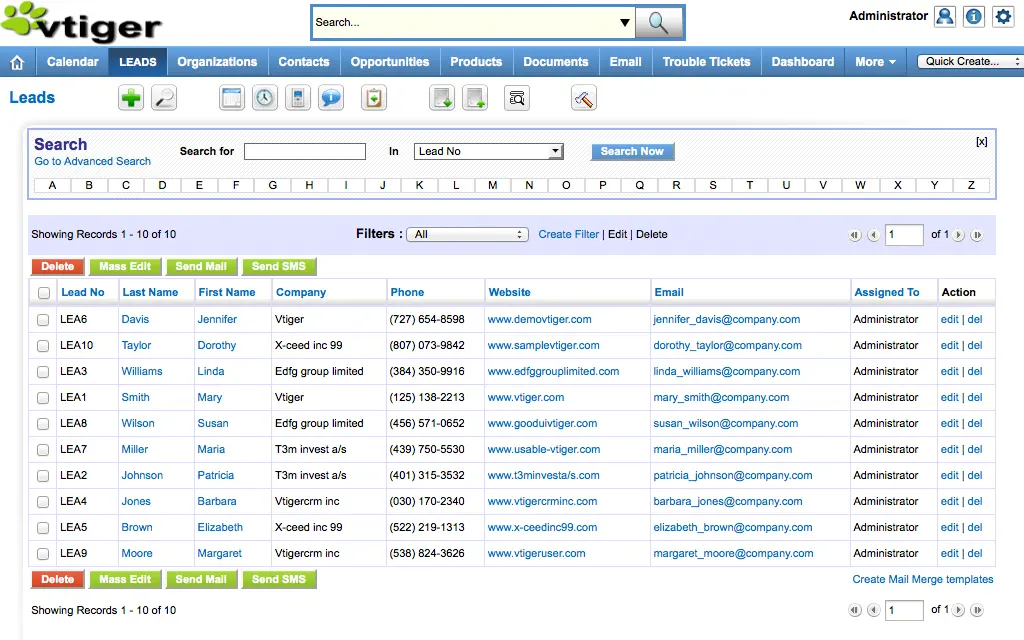
Vtiger Lead Management Software provides an integrated environment that helps businesses manage leads, customer records, and communication workflows within one system. It allows teams to access shared information that improves coordination across departments.
The platform also supports workflow automation that helps organizations maintain consistent updates and reduce manual tracking processes. Therefore, companies maintain structured communication histories across multiple operational functions.
Key Features of Vtiger:
- Unified Customer Records
- Sales Automation
- Support Integration
| Pros | Cons |
|---|---|
|
|
Best For: Vtiger is suitable for mid-sized businesses that require coordination between sales, marketing, and support teams within one shared environment. It supports organizations that manage multiple customer touchpoints across operational workflows.
8. Dealfront (Leadfeeder)
Leadfeeder Lead Management Software focuses on identifying website visitors and converting browsing activity into actionable lead information. It helps businesses understand which organizations show interest based on measurable website behavior.
The platform also supports visitor analytics that help teams review engagement patterns across digital channels. As a result, organizations improve targeting decisions while prioritizing leads based on engagement levels.
Key Features of Leadfeeder:
- Visitor Tracking
- Lead Identification
- Behavior Analytics
| Pros | Cons |
|---|---|
|
|
Best For: Leadfeeder is suitable for mid-sized B2B companies that rely on website activity to identify potential business prospects. It supports organizations that prioritize digital engagement tracking within structured marketing workflows.
9. Keap
Keap Lead Management Software provides tools that help businesses organize contact records, automate follow-ups, and maintain structured customer engagement workflows. It supports recurring communication tasks that help teams maintain consistent interaction schedules.
Additionally, the platform also connects customer records with workflow automation tools that help organizations manage long-term relationships more effectively. Therefore, businesses maintain continuity in communication across repeated customer interactions.
Key Features of Keap:
- Task Automation
- Contact Organization
- Payment Integration
| Pros | Cons |
|---|---|
|
|
Best For: Keap is suitable for small to mid-sized service-oriented businesses that manage recurring customer relationships. It supports organizations that require structured follow-up scheduling within relationship-based service models.
10. Monday.com
Monday.com Lead Management Software functions as a workflow platform that helps teams track leads and manage tasks using customizable visual boards. It allows users to organize data fields that align with internal reporting needs.
The platform also supports collaboration features that help teams update workflows in real time across shared environments. As a result, organizations maintain visibility into task progress while coordinating responsibilities between departments.
Key Features of Monday.com:
- Visual Workflow Boards
- Team Collaboration
- Custom Fields
| Pros | Cons |
|---|---|
|
|
Best For: Monday.com is suitable for small to mid-sized teams that require flexible workflow management across collaborative environments. It supports organizations that need customizable tracking tools to coordinate lead activities and internal responsibilities.
However, businesses that manage complex pipelines often require platforms designed for structured coordination across departments. Solutions like ScaleOcean Lead Management Software support centralized tracking, workflow automation, and scalable lead handling within one integrated environment.
Moreover, ScaleOcean offers flexible configuration, modular implementation, and enterprise-ready workflows designed for long-term operational stability. Therefore, request a free demo to evaluate ScaleOcean’s performance using real workflows aligned with your business requirements.

Must-Have Lead Management System Features
A lead management system provides structured tools that help businesses manage growing lead volumes consistently and accurately. Therefore, understanding essential features helps organizations select platforms that support operational control and long-term customer acquisition strategies.
Moreover, each feature supports a specific stage of the lead lifecycle, from initial capture to final conversion and performance evaluation. As a result, companies maintain organized workflows while improving coordination between marketing, sales, and customer service teams.
Centralized Database
A centralized database stores all lead information in one secure location that allows teams to access consistent customer records without relying on scattered spreadsheets or disconnected systems. It ensures data accuracy while supporting shared visibility across departments.
Additionally, centralized storage helps organizations maintain updated communication histories and reduce duplicate entries across different channels. Therefore, teams improve the efficiency of collaboration while maintaining reliable records that support structured follow-up processes.
Lead Capture
Lead capture tools collect customer information from multiple sources, such as websites, social media platforms, and online forms, within a unified system. They help organizations ensure that every inquiry enters the pipeline without manual entry delays.
Furthermore, automated capture reduces the risk of lost leads while maintaining consistent data collection across campaigns and digital touchpoints. As a result, businesses maintain a steady lead flow while improving response speed across customer engagement channels.
Lead Scoring
Lead scoring assigns values to potential customers based on predefined criteria such as behavior, demographics, or engagement levels within marketing campaigns. It helps teams identify high-priority prospects that require immediate attention.
Moreover, scoring systems support structured prioritization that prevents teams from spending excessive time on low-quality leads. Therefore, organizations improve conversion efficiency while focusing resources on prospects with higher purchase potential.
Lead Nurturing & Routing
Lead nurturing tools support continuous engagement by sending scheduled communications that maintain customer interest across different stages of the buying journey. They help teams build relationships through consistent follow-ups and relevant messaging.
Routing functions automatically assign leads to the appropriate sales representatives based on territory, workload, or expertise. As a result, organizations maintain balanced task distribution while reducing response delays during high lead volume periods.
Automated Data Collecting
Automated data collection gathers customer details from interactions such as emails, forms, and system activity without requiring manual input from team members. It helps organizations maintain updated records while minimizing repetitive administrative tasks.
Additionally, automation improves accuracy by reducing human entry errors across large datasets. Therefore, businesses maintain consistent information quality while improving efficiency across daily operational workflows.
Sales Funnel
Sales funnel features visualize the journey that leads follow from initial awareness to final purchase decision within structured pipeline stages. They help teams monitor progress and identify bottlenecks that slow down deal movement.
Furthermore, funnel tracking supports performance evaluation similar to tools found in the best sales management software that display conversion rates across different stages. As a result, organizations gain clearer insights into sales effectiveness while improving planning strategies across campaigns.
Task Management
Task management tools organize daily activities such as follow-ups, reminders, and meeting schedules within a centralized workflow environment. They help teams maintain accountability for each assigned responsibility.
Additionally, structured task tracking improves productivity by ensuring that no critical action is overlooked during active sales cycles. Therefore, businesses maintain consistent communication schedules while improving operational discipline across departments.
Lead Monitoring
Lead monitoring features track customer behavior and engagement activity throughout the interaction lifecycle within a centralized system. They help teams observe how prospects respond to communication and marketing campaigns.
Moreover, monitoring tools provide real-time updates, enabling managers to detect inactive leads or stalled deals. As a result, organizations maintain proactive follow-up strategies while improving engagement effectiveness across ongoing campaigns.
Analytics & Reporting
Analytics and reporting tools transform collected lead data into visual dashboards that support performance evaluation and strategic planning decisions. They help managers understand pipeline trends and identify opportunities for improvement.
Furthermore, structured reports provide measurable insights into campaign outcomes and sales productivity across defined time periods. Therefore, organizations maintain data-driven decision-making while improving forecasting accuracy and operational transparency.
What are the Benefits of Lead Management Software?

Lead management system software helps businesses manage customer acquisition activities more effectively by organizing workflows and improving coordination between teams. Therefore, companies maintain structured processes while reducing delays that often occur during manual lead handling.
Moreover, adopting structured systems improves visibility into customer behavior and operational performance across multiple sales stages. As a result, organizations strengthen decision-making while maintaining consistent communication across growing lead pipelines.
Boost Efficiency
A Lead management system streamlines repetitive processes such as data entry, follow-ups, and assignment tasks within a structured workflow environment. They help teams complete daily activities faster while maintaining consistent execution across operational routines.
Additionally, automation reduces manual workload that often slows productivity during high lead volumes. Therefore, businesses improve resource allocation while ensuring employees focus on high-value engagement activities.
Turn More Leads Into Sales
Structured lead tracking improves conversion potential by ensuring that every prospect moves through the defined pipeline stages without delay. It helps sales teams maintain consistent follow-ups that support relationship development across customer interactions.
Furthermore, clear visibility into lead progress allows managers to identify stalled opportunities early. As a result, organizations improve response strategies while increasing the likelihood of converting qualified prospects into customers.
Enhance Team Communication
Centralized platforms provide shared access to customer records that help departments exchange accurate information without relying on fragmented communication channels. They support consistent updates that maintain alignment between marketing and sales teams.
Moreover, synchronized communication histories prevent duplicated outreach across different representatives. Therefore, organizations strengthen collaboration while maintaining clear accountability across team responsibilities.
Gain Deeper Insights
Data collection tools provide measurable insights into lead behavior, engagement patterns, and pipeline movement across multiple stages. They help decision-makers evaluate campaign effectiveness using structured performance indicators.
Additionally, analytical dashboards display historical trends that support forecasting and resource planning activities. As a result, companies maintain data-driven strategies while improving the accuracy of long-term operational planning.
Automate Lead Scoring
Automated scoring tools assign values to leads based on behavior and predefined criteria that reflect customer interest levels. They help teams prioritize high-potential prospects without relying on manual evaluation methods.
Furthermore, structured scoring reduces subjective decision-making across qualification processes. Therefore, organizations maintain consistent lead prioritization while improving overall conversion efficiency.
Expand Your Database
Lead management system captures customer information from multiple channels, supporting steady database growth across marketing campaigns. They help organizations maintain updated contact records without relying on separate tracking methods.
Additionally, centralized storage supports long-term customer relationship development through consistent data management practices. As a result, businesses maintain scalable databases that support future outreach activities.
Improve Buyer Experience
Structured communication workflows ensure customers receive timely responses and relevant information across different stages of engagement. They help businesses maintain professional interaction standards that strengthen customer trust.
Moreover, consistent follow-ups improve satisfaction by reducing response delays that often frustrate potential buyers. Therefore, organizations enhance customer perception while improving retention across ongoing relationships.
What are the Criteria for Selecting the Right Lead Management Software?
Selecting the right lead management software requires careful evaluation of operational needs, growth plans, and technical requirements across departments. Therefore, businesses must assess system compatibility to ensure long-term performance and scalability.
Moreover, organizations benefit from defining clear evaluation criteria before comparing available platforms in the market. As a result, decision-makers reduce implementation risks while selecting solutions that align with business objectives.
Size & Scalability
Business size plays a critical role when selecting lead management system software because system requirements vary across small, mid-sized, and enterprise organizations. It determines the level of customization, storage capacity, and workflow complexity required.
Additionally, scalable platforms support future growth without requiring frequent system replacement or costly restructuring. Therefore, companies maintain long-term operational continuity while adapting to increasing customer volumes.
Integration Capabilities
Integration capabilities determine how well lead management software connects with existing systems such as accounting, marketing, and customer service tools. They help organizations maintain synchronized workflows across departments.
Furthermore, seamless integrations reduce manual data transfer between platforms, which often creates duplication errors. As a result, businesses maintain consistent information accuracy while improving operational efficiency across interconnected systems.
Lead Volume
Lead volume influences the level of system performance required to handle daily inquiries and customer interactions efficiently. It determines the processing capacity needed to store and manage large datasets without delays.
Additionally, platforms designed for higher volumes support automated routing and data organization features that improve response times. Therefore, companies maintain consistent workflow performance while preventing bottlenecks during peak periods.
How to Choose the Best Lead Management Software for Your Business?

Choosing the best lead management software involves aligning technical capabilities with operational workflows and long-term strategic goals. Therefore, organizations must evaluate both functional requirements and implementation readiness before making decisions.
Moreover, structured evaluation steps help businesses compare options objectively rather than relying solely on pricing or brand familiarity. As a result, companies reduce selection risks while improving the success rate of digital adoption initiatives.
Match Software to Business Size
Businesses should select software that matches operational scale because system complexity varies depending on organizational size and internal workflows. Smaller companies typically require simpler interfaces, while larger enterprises need advanced controls.
Additionally, choosing systems aligned with business size reduces unnecessary feature overload and performance inefficiencies. Therefore, organizations maintain efficient workflows while avoiding high operational costs.
Evaluate Must-Have Features
Companies must identify essential features that directly support daily lead management activities before comparing available platforms. These features typically include tracking tools, automation functions, and communication management capabilities.
Furthermore, prioritizing required features prevents investment in unnecessary tools that increase implementation complexity. As a result, businesses maintain a focused approach to system adoption while improving usability across departments.
Audit Integration & Compliance
Organizations should evaluate whether selected software supports required integrations and compliance standards across operational systems. This ensures compatibility with financial, marketing, and regulatory workflows.
Additionally, compliance-ready platforms reduce risks associated with data handling and reporting requirements. Therefore, companies maintain operational reliability while supporting regulatory responsibilities across industries.
Test Before Committing
Testing software through trials or demonstrations allows businesses to evaluate usability and performance before making long-term commitments. It helps teams assess how workflows function under real operational conditions.
Moreover, testing reduces uncertainty by revealing limitations that may not appear during product evaluation stages. As a result, organizations make informed decisions while improving confidence in the final system selection.
Lead Management Software vs. CRMs: What’s the Difference?
Lead management software and customer relationship management systems are closely related tools that support customer acquisition and relationship tracking across different stages. However, they serve distinct purposes depending on how businesses structure their sales and marketing workflows.
Lead management system software focuses primarily on capturing, qualifying, and nurturing potential customers before they become paying clients. CRM systems manage broader customer relationships that continue beyond the initial sales process, similar to platforms featured in the best CRM software in Singapore.
Key Differences Between Lead Management Software and CRM Systems:
- Primary Focus: Lead management software focuses on handling early-stage prospects from capture to qualification, while CRM systems manage long-term relationships, including sales, service, and post-purchase interactions.
- Scope of Functions: Lead management tools typically emphasize lead capture, scoring, and routing, whereas CRM platforms support broader operational functions, such as customer service tracking and account management.
- Data Usage: Lead management software organizes prospect-level data to improve conversion efficiency, while CRM systems maintain comprehensive customer records that support ongoing relationship development across multiple lifecycle stages.
- User Roles: Marketing and pre-sales teams frequently rely on lead management tools for initial engagement, while CRM systems support sales, service, and account management across extended workflows.
In practice, many organizations integrate both systems to create a seamless workflow that connects marketing efforts with long-term customer management strategies. Therefore, understanding their differences helps businesses select solutions that match operational priorities while maintaining structured customer lifecycle management.
Conclusion
Lead management software helps businesses organize lead data, automate follow-ups, and maintain structured pipelines across multiple channels. Therefore, companies improve response consistency while reducing missed opportunities that often disrupt customer acquisition performance today.
Moreover, ScaleOcean Lead Management System Software provides structured tools that support centralized tracking, workflow automation, and pipeline visibility across departments. Moreover, businesses maintain consistent communication while managing growing lead volumes across multi-channel customer acquisition activities.
Additionally, businesses benefit from evaluating system compatibility before committing to long-term implementation decisions. Therefore, you can request a free demo today to explore how ScaleOcean can support your operational efficiency using real workflows and measurable performance scenarios.
FAQ:
1. How to create a lead management system?
1. Define clear objectives.
2. Understand customer needs and preferences.
3. Produce quality content.
4. Develop an editorial strategy and calendar.
5. Measure and analyze your results.
2. What is the difference between CRM and a lead management system?
Lead management systems focus on capturing and nurturing leads early in the sales funnel to convert them into qualified opportunities. CRMs manage the entire customer lifecycle, covering sales, marketing, and customer service.
3. What are the 4 types of leads?
The four common types are soft leads, hard leads, throwaway leads, and umbrella leads, each designed to engage the audience and transition into the sales process.
4. What are the four main stages in the lead management process?
1. Capture – Collect and store lead information.
2. Qualify – Assess if the lead fits your ideal customer profile.
3. Nurture – Maintain contact and build interest.
4. Convert – Close the sale when the lead is ready.
























.png)