
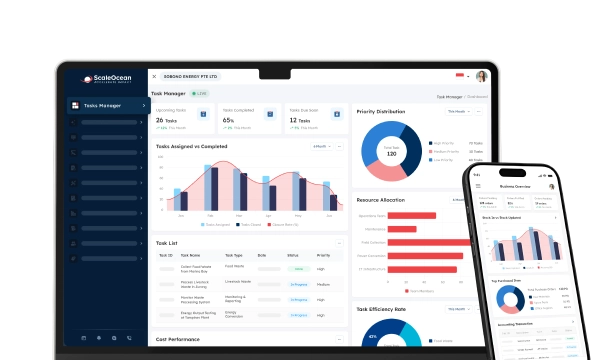

Employee monitoring software refers to a software tool that provides companies with actionable insights into workforce activity by monitoring and analyzing workforce behavior. It gathers operational data, including employees’ hours, attendance, application usage, productivity metrics, and more, to give a comprehensive overview of employee workflow.
Managing modern workforces can be a challenge for many Singapore companies. Hybrid work and distributed teams, combined with increasing manpower costs, all add complexities to the management challenge. Many companies rely on paper-based timesheets and spreadsheets that offer limited insights into load balancing, resource utilization, and employee productivity.
Employee tracking software can bring all of your data onto one screen, as you can centralize your workforce activity monitoring into a single system. More than just watching your workers in real-time, you can also focus on productivity trends, workforce planning, reporting, and operational support.
Based on the data our team collected from IMDA, 95.1% of SMES in Singapore implemented a minimum of one digital solution in 2024, indicating the increasing interest in technology to better optimize productivity and manage a workforce. This depicts how employee monitoring software optimizes productivity and supports regulatory compliance and insights.
Read this article to understand how employee monitoring software works, the key features to consider, the differences between employee monitoring tools and traditional time tracking methods, and the top employee monitoring software options available for Singapore businesses in 2026.
 Key Takeaways
- Employee monitoring software is a digital workforce solution that helps businesses track employee activities, analyse productivity patterns, and improve workforce visibility through data-driven insights.
- Key features of employee monitoring software include employee activity tracking, workforce analytics, real-time reporting, productivity measurement, data security controls, and integration with HR or business systems.
- The best employee monitoring software systems for 2026 include ScaleOcean Atlas, Teramind, Desklog, ActivTrak, Insightful, Hubstaff, Time Doctor, Appployee, KeepActive/Kickidler, and Monitask.
- ScaleOcean Atlas helps businesses manage employee monitoring as part of an integrated ERP ecosystem by connecting workforce data, HR processes, operational workflows, and ScaleMind AI-powered insights to support better productivity analysis and workforce decisions.
What Is Employee Monitoring Software?
Employee monitoring software is a type of workforce management software used by businesses to monitor or access employee behavior and productivity by gathering data from workplace activities. Usually, it tracks work-related activities like attendance, working hours, and performance, and gives managers insights through dashboards and reports.
The employee monitoring software offers much more information about the workforce than a simple check-in/out solution. Companies can know how the workers divide their working hours, what obstacles they come up against during the day, and how to optimize resource planning.
Using employee monitoring software for hybrid teams, departments, and project-based businesses. The use of employee monitoring for Singapore companies with hybrid teams, different departments, and project-based businesses can support your efforts to better manage your workforce by aligning the activities of employees with your business goals.
Modern employee monitoring solutions are also moving beyond basic tracking capabilities. Many platforms now incorporate analytics, automation, and AI-assisted insights to help businesses identify productivity trends, forecast workforce requirements, and support data-driven management decisions.
 Also Read: Best 15 HR Software Solution in 2026
Why Are Singapore Businesses Adopting Employee Monitoring Software?
Singapore businesses are adopting employee monitoring software primarily to manage remote work, secure corporate data, and optimize workforce productivity.
1. Managing Hybrid and Remote Workforce More Effectively
With changing work styles, business leaders are increasingly adopting hybrid and distributed working models. With teams spread across many locations, managers can’t always get a sense of what an employee is working on, how busy they are, or how the business is operating.x
Employee monitoring software helps businesses maintain workforce visibility by providing insights into working patterns, task activities, and team productivity. Instead of relying only on physical presence or manual updates, managers can use structured data to understand how work is progressing across different teams.
For organizations with remote employees, distributed teams, or multiple sites, this granularity enables more collaborative planning and ensures managers can recognize where workloads might be uneven and distribute the workload more effectively.
2. Improving Workforce Productivity Visibility
Making sense of productivity is a challenge for many companies. Tools like traditional reporting are often a bottleneck to meaningful engagement, such as being manually updated, hard to interpret, and hindered by opinion or partial data.
With tools to measure conducted through the analysis of activities in the workplace, progress on particular tasks, and overall trends of productivity, employee monitoring software supplies quantifiable data that you can use to identify and eliminate inefficient work practices, create optimal procedures, and assist your employees.
3. Optimising Resource Allocation Across Teams
A team or department that is out of balance, working on too many projects for different customers, or tackling too many client projects needs to use a resource tracking method.
Employee monitoring software allows organisations to look into what the workload distribution patterns look like across the organisation and where resources are falling short. Managers can then use this information to reprioritise work and reassign work accordingly.
4. Supporting Data-Driven Performance Management
Traditional performance reviews often rely on periodic evaluations, making it challenging to capture ongoing productivity trends. Monitoring tools can be used to provide you with constant insight that will help you form a more objective discussion.
Managers can access productivity measures, attendance trends, reporting patterns, and operational metrics using the dashboards and analytics. This information can guide the business towards areas for improvement, helping employees to better understand their expectations.
5. Strengthening Data Security and Compliance
With many companies digitising operations and processes, the need to safeguard employee and company data has grown. Whether it is enforcing access controls, monitoring for abnormal user activity, or taking data governance measures, employee monitoring software can aid your security efforts.
For example, Reuters reports on companies implementing workforce monitoring tools highlight the importance of transparency, clear usage policies, and privacy safeguards when collecting employee activity data. These considerations are especially relevant for organisations operating in regulated environments where employee information must be managed carefully.
For Singapore businesses managing hybrid teams and digital operations, employee monitoring software should be implemented with appropriate governance frameworks. Features such as role-based access, audit trails, and security controls help organisations maintain visibility into workforce activities while ensuring employee data is handled responsibly.
Modern employee monitoring platforms with role-based access, audit trails, and security controls can help businesses maintain better governance while ensuring workforce data is handled responsibly.
6. Reducing Manual Reporting Processes
Manual reporting processes often require HR teams and managers to collect information from multiple sources, consolidate spreadsheets, and prepare productivity reports manually. These processes can consume significant administrative time and increase the possibility of inconsistent data.
Employee monitoring software automates data collection and reporting by generating real-time dashboards and workforce analytics. HR teams can access relevant information faster without depending on repetitive manual updates.
How Does Employee Monitoring Software Work?
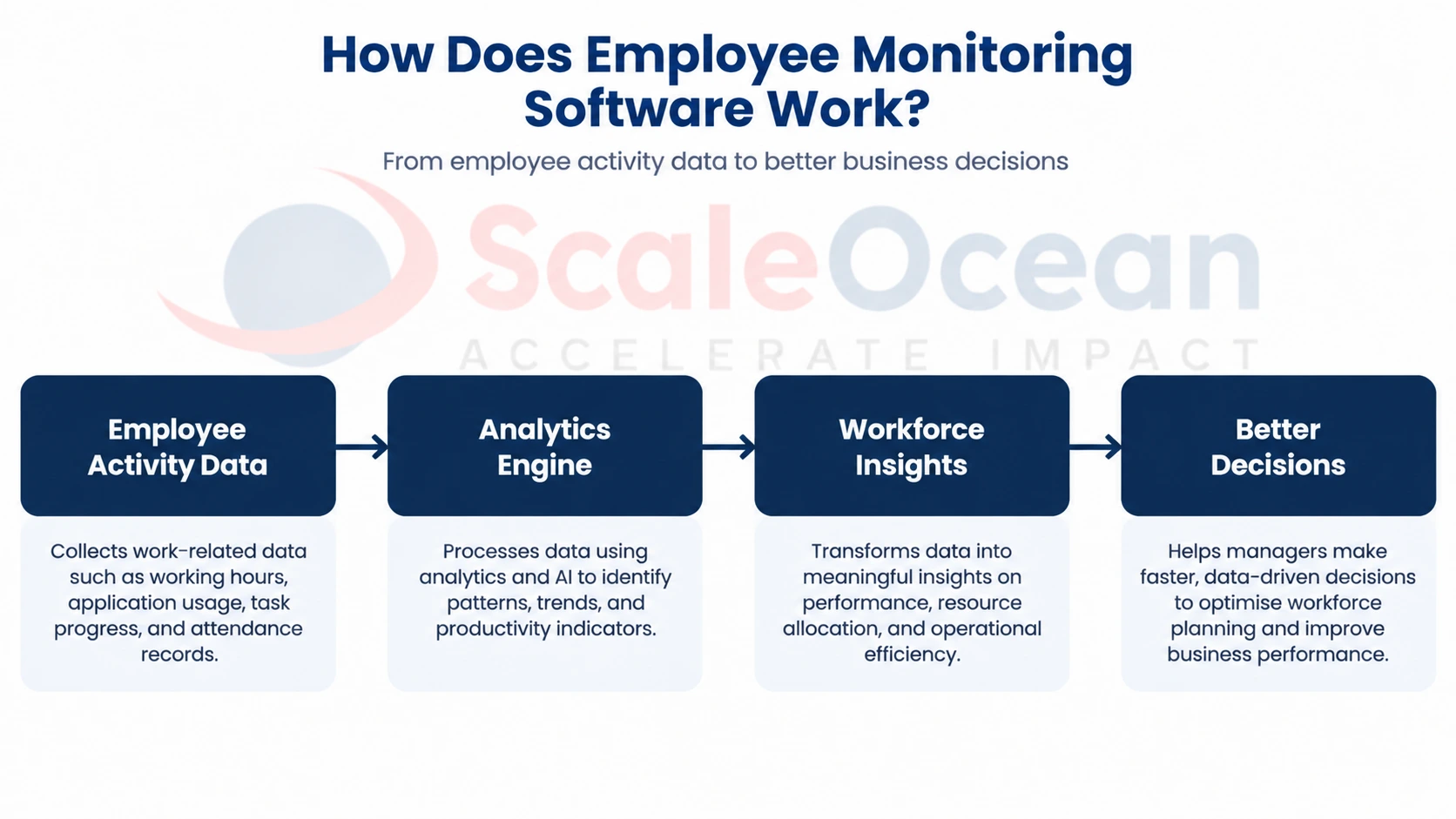
Employee monitoring software tracks, records, and analyzes digital work activities on company-issued devices using a lightweight background agent.
The workflow helps businesses move from manual workforce tracking into a more data-driven approach for managing productivity and operational efficiency.
1. Data Collection from Employee Activities
The initial phase of employee monitoring software involves collecting data related to the work performed across various employee activities. The system collects information like working hours, attendance logs, application usage, task completion, and workflow activities, helping to give a more comprehensive view of the day-to-day operations.
For businesses managing hybrid teams or multiple departments, automated data collection reduces dependency on manual timesheets and spreadsheet reporting. This allows HR teams and managers to access more consistent workforce information for better analysis.
2. Activity Analysis and Productivity Insights
After collecting employee activity data, the software analyses information to identify productivity patterns, workload distribution, and potential workflow improvements. Analytics capabilities help businesses understand how employees spend their time and identify areas where operational efficiency can be improved.
For Singapore enterprises, these insights are valuable for managing distributed teams, balancing workloads, and improving workforce utilisation. When connected with ERP or HR systems, employee activity insights can provide a broader view of workforce performance.
3. Reporting and Performance Analytics
Employee monitoring software translates the gathered information into charts and report formats that managers can analyze to monitor performance. Attendance patterns, productivity metrics, task completion, and team performance metrics are often included in these reports.
Real-time reporting can help to cut down on manual reporting tasks for HR teams and provide timely and accurate information about the workforce. These analytics can be leveraged by businesses for performance discussions, to look for opportunities to improve, and to optimise workforce planning.
4. Managerial Decision Support
The last step is to convert workforce insights into business decisions. Managers can leverage the data they have to optimize resource deployment, balance workloads, address business issues, and develop their staff.
For businesses with a more complex work environment, employee monitoring software will give a more comprehensive view of the workforce’s capacity and performance. It can be used in conjunction with business systems, and it can help to ensure that all employees are doing what the organization wants.
Key Features to Look for in Employee Monitoring Software
Businesses need to look for aspects like productivity visibility, workforce analytics, security, and compliance while choosing employee surveillance software. The top three features that are necessary when selecting employee monitoring software include time tracking, application and URL monitoring, and configurable privacy controls.
1. Time Tracking and Attendance Monitoring
Time tracking and attendance monitoring features help businesses record employee working hours, attendance patterns, overtime, and availability. This capability reduces manual attendance management and improves accuracy in workforce reporting.
For companies with hybrid teams or flexible working arrangements, automated time tracking provides better visibility into employee schedules while supporting more efficient workforce planning through modern HR technology solutions.
2. Application and Website Usage Tracking
Application and website usage tracking helps businesses understand how employees interact with workplace tools during working hours. The feature provides insights into software utilisation, workflow efficiency, and potential process improvements.
Rather than focusing only on activity measurement, businesses can use these insights to identify whether teams have the right tools and processes to complete their responsibilities effectively.
3. Productivity Analytics Dashboard
A productivity analytics dashboard provides managers with a centralised view of workforce performance indicators. Dashboards can display metrics related to working patterns, productivity trends, workload distribution, and team activities.
Real-time dashboards are beneficial for enterprise organizations as they provide visibility of data across departments and locations, enabling managers to make timely decisions with accurate information.
4. Task and Project Tracking Integration
Integration with task and project management systems allows employee monitoring software to connect workforce activities with business objectives. This helps managers understand project progress, resource allocation, and employee workload.
For project-based businesses, this feature provides better alignment between employee capacity and operational requirements while reducing information gaps between teams.
5. Screenshot Monitoring and Activity Logs
Businesses can keep track of activities on their workplaces with the help of screenshots and activity logs, giving them transparency into workplace activities. The capabilities listed below can assist in detecting workflow problems, increase accountability, and help with security monitoring.
But for businesses, it is important to use these tools responsibly: they must be transparent to their employees and comply with Singapore’s PDPA guidelines.
6. AI-Powered Workforce Insights
Businesses can leverage AI-powered workforce insights to analyze vast quantities of employee data and uncover significant patterns. AI-powered tools can contribute to productivity analysis, workload prediction, and workforce planning.
AI-generated insights can help Singapore businesses make better decisions by providing managers with valuable information about their employees, which can be used to guide their decision-making without the need for manual data entry.
ScaleOcean Atlas integrates ScaleMind AI to provide AI-assisted workforce insights by connecting employee-related data with broader ERP workflows. This allows businesses to analyse workforce information alongside operational data for more comprehensive decision support.
7. Security & DLP
Security and Data Loss Prevention (DLP) capabilities provide businesses with protection for sensitive information related to employees and the company. They can include a range of capabilities such as access controls, activity monitoring, audit trails, and data governance measures.
For Singapore organisations handling confidential information, security features are essential to maintain compliance with data protection requirements while ensuring workforce data is managed appropriately.
Employee Monitoring Software vs Traditional Time Tracking Methods
Deep digital activity and behavior are tracked by employee monitoring software, whereas working hours and basic task attendance are tracked by traditional time tracking. If your organization works with hybrid teams, multiple departments, or project-based teams, then having only manual timesheets might not give you the complete picture.
| Aspect | Employee Monitoring Software | Traditional Time Tracking |
|---|---|---|
| Primary Focus | Provides workforce visibility by analysing employee activities, productivity patterns, attendance, and workflow data. | Primarily records employee working hours, attendance, and clock-in or clock-out information. |
| Data Collection | Automatically collects work-related data such as application usage, task activities, attendance, and productivity indicators. | Usually depends on manual input, timesheets, spreadsheets, or attendance systems. |
| Productivity Insights | Provides analytics dashboards to identify productivity trends, workload distribution, and operational improvements. | Provides limited visibility because it mainly shows time spent rather than how work is performed. |
| Reporting Capability | Generates automated reports with workforce analytics, performance indicators, and activity insights. | Often requires manual consolidation before generating reports. |
| Hybrid Work Support | Supports distributed teams by providing visibility into remote and hybrid workforce activities. | May provide limited visibility when employees work outside traditional office environments. |
| Decision Support | Helps managers make data-driven decisions related to workforce planning, workload balancing, and performance improvement. | Mainly supports administrative tracking of employee attendance and working hours. |
Comparison of the Best Employee Monitoring Software At-a-Glance
Choosing the right employee monitoring software depends on whether your main goal is productivity tracking, remote workforce management, or enterprise security. The following comparison provides an overview of popular employee monitoring software options based on their primary capabilities.
| Software | Best For | Standout Features | Starting Price |
|---|---|---|---|
| ScaleOcean | Medium and large enterprises requiring integrated workforce management | ERP-based workforce visibility, configurable workflows, ScaleMind AI insights, dashboards, and enterprise integrations | Custom pricing based on business requirements |
| Teramind | Businesses requiring activity monitoring and security insights | User activity tracking, productivity analysis, insider risk monitoring | Starts from subscription-based plans |
| Desklog | Companies focusing on productivity and attendance monitoring | Time tracking, productivity reports, attendance management | Starts from subscription-based plans |
| ActivTrak | Organisations analysing workforce productivity trends | Productivity analytics, workforce insights, behaviour trends | Starts from subscription-based plans |
| Insightful | Remote and hybrid teams | Time tracking, productivity monitoring, employee analytics | Starts from subscription-based plans |
| Hubstaff | Remote teams and project-based organisations | Time tracking, project tracking, workforce reporting | Starts from subscription-based plans |
| Time Doctor | Companies managing distributed teams | Time tracking, productivity monitoring, reporting | Starts from subscription-based plans |
| Appployee | Businesses requiring employee productivity visibility | Employee tracking, analytics, workforce reports | Custom pricing |
| KeepActive/Kickidler | Companies requiring monitoring and activity reporting | Screen monitoring, activity logs, productivity analysis | Subscription-based plans |
| Monitask | Small and medium businesses | Time tracking, screenshots, activity monitoring | Subscription-based plans |
Popular Employee Monitoring Software Tools in Singapore for 2026
Businesses managing hybrid teams, multiple departments, and distributed workforces need more than traditional attendance tracking or spreadsheet-based reporting. The right employee monitoring software helps organisations improve workforce visibility, analyse productivity trends, optimise resource allocation, and support data-driven workforce decisions.
When selecting employee monitoring software, businesses should consider factors such as workforce size, operational complexity, compliance requirements, integration capabilities, reporting features, scalability, and customisation options.
1. ScaleOcean
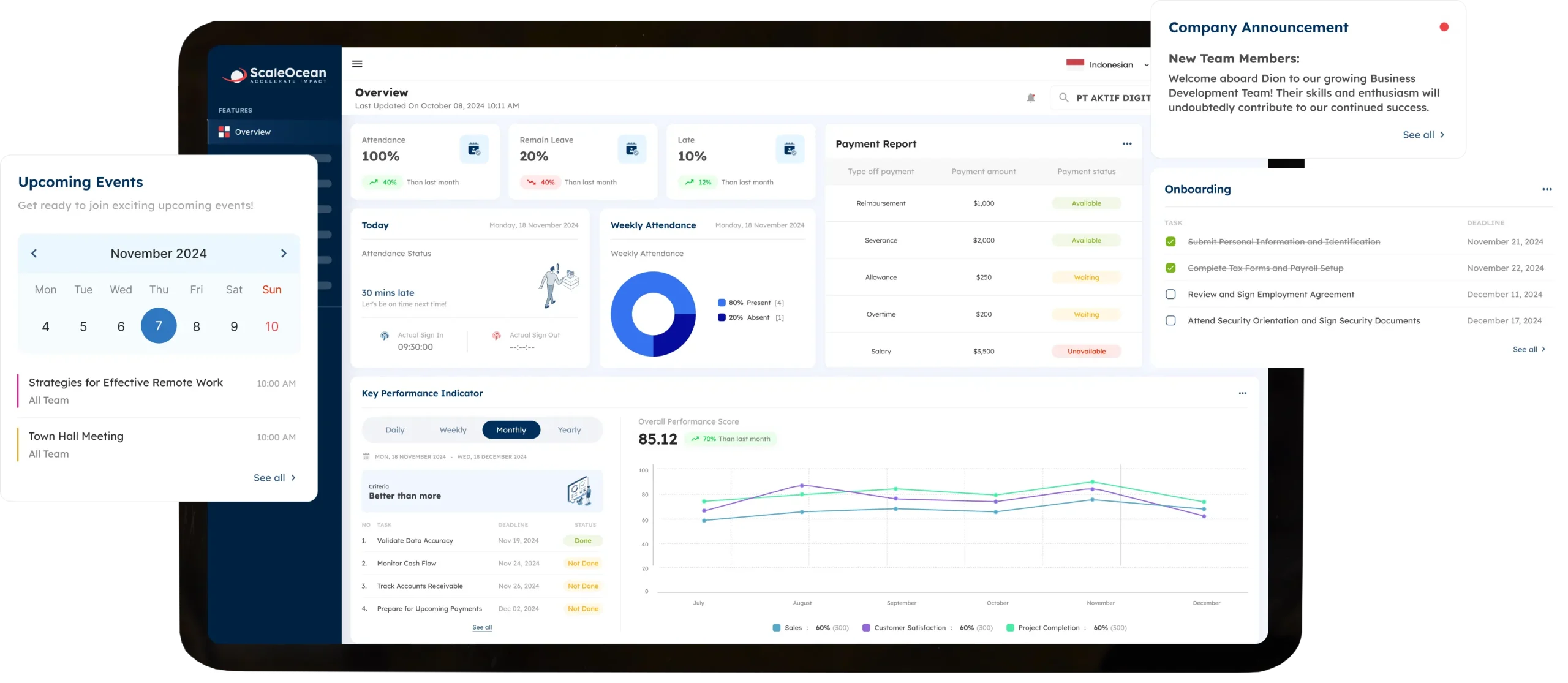
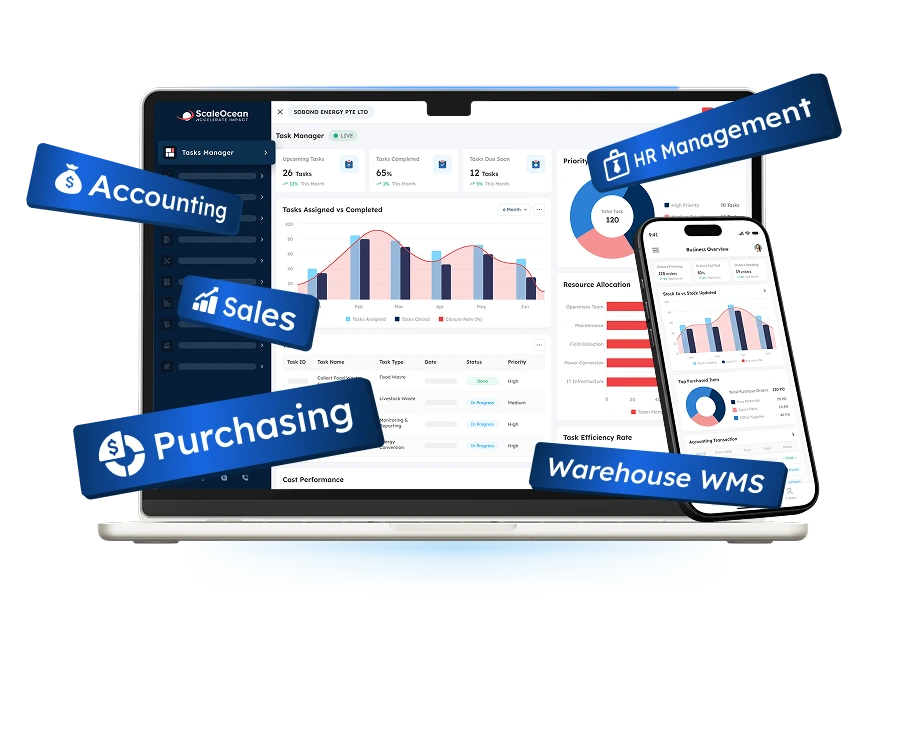
ScaleOcean is an ERP solution provider that provides its flagship product, ScaleOcean Atlas, for medium- and large-sized companies that have complicated Human Resources Management and operations needs. ScaleOcean integrates workforce visibility with other ERP processes like HR management, attendance, project operations, and business processes.
ScaleOcean Atlas helps businesses manage workforce performance through configurable workflows, allowing organisations to monitor employee activities, attendance patterns, and operational efficiency across multiple departments or locations. The platform combines workforce data with ScaleMind AI-powered insights to help businesses identify productivity trends and make more informed workforce decisions.
The system supports various business structures, including multi-location organisations and companies managing multiple projects, departments, and workforce requirements. Through role-based access, approval workflows, and audit trails, businesses can maintain structured workforce governance.
This system has been optimised and complies with PDPA regulations. It can also be customised to support EDG/CTC requirements, subject to company eligibility and qualifying project costs. Schedule a consultation with ScaleOcean to explore configurable employee monitoring and workforce management workflows.
Key Features:
- Enterprise-wide workforce visibility
- Employee activity and productivity analytics
- Attendance and timesheet management
- Configurable HR and operational workflows
- Real-time workforce dashboards and reporting
- Integration with ERP, project, and business operations
- Role-based access, approval workflows, and audit trails
| Pros | Cons |
|---|---|
| Connects employee monitoring capabilities with broader ERP processes instead of operating as a standalone tracking tool. | May provide broader functionality than required for small businesses with simple employee tracking needs. |
| Provides configurable workflows that adapt to different business processes and workforce structures. | Implementation requires business process analysis to configure workflows according to organisational requirements. |
| Combines workforce data, operational information, and AI-assisted insights within one integrated platform. | Pricing depends on business requirements, modules, integrations, and implementation scope. |
| Supports scalability for enterprises expanding teams, locations, and operational complexity. |
Best for: Medium and large enterprises, multi-location organisations, professional services companies, manufacturing businesses, construction companies, and organisations requiring integrated workforce visibility.
ℹ️ Why choose ScaleOcean?
ScaleOcean helps businesses manage employee monitoring as part of a broader workforce management ecosystem. Instead of focusing only on activity tracking, the platform connects employee data with HR, operational workflows, and business processes to provide deeper workforce visibility.
2. Teramind
Teramind is an employee monitoring and workforce analytics platform designed to help businesses track user activities, analyse productivity patterns, and improve workplace security. The platform focuses on providing visibility into employee behaviour through activity tracking, reporting, and risk monitoring capabilities.
Teramind is widely adopted by organizations that must have comprehensive employee activity monitoring capabilities, such as companies seeking more insight into what happens in their digital workplace and in terms of data security threats.
Key Features:
- User activity monitoring
- Productivity analytics
- Screen monitoring
- Insider risk detection
- Behaviour analytics
- Reporting dashboards
| Pros | Cons |
|---|---|
| Provides detailed employee activity monitoring capabilities for organisations requiring workforce visibility. | Businesses focused mainly on HR and operational workflows may require additional platforms. |
| Includes security monitoring features to help organisations identify potential data risks. | Advanced monitoring features may require careful configuration and implementation planning. |
| Offers analytics and reporting tools to support productivity evaluation. | Companies managing complex business processes may need integration with other enterprise systems. |
Best for: Medium to large organisations requiring employee activity monitoring and security visibility.
ℹ️ Why choose Teramind?
Teramind provides businesses with detailed workforce activity monitoring and analytics capabilities to improve visibility into employee behaviour, productivity trends, and workplace security.
3. Desklog
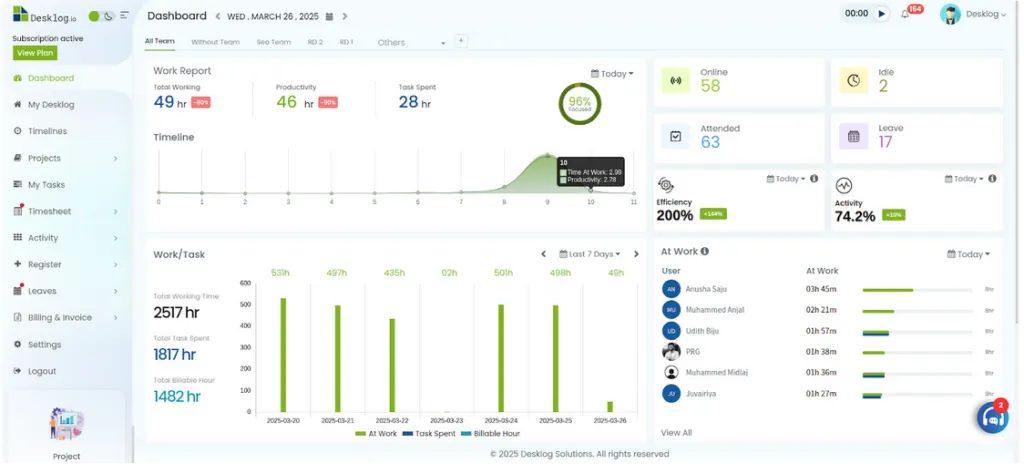
Desklog is an employee productivity monitoring solution that helps businesses track working hours, attendance, and employee productivity. The platform provides visibility into how teams spend their time and supports organisations managing remote or hybrid work environments.
It seamlessly integrates with productivity reporting capabilities, empowering managers to analyze work habits and pinpoint process optimization opportunities.
Key Features:
- Time tracking
- Attendance monitoring
- Productivity reports
- Application usage tracking
- Project tracking
- Employee dashboards
| Pros | Cons |
|---|---|
| Provides automated time tracking and attendance monitoring to improve workforce visibility. | Businesses requiring broader ERP and business process integration may need additional solutions. |
| Offers productivity reports that help managers understand employee working patterns. | Advanced workforce planning capabilities may require further configuration or supporting tools. |
| Supports remote and hybrid teams with centralised employee activity monitoring. | May be more suitable for organisations focusing on productivity tracking rather than complex operational workflows. |
Best for: Small to medium businesses, remote teams, and organisations requiring basic productivity tracking.
ℹ️ Why choose Desklog?
Desklog provides businesses with straightforward employee productivity tracking through time monitoring, attendance management, and reporting features designed for improving workforce visibility.
4. ActivTrak
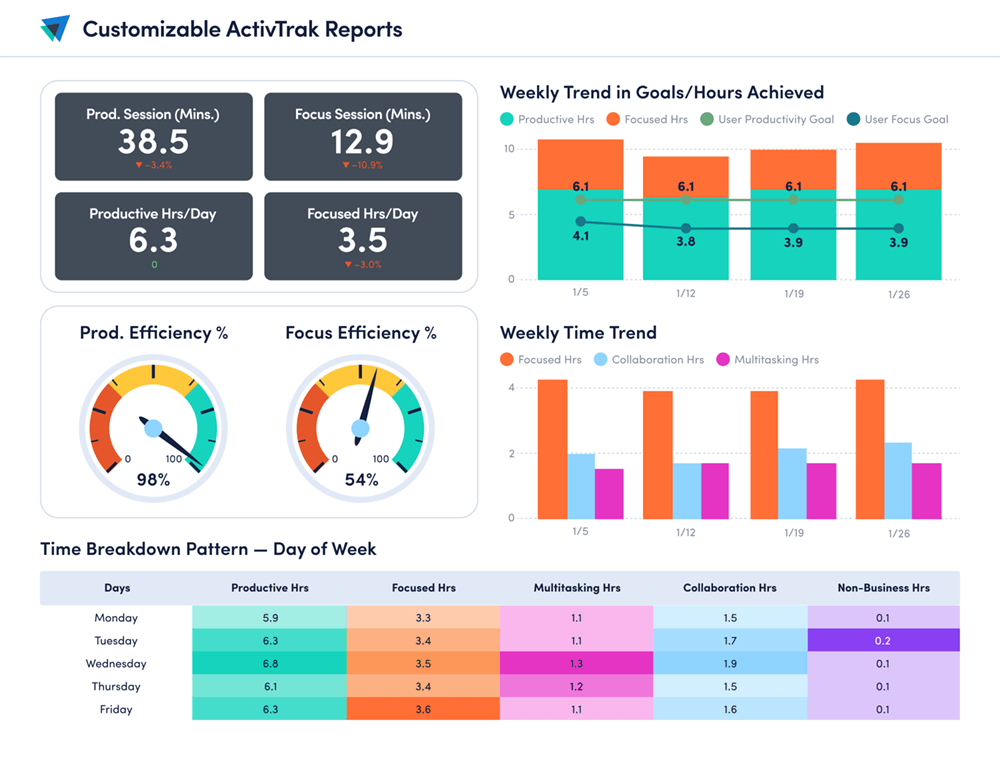
ActivTrak is a workforce and employee productivity analytics platform that helps businesses gain insights into their employees’ work habits, productivity trends, and team performance. It offers analytics dashboards for visibility of employee activities, enabling managers to look into workflows and optimise workforce efficiency.
ActivTrak is more than just attendance tracking; it’s about workforce insights. The platform can be utilized by businesses to assess levels of productivity, workload allocation, and behaviours within the workplace and make more informed management decisions.
Key Features:
- Workforce productivity analytics
- Employee activity insights
- Work pattern analysis
- Productivity dashboards
- Benchmarking reports
- Workforce planning insights
| Pros | Cons |
|---|---|
| Provides workforce analytics that help businesses identify productivity trends and work patterns. | Organisations requiring HR, finance, or ERP integration may need additional platforms. |
| Offers dashboards and reporting tools to support data-driven workforce decisions. | Businesses may need configuration to align analytics with specific performance metrics. |
| Supports hybrid work management through employee productivity visibility. | Companies with complex operational workflows may require additional customisation. |
Best for: Medium businesses, enterprise teams, and organisations looking for workforce productivity analytics and employee activity insights.
ℹ️ Why choose ActivTrak?
ActivTrak helps organisations understand workforce productivity through analytics-based insights. The platform provides visibility into employee activities and work patterns, supporting better workforce planning and performance management decisions.
5. Insightful
Insightful is an employee monitoring and productivity analytics tool for remote & hybrid work environments. It enables companies to monitor employee working hours, identify trends in productivity, and gain insights into employee time allocation.
The platform provides visibility into workforce performance through dashboards and reports, allowing managers to monitor productivity trends while improving team collaboration.
Key Features:
- Automatic time tracking
- Productivity analytics
- Application usage monitoring
- Employee activity reports
- Remote workforce tracking
- Team performance dashboards
| Pros | Cons |
|---|---|
| Provides automated time tracking and productivity analytics for remote and hybrid teams. | Businesses requiring comprehensive enterprise resource planning may need additional systems. |
| Offers visibility into application usage and employee working patterns. | Advanced workflow customisation may require additional setup. |
| Provides dashboards that help managers review workforce productivity. | May be more focused on productivity tracking rather than broader business operations. |
Best for: Small to medium businesses, remote teams, and companies seeking productivity tracking capabilities.
ℹ️ Why choose Insightful?
Insightful provides employee monitoring and productivity analytics features that help businesses understand workforce activity patterns and improve visibility across remote and hybrid teams.
6. Hubstaff
Hubstaff is a workforce management platform that combines employee time tracking, project management, and productivity monitoring features. It is commonly used by businesses managing distributed teams, freelancers, and project-based operations.
The platform helps organisations monitor working hours, track project progress, and understand resource utilisation. Through dashboards and reporting features, managers can review team performance and improve project coordination.
Key Features:
- Time tracking
- Project tracking
- Productivity monitoring
- GPS tracking
- Automated reports
- Team management dashboards
| Pros | Cons |
|---|---|
| Combines time tracking and project monitoring features within one platform. | Large enterprises may require additional systems for complete business management. |
| Supports remote teams with workforce tracking and project visibility features. | Advanced workforce planning may require integration with other solutions. |
| Provides reporting features to monitor team productivity and project progress. | Businesses with complex approval workflows may need further customisation. |
Best for: Remote teams, agencies, startups, and project-based businesses requiring time and project tracking.
ℹ️ Why choose Hubstaff?
Hubstaff provides businesses with workforce tracking and project management capabilities that help teams monitor working hours, project progress, and resource utilisation.
7. Time Doctor
Time Doctor is an employee productivity monitoring platform designed to help businesses manage remote teams and improve workforce visibility. It provides tools for tracking working hours, analysing productivity patterns, and generating performance reports.
The platform is commonly used by organisations that need better visibility into distributed teams while maintaining structured reporting processes.
Key Features:
- Time tracking
- Productivity measurement
- Task tracking
- Activity monitoring
- Reporting dashboards
- Remote team management
| Pros | Cons |
|---|---|
| Provides workforce visibility through time tracking and productivity monitoring. | Businesses requiring integrated ERP workflows may need supporting systems. |
| Supports remote workforce management with activity tracking and reporting. | Organisations should establish clear monitoring policies for employee transparency. |
| Offers productivity reports to help managers analyse team performance. | Advanced business process management may require additional integrations. |
Best for: Remote teams, outsourcing companies, and businesses managing distributed employees.
ℹ️ Why choose Time Doctor?
Time Doctor helps businesses improve workforce visibility through time tracking, productivity monitoring, and reporting capabilities designed for remote and distributed teams.
8. Appployee
Appployee is an employee monitoring and workforce productivity solution designed to help businesses track employee activities, working patterns, and productivity levels. The platform provides organisations with better visibility into workforce behaviour through monitoring features and reporting capabilities.
The software supports businesses in understanding how employees spend their working hours, identifying productivity trends, and improving workforce management processes. It can be used by organisations that require additional visibility into employee activities across different working environments.
Key Features:
- Employee activity monitoring
- Time tracking
- Productivity reporting
- Attendance management
- Workforce analytics
- Employee performance insights
| Pros | Cons |
|---|---|
| Provides employee activity monitoring to improve workforce visibility. | Businesses with complex enterprise requirements may require broader platforms. |
| Offers reporting features to help businesses understand productivity patterns. | Advanced analytics capabilities may depend on business configuration needs. |
| Supports businesses looking for structured employee monitoring capabilities. | Integration with wider HR and operational systems may require additional setup. |
Best for: Small to medium businesses looking for employee activity monitoring and productivity tracking capabilities.
ℹ️ Why choose Appployee?
Appployee provides businesses with workforce monitoring features that help improve visibility into employee activities, productivity trends, and working patterns through structured reporting.
9. KeepActive/Kickidler
KeepActive and Kickidler are employee monitoring solutions designed to provide businesses with visibility into employee computer activities, working behaviour, and productivity patterns. These platforms focus on activity monitoring, screen tracking, and workforce analytics to help organisations better understand workplace operations.
The solutions are commonly used by companies that require detailed monitoring capabilities, particularly organisations managing remote employees or teams where digital activity visibility is important.
Key Features:
- Screen activity monitoring
- Employee activity tracking
- Time tracking
- Productivity analytics
- Application usage monitoring
- Activity reports
| Pros | Cons |
|---|---|
| Provides detailed activity monitoring and screen tracking capabilities. | Businesses should establish clear employee monitoring guidelines before implementation. |
| Offers productivity reports based on employee digital activities. | May require additional solutions for HR and business workflow management. |
| Supports organisations requiring detailed workplace activity visibility. | Enterprise-level integration capabilities may require further configuration. |
Best for: Small to medium businesses requiring detailed employee activity monitoring and workplace visibility.
ℹ️ Why choose KeepActive/Kickidler?
KeepActive and Kickidler provide detailed employee monitoring capabilities that help organisations understand digital workplace activities, productivity patterns, and workforce behaviour.
10. Monitask
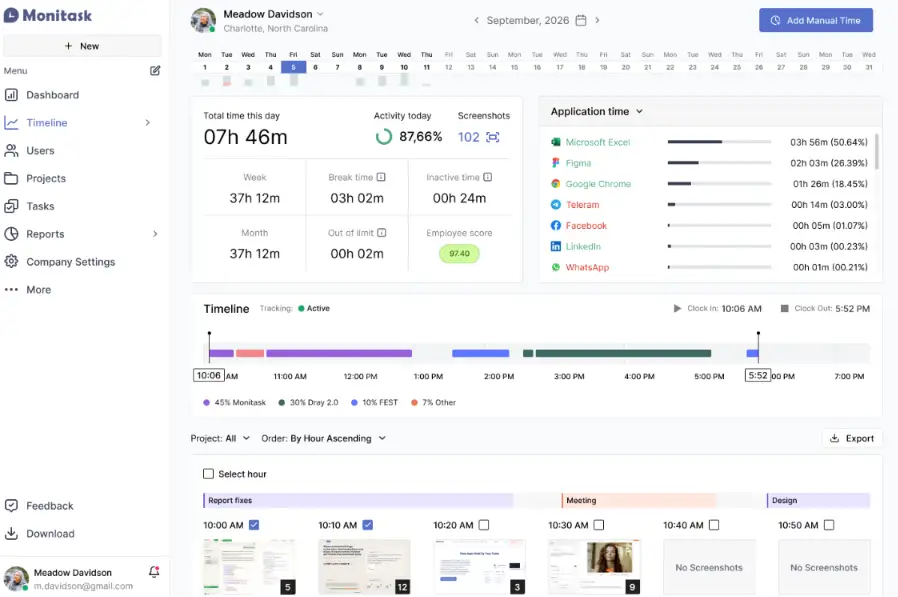
Monitask is an employee monitoring and productivity tracking platform designed to help businesses manage remote and distributed teams. The software provides tools for monitoring working hours, tracking employee activities, and generating productivity reports.
The platform is commonly used by small and medium businesses that need a straightforward solution for improving workforce visibility without requiring complex implementation processes.
Key Features:
- Time tracking
- Employee activity monitoring
- Screenshot monitoring
- Productivity reports
- Attendance tracking
- Team management dashboard
| Pros | Cons |
|---|---|
| Provides simple employee monitoring features suitable for small and medium businesses. | Large enterprises may require more comprehensive workforce management capabilities. |
| Supports time tracking, screenshots, and productivity reporting. | Advanced workflow customisation may require additional configuration. |
| Offers an accessible approach for businesses starting workforce monitoring initiatives. | Integration with broader HR or ERP ecosystems may require additional tools. |
Best for: Small businesses, startups, and remote teams looking for basic employee monitoring and productivity tracking.
ℹ️ Why choose Monitask?
Monitask provides businesses with essential employee monitoring capabilities, including time tracking, activity monitoring, and productivity reporting to improve workforce visibility.
How to Choose the Right Employee Monitoring Software in Singapore

While selecting employee monitoring software in Singapore, you must consider productivity monitoring and compliance with local legislation and statutory requirements. The following are factors that can assist organisations in finding the solution that meets their operational needs.
1. Evaluate Privacy and PDPA Compliance
One of the key points that Singapore businesses will need to take into account is data privacy when using employee monitoring software, as information related to the workforce is being gathered. Companies need to consider whether it offers the right security controls and data management capabilities to meet the requirements of compliance with the Personal Data Protection Act (PDPA).
It’s also essential for businesses to make sure employees are aware of which data is being tracked, for what purpose, and why it is being tracked. To ensure that organisations are using workforce data responsibly and maintaining trust, a transparent approach is required.
2. Check Integration Capabilities
Integration capacity is the ability of employee monitoring software to integrate with the business environment. Integrated solutions that bring HR software, payroll systems, project management software, or ERP solutions together will help you get a more complete view of the workforce.
With the right employee monitoring software, organisations can gain better insights into their workforce, track productivity trends, optimise resource allocation, and make data-driven decisions about their workforce.
3. Consider Scalability for Enterprise Growth
Businesses should select employee monitoring software that can support future growth. As companies expand their workforce, locations, and operational complexity, the solution should be able to accommodate increasing users, departments, and reporting requirements.
Scalable software allows organisations to maintain workforce visibility without replacing systems as business needs evolve. Enterprise-ready solutions typically provide flexible configurations, user management capabilities, and support for more complex workflows.
4. Review Reporting and Analytics Features
Reporting and analytics features help businesses transform workforce data into actionable insights. Companies should evaluate whether the software provides dashboards, productivity reports, attendance analytics, workload insights, and performance indicators.
Advanced analytics features enable managers to gain insights into productivity trends, resource utilisation, and workforce planning. Additionally, AI-generated insights can supplement the decision-making process by uncovering trends that may not be seen in manual analysis.
5. Assess Customisation and Workflow Requirements
Every organisation has different workforce processes, approval structures, and reporting requirements. Employee monitoring software with customisation capabilities allows businesses to adapt workflows according to their operational needs instead of following rigid processes.
For companies with complex structures, configurable workflows, role-based access, and custom reporting can improve system adoption and ensure the solution aligns with existing business operations, similar to how employee scheduling software helps organisations optimise workforce allocation and scheduling processes.
Conclusion
For Singapore businesses, challenges such as managing hybrid teams, improving productivity visibility, protecting workforce data, and coordinating distributed employees require a more structured approach. Employee monitoring software helps businesses overcome these challenges by providing real-time insights, improving operational transparency, and supporting better workforce planning.
ScaleOcean Atlas helps businesses manage employee monitoring as part of an integrated ERP-based workforce management platform. Through configurable workflows and ScaleMind-powered insights, businesses can connect employee data with HR and operational processes to improve productivity analysis, resource planning, and decision-making. Schedule a consultation with ScaleOcean to explore how a configurable workforce solution can support your organisation.
FAQ Employee Monitoring Software:
1. What is employee monitoring software used for?
Employee monitoring software is used to track work-related activities, analyse productivity trends, monitor attendance, and provide workforce insights that help businesses improve operational efficiency and decision-making.
2. Is employee monitoring software legal in Singapore?
Yes, employee monitoring software can be implemented in Singapore when businesses follow proper data management practices, maintain transparency with employees, and ensure compliance with the Personal Data Protection Act (PDPA).
3. Does employee monitoring software reduce employee privacy?
Employee monitoring software does not necessarily reduce employee privacy when businesses collect only relevant work-related data, apply clear policies, and implement proper security controls for managing employee information.
4. What is the difference between employee monitoring software and HR software?
Employee monitoring software focuses on workforce activity tracking, productivity analysis, and operational insights, while HR software manages broader employee processes such as payroll, recruitment, employee records, and performance management.
5. Can employee monitoring software support hybrid work management?
Yes, employee monitoring software supports hybrid work management by providing visibility into employee activities, working patterns, productivity trends, and workload distribution across different locations.





.png)