
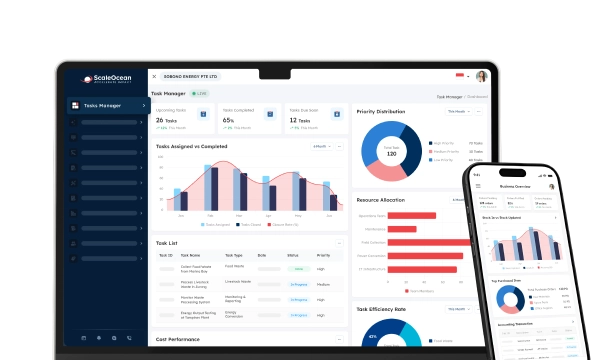

Capacity planning software is a computer program that enables companies to gauge the workforce and resources they have available in comparison to current and future workloads. It allows teams to determine what resources are missing, schedule resources according to resource demand, predict future resource needs, and distribute workload evenly among projects and locations.
In Singapore, capacity planning can be difficult if the number of available employees, project needs, skills, and demand fluctuate constantly. It can be a challenge for businesses to keep up their productivity without overburdening their existing teams, given the talent shortages, increasing manpower costs, and the difficulty in allocating employees to multiple projects.
A structured capacity planning solution helps businesses to bring together these. A single source of data helps companies analyse their workforce capacity, identify any resource voids, look forward, and make better resource allocation decisions than ever before compared to spreadsheets or isolated systems.
According to the data our team gathered from The Straits Times, 79% of employers surveyed by the Singapore National Employers Federation cited rising manpower costs as a key challenge. The discovery not only underlines the need for businesses to carefully plan workforce capacities, but also the need to better utilize workforce members.
Read through this article to learn about 14 capacity planning tools and software in Singapore, their features, pros, cons, and which ones are best for various business sizes and operations.
 Key Takeaways
- Capacity planning software is a digital solution that helps businesses compare available workforce and resources with current and future workloads.
- Key features of capacity planning software include real-time capacity visibility, resource forecasting, skill-based allocation, scenario planning, planned-versus-actual reporting, and integration with existing business systems.
- The top 14 capacity planning software platforms in Singapore include ScaleOcean Atlas, ClickUp, Jira Cloud Premium, Wrike, Float, Epicflow, Smartsheet, Resource Expert, Planview, Tempo Capacity Planner, Celoxis, Productive, Meisterplan, and Runn.
- ScaleOcean Atlas helps businesses manage capacity planning through configurable ERP workflows that connect workforce data, project requirements, and operational processes.
What Is Capacity Planning Software?
Capacity planning software is used to see if there is enough capacity to handle current and future workloads. Resources may include human resources, skills, working hours, equipment, project capacity, and other resources needed to carry out planned activities.
The software typically combines resource availability, workload requirements, project schedules, and demand forecasts to help managers identify overcapacity or underutilisation. This allows businesses to adjust assignments, plan hiring or reskilling, and allocate resources according to changing business priorities.
For workforce-focused organizations, capacity planning can also form part of broader human capital management strategies by connecting workforce data with talent development, employee allocation, and long-term workforce planning.
 Also Read: 10 Best Talent Management Software System/Tools (2026)
Why Businesses Need Capacity Planning Software
Capacity planning software is essential for businesses to ensure that resources are allocated appropriately based on the current workload, preventing overcommitting and unnecessary waste. A capacity planning solution offers a more systematic way to align resources and business needs.
1. Prevent Resource Overload and Underutilisation
If workloads do not match capacity, then some resources might be idle, and some workers might be overloaded. These can impact productivity and resource efficiency in both scenarios.
Capacity planning software enables IT managers to balance workload with employees and uncover workload imbalances before they turn into operational bottlenecks.
2. Improve Project Delivery and Operational Efficiency
There may be skill or manpower shortages that prevent the work from starting when required. Capacity planning gives managers a clearer picture of the resources available before the work is assigned.
Businesses can plan ahead for capacity to ensure projects are delivered, reschedule projects, or redistribute workloads if capacity is identified earlier in the process.
3. Support Data-Driven Business Decisions
Capacity planning is a combination of workforce, workload, project, and availability information to assist with more informed planning. This data can be used by managers to determine current capacity and to consider future scenarios.
This assists companies in moving away from manual approximations and into planning on a central operational data basis.
4. Reduce Project Delays and Operational Bottlenecks
If multiple projects need to access the same resources at the same time, a lack of staffing or expertise can be a limiting factor. Capacity planning can help companies to uncover these conflicts before they impact delivery.
Managers can then schedule projects, allocate resources to fill in project gaps, or schedule extra capacity if it is required. By doing this, businesses can help minimize bottlenecks and optimize their use of resources due to operational needs.
5. Increase Planning Accuracy
It can be challenging to maintain workforce availability, workload, leave, skills, and project assignments up to date across manual spreadsheets. A centralized capacity planning system can provide more up-to-date information for planning activities.
With connected workforce data, businesses can compare planned capacity with actual resource availability more effectively. ScaleOcean Atlas supports this process by integrating talent management data and operational information within one platform, helping businesses improve workforce visibility and make more accurate allocation decisions through ScaleMind-powered insights.
6. Enable Scalable Business Growth
As companies expand, the need for workforce can become more complex. There might be a need for more people, new skills, more sites, or other resource configurations.
Capacity planning can assist organizations in modeling these needs and deciding what more capacity might be required to accommodate future expansion.
How Does Capacity Planning Software Work?

Capacity planning software matches work and projects the amount of work an organization takes in with the availability, skills, and time of its members in real-time.
1. Analyse Current Resource Availability
The first step in capacity planning is understanding the resources currently available within the business. For workforce planning, this includes employee numbers, working hours, skills, availability, current assignments, leave schedules, and other factors that may affect resource capacity.
Combining all this in a single system allows businesses to see what their true capacity is, rather than needing to check multiple spreadsheets or manually gather updates. This enables managers to see if there is an effective balance between the resources available and the current workload.
2. Forecast Future Resource Demand
After understanding current capacity, businesses need to estimate future resource requirements based on upcoming projects, expected demand, business expansion, or seasonal changes. This allows companies to prepare resources before operational needs increase.
Forecasting helps managers identify whether future workloads may exceed existing capacity and determine whether additional hiring, training, or resource adjustments may be required to maintain productivity.
3. Compare Capacity Against Workload
The system then compares available capacity with planned workloads to identify potential gaps or resource conflicts. For example, a project may require 500 hours of engineering capacity, while the available team only has 400 hours to complete the required tasks.
This comparison allows managers to identify constraints earlier, adjust project timelines, redistribute workloads, or prepare additional resources before capacity issues impact business operations.
4. Optimise Resource Allocation
Once capacity gaps or excess resources are identified, managers can make adjustments to improve resource utilisation. This may include moving employees between projects, balancing workloads across teams, adjusting schedules, or planning additional workforce capacity.
ScaleOcean Atlas supports skill-based resource allocation by connecting workforce information with operational and project requirements. This allows businesses to match available talent with suitable initiatives based on skills, availability, and business priorities.
Key Features to Look for in Capacity Planning Software

The best capacity planning software should offer critical capacity insights and offer a better view into team workloads and future resource needs.
A comprehensive solution must enable businesses to not just be aware of their existing resource situation, but also be ready for upcoming changes in their operations with proper data, structured processes, and workflows.
1. Real-Time Capacity and Workload Visibility
Availability, workload distribution, project assignments, and capacity utilization should be visible in a centralized dashboard. This enables managers to get an instant overview of their team’s resource utilization throughout the organization.
Real-time visibility will allow businesses to see if there are overloaded teams, available resources, and resource conflicts between teams without having to manually add up information from a number of sources.
2. Resource Forecasting and Demand Planning
Forecasting allows businesses to predict the size of the workforce they need based on the projects they plan, the anticipated demand, business expansion, or seasonal requirements. This allows organisations to save resources in times of low demand.
This functionality can be particularly beneficial for companies with hiring, employee development, and reskilling plans, or needing to allocate resources in advance of operational change.
3. Resource Allocation Based on Skills and Availability
The number of available employees is not the only factor to consider in capacity planning. Businesses also need to review the skill sets, experiences, and availability of their employees to determine if they are qualified to undertake a particular project or task.
Skill-based allocation is the practice of making sure that the correct individuals are assigned to the proper positions, balancing workloads, and making sure resources are used according to their skill.
4. Scenario Planning and What-If Analysis
The aim of scenario planning is for managers to consider various scenarios before deciding how to allocate resources. For instance, companies can evaluate how project delays, rising customer demands, or extra labor availability affect projects.
This allows businesses to plan ahead, minimize risks, and make quick decisions when business needs evolve.
5. Planned vs. Actual Reporting
Businesses should be able to compare the capacity of resources they planned for to the workload and utilisation of those resources. This assists managers to recognise the gap between what they expect and what they are actually operating in.
These differences can be used to better understand those that may occur in the future, modify resource planning techniques, and make more informed decisions and choices based on past performance.
6. Integration With Existing Business Systems
Effective capacity planning is more effective when integrated with existing HR, project management, finance, ERP, and operational systems. Integration provides consistent and up-to-date business information for planning decisions.
When choosing capacity planning software, businesses should consider workforce size, operational complexity, integrations, customization, and scalability. Connecting capacity planning with processes such as onboarding software in Singapore can also help businesses prepare new employees more effectively and align workforce availability with future operational needs.
Capacity Planning Software vs. Resource Management Software
Capacity planning and resource management go hand in hand, but they’re different aspects of resource decision-making. Capacity planning is mainly assessing if the resources are sufficient to accommodate the expected demand, whereas resource management is more broadly about assigning, scheduling, and managing resources.
| Comparison | Capacity Planning Software | Resource Management Software |
|---|---|---|
| Primary Focus | Determines whether available capacity can meet current and future demand. | Manages how available resources are assigned and utilised. |
| Main Question | Do we have enough capacity to meet the workload? | How should available resources be allocated? |
| Planning Horizon | Often supports short-, medium-, and long-term planning. | Often focuses on current and upcoming resource assignments. |
| Key Data | Capacity, demand, skills, availability, workload, and forecasts. | Resources, schedules, assignments, workloads, and project requirements. |
| Typical Outcome | Identifies capacity gaps, surpluses, and future resource requirements. | Creates and manages resource assignments and schedules. |
Capacity Planning Software vs. Project Management Software
Capacity planning software and project management software can work together but have different primary purposes. Most project management platforms are used to plan and implement projects, whereas capacity planning determines if there is enough capacity to handle the proposed workload.
| Comparison | Capacity Planning Software | Project Management Software |
|---|---|---|
| Primary Focus | Workforce and resource capacity against expected demand. | Project planning, task execution, timelines, and collaboration. |
| Resource Planning | Evaluates available capacity and future resource requirements. | Assigns resources to project tasks and activities. |
| Forecasting | Supports demand forecasting and capacity scenarios. | Primarily forecasts project schedules and completion dates. |
| Key Users | HR leaders, resource managers, operations teams, and business leaders. | Project managers, team leaders, project teams, and stakeholders. |
| Typical Output | Capacity gaps, resource requirements, utilisation insights, and workforce scenarios. | Project schedules, tasks, milestones, progress, and completion reports. |
Types of Capacity Planning Tools
Capacity planning tools and software are digital solutions that monitor, balance, and predict an organization’s resources (including people, equipment, and time) against project requirements.
The selection of the right resource visibility tool, a workforce forecasting tool, or a combination of both, and the integration of capacity planning with other business workflows is reliant on the business’s requirements.
1. Pure-Player Capacity Tools
Capacity tools are platforms that are particularly developed for resource capacity planning, allocation, scheduling, and workload management, which are commonly referred to as pure-players. These solutions enable businesses to track availability, determine resource gaps, and manage workloads between teams or projects.
They are suitable for organizations that have to have specific capacity planning capabilities but not extensive business management functions. For more complex operations, though, companies might require more integrations to correlate capacity planning with HR, finance, or other operational systems.
2. Enterprise Work Management Software
Enterprise work management platforms integrate capacity planning with project, task, workflow, and collaboration management. These tools are useful for businesses to manage multiple teams and track workloads, as well as handle complex workstreams across various departments.
These platforms will offer improved resource allocation and workload distribution visibility for organizations with multiple projects running at once. But companies must consider whether it will meet their long-lasting operational needs and integration requirements.
3. Enterprise Resource Planning (ERP)
ERP can integrate capacity planning into other business areas like finance, procurement, operations, HR, and project management. This enables businesses to assess resource capability based on operational data that is connected, instead of data that is isolated in the planning process.
An ERP-based solution can deliver a more comprehensive profile of workforce availability, project needs, and business performance. ScaleOcean Atlas embraces this concept by leveraging a configurable ERP ecosystem that ties workforce management and business workflows with capacity planning to enable businesses to match their resources with their specific needs.
4. Professional Services Automation Software (PSAs)
Professional Services Automation (PSA) platforms seamlessly integrate resource planning, project management, time tracking, billing, and professional services management. These are commonly used by consulting firms, agencies, engineering companies, and service-based organizations.
Businesses can gain insight into employee usage, forecast profit, and availability of resources with PSA solutions. They can be especially valuable for companies where the delivery of a project and how it performs in service is directly tied to the employees’ capacity.
5. All-in-One Project Management Tools
All-in-one project management tools include capacity planning features alongside task management, collaboration, scheduling, and reporting capabilities. These platforms help teams manage daily work activities while gaining visibility into workload distribution.
They can be a practical option for businesses that already manage projects through digital platforms and need additional resource planning capabilities. However, companies with complex workforce structures may require more advanced capacity planning or ERP-based solutions.
Core Comparison of Capacity Planning Software
Capacity planning software is designed to align the workload of teams and their resources with the demands of future projects. The main distinctions between tools are their planning capabilities, what type of work data they store, and their automation and manual tracking features.
| Tool | Focus Areas | Best For | Key Strengths |
|---|---|---|---|
| ScaleOcean Atlas | Enterprise workforce, project, and capacity planning | Medium and large enterprises | Configurable ERP workflows and integrated business data |
| ClickUp | Workload, project, and task management | Teams and growing businesses | Flexible workload and project views |
| Jira Cloud Premium | Agile project and resource planning | Software and product teams | Advanced planning for complex development work |
| Wrike | Workload and project resource management | Medium and large teams | Workload visibility and portfolio management |
| Float | Resource scheduling and capacity planning | Project-based teams | Visual resource scheduling |
| Epicflow | Multi-project resource management | Complex project environments | Multi-project capacity optimisation |
| Smartsheet | Work management and resource planning | Cross-functional organizations | Flexible project and portfolio management |
| Resource Expert | Resource scheduling and workload management | Small and medium teams | Simple resource scheduling |
| Planview | Enterprise portfolio and capacity planning | Large enterprises | Portfolio-level planning and strategic alignment |
| Tempo Capacity Planner | Jira resource and capacity planning | Jira-based teams | Capacity planning within Jira workflows |
| Celoxis | Project and resource management | Medium and large project teams | Project planning and resource allocation |
| Productive | Resource, project, and financial management | Agencies and professional services | Resource planning connected with financial management |
| Meisterplan | Portfolio and resource capacity planning | Enterprise PMOs | Strategic portfolio resource planning |
| Runn | Resource planning and project forecasting | Professional services teams | Resource forecasting and utilisation tracking |
Best Capacity Planning Software for Businesses in Singapore
Businesses with multiple teams, multiple projects, and evolving workloads need more than manual workforce planning that relies on spreadsheets. Businesses can use the right capacity planning software to enhance resource visibility, predict capacity requirements, and optimize workforces.
Firms should take into account the size of their workforce, complexity of operations, forecasting features, integration options, customizability, reporting options, and ability to scale when selecting capacity planning software.
1. ScaleOcean
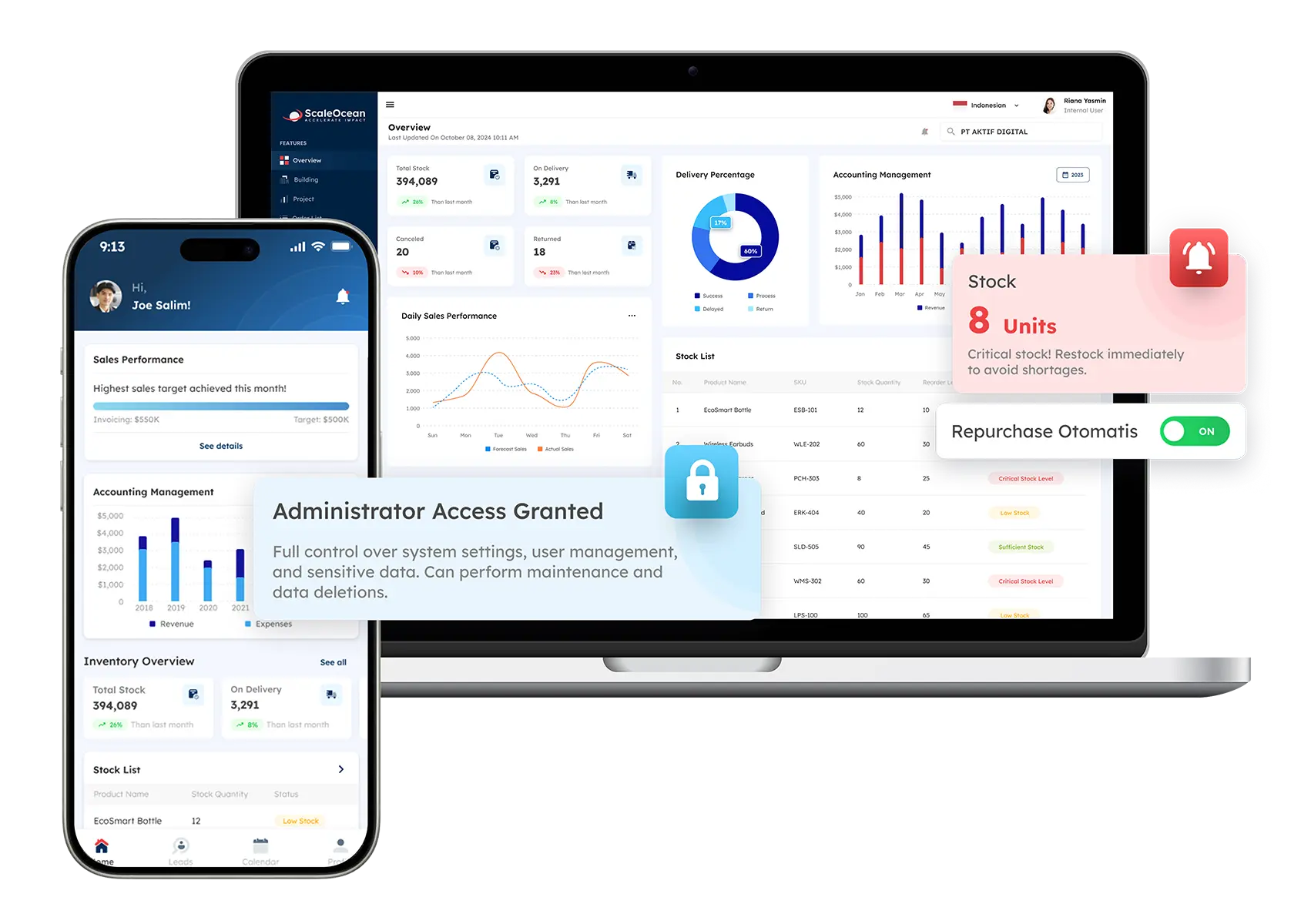
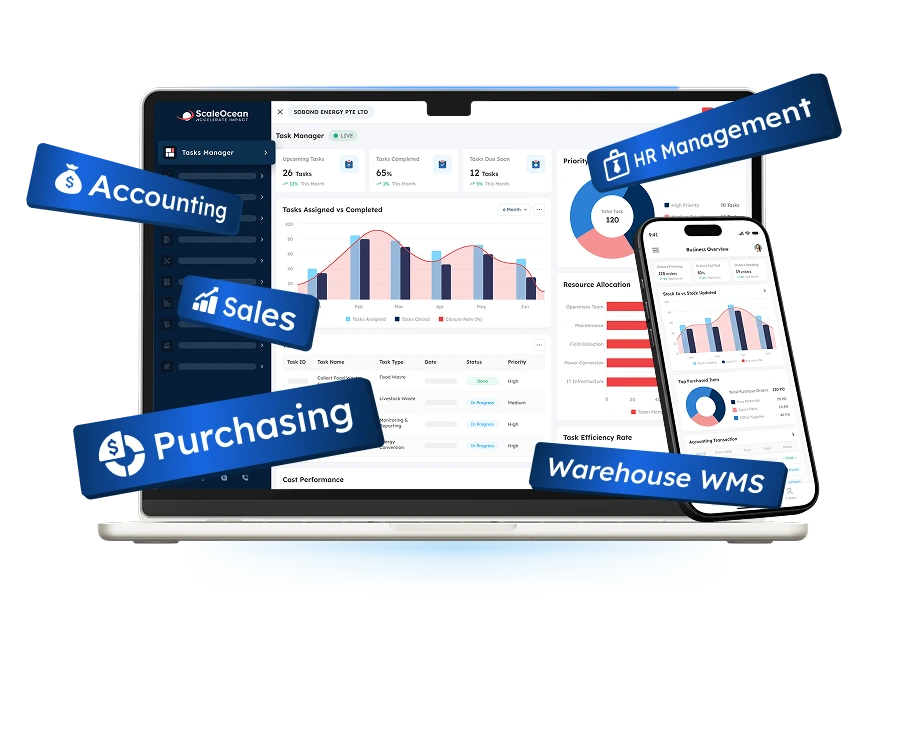
ScaleOcean is an ERP solution provider offering its flagship platform, ScaleOcean Atlas, designed to support medium and large enterprises with complex workforce and operational planning requirements. ScaleOcean connects capacity planning with broader ERP workflows, allowing businesses to align workforce capacity with projects, operations, and other business functions.
ScaleOcean Atlas can support various business architectures, such as multiple locations and companies with multiple projects, departments, and workforce needs, by supporting configurable workflows. The platform provides businesses with workforce visibility, resource allocation, demand planning, and ScaleMind insight to make better workforce decisions.
A structured governance framework is also provided through access controls, approval workflows, and audit trails. The system has been optimized and complies with PDPA regulations and local financial reporting standards, including IRAS and GST requirements in Singapore. Additionally, it can be customized to support EDG and CTC requirements, subject to company eligibility and qualifying project costs. Schedule a consultation with ScaleOcean to discuss configurable capacity planning workflows.
Key Features:
- Enterprise-wide workforce capacity visibility
- AI-assisted capacity forecasting and planning
- Skill-based talent and resource allocation
- Configurable workforce and project workflows
- Real-time workforce analytics and dashboards
- Integration with project, finance, and business operations
- Role-based access, approval workflows, and audit trails
| Pros | Cons |
|---|---|
| Connects capacity planning with broader ERP processes instead of operating as a standalone scheduling tool. | May provide broader capabilities than required for small teams with simple resource scheduling needs. |
| Configurable workflows allow businesses to align capacity planning with their existing operational processes. | Implementation requires business process analysis to configure workflows according to specific requirements. |
| Combines workforce data, project requirements, operational information, and AI-assisted insights within one platform. | Pricing depends on business requirements, modules, integrations, and implementation scope. |
| Supports scalable implementation as businesses expand their workforce and operational requirements. |
Best for: Medium and large enterprises, multi-location organizations, professional services companies, engineering businesses, construction companies, manufacturing organizations, and businesses managing complex workforce capacity requirements.
ℹ️Why choose ScaleOcean Atlas?
ScaleOcean Atlas helps businesses manage capacity planning through configurable ERP workflows that adapt to specific business requirements. Instead of forcing teams to work around a rigid planning structure, businesses can configure workforce, project, allocation, and reporting processes according to their operational needs.
2. ClickUp
ClickUp is a work management solution that features task management, project management, workload management, and team collaboration all in one. It enables teams to see workload and resource allocation, and helps to determine capacity gaps.
It is perfect for businesses that wish to integrate project management capabilities with capacity visibility in a single workspace. Teams have the ability to track assignments and redistribute work through workload views and planning capabilities.
Key Features:
- Workload management
- Task and project planning
- Resource allocation
- Team collaboration
- Dashboards and reporting
| Pros | Cons |
|---|---|
| Combines capacity visibility with task and project management. | Businesses with complex enterprise resource planning requirements may need additional systems. |
| Provides flexible views for monitoring workload distribution. | Advanced capacity planning may require configuration across different workspace features. |
| Supports collaboration between teams and project stakeholders. | Organizations requiring integrated finance, procurement, and HR workflows may need further integration. |
Best for: Small to medium businesses, project teams, agencies, and organizations looking for combined work and capacity management.
ℹ️Why choose ClickUp?
ClickUp provides workload, task, project, and collaboration capabilities that help teams organize work and understand resource distribution within a centralized workspace.
3. Jira Cloud Premium
Jira Cloud Premium is a project and work management platform that is popularly used by software and product development teams. It offers some sophisticated planning tools that can assist organizations in coordinating work across teams, projects, timelines, and available resources.
Capacity and workload planning, coupled with agile project management, may be available for technology companies with complex development portfolios using Jira Cloud Premium. The planning features are of special relevance if resources have to be taken into account along with development priorities.
Key Features:
- Advanced project planning
- Team workload management
- Agile planning
- Resource and capacity visibility
- Portfolio-level planning
| Pros | Cons |
|---|---|
| Provides advanced planning capabilities for complex software and product development environments. | Organizations outside technology and agile environments may require additional configuration. |
| Connects planning with Jira work items and development workflows. | Broader HR and enterprise resource planning functions are not its primary focus. |
| Supports planning across multiple teams and projects. | Advanced planning can require familiarity with Jira’s planning environment. |
Best for: Software companies, product teams, technology departments, and agile organizations.
ℹ️Why choose Jira Cloud Premium?
Jira Cloud Premium provides advanced planning and workload capabilities that help technology teams coordinate development work across multiple teams and projects.
4. Wrike
Wrike is a collaborative work management platform that provides project planning, workload management, resource allocation, and reporting capabilities. Its resource management functions help teams understand employee workloads and identify potential resource conflicts.
The platform is designed for organizations managing multiple projects and departments that need greater visibility into work distribution. It combines project execution with resource planning to help managers coordinate team capacity.
Key Features:
- Resource and workload management
- Project portfolio management
- Workload forecasting
- Project dashboards
- Team collaboration
| Pros | Cons |
|---|---|
| Provides workload visibility across projects and teams. | May require additional systems for broader ERP functions. |
| Combines project management with resource planning. | Complex organizations may require configuration to align the platform with specific processes. |
| Supports portfolio-level visibility for managers. | Can be more comprehensive than required for teams needing only basic capacity scheduling. |
Best for: Medium and large businesses, marketing teams, professional services organizations, and project-based companies.
ℹ️Why choose Wrike?
Wrike helps businesses connect project execution with workload and resource planning, giving managers greater visibility into how work is distributed across teams.
5. Float
Float is a resource management and scheduling platform designed to help project-based businesses plan employee capacity, schedules, and workloads. Its visual scheduling interface allows managers to allocate people to projects and monitor availability.
The platform focuses specifically on resource planning rather than broader enterprise operations. This makes it useful for teams that need a dedicated tool for scheduling and capacity visibility.
Key Features:
- Resource scheduling
- Capacity planning
- Workload management
- Project forecasting
- Utilisation reporting
| Pros | Cons |
|---|---|
| Provides dedicated resource scheduling and capacity planning capabilities. | Businesses needing integrated ERP functions may require additional software. |
| Visual scheduling makes employee availability easier to understand. | Its scope is more focused on resource planning than full enterprise management. |
| Supports workload and utilisation tracking. | Organizations with highly customized workflows may need additional configuration. |
Best for: Agencies, consultancies, professional services firms, and project-based teams.
ℹ️Why choose Float?
Float provides dedicated resource scheduling and capacity planning tools that help project-based teams manage availability, workloads, and project assignments.
6. Epicflow
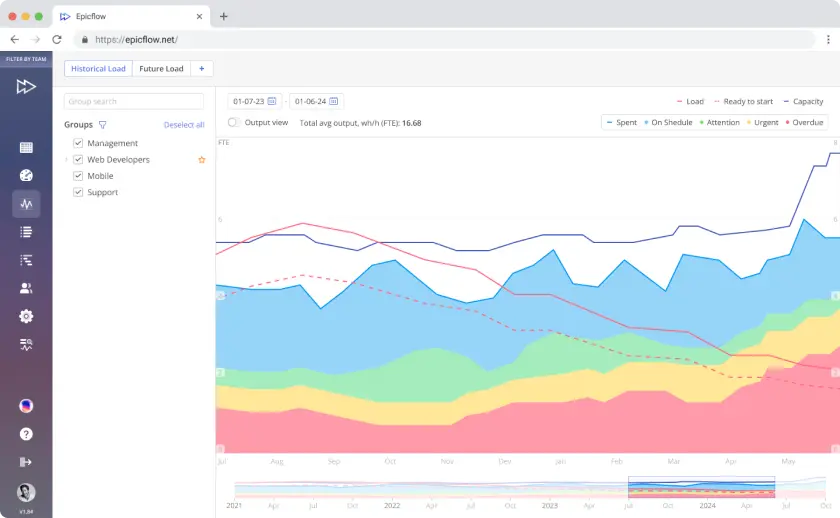
Epicflow is a multi-project resource management platform designed to help businesses coordinate workloads and resources across complex project portfolios. It focuses on balancing demand with available resources across multiple simultaneous projects.
The platform is particularly relevant for organizations where resource conflicts can occur because several projects compete for the same employees or specialist skills.
Key Features:
- Multi-project resource management
- Resource capacity planning
- Workload balancing
- Project portfolio visibility
- Resource forecasting
| Pros | Cons |
|---|---|
| Designed for organizations managing multiple projects competing for shared resources. | May be more specialized than required for simple single-project environments. |
| Provides visibility into resource workload and capacity. | Implementation may require teams to establish structured resource planning processes. |
| Supports portfolio-level resource planning. | Broader finance and HR processes may require separate integrations. |
Best for: Medium and large organizations managing complex multi-project environments.
ℹ️Why choose Epicflow?
Epicflow helps businesses coordinate resources across multiple projects and improve visibility into workload, capacity, and resource conflicts.
7. Smartsheet
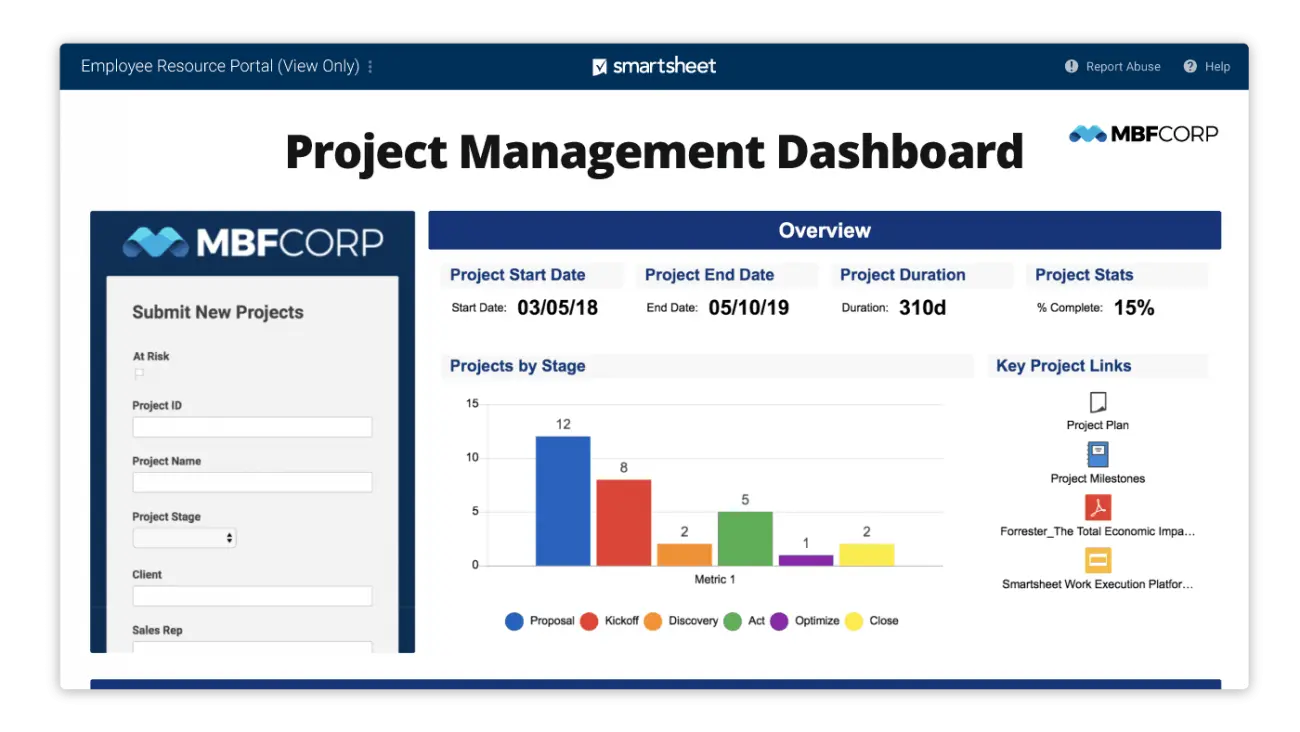
Smartsheet is a work management and project planning platform that combines spreadsheet-style interfaces with project, resource, and portfolio management capabilities. Businesses can use it to plan workloads, monitor resource allocation, and coordinate projects.
Its flexible structure allows organizations to adapt planning workflows to different departments and use cases. It can therefore support businesses that require customizable work and resource planning.
Key Features:
- Resource management
- Project planning
- Workload tracking
- Portfolio management
- Dashboards and reporting
| Pros | Cons |
|---|---|
| Provides flexible project and resource planning capabilities. | Highly complex enterprise workflows may require additional configuration. |
| Supports dashboards and portfolio-level reporting. | Businesses requiring integrated ERP processes may need complementary systems. |
| Familiar spreadsheet-style structure can support user adoption. | Resource planning capabilities may depend on the selected configuration and plan. |
Best for: Medium and large organizations, PMOs, operations teams, and cross-functional project groups.
ℹ️Why choose Smartsheet?
Smartsheet provides flexible work, project, resource, and portfolio management capabilities that can be adapted to different organizational planning processes.
8. Resource Expert
Resource Expert is a dedicated resource scheduling platform designed to help businesses manage employee availability, workload, time off, and project assignments. It provides a centralized calendar for understanding resource utilisation.
The platform focuses on straightforward resource scheduling, making it suitable for businesses that need clear visibility into team capacity without implementing a broader enterprise platform.
Key Features:
- Resource scheduling
- Capacity management
- Time-off management
- Workload visibility
- Resource utilisation reporting
| Pros | Cons |
|---|---|
| Focused specifically on resource scheduling and availability. | Organizations requiring broader project, finance, or HR workflows may need other systems. |
| Provides clear visibility into workloads and time off. | Advanced enterprise planning may require additional tools. |
| Suitable for teams looking for a dedicated scheduling environment. | Less suitable when capacity planning must be deeply integrated with ERP processes. |
Best for: Small and medium businesses, agencies, consultancies, and project teams.
ℹ️Why choose Resource Expert?
Resource Expert provides dedicated resource scheduling capabilities to help businesses with availability, resource allocation, time off, and project assignments.
9. Planview
Planview provides enterprise portfolio and work management solutions designed to help organizations align strategy, projects, resources, and investments. Its planning capabilities can support capacity management across portfolios and business initiatives.
The platform is particularly relevant to large organizations and PMOs that need to assess resource requirements across multiple strategic initiatives rather than individual projects alone.
Key Features:
- Enterprise portfolio management
- Resource and capacity planning
- Strategic planning
- Portfolio prioritization
- Analytics and reporting
| Pros | Cons |
|---|---|
| Supports enterprise-level portfolio and capacity planning. | May be more extensive than required for smaller businesses. |
| Helps connect resource planning with strategic initiatives. | Implementation can require significant planning in complex organizations. |
| Provides portfolio-level visibility for decision-makers. | Organizations seeking operational ERP functions may require additional systems. |
Best for: Large enterprises, PMOs, transformation offices, and organizations managing extensive project portfolios.
ℹ️Why choose Planview?
Planview helps enterprises connect portfolio strategy with project, resource, and capacity planning across large-scale initiatives.
10. Tempo Capacity Planner
Tempo Capacity Planner is designed to help Jira users plan resource capacity and workloads within project and development environments. It provides visibility into team availability and planned work to help managers identify potential resource gaps.
Because it is designed around Jira-based workflows, it can be useful for organizations that already use Jira and want to extend their project planning environment with capacity management capabilities.
Key Features:
- Jira-based capacity planning
- Team workload visibility
- Resource allocation
- Capacity forecasting
- Project planning
| Pros | Cons |
|---|---|
| Works within Jira-based project planning environments. | Organizations not using Jira may find the platform less suitable. |
| Helps teams compare workload and available capacity. | Broader enterprise workforce management requires additional systems. |
| Supports resource planning alongside project work. | Its strongest use cases are connected to Jira-centric project environments. |
Best for: Software development teams and organizations using Jira for project management.
ℹ️Why choose Tempo Capacity Planner?
Tempo Capacity Planner helps Jira-based organizations understand team capacity, workload, and resource requirements alongside their existing project workflows.
11. Celoxis
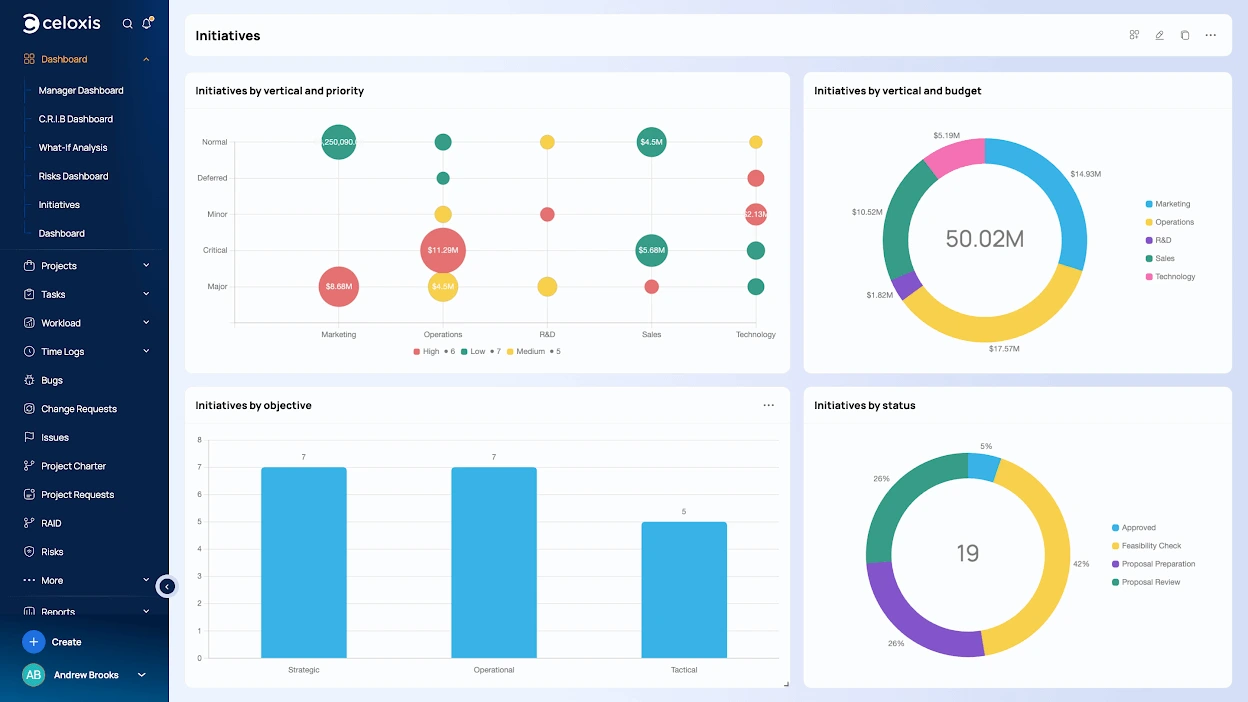
Celoxis is a project management and resource planning platform designed to help organizations manage projects, resources, schedules, and financial information. Its resource management capabilities allow teams to allocate people based on project requirements and availability.
The platform can support organizations managing multiple projects that require centralized visibility into schedules, workloads, and resource allocation.
Key Features:
- Resource allocation
- Project scheduling
- Workload management
- Portfolio management
- Project financial tracking
| Pros | Cons |
|---|---|
| Combines project management with resource planning and financial tracking. | Businesses requiring dedicated strategic workforce planning may need additional capabilities. |
| Supports multi-project resource allocation. | Complex enterprise workflows may require configuration. |
| Provides project-level visibility into resources and schedules. | Organizations seeking broader ERP functions may need complementary platforms. |
Best for: Medium and large project-based businesses, PMOs, and organizations managing multiple projects.
ℹ️Why choose Celoxis?
Celoxis helps businesses combine project planning, resource allocation, scheduling, and financial management within one project management environment.
12. Productive
Productive is a work management and resource planning platform designed primarily for agencies and professional services organizations. It combines resource scheduling with project management, time tracking, budgeting, and financial visibility.
Its capacity planning capabilities help professional services businesses assess resource availability against project requirements while also considering project budgets and utilization.
Key Features:
- Resource planning
- Project management
- Capacity and utilisation tracking
- Time tracking
- Budget and financial management
| Pros | Cons |
|---|---|
| Connects resource planning with project and financial management. | Its strongest use cases are professional services and agency environments. |
| Helps businesses monitor resource utilisation and project budgets. | Businesses outside project-based services may require different workflows. |
| Provides planning visibility across projects and teams. | Large enterprises with complex ERP requirements may need additional integration. |
Best for: Small and medium agencies, consultancies, creative companies, and professional services businesses.
ℹ️Why choose Productive?
Productive helps professional services organizations connect resource planning, project management, time tracking, budgeting, and financial visibility within one platform.
13. Meisterplan
Meisterplan is a project portfolio and resource management tool for planning project portfolios based on available workforce capacity. It assists managers in assessing resource needs and prioritizing projects according to the available resources.
The platform has special relevance for PMOs with the need to manage several projects and strategic initiatives in the face of limited workforce capacity.
Key Features:
- Portfolio resource planning
- Capacity management
- Project prioritisation
- Scenario planning
- Resource allocation
| Pros | Cons |
|---|---|
| Designed for portfolio-level resource and capacity planning. | May be more specialized than required for organizations managing only a few projects. |
| Supports scenario planning for project and resource decisions. | Broader operational and ERP processes may require additional platforms. |
| Helps PMOs evaluate project priorities against available capacity. | Implementation requires reliable project and resource data to produce useful planning results. |
Best for: Medium and large enterprises, PMOs, transformation teams, and organizations managing multiple strategic projects.
ℹ️Why choose Meisterplan?
Meisterplan helps organizations balance project portfolios with available workforce capacity and evaluate resource scenarios before committing to new initiatives.
14. Runn
Runn is a project forecasting and resource management tool that assists businesses with project scheduling, employee capacity in their business, utilization, and workload planning. It offers organizations with project-based teams visual planning tools.
It integrates resource scheduling, forecasting, and utilization tracking, enabling managers to compare their planned work with available resources and rearrange the resources when requirements change.
Key Features:
- Resource scheduling
- Capacity planning
- Project forecasting
- Workload and utilization tracking
- Resource reporting
| Pros | Cons |
|---|---|
| Combines resource planning with project forecasting and utilisation tracking. | Businesses requiring broader ERP workflows may need additional systems. |
| Provides visual planning for workloads and resource assignments. | Its primary focus is project and resource management rather than enterprise workforce management. |
| Helps project teams compare planned capacity with actual utilisation. | Complex multi-department workflows may require further integration or configuration. |
Best for: Small and medium professional services businesses, agencies, consultancies, and project-based teams.
ℹ️Why choose Runn?
Runn helps project-based businesses plan resources, forecast project requirements, monitor utilization, and manage workload through a centralized resource planning platform.
How to Choose the Right Capacity Planning Software
When deciding on capacity planning software, businesses should not only consider the features that each software provides, but also the amount of capacity. The right solution should be in line with the organization’s existing technology environment, planning horizon, and workforce structure, as well as its complexity.
1. Consider Business Size and Operational Complexity
The first step is to understand the extent of planning and how many employees, projects, departments, locations, and resource types are involved. For small projects,s a simple resource schedule will suffice,ce while for a large enterprise there could be a need for a multi-department capacity plan and strategic staffing forecast.
Businesses should also determine whether they need to include capacity planning for employees or for other resources like project budgets, equipment, facilities, or contractors.
2. Evaluate Integration Capabilities
The degree of accuracy required for capacity planning relies heavily on accurate data. A solution should be able to integrate with relevant HR, project management, ERP, finance, and operational systems as necessary.
Because integrated data eliminates the need to manually consolidate data, it can also help to ensure that capacity decisions are based on the current assignments, employee availability, project requirements, and business priorities.
3. Check Customisation and Scalability Options
Businesses need to consider if workflow, planning, approvals, and reporting can be designed to fit their operations.
This is particularly crucial for businesses with various departments or locations, as the capacity of their workforce might vary depending on the function of the business.
ScaleOcean Atlas was designed with the goal of being flexible and adaptable, with the ability to be customized for each business to fit their current workflows rather than bending their workflows to fit a specific software model.
4. Review Reporting and Analytics Capabilities
It is important to have visibility of current and future capacity when planning effectively. It’s important to determine if the software offers workflow, utilization, capacity gaps, skills, project demand, and predicted versus actual resource usage dashboards.
Based on the data our team got from CNA, 24.3% of employers reported experiencing skills shortages, with these shortages contributing to heavier workloads for other employees and challenges in meeting quality standards. This reinforces the value of capacity planning tools that can help businesses identify skill and resource gaps before they affect operational performance.
In the context of Singapore businesses, a connection with capacity planning can also aid in establishing a more seamless workforce process, ranging from forecasting future capacity demands to training new staff for their roles.
Conclusion
Capacity planning software is a digital solution that helps businesses compare available workforce and resources with current and future workloads. It supports demand forecasting, resource allocation, workload balancing, and capacity analysis to help organizations make more structured planning decisions.
For Singapore businesses, challenges such as manpower costs, skills shortages, fragmented workforce information, and changing project requirements can make resource planning more difficult. Capacity planning software provides a structured way to improve visibility, identify capacity gaps, and align available talent with business requirements.
ScaleOcean Talent Management Software helps businesses approach capacity planning as part of broader workforce management rather than as an isolated scheduling activity. Through configurable workflows and ScaleMind-powered insights, businesses can align workforce capacity with projects and changing business requirements. Schedule a consultation with ScaleOcean to discuss how a configurable workforce capacity planning solution can support your organization.
FAQ Capacity Management Software:
1. How does capacity planning software improve resource utilisation?
Capacity planning software compares resource availability with workload requirements, helping managers identify overloaded or underutilised resources and adjust assignments based on current and projected demand.
2. What features should capacity planning software have?
Key features include real-time capacity visibility, demand forecasting, skill-based resource allocation, workload management, scenario planning, planned-versus-actual reporting, and integration with existing business systems.
3. What is the difference between capacity planning and resource planning?
Capacity planning focuses on determining whether available resources are sufficient to meet expected demand, while resource planning focuses more broadly on assigning, scheduling, and managing those resources.
4. Can capacity planning software integrate with ERP systems?
Yes. Capacity planning software can integrate with ERP systems to connect workforce and resource information with project management, finance, procurement, operations, and other business processes.
5. Is capacity planning software suitable for enterprise companies?
Yes. Enterprise companies can use capacity planning software to manage workforce requirements across multiple departments, projects, locations, and skill groups while supporting longer-term resource forecasting and strategic planning.





















.png)