




An Order Management System (OMS) is an online system that allows the monitoring of customers’ orders, verifies the order, updates the stock level, and maintains inventory management data in sync with other sales channels. Typically, it has the features of order entry, pricing validation, inventory allocation, payment processing, shipping, delivery tracking, invoicing, and returns management.
Businesses can receive orders for products not in stock, apply the wrong customer pricing, ignore credit risks, double-book orders, and delay order fulfillment as employees search through spreadsheets and multiple applications, without a system. All the risks are aggravated if an enterprise has more than one entity in its business.
That’s why an enterprise OMS should connect CRM, sales, contracts, inventory, procurement, warehouses, logistics, finance, and customer service within one order-to-cash workflow. Instead of merely storing transactions, it validates whether each order meets stock, pricing, credit, approval, fulfilment, and financial requirements before the business confirms its commitment to the customer.
While conducting research, we found that 95% of our businesses surveyed experienced order management problems from TrueCommerce. The operational risks brought about by order and inventory being out of sync are evident in inventory discrepancies 47%, returns and reverse-logistics issues 46%, and order-volume fluctuations 39%.
Learn about what an order management system is, its lifecycle, and the importance of various features that it contains, as well as how it compares with 5 OMS software platforms for businesses in Singapore.
 Key Takeaways
- An order management system coordinates order capture, validation, inventory allocation, fulfilment, delivery, invoicing, returns, and customer updates.
- The best order management system should connect sales decisions with accurate stock, contract pricing, customer credit, approval rules, and fulfilment capacity.
- OMS, IMS, CRM, and ERP platforms serve different purposes, although they frequently exchange customer, inventory, order, and financial data.
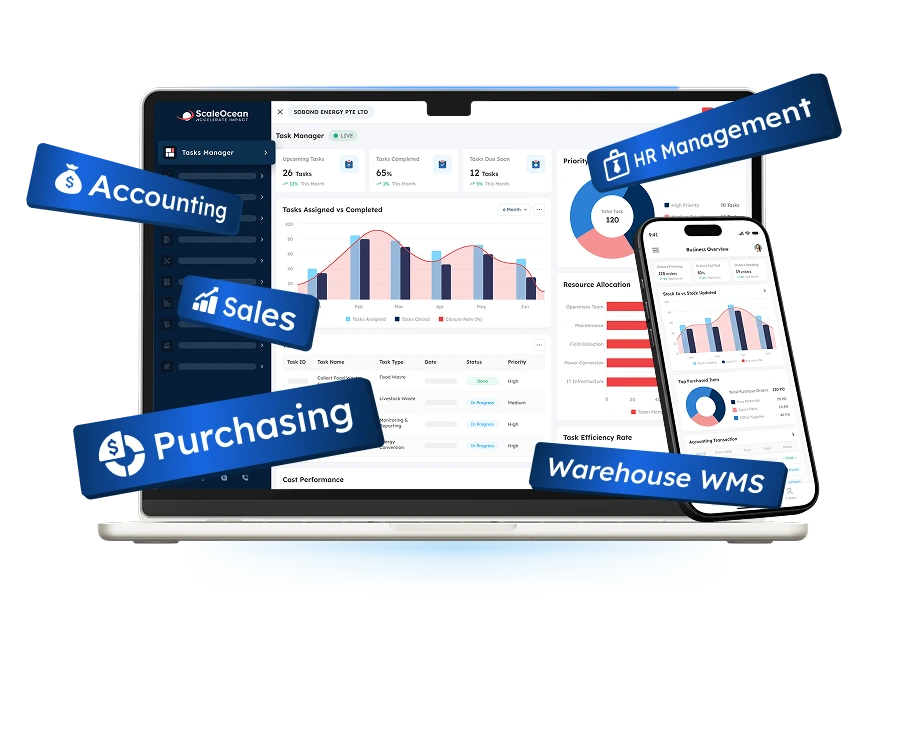
- ScaleOcean sales software connects order management with CRM, contracts, inventory, procurement, fulfilment, invoicing, and finance within one configurable enterprise platform.

What Is an Order Management System (OMS)?
An Order Management System (OMS) is software that manages a customer order from receipt to order fulfilment, delivery, invoice, payment, return, and order closure. It creates one record containing the customer’s details and all the products and quantities, the prices, the discounts, the delivery details, the payment schedule, the status of the approval, and the status of fulfilment.
A complete OMS does more than register the transaction. It checks whether the order can be processed under the company’s commercial and operational policies, including inventory availability, customer credit, contract validity, pricing authority, warehouse allocation, payment status, and delivery commitments.
An online order management system uses the same controls as orders placed over the Internet, marketplace, customer portal, mobile app, point-of-sale systems, or electronic data interchange. It sends validated info to the inventory, fulfillment and shipping, accounting, and customer-notification workflows.
For example, a healthcare distributor may receive an order from a hospital with an agreed price list, credit terms, batch requirements, and scheduled delivery window. The OMS can validate those conditions, reserve eligible stock, and send the confirmed order to the correct warehouse.
Why Is an Order Management System Important?
Order management affects revenue, margins, working capital, fulfilment costs, and customer retention. Incorrect prices can reduce profitability, unavailable inventory can result in cancellations, and delayed approvals can prevent a company from meeting contractual delivery dates.
An OMS introduces control before a commercial promise becomes an operational obligation. It can identify incomplete information, excessive discounts, insufficient inventory, overdue invoices, expired agreements, or warehouse constraints before fulfilment begins.
The platform also gives management greater visibility into order cycle time, fill rates, backorders, cancellation reasons, discount exposure, delivery performance, return rates, and revenue waiting for approval or shipment.
Rather than managing every delayed transaction individually, decision makers can identify recurring bottlenecks by entity, warehouse, channel, customer group, product, or approval stage. These insights help the company address underlying process weaknesses.
For customers, the main benefit is greater consistency. Sales and service teams can provide more reliable stock information, pricing, delivery estimates, shipment status, and return updates without repeatedly contacting other departments.
A connected platform such as ScaleOcean Atlas can extend this visibility across CRM, sales, contracts, inventory, procurement, logistics, invoicing, and finance. ScaleMind works within those workflows to surface order exceptions, stock risks, customer exposure, and margin conditions requiring attention.
How Does an Order Management System (OMS) Work?

The first step in an OMS is to order and verify necessary information to process orders. Depending on the business model, these checks can be made on the customer account, product, price, discount, currency, tax status, delivery address, credit limit, payment status, requested date, and supporting documents.
The system will then determine whether or not it can move forward without approval or if it must be approved. A regular order is executed as is and sent to an authorized employee when the items are unavailable, it is a blocked account, or the delivery is unusual or involves an excessive discount.
After validation, the OMS allocates inventory, selects a fulfilment location, sends instructions to the warehouse, records shipping progress, updates the customer, and transfers relevant information to invoicing and accounting.
Each activity remains connected to the original transaction. Sales, warehouse, finance, logistics, and customer-service teams can therefore review the same status rather than maintaining separate records.
The workflow may continue after delivery when the customer requests an exchange, refund, repair, warranty service, or credit note. A comprehensive system keeps these post-sales transactions linked to the original order.
This traceable workflow makes it easier to identify where a transaction stopped, which employee handled it, what information changed, and whether each action followed the company’s policies.
Types of Order Management Systems
Order management system examples range from simple applications for individual sellers to enterprise platforms coordinating several entities, branches, warehouses, currencies, and sales models.
Companies must also select an appropriate deployment structure. Cloud, on-premises, and hybrid systems provide different levels of accessibility, infrastructure ownership, integration flexibility, maintenance responsibility, and security control.
1. Individual and Enterprise Systems
An individual or small-business order management system commonly focuses on entering orders, updating stock, creating invoices, preparing packing documents, and recording shipments. It may be sufficient for a seller with one entity, one warehouse, limited pricing variations, and straightforward approval requirements.
These systems are usually easier to introduce because fewer employees, processes, and integrations are involved. However, companies can outgrow them when they add sales channels, customer-specific prices, fulfilment locations, legal entities, or more complex return policies.
An enterprise order management system supports wider operational dependencies, including multi-entity ownership, contract pricing, customer credit, inventory reservations, cross-warehouse allocation, partial fulfilment, approval matrices, and consolidated reporting.
It must also handle exceptions without removing accountability. Urgent requests, unavailable products, non-standard discounts, split shipments, customer holds, and cross-border orders should follow documented workflows with appropriate permissions and escalation paths.
2. Cloud-Based Options and On-Premises
A cloud-based OMS is hosted in an external cloud environment and accessed through an internet connection. It can reduce the infrastructure maintained internally while supporting employees across offices, stores, warehouses, and regional locations.
However, companies should still assess data hosting, cybersecurity, service availability, backups, access permissions, integration architecture, and disaster-recovery procedures. Cloud deployment does not remove the need for strong data governance.
An on-premises OMS is installed on infrastructure controlled by the organisation. This model may suit companies with specialized legacy systems, strict internal policies, or technical requirements that restrict external hosting.
The organization becomes responsible for infrastructure maintenance, upgrades, resilience, security monitoring, and technical resources. A hybrid arrangement offers another option by retaining selected systems or data internally while connecting them with cloud-based applications.
Challenges of an Order Management System
An OMS does not solve all the issues of orders. Lack of data, confusion over data ownership, clunky applications, and flawed processes can all turn into inefficiencies that end up as a new interface.
1. Integration Complexity
An OMS usually exchanges information with CRM, e-commerce, marketplace, inventory, warehouse, procurement, accounting, payment, shipping, customer portal, tax, and reporting applications. Every connection introduces decisions about data ownership, field mapping, update frequency, security, and error handling.
The company should find out from the customer, product, price, inventory, shipment, invoice, and payment records which application they were created from. Without rules, two systems can update the same information in different ways, or be able to duplicate transactions.
2. Inventory Visibility Flaws
OMS needs to maintain accurate inventories, and inventory must be accurate about the products in the system to decide on fulfilment. Some of the other false availability reasons are damage, late receipts, unauthorized adjustments and partial transfers, and unrecorded returns.
This risk is multiplied in the case of multiple sales channels. Product not in our online store, sold to a key account, or quarantined for inspection or reserved for other transactions.
It should differentiate on-hand, available, reserved, committed, in-transit, damaged, consignment, and backordered inventory. One total quantity displayed can provide a misleading picture to sales teams as to what it may be able to deliver.
3. Missing Features
It may be safe to assume that some platforms are offered with minimal order entry capabilities, but may not include the control that is needed to support complicated order management. Price may not be available, credit checks or other rules for allocation, return authorization, partial fulfilment, or approval process may not exist, and multi-entity reporting may not be available.
Companies should test prospective platforms against realistic scenarios, including backorders, customer-specific prices, split deliveries, substitutions, deposits, recurring orders, credit holds, expired contracts, and cross-warehouse fulfilment.
4. Lack of Configuration
Rigid software can force users to follow workflows that do not match the organization’s sales policies or responsibilities. Employees may bypass the system when its pricing, approval, or fulfilment rules make normal work unnecessarily difficult.
For example, one entity may require finance approval for every credit order, while another only escalates customers exceeding a defined exposure. Applying the same generic rule can either delay routine orders or weaken financial control.
5. High Implementation Costs
OMS investment can include software subscriptions, infrastructure, process mapping, configuration, integration, data cleansing, migration, testing, training, change management, and post-launch support. Subscription fees alone therefore provide an incomplete cost comparison.
Expenses may increase when requirements are unclear, data quality is poor, or departments introduce major changes late in the project. Unsupported legacy applications and undocumented approval practices can also extend the implementation.
The Core Order Management System Lifecycle
The OMS lifecycle describes the stages through which an order moves, from initial submission to fulfilment, settlement, and post-sales resolution.
When these stages operate separately, employees spend more time verifying status, correcting records, and resolving exceptions. A connected lifecycle maintains one traceable relationship between customer demand, fulfilment activities, and financial outcomes.
1. Order Capture
Order capture collects transactions from websites, marketplaces, stores, customer portals, EDI connections, sales representatives, call centers, or mobile applications. The OMS standardizes these orders even when their original formats differ.
Required fields may include the customer account, product, unit of measure, quantity, currency, price, discount, tax treatment, delivery address, requested date, payment terms, sales channel, and supporting documents.
2. Payment Processing
Payment processing confirms how the customer will settle the transaction. Online orders may involve cards, digital wallets, bank transfers, deposits, payment gateways, or other electronic payment services.
The OMS should distinguish authorized, pending, partially paid, failed, refunded, and disputed transactions. Each status may require a different fulfilment or customer-service response.
3. Intelligent Routing
Intelligent routing determines where and how an order should be fulfilled. The decision may consider available inventory, customer location, warehouse capacity, delivery commitments, transport costs, product restrictions, and account priority.
A retailer may send an online transaction to the nearest store, while a distributor may choose the warehouse holding the required batch. A manufacturer may trigger procurement or production when finished goods are unavailable.
Routing rules should balance customer service with profitability. The fastest warehouse may not be the most appropriate when it causes expensive split shipments or consumes inventory reserved for strategic customers.
Within ScaleOcean Atlas, ScaleMind can identify stock risks, unusual fulfilment costs, demand patterns, and orders approaching service deadlines. Human approval can remain mandatory when decisions affect margin, credit, compliance, or key accounts.
4. Fulfilment
Fulfilment includes that segment of any process where, upon order acceptance, its successful realization in the form of a tangible or intangible delivery takes place. As far as product organizations are concerned, it can cover stock keeping, order picking, verification and checking, packing and consolidation, order staging and handing off to the logistics provider.
OMS should generate correct commands to the warehouse or fulfillment centers. The correct quantity and the per-package quantity, packing condition and date, and any instructions from the client must match order confirmations.
5. Shipping and Tracking
Shipping refers to the moment when goods leave an organization’s control and are passed to the care of a carrier, route, vehicle, drop-off point, or delivery agent. The system registers tracking numbers, shipment date or time, shipping documents, and delivery instructions.
Customers and internal employees can receive suitable status updates, including dispatch confirmation, expected arrival, failed delivery attempts, proof of delivery, or exceptions requiring action.
Each shipment should remain linked to its corresponding sales order lines. The resulting data can also be used to compare transit time, carrier cost, damage rates, failed deliveries, and service-level achievement.
6. Post-Sales Follow-Up
Post-sales follow-up includes delivery confirmation, collections, returns, exchanges, refunds, warranty claims, complaints, and customer feedback. These activities influence both customer experience and the final financial value of an order.
A single OMS provides customer-service reps the ability to see what was ordered, approved, picked, shipped, delivered, invoiced, paid, returned, or credited without additional reports from multiple departments.
Who Needs an Order Management System?
A company needs an OMS when its order volume or complexity can no longer be handled reliably through spreadsheets, accounting applications, e-commerce dashboards, or informal communication.
The requirement becomes stronger when order errors affect stock availability, delivery performance, margins, cash flow, or customer confidence.
According to the data our team got from Esker, Siemens Healthineers increased its automated order-processing rate from 8% to 85%, while 93% of order fields were captured correctly. The implementation illustrates how structured automation can reduce manual entry and allow customer-service teams to focus on exceptions rather than routine data processing.
The following order management system examples show which organizations are most likely to benefit from centralized order orchestration.
1. Online Sellers
Online sellers receive transactions through digital storefronts where customers expect immediate confirmation and accurate product availability. Promotions, bundles, product variations, shipping methods, and payment options can quickly make basic order processing difficult to manage.
The platform becomes more valuable when sellers add marketplaces, social-commerce channels, or third-party fulfilment providers. Central visibility allows employees to manage every transaction without switching between multiple dashboards.
2. Omnichannel and Multi-Channel Retailers
Multi-channel retailers sell through stores, websites, marketplaces, call centers, or wholesale accounts. Omnichannel retailers also allow customers to move between channels during the same purchasing or return journey.
This model creates complex fulfilment requirements. A customer may purchase online, collect from a store, exchange the product at another branch, or request delivery from inventory held at a different location.
3. High-Volume E-Commerce Brands
High-volume e-commerce brands may receive large order increases during promotions, product launches, holidays, and flash sales. Manual checks that work during ordinary periods can create severe delays during demand peaks.
Companies should test platform scalability using realistic peak volumes. The system must process incoming orders, inventory updates, allocations, fulfilment requests, documents, notifications, and integration traffic without creating long queues.
4. Businesses with Multi-Location Inventory
Companies operating multiple warehouses, stores, branches, consignment locations, or third-party facilities need to know where inventory is located and whether it can be promised.
An OMS can allocate stock according to proximity, availability, cost, customer priority, batch requirements, or delivery targets. It may also initiate transfers when another location should replenish the selected fulfilment point.
5. B2B and Wholesale Distributors
B2B distributors manage customer-specific prices, negotiated discounts, bulk quantities, credit terms, delivery schedules, purchase-order references, and approval requirements. The same product may have different commercial conditions for each customer.
An enterprise OMS can apply those conditions during order creation and identify expired price agreements, discounts outside an employee’s authority, overdue accounts, minimum quantities, or unavailable inventory.
Wholesale fulfilment may involve partial deliveries, reserved inventory, backorders, drop shipments, recurring orders, and several delivery addresses. The OMS preserves visibility across these arrangements while maintaining one customer order history.
The ScaleOcean sales system can connect customer orders with CRM, contracts, inventory, approvals, procurement, fulfilment, invoicing, and finance for distributors managing complex order-to-cash workflows.
6. High-Return Retail Sectors
Fashion, footwear, electronics, furniture, beauty, and other return-sensitive sectors require more than a basic refund function. Returned products may need to be authorized, received, inspected, classified, restocked, repaired, quarantined, or written off.
An OMS keeps the commercial and physical sides of the return connected. The refund or replacement should match the original transaction, received item, product condition, payment method, and approved policy.
Key Features an Order Management System Must Have

It’s not the system with the longest list of features that will be the most effective, but rather the one that provides the controls, information, and flexibility required by the organization’s specific order model.
In order for an OMS to function effectively, the decision-maker must be able to see how each functional area links to others. For example, knowledge of stock levels would be useless if the sales price was not included, as well as customer credit authorization, warehouse location assignment, invoicing, and handling returns of an item.
1. Real-Time Inventory Syncing
Real-Time Inventory Synchronization (RSIS) updates stock levels to the exact instant the product is either sold, received, transferred, returned, broken, spoiled, assigned, or otherwise committed or claimed.
RSIS would ensure that one sales channel is not permitted to offer a product that a separate, less sophisticated channel cannot fulfill to the customer. SRSIS should supply available-to-promise inventory levels as opposed to exact physical inventory in order to mitigate the risk of promising an order to a customer prior to its receipt.
2. Omnichannel Support
Omnichannel support means that an order, customer, item, fulfillment, or return may cross between numerous related channels. A given customer should not be a new entity every time the channel within which he interacts with the company is different.
Each OMS should preserve channel attribution to maintain a single, comprehensive customer record and help businesses compare sales, margins, fulfilment costs, service expenses, and missed opportunities across channels when evaluating the best sales management software.
3. Returns Management
Returns management controls the reverse process from a customer’s request to financial and inventory resolution. It can cover eligibility checks, authorization, shipping labels, receipt, inspection, refund, exchange, repair, and restocking.
The system should record why each product was returned and what happened after receipt. Standard reason and disposition codes support consistent processing and useful analysis.
4. Sales Channels and Support
The OMS should accept orders from every channel used by the business, including websites, marketplaces, stores, mobile applications, customer portals, sales representatives, call centers, and EDI connections.
Channel support must continue after checkout. Cancelling, changing, holding, splitting, or refunding an order should update all relevant applications correctly.
Companies should test uncommon scenarios before selection. A connector that imports ordinary orders may not support bundles, subscriptions, deposits, partial refunds, or customer-specific price agreements.
5. Customer Database
A customer database stores the information required to process and support orders. This may include contacts, addresses, tax details, price lists, credit terms, contracts, preferences, delivery instructions, and transaction histories.
B2B customers may have several branches, buyers, delivery locations, cost centers, and authorized contacts. The system should represent these relationships without creating uncontrolled duplicate records.
6. Order Entry and Routing
Order entry should make it easy to create accurate transactions while enforcing mandatory controls. Product search, quotation conversion, templates, recurring orders, and bulk uploads can reduce administrative work.
Routing directs each transaction to the correct approval or fulfilment path. Conditions may depend on value, margin, entity, branch, customer group, payment terms, product risk, or delivery commitment.
7. Real-Time Order Tracking
Real-time order tracking provides actual status for each order in terms of progression from data entry through acceptance, picking, packing, shipping, delivery, invoicing, and final goods received status.
Exception tracking is as essential as actual tracking in order to identify blocking conditions for orders in progress such as hold orders, short-stock conditions, required payment, due service level agreement expiration dates for order fulfillment, and so on. Management must be aware of these circumstances.
8. Compliance and Risk Management
Compliance capabilities help ensure that orders follow internal policies and applicable business requirements. Controls may cover customer validation, product restrictions, data access, tax treatment, documentation, and approval authority.
The system should maintain an audit trail showing who created, changed, approved, released, cancelled, or credited an order. Sensitive changes may require additional authorization.
Businesses in Singapore should also evaluate role-based access, PDPA-aligned data governance, GST processes, InvoiceNow connectivity, document retention, and local financial reporting requirements.
9. Inventory Management
While the OMS often may not take the place of an independent Inventory Management System (IMS), it will need all necessary data for a customer’s available-to-promise and order fulfillment, including quantities by SKU and location, reserved and open purchase orders, transfers, batched or serialized products, expiry dates, and material classification if applicable.
Customers with sophisticated operations may have an integration between the OMS and an external WMS, where the OMS defines what orders and parts orders should be delivered from and to whom, and where the WMS tracks the real physical process.
10. Accounting Integration
Accounting integration connects orders with invoices, taxes, payments, credit notes, accounts receivable, revenue, cost of goods sold, and financial reporting.
This reduces duplicate entry and helps finance reconcile operational events with accounting records. Changes to quantities, prices, returns, or fulfilment should follow controlled financial rules.
Software Ecosystem Comparison: OMS vs. IMS vs. CRM vs. ERP
OMS, IMS, CRM, and ERP platforms frequently exchange information, but each has a different operational purpose. Choosing the wrong system category can leave important gaps or create unnecessary duplication.
An OMS manages customer orders, an IMS manages stock, a CRM manages customer relationships, and an ERP connects wider operational and financial resources.
| Comparison Area | OMS | IMS | CRM | ERP |
|---|---|---|---|---|
| Primary purpose | Coordinates orders from capture through fulfilment, delivery, settlement, and returns. | Tracks stock quantities, locations, movements, conditions, and replenishment. | Manages leads, opportunities, communications, and customer relationships. | Connects finance, sales, procurement, inventory, HR, production, and other resources. |
| Central data object | Customer order and fulfilment status. | SKU, quantity, location, and inventory movement. | Lead, contact, account, opportunity, and interaction. | Operational and financial transactions across the organization. |
| Order lifecycle | Provides validation, routing, allocation, fulfilment, tracking, and returns. | Updates stock when orders reserve, consume, transfer, or return goods. | May create quotations but usually does not execute warehouse fulfilment. | May include order management as one function within a broader platform. |
| Inventory depth | Focuses on availability, reservation, allocation, and fulfilment decisions. | Provides deeper counting, replenishment, batch, serial, transfer, and stock controls. | Usually limited unless connected to inventory or ERP software. | May include inventory, warehousing, procurement, costing, and production planning. |
| Customer management | Stores customer data required for pricing, ordering, delivery, and service. | Uses customer data mainly to support stock transactions and fulfilment. | Provides deeper sales-pipeline, communication, campaign, and account information. | Maintains customer master data connected to financial and operational records. |
| Financial capability | Transfers order, invoice, payment, refund, and credit data to finance. | May support stock valuation, landed costs, and inventory accounting data. | Tracks potential sales value but usually depends on accounting integration. | Provides ledgers, receivables, payables, tax, consolidation, and reporting. |
| Best use | Managing complex, high-volume, B2B, or omnichannel orders. | Improving inventory accuracy, availability, and replenishment. | Developing customer relationships and managing sales pipelines. | Connecting company-wide operations with financial governance. |
| Main limitation when used alone | May require CRM, ERP, accounting, or WMS integrations. | Does not always manage pricing, credit, approvals, payment, and service. | Usually cannot execute complete inventory and fulfilment processes. | Generic order functions may require configuration for specialized orchestration. |
A standalone OMS may suit a company that already has established CRM, finance, and warehouse systems. It can strengthen order orchestration without requiring the company to replace every existing application.
An ERP-based OMS may be more appropriate when the company wants customer orders, inventory, procurement, contracts, invoicing, and accounting to operate within the same ecosystem.
Top Order Management System Platform in Singapore
The platforms below represent different approaches to order management. Some focus on retail and e-commerce orchestration, while others provide inventory-led capabilities or include OMS functions within an ERP ecosystem.
The right choice depends on company size, transaction volume, entity structure, sales channels, fulfilment operations, integration requirements, governance, and expected expansion.
1. ScaleOcean for Multi-Entity Medium-Large Enterprises
ScaleOcean is an enterprise software provider whose flagship platform is ScaleOcean Atlas ERP. Within the platform, the Sales System module from ScaleOcean Atlas connects order management with CRM, contracts, pricing, inventory, warehouses, procurement, logistics, and accounting. Its configurable workflows can support multiple entities, customer groups, fulfilment locations, pricing structures, and approval levels.
ScaleOcean also equips the Sales System with ScaleMind AI as a business assistant. It helps teams analyze demand, monitor inventory conditions, assess customer exposure, identify margin risks, and highlight fulfilment exceptions or transactions that require management attention.
The system also supports PDPA-aligned data governance and local financial reporting standards, while its implementation scope can be structured around relevant EDG and CTC Grant requirements, subject to company eligibility and qualifying project costs.
Companies can schedule a consultation to map their existing order-to-cash process before defining the implementation scope. ScaleOcean provides unlimited-user options, configurable modules, and cloud and on-premises for enterprises prioritizing long-term adaptability.
Key features:
- Prompt-led order processing with branch-based approvals
- Contract pricing, discount thresholds, and margin controls
- Available-to-promise allocation across entities and warehouses
- Credit validation linked to overdue invoices and exposure
- Customer, project, safety, and committed-stock reservations
- Automated order-to-invoice workflows
- Multi-entity and multi-currency order documentation
- Approval escalation, audit trails, and mobile authorization
| Pros | Cons |
|---|---|
| Uses a need-based commercial scope so companies can prioritize the modules relevant to their operational requirements. | Its enterprise-level depth may be unnecessary for small businesses requiring only basic order entry and shipping records. |
| Allows priority workflows to be activated first before expanding the platform into other departments or entities. | Final pricing requires an assessment because process complexity, integrations, entities, and deployment influence the scope. |
| Prioritizes accurate workflow design, data readiness, testing, and long-term system stability. | The platform focuses on long-term suitability rather than providing an immediate generic setup. |
| Sets project timelines according to process, migration, integration, and testing requirements rather than one general estimate. |
Best for: Medium and large enterprises, regional distributors, trading companies, manufacturers, wholesalers, retail groups, healthcare distributors, and multi-entity businesses with complex order-to-cash processes.
ℹ️Why choose the ScaleOcean Order Management System?
ScaleOcean supports configurable sales workflows for medium and large enterprises, covering contracts, pricing, credit, inventory, fulfilment, invoicing, and finance. Instead of using rigid templates, the system adapts to multi-entity structures, complex processes, and business growth through unlimited-user options, ScaleMind assistance, and phased implementation.
2. Brightpearl for High-Volume Businesses
Brightpearl is a retail operating platform designed for e-commerce, direct-to-consumer, omnichannel, and wholesale companies. It consolidates transactions from online and offline channels and connects them with inventory allocation, fulfilment, shipping, invoicing, and customer records.
Its automation engine can apply rules to inventory allocation, order routing, fulfilment, shipping, and invoicing. The platform also supports connections with e-commerce platforms, marketplaces, point-of-sale applications, third-party logistics providers, and shipping services.
Key features:
- Multichannel order consolidation
- Rule-based workflow automation
- Multi-location inventory synchronization
- Partial fulfilment and dropshipping
- Retail and marketplace integrations
- Returns and exchange workflows
| Pros | Cons |
|---|---|
| Provides retail-oriented workflows for companies operating several digital and physical sales channels. | Businesses outside retail and wholesale should assess whether its industry focus matches their processes. |
| Can automate repetitive allocation, routing, fulfilment, shipping, and invoicing activities. | Companies with extensive manufacturing, project, or regional finance requirements may need additional applications. |
| Offers connections for common commerce platforms, marketplaces, POS applications, and logistics providers. | Pricing depends on business requirements and order volume, requiring a vendor assessment. |
Best for: Medium and large e-commerce brands, omnichannel retailers, direct-to-consumer businesses, and retail-focused wholesalers.
ℹ️Why choose Brightpearl Order Management?
Brightpearl may suit retail businesses seeking multichannel order consolidation, fulfilment automation, inventory synchronization, returns handling, and established commerce integrations within one retail operating platform.
3. Oracle NetSuite for Large Enterprises
Oracle NetSuite Order Management operates within the NetSuite cloud ERP environment. It supports sales orders, fulfilment, shipping, billing, payment processing, customer returns, collections, and order-related reporting.
Its broader ERP environment connects customer orders with inventory, CRM, commerce, finance, and other operational processes. Advanced capabilities can also support order promising, inventory allocation, orchestration, and execution.
Key features:
- Multichannel order management
- Order-to-cash processing
- Inventory-based allocation
- Split shipment support
- Returns and payment processing
- Order reporting and workbooks
| Pros | Cons |
|---|---|
| Connects order management with a broad suite of financial and operational applications. | Configuration and implementation may require substantial planning, expertise, and consulting support. |
| Supports order allocation, fulfilment, shipping, billing, payments, and returns. | Platform, module, user, and implementation requirements can increase total ownership costs. |
| Provides order information alongside inventory, customer, and financial records. | Small businesses with straightforward order flows may not require the complete ERP environment. |
Best for: Large enterprises and established mid-market organizations seeking order management within a broad cloud ERP platform.
ℹ️Why choose Oracle NetSuite Order Management?
NetSuite may suit companies requiring order allocation, fulfilment, billing, payments, returns, inventory, and financial processes within an established cloud ERP environment.
4. Zoho Inventory for Small Businesses
Zoho Inventory is a cloud application for managing sales orders, purchase orders, packages, shipments, inventory, and customer updates. It provides smaller businesses with one environment for common order and stock activities without requiring a large enterprise implementation.
The platform supports multi-warehouse inventory, multichannel selling, packaging, shipping, post-shipment tracking, backorders, dropshipping, sales returns, serial and batch tracking, and automation.
Key features:
- Sales and purchase order management
- Marketplace and shopping-cart connections
- Multi-warehouse inventory records
- Packaging and shipment creation
- Sales returns and credits
- Automation and reporting
| Pros | Cons |
|---|---|
| Provides an accessible starting point for businesses replacing spreadsheets and manual administration. | Complex enterprises should assess whether governance, approval, and multi-entity depth meet their requirements. |
| Covers essential order, stock, packaging, shipment, return, and reporting processes. | Advanced manufacturing or enterprise finance processes may require additional applications. |
| Can consolidate transactions from common digital sales channels. | Companies should review plan limits, transaction volumes, integrations, and localization requirements. |
Best for: Small businesses, emerging e-commerce sellers, and growing companies requiring practical cloud-based order and inventory administration.
ℹ️Why choose Zoho Inventory?
Zoho Inventory may suit small businesses needing sales orders, inventory, packaging, shipping, returns, purchasing, marketplace connections, and operational reporting without implementing a large ERP suite.
5. Fishbowl for Mid-Market Distribution
Fishbowl is an inventory, warehouse, manufacturing, and fulfilment platform for product-based businesses. It supports order processing, stock management across locations, purchasing, replenishment, barcode workflows, and product traceability.
Its order management capabilities can connect inventory allocation, order routing, reordering, fulfilment, and accounting processes. The platform is commonly positioned for businesses that require stronger inventory operations alongside QuickBooks or Xero.
Key features:
- Multi-location inventory tracking
- Sales-order status visibility
- Barcode picking and packing
- Inventory allocation and routing
- Automated replenishment
- Accounting integrations
| Pros | Cons |
|---|---|
| Provides inventory, warehouse, purchasing, fulfilment, and manufacturing capabilities for product businesses. | Regional enterprises should assess multi-entity finance, consolidation, and governance requirements. |
| Supports barcode workflows, replenishment rules, shipment processing, and multi-location control. | Companies outside its preferred accounting ecosystem should examine alternative integration depth. |
| Can extend the inventory and fulfilment capabilities available to QuickBooks and Xero users. | Buyers must confirm which products, modules, integrations, and services are required. |
Best for: Small and midsize distributors, wholesalers, warehouses, and manufacturers seeking inventory-led order fulfilment.
ℹ️Why choose Fishbowl?
Fishbowl may suit product businesses requiring multi-location inventory, barcode processing, warehouse fulfilment, purchasing, replenishment, manufacturing support, and accounting connectivity.
How to Choose the Right Order Management System for Your Business
Begin by documenting how orders currently enter, move through, and leave the company. Include normal transactions and exceptions such as unavailable stock, excessive discounts, credit blocks, partial fulfilment, urgent orders, substitutions, cancelled shipments, and returns.
The selection team should involve sales, customer service, finance, inventory, warehouse, procurement, logistics, IT, compliance, and management. A platform selected by one department may transfer administrative work or operational risk to another.
Next, define measurable business outcomes, such as higher order accuracy, faster approval, fewer cancellations, improved allocation, stronger margin control, shorter fulfilment time, and reduced manual entry.
Each objective should have a baseline. Without current information about cycle times, processing errors, backorders, approval delays, fulfilment costs, and return rates, the company cannot accurately evaluate results.
Ask vendors to demonstrate realistic transactions using the organization’s requirements. The demonstration should cover pricing, validation, approval, credit, allocation, fulfilment, invoicing, returns, audit history, and integration failures.
Finally, compare total ownership costs rather than subscription fees alone. Include implementation, integration, data migration, employee training, infrastructure, internal resources, support, upgrades, and additional applications.
The best order management system is the platform that supports the company’s operating model without introducing unnecessary complexity.
Medium and large enterprises can schedule a consultation with ScaleOcean to identify whether it should initially prioritize order entry, contract pricing, stock allocation, credit controls, fulfilment, invoicing, or a broader order-to-cash transformation.
Conclusion
Order management software is a digital platform that helps organizations capture, validate, allocate, fulfil, deliver, invoice, track, and close customer orders. It provides sales, warehouse, logistics, finance, and customer-service teams with a central record of customers, products, prices, inventory reservations, approvals, shipments, invoices, payments, returns, and transaction histories.
Without a structured system, enterprises may experience duplicate entry, incorrect prices, unavailable stock, delayed approvals, fulfilment errors, weak credit control, incomplete documentation, and limited visibility. An OMS addresses these problems through connected order capture, inventory allocation, approval workflows, shipment tracking, returns management, accounting integration, audit trails, and operational dashboards.
ScaleOcean sales software integrates order management with CRM, contracts, inventory, procurement, fulfilment, invoicing, and finance within one configurable enterprise platform. With unlimited-user options, embedded ScaleMind AI, API connectivity, and flexible deployment, it supports complex and evolving sales operations. Schedule a consultation to assess how it can improve order accuracy, protect margins, strengthen fulfilment performance, and increase operational visibility.
FAQ Order Management System:
1. How Does an Order Management System Improve Order Accuracy?
An OMS validates customer data, prices, stock, discounts, payment terms, and delivery details before fulfilment, reducing manual entry and preventable order errors.
2. Can an Order Management System Integrate with Other Business Software?
Yes. An OMS can integrate with CRM, ERP, inventory, warehouse, e-commerce, accounting, payment, logistics, and customer portal systems.
3. Can an Order Management System Manage Orders from Multiple Channels?
Yes. It can consolidate orders from websites, marketplaces, stores, customer portals, EDI, call centres, and sales representatives in one system.
4. How Does an Order Management System Improve Customer Satisfaction?
An OMS improves customer satisfaction by providing accurate stock information, faster fulfilment, reliable delivery updates, and more efficient returns handling.





















.png)